

WWW And Web Browser, E-Mail. Innovation
COURTESY :- vrindawan.in
Wikipedia

The World Wide Web (WWW), commonly known as the Web, is an information system enabling documents and other web resources to be accessed over the Internet.

Documents and downloadable media are made available to the network through web servers and can be accessed by programs such as web browsers. Servers and resources on the World Wide Web are identified and located through character strings called uniform resource locators (URLs). The original and still very common document type is a web page formatted in Hypertext Markup Language (HTML). This markup language supports plain text, images, embedded video and audio contents, and scripts (short programs) that implement complex user interaction. The HTML language also supports hyperlinks (embedded URLs) which provide immediate access to other web resources. Web navigation, or web surfing, is the common practice of following such hyperlinks across multiple websites. Web applications are web pages that function as application software. The information in the Web is transferred across the Internet using the Hypertext Transfer Protocol (HTTP).
Multiple web resources with a common theme and usually a common domain name make up a website. A single web server may provide multiple websites, while some websites, especially the most popular ones, may be provided by multiple servers. Website content is provided by a myriad of companies, organizations, government agencies, and individual users; and comprises an enormous amount of educational, entertainment, commercial, and government information.
The World Wide Web has become the world’s dominant software platform. It is the primary tool billions of people worldwide use to interact with the Internet.
The Web was originally conceived as a document management system. It was invented by Tim Berners-Lee at CERN in 1989 and opened to the public in 1991.
The Web was invented by English computer scientist Tim Berners-Lee at CERN, and originally conceived as a document management system. The first proposal was written in 1989, and a working system implemented by the end of 1990 including the World Wide Web browser and an HTTP server. The technology was released outside CERN to other research institutions starting in January 1991, and then to the general public on 23 August 1991. The Web was a success at CERN, and began to spread to other scientific and academic institutions. Within the next two years, there were 50 websites created.
CERN made the Web protocol and code available royalty free in 1993, enabling its widespread use. After the NCSA released Mosaic later that year, the Web became very popular with thousands of websites springing up in less than a year. Mosaic was a graphical browser that could display inline images and submit forms, and HTT Pd, a server that could process forms (see CGI). Marc Andreessen and Jim Clark founded Netscape the following year and released Navigator, which introduced Java and JavaScript to the Web. It quickly became the dominant browser. Netscape became a public company in 1995 which triggered a frenzy for the Web and started the dot-com bubble. Microsoft responded by developing its own browser, Internet Explorer. By bundling it with Windows, it became the dominant browser for 14 years.
Tim Berners-Lee founded the World Wide Web Consortium (W3C) which created XML in 1996 and recommended replacing HTML with stricter XHTML. In the meantime, developers began exploiting an IE feature called XML Http Request to make Ajax applications and launched the Web 2.0 revolution. Mozilla, Opera, and Apple rejected XHTML and created the WHATWG which developed HTML5. In 2009, the W3C conceded and abandoned XHTML and in 2019, ceded control of the HTML specification to the WHATWG.
The World Wide Web has been central to the development of the Information Age and is the primary tool billions of people use to interact on the Internet.
A web browser (commonly just called a browser) is application software for accessing websites. When a user requests a web page from a particular website, the browser retrieves its files from a web server and then displays the page on the user’s screen.

A web browser is not the same thing as a search engine, though the two are often confused. A search engine is a website that provides links to other websites. However, to connect to a website’s server and display its web pages, a user must have a web browser installed.
Browsers are used on a range of devices, including desktops, laptops, tablets, and smartphones. In 2020, an estimated 4.9 billion people used a browser. The most used browser is Google Chrome, with a 65% global market share on all devices, followed by Safari with 18%.
In some technical contexts, browsers are referred to as user agents. Also, browsers are sometimes called “Internet browsers”, but this is technically incorrect; websites are only a portion of the Internet.
The purpose of a web browser is to fetch content from the Web or from a local storage device and display it on a user’s device.
This process begins when the user inputs a Uniform Resource Locator (URL), such as https://en.wikipedia.org/, into the browser. Virtually all URLs on the Web start with either http: or https: which means the browser will retrieve them with the Hypertext Transfer Protocol (HTTP). In the case of secure mode (HTTPS), the communication between the browser and the web server is encrypted for the purposes of security and privacy.
Once a web page has been retrieved, the browser’s rendering engine displays it on the user’s device. This includes image and video formats supported by the browser. Many web browsers can display partial content, while the retrieval is still in progress, providing more responsive behavior, especially on slower network connections.
Web pages usually contain hyperlinks to other pages and resources. Each link contains a URL, and when it is clicked or tapped, the browser navigates to the new resource. Thus, the process of bringing content to the user begins again.
Most browsers use an internal cache of web page resources to improve loading times for subsequent visits to the same page. The cache can store many items, such as large images, so they do not need to be downloaded from the server again. Cached items are usually only stored for as long as the web server stipulates in its HTTP response messages.
Web browsers can typically be configured with a built-in menu. Depending on the browser, the menu may be named Settings, Options, or Preferences.
The menu has different types of settings. For example, users can change their home page and default search engine. They can also change default web page colors and fonts. Various network connectivity and privacy settings are also usually available.
Electronic mail (email or e-mail) is a method of exchanging messages (“mail”) between people using electronic devices. Email was thus conceived as the electronic (digital) version of, or counterpart to, mail, at a time when “mail” meant only physical mail (hence e- + mail). Email later became a ubiquitous (very widely used) communication medium, to the point that in current use, an email address is often treated as a basic and necessary part of many processes in business, commerce, government, education, entertainment, and other spheres of daily life in most countries. Email is the medium, and each message sent therewith is called an email (mass/count distinction).
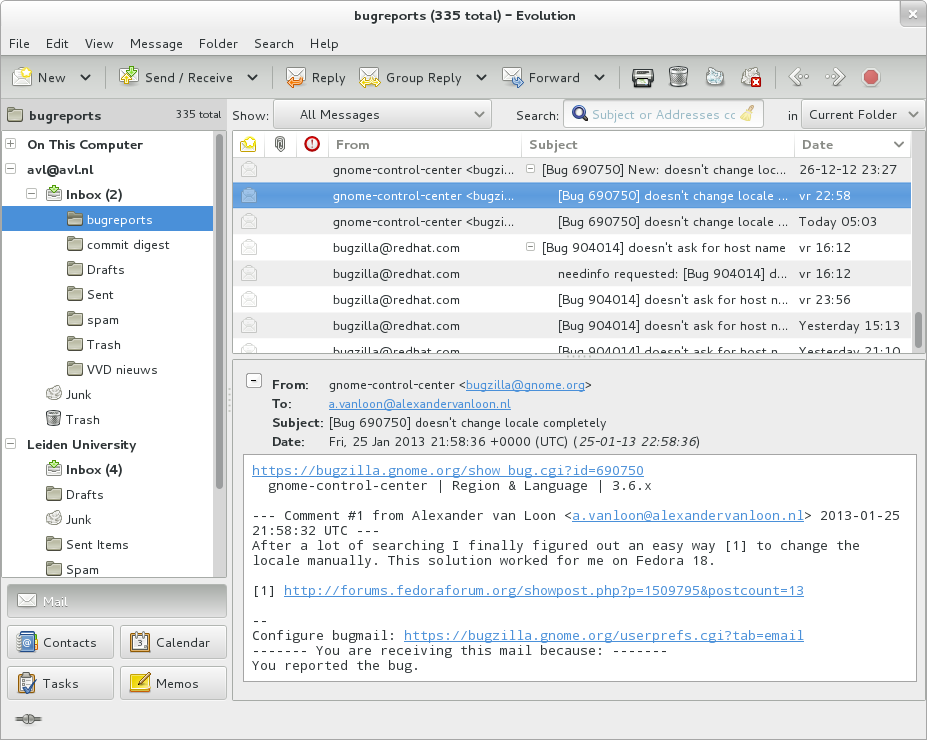
Email operates across computer networks, primarily the Internet, and also local area networks. Today’s email systems are based on a store-and-forward model. Email servers accept, forward, deliver, and store messages. Neither the users nor their computers are required to be online simultaneously; they need to connect, typically to a mail server or a web mail interface to send or receive messages or download it.
Originally an ASCII text-only communications medium, Internet email was extended by Multipurpose Internet Mail Extensions (MIME) to carry text in other character sets and multimedia content attachments. International email, with internationalized email addresses using UTF-8, is standardized but not widely adopted.
The term electronic mail has been in use with its modern meaning since 1975, and variations of the shorter E-mail have been in use since 1979:
- email is now the common form, and recommended by style guides. It is the form required by IETF Requests for Comments (RFC) and working groups. This spelling also appears in most dictionaries.
- e-mail is the form favored in edited published American English and British English writing as reflected in the Corpus of Contemporary American English data, but is falling out of favor in some style guides.
- E-mail is sometimes used. The original usage in June 1979 occurred in the journal Electronics in reference to the United States Postal Service initiative called E-COM, which was developed in the late 1970s and operated in the early 1980s.
- Email is also used.
- EMAIL was used by CompuServe starting in April 1981, which popularized the term.
- EMail is a traditional form used in RFCs for the “Author’s Address”.
The service is often simply referred to as mail, and a single piece of electronic mail is called a message. The conventions for fields within emails — the “To,” “From,” “CC,” “BCC” etc. — began with RFC-680 in 1975.
An Internet email consists of an envelope and content; the content consists of a header and a body.
Computer-based messaging between users of the same system became possible after the advent of time-sharing in the early 1960s, with a notable implementation by MIT’s CTSS project in 1965. Most developers of early mainframes and minicomputers developed similar, but generally incompatible, mail applications. In 1971 the first ARPANET network mail was sent, introducing the now-familiar address syntax with the ‘@’ symbol designating the user’s system address. Over a series of RFCs, conventions were refined for sending mail messages over the File Transfer Protocol.
Proprietary electronic mail systems soon began to emerge. IBM, CompuServe and Xerox used in-house mail systems in the 1970s; CompuServe sold a commercial intra office mail product from 1978 and IBM and Xerox from 1981. DEC’s ALL-IN-1 and Hewlett-Packard’s HP MAIL (later HP Desk Manager) were released in 1982; development work on the former began in the late 1970s and the latter became the world’s largest selling email system.
The Simple Mail Transfer Protocol (SMTP) protocol was implemented on the ARPANET in 1983. LAN email systems emerged in the mid 1980s. For a time in the late 1980s and early 1990s, it seemed likely that either a proprietary commercial system or the X.400 email system, part of the Government Open Systems Interconnection Profile (GOSIP), would predominate. However, once the final restrictions on carrying commercial traffic over the Internet ended in 1995, a combination of factors made the current Internet suite of SMTP, POP3 and IMAP email protocols the standard.
The following is a typical sequence of events that takes place when sender Alice transmits a message using a mail user agent (MUA) addressed to the email address of the recipient.
- The MUA formats the message in email format and uses the submission protocol, a profile of the Simple Mail Transfer Protocol (SMTP), to send the message content to the local mail submission agent (MSA), in this case smtp.a.org.
- The MSA determines the destination address provided in the SMTP protocol (not from the message header) — in this case, bob@b.org — which is a fully qualified domain address (FQDA). The part before the @ sign is the local part of the address, often the username of the recipient, and the part after the @ sign is a domain name. The MSA resolves a domain name to determine the fully qualified domain name of the mail server in the Domain Name System (DNS).
- The DNS server for the domain b.org (ns.b.org) responds with any MX records listing the mail exchange servers for that domain, in this case mx.b.org, a message transfer agent (MTA) server run by the recipient’s ISP.
- smtp.a.org sends the message to mx.b.org using SMTP. This server may need to forward the message to other MTAs before the message reaches the final message delivery agent (MDA).
- The MDA delivers it to the mailbox of user bob.
- Bob’s MUA picks up the message using either the Post Office Protocol (POP3) or the Internet Message Access Protocol (IMAP).
In addition to this example, alternatives and complications exist in the email system:
- Alice or Bob may use a client connected to a corporate email system, such as IBM Lotus Notes or Microsoft Exchange. These systems often have their own internal email format and their clients typically communicate with the email server using a vendor-specific, proprietary protocol. The server sends or receives email via the Internet through the product’s Internet mail gateway which also does any necessary reformatting. If Alice and Bob work for the same company, the entire transaction may happen completely within a single corporate email system.
- Alice may not have an MUA on her computer but instead may connect to a web mail service.
- Alice’s computer may run its own MTA, so avoiding the transfer at step 1.
- Bob may pick up his email in many ways, for example logging into mx.b.org and reading it directly, or by using a webmail service.
- Domains usually have several mail exchange servers so that they can continue to accept mail even if the primary is not available.
Many MTAs used to accept messages for any recipient on the Internet and do their best to deliver them. Such MTAs are called open mail relays. This was very important in the early days of the Internet when network connections were unreliable. However, this mechanism proved to be exploitable by originators of unsolicited bulk email and as a consequence open mail relays have become rare, and many MTAs do not accept messages from open mail relays.
The basic Internet message format used for email is defined by RFC 5322, with encoding of non-ASCII data and multimedia content attachments defined in RFC 2045 through RFC 2049, collectively called Multipurpose Internet Mail Extensions or MIME. The extensions in International email apply only to email. RFC 5322 replaced the earlier RFC 2822 in 2008, then RFC 2822 in 2001 replaced RFC 822 – the standard for Internet email for decades. Published in 1982, RFC 822 was based on the earlier RFC 733 for the ARPANET.
Internet email messages consist of two sections, “header” and “body”. These are known as “content”. The header is structured into fields such as From, To, CC, Subject, Date, and other information about the email. In the process of transporting email messages between systems, SMTP communicates delivery parameters and information using message header fields. The body contains the message, as unstructured text, sometimes containing a signature block at the end. The header is separated from the body by a blank line.
RFC 5322 specifies the syntax of the email header. Each email message has a header (the “header section” of the message, according to the specification), comprising a number of fields (“header fields”). Each field has a name (“field name” or “header field name”), followed by the separator character “:”, and a value (“field body” or “header field body”).
Each field name begins in the first character of a new line in the header section, and begins with a non-white space printable character. It ends with the separator character “:”. The separator is followed by the field value (the “field body”). The value can continue onto subsequent lines if those lines have space or tab as their first character. Field names and, without SMTPUTF8, field bodies are restricted to 7-bit ASCII characters. Some non-ASCII values may be represented using MIME encoded words.
Email header fields can be multi-line, with each line recommended to be no more than 78 characters, although the limit is 998 characters. Header fields defined by RFC 5322 contain only US-ASCII characters; for encoding characters in other sets, a syntax specified in RFC 2047 may be used. In some examples, the IETF EAI working group defines some standards track extensions, replacing previous experimental extensions so UTF-8 encoded Unicode characters may be used within the header. In particular, this allows email addresses to use non-ASCII characters. Such addresses are supported by Google and Microsoft products, and promoted by some government agents.
The message header must include at least the following fields:
- From: The email address, and, optionally, the name of the author(s). Some email clients are changeable through account settings.
- Date: The local time and date the message was written. Like the From: field, many email clients fill this in automatically before sending. The recipient’s client may display the time in the format and time zone local to them.
RFC 3864 describes registration procedures for message header fields at the IANA; it provides for permanent and provisional field names, including also fields defined for MIME, netnews, and HTTP, and referencing relevant RFCs. Common header fields for email include:
- To: The email address(es), and optionally name(s) of the message’s recipient(s). Indicates primary recipients (multiple allowed), for secondary recipients see Cc: and Bcc: below.
- Subject: A brief summary of the topic of the message. Certain abbreviations are commonly used in the subject, including “RE:” and “FW:”.
- Cc: Carbon copy; Many email clients mark email in one’s inbox differently depending on whether they are in the To: or Cc: list.
- Bcc: Blind carbon copy; addresses are usually only specified during SMTP delivery, and not usually listed in the message header.
- Content-Type: Information about how the message is to be displayed, usually a MIME type.
- Precedence: commonly with values “bulk”, “junk”, or “list”; used to indicate automated “vacation” or “out of office” responses should not be returned for this mail, e.g. to prevent vacation notices from sent to all other subscribers of a mailing list. Send mail uses this field to affect prioritization of queued email, with “Precedence: special-delivery” messages delivered sooner. With modern high-bandwidth networks, delivery priority is less of an issue than it was. Microsoft Exchange respects a fine-grained automatic response suppression mechanism, the X-Auto-Response-Suppress field.
- Message-ID: Also an automatic-generated field to prevent multiple deliveries and for reference in In-Reply-To: (see below).
- In-Reply-To: Message-ID of the message this is a reply to. Used to link related messages together. This field only applies to reply messages.
- References: Message-ID of the message this is a reply to, and the message-id of the message the previous reply was a reply to, etc.
- Reply-To: Address should be used to reply to the message.
- Sender: Address of the sender acting on behalf of the author listed in the From: field (secretary, list manager, etc.).
- Archived-At: A direct link to the archived form of an individual email message.
The To: field may be unrelated to the addresses to which the message is delivered. The delivery list is supplied separately to the transport protocol, SMTP, which may be extracted from the header content. The “To:” field is similar to the addressing at the top of a conventional letter delivered according to the address on the outer envelope. In the same way, the “From:” field may not be the sender. Some mail servers apply email authentication systems to messages relayed. Data pertaining to the server’s activity is also part of the header, as defined below.
Internet email was designed for 7-bit ASCII. Most email software is 8-bit clean, but must assume it will communicate with 7-bit servers and mail readers. The MIME standard introduced character set specifiers and two content transfer encodings to enable transmission of non-ASCII data: quoted printable for mostly 7-bit content with a few characters outside that range and base 64 for arbitrary binary data. The 8 BIT MIME and BINARY extensions were introduced to allow transmission of mail without the need for these encodings, but many mail transport agents may not support them. In some countries, e-mail software violates RFC 5322 by sending raw non-ASCII text and several encoding schemes co-exist; as a result, by default, the message in a non-Latin alphabet language appears in non-readable form (the only exception is a coincidence if the sender and receiver use the same encoding scheme). Therefore, for international character sets, Unicode is growing in popularity.
Most modern graphic email clients allow the use of either plain text or HTML for the message body at the option of the user. HTML email messages often include an automatic-generated plain text copy for compatibility.
Advantages of HTML include the ability to include in-line links and images, set apart previous messages in block quotes, wrap naturally on any display, use emphasis such as underlines and italics, and change font styles. Disadvantages include the increased size of the email, privacy concerns about web bugs, abuse of HTML email as a vector for phishing attacks and the spread of malicious software. Some e-mail clients interpret the body as HTML even in the absence of a Content-Type: html header field; this may cause various problems.
Some web-based mailing lists recommend all posts be made in plain text, with 72 or 80 characters per line for all the above reasons, and because they have a significant number of readers using text-based email clients such as Mutt. Various informal conventions evolved for marking up plain text in email and usenet posts, which later led to the development of formal languages like setext (c. 1992) and many others, the post popular of them being markdown.
Some Microsoft email clients may allow rich formatting using their proprietary Rich Text Format (RTF), but this should be avoided unless the recipient is guaranteed to have a compatible email client.
Messages are exchanged between hosts using the Simple Mail Transfer Protocol with software programs called mail transfer agents (MTAs); and delivered to a mail store by programs called mail delivery agents (MDAs, also sometimes called local delivery agents, LDAs). Accepting a message obliges an MTA to deliver it, and when a message cannot be delivered, that MTA must send a bounce message back to the sender, indicating the problem.
Users can retrieve their messages from servers using standard protocols such as POP or IMAP, or, as is more likely in a large corporate environment, with a proprietary protocol specific to Novell Group wise, Lotus Notes or Microsoft Exchange Servers. Programs used by users for retrieving, reading, and managing email are called mail user agents (MUAs).
When opening an email, it is marked as “read”, which typically visibly distinguishes it from “unread” messages on clients’ user interfaces. Email clients may allow hiding read emails from the inbox so the user can focus on the unread.
Mail can be stored on the client, on the server side, or in both places. Standard formats for mailboxes include Maildir and mbox. Several prominent email clients use their own proprietary format and require conversion software to transfer email between them. Server-side storage is often in a proprietary format but since access is through a standard protocol such as IMAP, moving email from one server to another can be done with any MUA supporting the protocol.
Many current email users do not run MTA, MDA or MUA programs themselves, but use a web-based email platform, such as Gmail or Yahoo! Mail, that performs the same tasks. Such web mail interfaces allow users to access their mail with any standard web browser, from any computer, rather than relying on a local email client.
Upon reception of email messages, email client applications save messages in operating system files in the file system. Some clients save individual messages as separate files, while others use various database formats, often proprietary, for collective storage. A historical standard of storage is the mbox format. The specific format used is often indicated by special filename extensions:
eml- Used by many email clients including Novell Group Wise, Microsoft Outlook Express, Lotus notes, Windows Mail, Mozilla Thunderbird, and Postbox. The files contain the email contents as plain text in MIME format, containing the email header and body, including attachments in one or more of several formats.
emlx- Used by Apple Mail.
msg- Used by Microsoft Office Outlook and Office Logic Groupware.
mbx- Used by Opera Mail, KMail, and Apple Mail based on the mbox format.
Some applications (like Apple Mail) leave attachments encoded in messages for searching while also saving separate copies of the attachments. Others separate attachments from messages and save them in a specific directory.
The URI scheme, as registered with the IANA, defines the mailto: scheme for SMTP email addresses. Though its use is not strictly defined, URLs of this form are intended to be used to open the new message window of the user’s mail client when the URL is activated, with the address as defined by the URL in the To: field. Many clients also support query string parameters for the other email fields, such as its subject line or carbon copy recipients.
Many email providers have a web-based email client. This allows users to log into the email account by using any compatible web browser to send and receive their email. Mail is typically not downloaded to the web client, so can’t be read without a current Internet connection.
The Post Office Protocol 3 (POP3) is a mail access protocol used by a client application to read messages from the mail server. Received messages are often deleted from the server. POP supports simple download-and-delete requirements for access to remote mailboxes (termed maildrop in the POP RFC’s). POP3 allows you to download email messages on your local computer and read them even when you are offline.
The Internet Message Access Protocol (IMAP) provides features to manage a mailbox from multiple devices. Small portable devices like smartphones are increasingly used to check email while traveling and to make brief replies, larger devices with better keyboard access being used to reply at greater length. IMAP shows the headers of messages, the sender and the subject and the device needs to request to download specific messages. Usually, the mail is left in folders in the mail server.
Messaging Application Programming Interface (MAPI) is used by Microsoft Outlook to communicate to Microsoft Exchange Server – and to a range of other email server products such as Axigen Mail Server, Kerio Connect, Scalix, Zimbra, HP OpenMail, IBM Lotus Notes, Zarafa, and Bynari where vendors have added MAPI support to allow their products to be accessed directly via Outlook.