
Basics Of E-Mail. Opening Email Client
Email, short for electronic mail, is a widely used form of digital communication for sending and receiving messages, documents, and files over the internet. An email client is a software application or program that allows you to send, receive, and manage emails. Here are the basic steps to open an email client:
Step 1: Choose an Email Client There are several email clients available, both web-based and desktop-based. Popular web-based email clients include Gmail, Outlook.com, and Yahoo Mail, while popular desktop-based email clients include Microsoft Outlook, Mozilla Thunderbird, and Apple Mail. Choose an email client that best suits your needs and preferences.
Step 2: Install and Set Up Email Client If you are using a desktop-based email client, you may need to install the software on your computer. Follow the installation instructions provided by the email client’s website or documentation. Once installed, you will need to set up your email account within the email client. This typically involves providing your email address, password, and other relevant information, and following the prompts to complete the setup process.
Step 3: Launch the Email Client After installation and setup, you can launch the email client by double-clicking on the email client’s icon on your desktop or finding it in your list of installed programs. If you are using a web-based email client, simply go to the email client’s website and sign in with your email address and password.
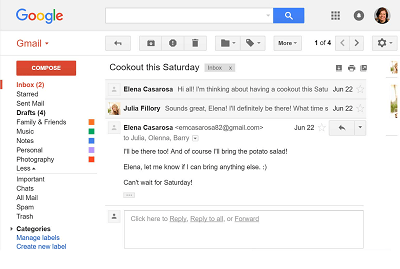
Step 4: View Inbox Once the email client is launched and you are signed in, you will typically be taken to your inbox, which is the folder where your received emails are stored. Here, you can view the list of emails in your inbox, including the sender, subject, and date of each email.
Step 5: Open an Email To open an email, click on the email’s subject or sender name in your inbox. This will open the selected email in a new window or tab, depending on your email client. The email will typically display the sender, recipient, subject, date, and the body of the email. You can also view any attachments, reply to the email, or perform other actions depending on the features of your email client.
Step 6: Close the Email Client After you have finished reading or managing your emails, you can close the email client by clicking the “X” or “Close” button in the top-right corner of the email client window or tab. This will exit the email client and end your email session.
Conclusion: Opening an email client is a basic step in using email for communication and managing your emails. By following the steps outlined above, you can open your email client, view your inbox, and open emails to read and respond to messages. Familiarizing yourself with the features and functions of your chosen email client will help you effectively manage your emails and communicate digitally.
The basic requirements for opening an email client and using email effectively include:
- Internet Connection: You need a stable internet connection to connect to the email server and send/receive emails. This can be through wired or wireless internet, such as broadband or Wi-Fi.
- Email Account: You need a valid email account with an email service provider, such as Gmail, Outlook, Yahoo, etc. You will typically need to sign up for an account with your desired email service provider, which will provide you with an email address and password to access your emails.
- Email Client Software: If you are using a desktop-based email client, such as Microsoft Outlook, Mozilla Thunderbird, or Apple Mail, you need to install the email client software on your computer. This may require downloading and installing the software from the email client’s official website.
- Email Client Configuration: You need to configure your email client with the settings of your email account, such as incoming and outgoing mail server settings, port numbers, and authentication methods. This information is typically provided by your email service provider and may vary depending on the email client you are using.
- Username and Password: You need to provide your email address and password to sign in to your email client and access your emails. Make sure to keep your username and password secure to protect your email account from unauthorized access.
- Basic Computer Skills: You need basic computer skills, such as navigating through software applications, using a mouse and keyboard, and understanding common icons and buttons, to open and use an email client effectively. Familiarity with email features such as composing, sending, receiving, and managing emails, as well as handling attachments, organizing folders, and using basic email etiquette, is also essential.
Conclusion: Opening an email client requires an internet connection, a valid email account, email client software, configuration of email settings, username and password, and basic computer skills. Once you have these requirements in place, you can effectively use email for communication, sending/receiving messages, managing your inbox, and utilizing various email features based on your needs.
Anyone who wants to use email as a means of communication or manage their emails would benefit from understanding the basics of opening an email client. This can include individuals in various personal or professional settings, such as:
- Individuals: Anyone who uses email for personal communication, such as sending and receiving messages with family, friends, and acquaintances, can benefit from understanding the basics of opening an email client. This can help them effectively access their emails, read and respond to messages, and manage their inbox.
- Students: Students who need to communicate with professors, classmates, or other educational institutions through email may need to open an email client to access their emails. This can be useful for submitting assignments, receiving updates, and participating in online discussions or group projects.
- Professionals: Professionals in various fields, such as business, academia, government, or non-profit organizations, often rely on email for communication with colleagues, clients, customers, and other stakeholders. Understanding the basics of opening an email client can help professionals effectively manage their work-related emails, respond to inquiries, and stay organized.
- Job Seekers: Job seekers often need to use email for communication with potential employers, submitting job applications, and following up on job opportunities. Knowing how to open an email client and effectively use email can be essential in the job search process.
- Entrepreneurs and Small Business Owners: Entrepreneurs and small business owners often rely on email for communication with customers, suppliers, partners, and other stakeholders. Understanding the basics of opening an email client can help them effectively manage their business-related emails and communicate with their network.
- Remote Workers: With the rise of remote work, many individuals now rely on email as a primary means of communication with their remote team members, clients, and other stakeholders. Knowing how to open an email client and use email effectively is crucial for remote workers to stay connected and collaborate remotely.
Conclusion: The basics of opening an email client are relevant for anyone who wants to use email for communication or manage their emails, including individuals, students, professionals, job seekers, entrepreneurs, small business owners, and remote workers. Understanding how to open an email client and effectively use email is essential in today’s digital communication landscape.
The need for understanding the basics of opening an email client arises whenever you want to access your email account and use email as a means of communication. Some specific situations where the basics of opening an email client are required include:
- When you want to check your emails: If you have an email account and want to access your inbox to read and respond to emails, you need to know how to open an email client to log in to your email account and check your messages.
- When you need to send or receive emails: If you want to send an email to someone or receive an email from someone, you need to open your email client to compose and send emails or to receive and view incoming emails.
- When you want to manage your inbox: Opening an email client is necessary when you want to manage your inbox, including tasks such as organizing emails into folders, deleting unwanted emails, marking emails as read or unread, and managing attachments.
- When you need to configure email settings: If you are setting up a new email account or need to configure email settings, such as changing your password, updating your email signature, or setting up email forwarding, you need to open your email client and access the settings options.
- When you want to access email features: Email clients come with various features, such as calendar integration, contact management, and advanced search options. To utilize these features, you need to open your email client and access the relevant functions.
- When you need to troubleshoot email issues: If you encounter any issues with your email account, such as problems with sending or receiving emails, error messages, or other technical issues, you may need to open your email client to troubleshoot the problem or seek support from your email service provider.
Conclusion: Understanding the basics of opening an email client is required whenever you want to access your email account, send or receive emails, manage your inbox, configure email settings, access email features, or troubleshoot email issues. It is a fundamental skill for effectively using email as a means of communication in various personal and professional settings.
The basics of opening an email client are required in various settings where email communication is used. Some common places where the knowledge of opening an email client is required include:
- Home: Many individuals use email for personal communication with family, friends, and acquaintances. Knowing how to open an email client is essential for accessing their email accounts, reading and responding to emails, and managing their inbox.
- Work: Email is widely used in professional settings for communication with colleagues, clients, customers, and other stakeholders. Opening an email client is necessary for professionals to access their work-related email accounts, send and receive work-related emails, and manage their inbox effectively.
- Educational institutions: Students, teachers, and administrators in educational institutions often use email for communication related to assignments, announcements, and other academic matters. Knowing how to open an email client is necessary for accessing their school or university email accounts and staying updated with important communications.
- Business environments: Entrepreneurs, small business owners, and employees in businesses of all sizes rely on email for communication with customers, suppliers, partners, and other business contacts. Understanding how to open an email client is crucial for managing business-related emails and staying connected with stakeholders.
- Remote work: With the increasing prevalence of remote work, many individuals rely on email as a primary means of communication with their remote team members, clients, and other stakeholders. Knowing how to open an email client is necessary for remote workers to access their email accounts and stay connected with their remote colleagues.
- Public institutions: Email is also commonly used in government agencies, non-profit organizations, and other public institutions for communication with constituents, stakeholders, and partners. Understanding how to open an email client is important for accessing official email accounts and managing communications effectively.
- Internet cafes and public places: In some cases, individuals may need to use email in public places, such as internet cafes, libraries, or other shared spaces. Knowing how to open an email client is essential for accessing their email accounts and using email services in such public environments.
Conclusion: The knowledge of opening an email client is required in various settings where email communication is used, including homes, workplaces, educational institutions, businesses, remote work scenarios, public institutions, and public places. It is a fundamental skill for effectively accessing and using email accounts in different contexts.
Understanding the process of opening an email client involves the following steps:
- Choose an email client: There are various email clients available, such as Microsoft Outlook, Gmail, Apple Mail, and Thunderbird, among others. Choose an email client that suits your needs and preferences.
- Install and set up the email client: Once you have chosen an email client, you may need to install it on your device (if it is not already installed) and set it up with your email account. This typically involves providing your email address, password, and other relevant details.
- Launch the email client: After installation and setup, you can launch the email client by clicking on its icon or opening it from your applications or programs menu.
- Log in to your email account: Once the email client is launched, you may be prompted to log in to your email account. Enter your email address and password as required to access your email account.
- Access your inbox: Once you have successfully logged in, the email client will typically display your inbox, which contains your incoming emails. You can navigate through your inbox to view, read, and manage your emails.
- Compose and send emails: To compose and send an email, you can usually find a “Compose” or “New Email” button within the email client. Click on it to open a new email window where you can enter the recipient’s email address, subject, and message, and then click on “Send” to send the email.
- Manage your inbox: Email clients typically provide various options for managing your inbox, such as organizing emails into folders, marking emails as read or unread, deleting emails, and managing attachments. Familiarize yourself with these options to effectively manage your inbox.
- Configure email settings: Email clients may have settings options that allow you to configure various aspects of your email account, such as changing your password, setting up email signatures, creating filters, and managing notifications. Explore the settings options to customize your email client according to your preferences.
- Troubleshoot issues: In case you encounter any issues with your email client, such as login problems, error messages, or other technical issues, you may need to troubleshoot the problem. This may involve checking your internet connection, verifying your email account settings, or seeking support from the email client’s help documentation or customer support.
Conclusion: Understanding how to open an email client involves installing, setting up, launching, logging in, accessing your inbox, composing and sending emails, managing your inbox, configuring email settings, and troubleshooting issues as needed. Familiarizing yourself with these steps is essential for effectively using an email client to send, receive, and manage emails.
Case Study: Basics of Email – Opening Email Client for a Small Business
Company XYZ is a small business that specializes in selling handmade candles online. They have a team of 10 employees who work remotely from different locations. The company uses email as their primary mode of communication for internal and external communication.
Challenge: Company XYZ recently migrated to a new email service provider and implemented a new email client for their employees. However, some of the employees were not familiar with the basics of email and opening an email client, which resulted in delays in communication and productivity issues. The management realized the need to provide training on the basics of email and opening an email client to ensure smooth communication among team members.
Solution: Company XYZ decided to conduct a training session for their employees on the basics of email and opening an email client. They followed the below steps:
- Training Material Preparation: The HR team prepared training materials that included step-by-step instructions, screenshots, and videos on how to open the email client, log in, access the inbox, compose and send emails, manage inbox, and configure email settings.
- Training Session: The HR team conducted a training session for all employees via an online webinar. The training covered the basics of email, including the purpose of email, email etiquette, and the importance of email security. The session then focused on opening the email client, logging in, accessing the inbox, composing and sending emails, managing the inbox, and configuring email settings.
- Hands-on Practice: After the training session, the employees were given time to practice opening the email client and performing various tasks, such as sending and receiving test emails, organizing emails into folders, marking emails as read or unread, and configuring email settings.
- Q&A and Support: The HR team encouraged employees to ask questions during the training session and provided clarifications on any doubts or issues raised. They also offered ongoing support through a designated email address for any further questions or assistance.
Results: The training on the basics of email and opening an email client provided by Company XYZ helped their employees gain proficiency in using the email client for their day-to-day communication. The results of the training were:
- Improved Communication: Employees were able to quickly open the email client, log in, and access their inbox to send and receive emails, resulting in improved communication among team members and with external stakeholders.
- Increased Productivity: With a better understanding of the email client, employees were able to manage their emails more efficiently, including organizing emails into folders, marking emails as read or unread, and managing attachments, which resulted in increased productivity.
- Enhanced Security: The training on email security helped employees understand the importance of keeping their email accounts secure by using strong passwords, avoiding phishing emails, and being cautious with email attachments and links, which contributed to enhanced email security.
- Positive Feedback: Employees appreciated the training provided by the company, as it helped them gain confidence in using the email client effectively. They found the training materials and hands-on practice helpful in understanding the basics of email and opening an email client.
Conclusion: The case study of Company XYZ highlights the importance of providing training on the basics of email and opening an email client to employees, especially in small businesses where some employees may not be familiar with these concepts. Proper training can help improve communication, productivity, and security in using email as a primary mode of communication.
Introduction: Email has become an integral part of modern communication, and its usage continues to grow rapidly. Whether for personal or professional use, opening an email client is the first step towards accessing an email account. However, for many individuals, especially those who are new to using email or have limited experience with technology, opening an email client can be a challenging task. This white paper aims to provide an overview of the basics of email and opening an email client, including its importance, how to open an email client, and some best practices for email usage.
Importance of Email: Email is one of the most widely used methods of communication, and it offers several benefits, such as speed, convenience, and cost-effectiveness. Email allows individuals to send and receive messages from anywhere in the world instantly, making it an efficient and effective mode of communication. In addition, email offers the ability to attach files, such as documents, images, and videos, making it a versatile communication tool.
Basics of Opening an Email Client: An email client is a software application that allows users to send and receive email messages. There are several types of email clients available, such as web-based clients, desktop clients, and mobile clients. Regardless of the type of email client, the process of opening an email client is typically straightforward.
- Launching the Email Client: To open an email client, first, locate the email client on your device, which may be on the desktop, in the Start menu, or in the applications folder. Once you have found the email client, click on the icon or double-click on the application to launch it.
- Logging In: After launching the email client, the login page will appear, prompting you to enter your email address and password. Once you have entered your login credentials, click on the login button to access your inbox.
- Accessing the Inbox: After logging in, you will be directed to the inbox, where you can see all the received emails. From here, you can click on any email to read its contents, or you can compose a new email by clicking on the “Compose” button.
Best Practices for Email Usage:
- Email Etiquette: Email etiquette refers to the set of guidelines that dictate how to write and send professional emails. Some best practices for email etiquette include being concise, using proper grammar and spelling, and avoiding the use of all caps, which can be interpreted as shouting.
- Email Security: Email security is essential to protect personal and business information from hackers and cybercriminals. Some best practices for email security include using strong passwords, being cautious with email attachments and links, and avoiding phishing emails.
- Email Management: Effective email management is crucial to keep your inbox organized and efficient. Some best practices for email management include creating folders to organize emails, marking emails as read or unread, and regularly deleting unwanted emails.
Conclusion: Opening an email client is the first step towards accessing an email account and utilizing its benefits. By following the basics of opening an email client and implementing best practices for email usage, individuals can effectively use email as a communication tool for personal and professional purposes. It is important to note that email etiquette, security, and management play a critical role in maximizing the benefits of email usage, and individuals should adhere to these best practices to ensure effective and efficient communication.