
Computer Fundamentals
Computer Fundamentals refers to the foundational concepts and principles underlying the design, operation, and use of computers. It encompasses a broad range of topics related to computer hardware, software, networking, and information processing. Understanding computer fundamentals is essential for anyone seeking to develop a comprehensive understanding of how computers work and how they can be effectively utilized. Here are some key areas covered in computer fundamentals:
- Computer Architecture:
- Central Processing Unit (CPU)
- Memory (RAM and ROM)
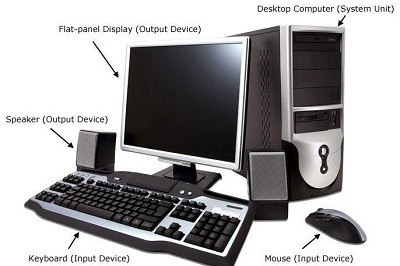
- Input and Output Devices
- Storage Devices (Hard Drives, Solid State Drives)
- Motherboard and Expansion Cards
- Operating Systems:
- Definition and functions of an operating system
- Common operating systems (Windows, macO S, Linux)
- File systems and file management
- Process management and multitasking
- Memory management and virtual memory
- Device management and drivers
- Computer Networks:
- Local Area Networks (LAN s) and Wide Area Networks (WAN s)
- Network topo logies (Bus, Star, Mesh, Ring)
- Network protocols (TC P/IP, HTTP, FTP)
- Network devices (Routers, Switches, Modems)
- Network security and firewalls
- Internet and the World Wide Web
- Software and Programming:
- Software types (System software, Application software)
- Programming languages (C, Java, Python)
- Algorithms and flowcharts
- Data types and variables
- Control structures (Conditional statements, Loops)
- Functions and modular programming
- Data Representation and Storage:
- Binary, Decimal, and Hexadecimal number systems
- Bits, Bytes, and Word sizes
- Character encoding (ASCII, Unicode)
- Data compression techniques
- Primary and Secondary storage devices
- File formats and data organization
- Computer Security and Ethics:
- Cyber security threats and vulnerabilities
- Passwords and authentication methods
- Encryption and decryption techniques
- Malware and antivirus software
- Privacy and data protection
- Ethical considerations in computer use
- Computer Applications:
- Word processing and document creation
- Spreadsheets and data analysis
- Presentations and multimedia creation
- Graphics and image editing
- Database management systems
- Web browsing and online communication
Understanding computer fundamentals provides a solid foundation for further exploration and specialization in various fields, including computer science, information technology, and software development. It helps individuals make informed decisions, troubleshoot common computer issues, and leverage the capabilities of computers effectively in personal and professional contexts.
What is required Computer Fundamentals
To understand Computer Fundamentals, several key components and concepts are necessary. These include:
- Computer Hardware:
- Understanding the basic components of a computer system, such as the central processing unit (CPU), memory (RAM), storage devices (hard drive, solid-state drive), input devices (keyboard, mouse), and output devices (monitor, printer).
- Knowledge of computer architecture, including the interaction between hardware components and their roles in executing instructions and processing data.
- Operating Systems:
- Familiarity with different types of operating systems (e.g., Windows, macO S, Linux) and their functionalities.
- Understanding the concepts of file management, multitasking, user interfaces, and system configuration.
- Software Applications:
- Knowledge of commonly used software applications, such as word processors, spreadsheets, presentation software, web browsers, and email clients.
- Understanding the features and functions of software applications and how to effectively utilize them for various tasks.
- Computer Networks:
- Awareness of network fundamentals, including concepts such as IP addresses, protocols (e.g., TC P/IP), local area networks (LAN s), wide area networks (WAN s), routers, switches, and wireless networks.
- Understanding the basics of network security, including firewalls, encryption, and secure data transmission.
- Data Management:
- Understanding the concepts of data representation (e.g., binary, hexadecimal), file systems, and file formats.
- Knowledge of data organization, storage, retrieval, and basic database principles.
- Digital Security and Privacy:
- Awareness of cyber security threats and best practices for securing computer systems and data.
- Understanding the importance of strong passwords, antivirus software, firewalls, and safe internet browsing habits.
- Knowledge of privacy concerns and data protection regulations.
- Computer Troubleshooting:
- Basic troubleshooting skills to identify and resolve common computer problems, such as software errors, connectivity issues, or hardware malfunctions.
- Ability to seek appropriate technical support when encountering complex problems.
- Ethical and Legal Considerations:
- Understanding ethical and legal aspects related to computer use, including copyright laws, intellectual property rights, software licensing, and responsible digital behavior.
Overall, Computer Fundamentals encompass a broad range of knowledge and skills related to computer hardware, software, networks, data management, security, troubleshooting, and ethical considerations. Developing a strong foundation in these areas is crucial for effectively using computers and technology in various personal, educational, and professional settings.
Who is required Computer Fundamentals
Computer Fundamentals are required by a wide range of individuals, including:
- Students: Computer Fundamentals are essential for students studying computer science, information technology, or related fields. It provides them with a strong foundation to build upon and understand more advanced concepts and technologies.
- Professionals in the IT Industry: Professionals working in the IT industry, such as software developers, network administrators, system analysts, and IT managers, require a solid understanding of Computer Fundamentals to effectively perform their job responsibilities.
- Business Professionals: Many professionals in non-technical roles, such as managers, marketers, and consultants, need a basic understanding of Computer Fundamentals to effectively use computers and technology in their daily work. This knowledge allows them to communicate with technical teams, understand technological implications, and make informed decisions.
- Entrepreneurs and Start-up Founders: Entrepreneurs and start-up founders often need to manage their own technology infrastructure and make strategic decisions regarding technology adoption. Having a grasp of Computer Fundamentals enables them to make informed choices, communicate with technical professionals, and leverage technology for business growth.
- Home Users: Computer Fundamentals are essential for home users who rely on computers and technology for personal tasks such as email, web browsing, document creation, and online communication. Understanding computer basics helps them troubleshoot common issues, protect their data, and utilize computer resources effectively.
- Job Seekers: Basic knowledge of Computer Fundamentals is often required or preferred by employers across various industries. Job seekers with computer literacy and understanding of fundamental concepts have a competitive advantage in today’s job market.
- Individuals Interested in Technology: Anyone with a general interest in technology, whether it be hobbyists, enthusiasts, or those looking to stay informed about the latest advancements, can benefit from learning Computer Fundamentals. It allows them to better understand and appreciate the inner workings of computers and the broader technology landscape.
Computer Fundamentals serve as a building block for individuals across various disciplines, enabling them to effectively navigate and leverage the capabilities of computers and technology in their personal and professional lives.
When is required Computer Fundamentals
Computer Fundamentals are required in various situations, including:
- Academic Studies: Computer Fundamentals are necessary for students pursuing degrees or courses in computer science, information technology, or related fields. They form the foundational knowledge needed to comprehend more advanced topics in these disciplines.
- Professional Career Development: Computer Fundamentals are crucial for professionals in the IT industry. Whether you are a software developer, network administrator, data analyst, or IT manager, a strong understanding of Computer Fundamentals is essential for performing your job effectively and staying up-to-date with technological advancements.
- Technology-related Job Applications: When applying for jobs in roles that involve working with computers and technology, employers often require candidates to have a basic understanding of Computer Fundamentals. Demonstrating proficiency in these concepts increases your chances of securing such positions.
- Technology-related Entrepreneurship: If you are starting a technology-based business or venturing into entrepreneurship in a field that involves technology, having a solid grasp of Computer Fundamentals is essential. It helps you make informed decisions, communicate effectively with technical professionals, and understand the technical aspects of your business.
- Home Computer Use: Even for everyday computer users, having a basic knowledge of Computer Fundamentals is beneficial. It enables you to troubleshoot common issues, ensure data security, and effectively use computer resources for tasks such as word processing, web browsing, and online communication.
- Technology Awareness in Non-Technical Roles: Computer Fundamentals are valuable for professionals in non-technical roles as well. Understanding the basics of computers and technology allows you to collaborate with technical teams, comprehend the implications of technological decisions, and make informed choices related to technology in your work.
- General Technology Literacy: In today’s digital world, having a certain level of technology literacy is beneficial for individuals in all walks of life. Computer Fundamentals provide a foundation for understanding and utilizing technology in personal and professional contexts, enhancing your overall digital literacy.
Computer Fundamentals are required in various situations to ensure individuals have the necessary knowledge and skills to effectively navigate the world of computers and technology. Whether for academic purposes, professional development, entrepreneurial endeavors, or everyday computer use, having a solid understanding of Computer Fundamentals is valuable and empowering.
Where is required Computer Fundamentals
Computer Fundamentals are required in various settings and industries. Some key areas where Computer Fundamentals are necessary include:
- Education Institutions: Schools, colleges, and universities incorporate Computer Fundamentals as part of their curriculum, particularly in computer science, information technology, and related programs.
- IT Industry: Computer Fundamentals are vital for professionals working in the IT industry. This includes roles such as software developers, system administrators, network engineers, cyber security analysts, database administrators, and IT support technicians.
- Business Organizations: Virtually all businesses today rely on computers and technology to some extent. Employees in various departments, such as marketing, finance, operations, and human resources, require a basic understanding of Computer Fundamentals to effectively use software applications, communicate digitally, and perform their job responsibilities.
- Technology Companies: In organizations that develop software, hardware, or other technology products, Computer Fundamentals are essential for all employees. This includes engineers, designers, product managers, testers, and technical support staff.
- Startups and Entrepreneurship: Individuals starting their own technology-focused businesses or ventures require a solid grasp of Computer Fundamentals. It helps them make informed decisions about technology infrastructure, software development, and other technical aspects of their business.
- Government Agencies: Government organizations at various levels often employ computer systems and technology to facilitate operations, deliver public services, and manage data. Employees working in these agencies need a fundamental understanding of computers and technology to fulfill their roles effectively.
- Nonprofit and Voluntary Organizations: Even in nonprofit and voluntary organizations, Computer Fundamentals are necessary to leverage technology for organizational management, communication, and outreach efforts.
- Personal Computer Use: Computer Fundamentals are required for individuals using computers for personal purposes, such as browsing the internet, managing personal finances, creating documents, or engaging in online communication. Basic knowledge helps with troubleshooting issues, data security, and efficient use of computer resources.
In summary, Computer Fundamentals are required in education, the IT industry, business organizations, technology companies, startups, government agencies, nonprofit organizations, and personal computer use. Regardless of the setting, understanding Computer Fundamentals enables individuals to effectively work with computers, leverage technology, and adapt to the digital world we live in.
How is required Computer Fundamentals
Computer Fundamentals are required in various ways to ensure individuals have the necessary knowledge and skills to work with computers effectively. Here are some specific aspects of how Computer Fundamentals are required:
- Professional Skills: Computer Fundamentals provide the foundation for developing professional skills in the field of information technology. It is crucial for professionals to understand the basic concepts of computer hardware, software, networking, and data management to perform their job responsibilities effectively.
- Problem Solving: Computer Fundamentals equip individuals with problem-solving skills specific to computer-related issues. Understanding the fundamentals helps in diagnosing and resolving common computer problems, such as software glitches, network connectivity issues, or hardware malfunctions.
- Technology Literacy: In today’s digital era, technology literacy is essential for individuals across various fields. Computer Fundamentals enable individuals to navigate and utilize technology effectively in personal and professional contexts. It helps them understand computer interfaces, use software applications, access online resources, and stay updated with the latest technological advancements.
- Adaptability: Computer Fundamentals provide individuals with the ability to adapt to new technologies and software applications. As technology rapidly evolves, individuals who have a solid understanding of the fundamentals can quickly learn and adapt to new tools and systems, enabling them to stay relevant in the ever-changing digital landscape.
- Communication and Collaboration: Computer Fundamentals facilitate effective communication and collaboration with technical professionals. Understanding the basics of computers and technology allows individuals to engage in meaningful conversations, understand technical jargon, and collaborate on projects that involve technology components.
- Data Management: Computer Fundamentals encompass the principles of data management, including data storage, organization, and retrieval. Individuals who grasp these fundamentals can effectively manage and manipulate data, ensuring its accuracy, integrity, and security.
- Digital Security and Privacy: Computer Fundamentals cover the basics of digital security and privacy, enabling individuals to understand potential threats and take appropriate measures to protect their data and digital assets. This includes knowledge about passwords, encryption, malware, and safe internet practices.
- Personal Productivity: Computer Fundamentals enhance personal productivity by providing individuals with the knowledge to use productivity tools such as word processors, spreadsheets, and presentation software. Understanding these tools and their features allows individuals to efficiently create, organize, and share information.
In summary, Computer Fundamentals are required to develop professional skills, solve computer-related problems, improve technology literacy, adapt to new technologies, facilitate communication and collaboration, manage data effectively, ensure digital security and privacy, and enhance personal productivity. Having a solid understanding of Computer Fundamentals enables individuals to leverage the power of computers and technology in various aspects of their personal and professional lives.
Case study on Computer Fundamentals
Title: Enhancing Digital Literacy: A Case Study on Computer Fundamentals Training Program
Introduction: This case study focuses on a company, Tech Solutions Inc., that implemented a Computer Fundamentals training program to enhance the digital literacy of its employees. The goal was to equip the workforce with essential knowledge and skills to effectively utilize computers and technology in their daily work. The case study explores the objectives, implementation process, and outcomes of the training program.
Objectives:
- Improve Computer Literacy: The primary objective was to enhance employees’ understanding of Computer Fundamentals, including hardware, software, networking, and data management. The goal was to ensure that employees could confidently use computers and technology in their roles.
- Foster Technology Adoption: The training aimed to promote the adoption of new technologies and software applications within the organization. By providing a solid foundation in Computer Fundamentals, employees would be more open to embracing and utilizing new tools to streamline workflows and increase efficiency.
- Enhance Problem-Solving Skills: The program aimed to improve employees’ problem-solving abilities related to computer-related issues. By understanding Computer Fundamentals, employees would be better equipped to diagnose and resolve common computer problems independently.
Implementation Process:
- Needs Assessment: A thorough needs assessment was conducted to identify the existing skill gaps and training requirements among employees. Surveys, interviews, and skill assessments were used to gather data and determine the specific areas where Computer Fundamentals training was needed.
- Curriculum Development: Based on the needs assessment, a comprehensive curriculum was developed, covering topics such as computer hardware, operating systems, software applications, network fundamentals, data management, and digital security. The curriculum was designed to be interactive, incorporating hands-on exercises and practical examples.
- Training Delivery: The training program was delivered through a combination of classroom sessions, online modules, and self-paced learning materials. Trainers with expertise in Computer Fundamentals facilitated the sessions, providing explanations, demonstrations, and opportunities for practice and Q&A.
- Assessment and Feedback: Regular assessments and quizzes were conducted to evaluate employees’ progress and understanding. Feedback sessions were held to address questions, clarify concepts, and provide additional support where needed.
Outcomes:
- Increased Digital Literacy: The Computer Fundamentals training program significantly improved employees’ digital literacy. They gained a solid understanding of computer hardware components, software applications, networking concepts, and data management principles.
- Improved Problem-Solving Skills: Employees demonstrated enhanced problem-solving skills when dealing with computer-related issues. They were able to troubleshoot common problems, make informed decisions, and seek appropriate technical support when needed.
- Technology Adoption: The training program positively impacted technology adoption within the organization. Employees were more willing to explore and use new software tools, resulting in increased efficiency and productivity.
- Enhanced Collaboration: The shared understanding of Computer Fundamentals improved collaboration among employees. They could communicate more effectively with technical teams, articulate their requirements, and participate in discussions related to technology-related projects.
- Increased Confidence: The training program boosted employees’ confidence in using computers and technology. They felt more comfortable exploring new software applications, adapting to system changes, and embracing technology-driven workflows.
Conclusion: The implementation of a Computer Fundamentals training program at Tech Solutions Inc. successfully enhanced employees’ digital literacy, problem-solving skills, and technology adoption. The program fostered a more tech-savvy workforce, capable of leveraging computers and technology effectively in their roles. By investing in Computer Fundamentals training, the company saw improved productivity, collaboration, and overall digital readiness among its employees.
White paper on Computer Fundamentals
Title: Computer Fundamentals: Empowering Individuals for the Digital Age
Abstract: This white paper provides an in-depth exploration of Computer Fundamentals and their significance in today’s digital world. It outlines the core concepts and components of Computer Fundamentals, discusses their relevance across various domains, and highlights the benefits of understanding these fundamentals. The paper also addresses the challenges and considerations associated with Computer Fundamentals education and proposes strategies to promote widespread digital literacy.
- Introduction:
- The increasing reliance on computers and technology
- The importance of Computer Fundamentals in navigating the digital landscape
- Overview of the paper’s content and objectives
- Understanding Computer Fundamentals:
- Definition and scope of Computer Fundamentals
- Components of Computer Fundamentals: hardware, software, data, networks
- Exploring the fundamental concepts of computer architecture, operating systems, and data management
- Relevance of Computer Fundamentals:
- Academic and professional contexts: computer science, information technology, and related fields
- Employment opportunities and career advancement
- Technology adoption and innovation in various industries
- Personal computer use and digital empowerment
- Benefits of Computer Fundamentals Education:
- Enhanced problem-solving skills and troubleshooting abilities
- Improved technology literacy and adaptability
- Effective utilization of software applications and tools
- Secure digital practices and awareness of data privacy
- Increased productivity and efficiency in personal and professional tasks
- Challenges in Computer Fundamentals Education:
- Rapidly evolving technology landscape and the need for updated curricula
- Bridging the digital divide and addressing disparities in access to education
- Overcoming resistance to technology adoption and digital transformation
- Ensuring effective training methods and engaging learning experiences
- Strategies for Promoting Digital Literacy:
- Integration of Computer Fundamentals into formal education curricula
- Establishing partnerships between educational institutions and industry
- Promoting lifelong learning and professional development opportunities
- Encouraging community-based initiatives and digital inclusion programs
- Conclusion:
- Recap of the importance of Computer Fundamentals in the digital age
- Call to action for individuals, educational institutions, and policymakers to prioritize digital literacy initiatives
- Potential impact of widespread understanding of Computer Fundamentals on societal progress and economic growth
References:
- List of academic sources, industry reports, and research papers cited in the white paper
This white paper serves as a comprehensive resource for individuals, educators, policymakers, and organizations seeking to understand the significance of Computer Fundamentals and the need for widespread digital literacy. By embracing Computer Fundamentals education, we can empower individuals to navigate the complexities of the digital world, contribute to technological advancements, and harness the full potential of computers and technology in various domains.