
Basics of computer networks
Computer networks are systems that allow multiple computers and devices to communicate and share resources with each other. They enable data transmission and information sharing between connected devices, such as computers, servers, printers, and mobile devices. Here are some basics of computer networks:
- Network Topology: Network topology refers to the physical or logical arrangement of the devices in a network. Common topo logies include bus, star, ring, mesh, and hybrid. Each topology has its advantages and disadvantages in terms of scalability, fault tolerance, and performance.
- Network Protocols: Network protocols are a set of rules and standards that govern how devices in a network communicate with each other. They define the format and order of messages exchanged between devices. Examples of network protocols include TC P/IP (Transmission Control Protocol/Internet Protocol), Ethernet, HTTP (Hypertext Transfer Protocol), and DN S (Domain Name System).
- Network Components: Network components are the building blocks of a computer network. These include:
- Network Interface Card (NI C): A NI C is a hardware component that enables a device to connect to a network. It provides a unique physical or MAC (Media Access Control) address to identify the device on the network.
- Switch: A switch is a networking device that connects multiple devices in a network and allows them to communicate with each other. It forwards data packets to the intended recipient based on the MAC address.
- Router: A router is a device that connects multiple networks together and forwards data packets between them. It uses IP addresses to determine the best path for data transmission.
- Modem: A modem is a device that modulates and demodulates digital signals to enable communication between a computer or network and an Internet Service Provider (ISP) over a telephone line, cable, or fiber connection.
- Network Addressing: In computer networks, devices are identified using unique addresses. IP addresses are commonly used in TC P/IP networks to identify devices. IPv 4 (Internet Protocol version 4) addresses are 32-bit numerical addresses written as four sets of numbers separated by dots (e.g., 192.168.0.1). IPv 6 (Internet Protocol version 6) addresses are 128-bit hexadecimal addresses written as eight groups of four hexadecimal digits separated by colons
- Network Security: Network security involves protecting a network and its data from unauthorized access, attacks, and data breaches. It includes measures such as firewalls, encryption, access control, and intrusion detection systems to safeguard network resources and information.
- Network Types: There are various types of computer networks, including:
- Local Area Network (LAN): A LAN is a network that covers a small geographic area, typically within a single building or campus.
- Wide Area Network (WAN): A WAN spans a large geographic area and connects multiple LAN s or other networks together. The Internet is the largest example of a WAN.
- Metropolitan Area Network (MAN): A MAN covers a larger area than a LAN but smaller than a WAN, typically within a city or metropolitan area.
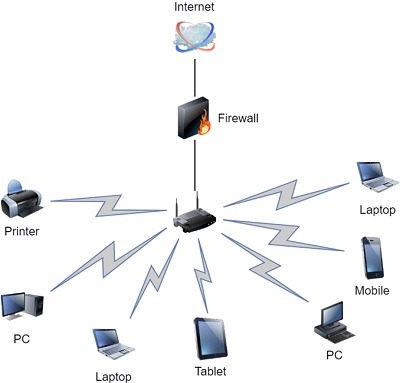
- Wireless Networks: Wireless networks use wireless signals, such as Wi-Fi or cellular networks, to connect devices without the need for physical cables.
These are just some of the basics of computer networks. Networking is a vast field with many concepts, protocols, and technologies that enable efficient communication and data sharing between devices.
What is required Basics of computer networks
To understand the basics of computer networks, you should familiarize yourself with the following concepts:
- Network Topo logies: Learn about different network topo logies like bus, star, ring, mesh, and hybrid. Understand how devices are connected in each topology and their advantages and disadvantages.
- Network Protocols: Gain knowledge about common network protocols like TC P/IP, Ethernet, HTTP, DN S, and their functions. Understand how protocols facilitate communication and data transmission between devices.
- Network Components: Study the essential network components such as Network Interface Cards (NIC s), switches, routers, modems, and their roles in connecting devices, managing traffic, and enabling communication.
- IP Addressing: Learn about IP addressing, including IPv 4 and IPv 6, and how devices are identified on a network using unique addresses. Understand the concepts of IP addresses, sub net masks, and default gateways.
- Network Security: Acquire knowledge about network security measures such as firewalls, encryption, access control, and intrusion detection systems. Understand the importance of securing networks to protect against unauthorized access and data breaches.
- Network Types: Familiarize yourself with different types of networks, including LAN s, WAN s, MAN s, and wireless networks. Understand their characteristics, scope, and typical use cases.
- Network Troubleshooting: Learn basic network troubleshooting techniques to identify and resolve common network issues. Understand concepts like ping, trace route, and IP configuration to diagnose connectivity problems.
- Network Services: Explore common network services like DHC P (Dynamic Host Configuration Protocol), DN S, and NAT (Network Address Translation). Understand their functions in network configuration and communication.
- Network Performance: Gain an understanding of network performance factors such as bandwidth, latency, throughput, and packet loss. Learn how to measure and optimize network performance.
- Network Management: Learn about network management practices, including monitoring, configuration management, and network documentation. Understand the importance of network management tools and protocols like SNM P (Simple Network Management Protocol).
These basics will provide you with a foundation to further explore and understand more advanced concepts in computer networking. It’s a dynamic field, so staying updated with the latest advancements and technologies is also important.
Who is required Basics of computer networks
Basics of computer networks are required by various individuals and professionals, including:
- IT Professionals: Network administrators, system administrators, and IT support staff need a solid understanding of computer networks to manage and troubleshoot network infrastructure, ensure network security, and maintain efficient network operations.
- Network Engineers: Network engineers design, implement, and maintain computer networks. They require a comprehensive understanding of network fundamentals to plan and configure networks based on business requirements.
- Network Technicians: Network technicians are responsible for the installation, maintenance, and repair of network equipment and connections. They need a strong foundation in computer networks to perform tasks such as cable management, network device configuration, and troubleshooting.
- Software Developers: Software developers often work with network-related technologies and protocols. Understanding computer networks helps them develop applications that interact with networks, utilize network resources, or communicate over the network.
- System Architects: System architects design and plan the overall structure and layout of complex computer systems, which includes network infrastructure. A grasp of computer networks is crucial for designing efficient and scal able systems.
- Network Security Professionals: Professionals in the field of network security, including network security analysts, penetration testers, and cyber security specialists, require a deep understanding of computer networks to identify vulnerabilities, protect against threats, and mitigate security risks.
- IT Managers: IT managers oversee the technology infrastructure within organizations. A basic knowledge of computer networks enables them to make informed decisions about network-related investments, resource allocation, and IT strategies.
- Students and Enthusiasts: Students pursuing degrees or certifications in computer science, information technology, or networking, as well as individuals interested in learning about computer networks as a hobby, can benefit from understanding the basics of computer networks. It provides a foundation for further study and specialization in networking.
Understanding computer networks is valuable for anyone who interacts with or relies on computer systems and networks in their personal or professional lives. It enables efficient communication, resource sharing, and the secure transfer of data in today’s interconnected world.
When is required Basics of computer networks
Basics of computer networks are required in various situations and scenarios, including:
- Professional Networking Roles: If you work or plan to work in roles such as network administrator, network engineer, network technician, or any other networking-related position, a solid understanding of computer networks is essential. It is required to design, implement, manage, and troubleshoot network infrastructures.
- IT Support and Troubleshooting: In IT support roles, having a basic understanding of computer networks is crucial. It allows you to diagnose and resolve network-related issues, assist users with network connectivity problems, and provide technical support for network-dependent applications.
- Network Design and Implementation: Whether you are setting up a small office network or designing complex enterprise networks, a foundation in computer networks is necessary. It helps you plan and implement network topo logies, select appropriate network components, configure network devices, and ensure optimal network performance.
- Network Security and Cyber security: Network security professionals require a deep understanding of computer networks to identify vulnerabilities, implement security measures, and protect networks from unauthorized access, data breaches, and cyber threats. Knowledge of network protocols, encryption techniques, and security best practices is crucial in this field.
- Software Development: If you are involved in software development, understanding computer networks is valuable. It allows you to design and develop network-aware applications, work with network protocols, and troubleshoot network-related issues in software systems.
- System Administration: System administrators need to manage and configure network services, such as DHCP, DNS, and file sharing, as part of their responsibilities. Having a basic understanding of computer networks enables them to perform these tasks effectively and ensure smooth system operations.
- Business and Project Management: Basic knowledge of computer networks is useful for business and project managers who oversee IT projects or make decisions related to network infrastructure. It helps them communicate with technical teams, understand network requirements, and assess the impact of network-related decisions on business operations.
- Personal and Home Networks: Understanding computer networks is beneficial for individuals setting up and managing their personal or home networks. It enables them to configure network devices, troubleshoot connectivity issues, and secure their network against unauthorized access.
Overall, the basics of computer networks are required in a wide range of professional and personal contexts where networking plays a significant role. It empowers individuals to work with networks effectively, contribute to network-related projects, and make informed decisions related to network infrastructure and security.
Where is required Basics of computer network
Basics of computer networks are required in various environments and industries, including:
- Corporate Environments: In corporate settings, computer networks are the backbone of communication and data sharing. Understanding network fundamentals is crucial for IT professionals managing the network infrastructure, ensuring network security, and supporting employees’ network-related needs.
- Information Technology (IT) Departments: IT departments in organizations of all sizes require a solid foundation in computer networks. IT staff need to configure network devices, troubleshoot connectivity issues, implement network security measures, and manage network services.
- Internet Service Providers (ISP s): ISP s are responsible for providing internet connectivity to their customers. Network engineers and technicians working in ISP s require a deep understanding of computer networks to manage and maintain the ISP’s network infrastructure and ensure reliable internet service delivery.
- Data Centers: Data centers house large amounts of computing and network equipment. Professionals working in data centers, such as network administrators, system administrators, and network engineers, need to understand computer networks to design, manage, and optimize the data center’s network architecture.
- Telecommunication Industry: Telecommunication companies heavily rely on computer networks to provide voice, data, and video communication services. Network engineers and technicians in the telecom industry require expertise in computer networks to design and maintain the network infrastructure supporting these services.
- Healthcare Institutions: In healthcare environments, computer networks are crucial for the secure exchange of patient information, accessing electronic health records, and supporting tele medicine applications. IT professionals working in healthcare institutions need to understand networks to ensure reliable and secure network operations.
- Educational Institutions: Schools, colleges, and universities often have extensive computer networks to support educational activities and administrative operations. IT staff in educational institutions require knowledge of computer networks to manage network resources, provide internet access, and support network-dependent educational tools.
- Government and Defense: Government agencies and defense organizations rely on computer networks for secure communication, data sharing, and critical infrastructure management. Network specialists in these sectors need to have a strong grasp of computer networks to ensure secure and efficient network operations.
- Research and Development: Research institutions and laboratories often have specialized networks for data-intensive research and collaborative projects. Network engineers and researchers in these environments require a solid understanding of computer networks to design and manage networks optimized for research requirements.
- Small Businesses and Home Networks: Even in small businesses and home environments, basic knowledge of computer networks is essential for setting up and managing networks, ensuring connectivity, and troubleshooting common network issues.
In summary, basics of computer networks are required in various industries and environments where networking is integral to operations, communication, and data exchange. Proficiency in computer networks enables professionals to effectively manage network resources, maintain network security, and ensure reliable connectivity.
How is required Basics of computer networks
Basics of computer networks are required in several ways:
- Professional Skills and Employ ability: Understanding computer networks is a fundamental skill for many IT-related professions. Having a solid foundation in computer networks enhances your employ ability and opens up various career opportunities in network administration, network engineering, network security, and related fields.
- Network Design and Implementation: When designing and implementing computer networks, a strong understanding of network basics is essential. It helps you make informed decisions regarding network topo logies, device selection, IP addressing, and network protocols to ensure optimal network performance and scalability.
- Network Troubleshooting and Maintenance: Networks may experience issues and require troubleshooting to identify and resolve connectivity problems, performance bottlenecks, or security vulnerabilities. With basic knowledge of computer networks, you can effectively troubleshoot network-related issues, conduct network diagnostics, and perform maintenance tasks to keep the network running smoothly.
- Network Security: Computer networks are prone to security threats and attacks. Understanding network basics allows you to implement appropriate security measures, such as firewalls, access controls, and encryption, to safeguard the network and protect sensitive data from unauthorized access.
- Collaboration and Communication: In a connected world, collaboration and communication often rely on computer networks. Having a grasp of network fundamentals enables effective collaboration through shared resources, file sharing, video conferencing, and other network-dependent communication tools.
- Personal Networking: Basic knowledge of computer networks is valuable in personal and home settings. It allows you to set up and manage your own networks, troubleshoot connectivity issues, and ensure secure internet access for various devices.
- Adapting to Technological Advancements: Computer networks continuously evolve with new technologies and protocols. Understanding network basics equips you with the foundational knowledge to adapt to emerging technologies, such as cloud computing, Internet of Things (Io T), and software-defined networking (SD N).
- Enhanced Problem-Solving Abilities: The ability to analyze and solve network-related problems is enhanced when you have a solid understanding of computer networks. It allows you to break down complex issues, identify the root cause, and devise effective solutions to optimize network performance and resolve connectivity issues.
- Continuous Learning and Growth: Computer networking is a dynamic field that constantly evolves. Having a strong foundation in network basics positions you for continuous learning and professional growth, as you can build upon this foundation to explore advanced networking concepts, technologies, and specialized areas of network management or security.
In summary, understanding the basics of computer networks is crucial for professional growth, effective network management, troubleshooting, network security, and adapting to the ever-changing landscape of networking technologies. It provides a strong foundation for career opportunities and enables you to contribute to the efficient functioning of networked systems.
Case study on Basics of computer networks
Case Study: Small Business Network Setup
Company XY Z is a small technology startup with 20 employees. They recently moved to a new office space and need to set up a computer network to support their operations. Here is a case study on how the basics of computer networks apply to their scenario:
- Network Topology: After assessing their needs, the IT team at Company XY Z decides to implement a star network topology. They choose this topology because it offers centralized management, easy scalability, and provides redundancy in case of a device failure.
- Network Components: The IT team selects the necessary network components for their setup. They acquire a high-speed broadband internet connection from a local Internet Service Provider (ISP). They purchase a router to connect the office network to the internet and a switch to connect all the devices within the office.
- IP Addressing: The IT team configures the router with a static public IP address provided by the ISP. For the internal network, they decide to use private IP addresses from the IPv 4 address range. They assign a unique IP address to each device on the network, such as computers, printers, and servers, using DHCP (Dynamic Host Configuration Protocol) to automate IP address assignment.
- Network Security: To ensure network security, the IT team sets up a firewall on the router to monitor and filter incoming and outgoing network traffic. They configure secure wireless access points (WAP s) to provide Wi-Fi connectivity for employees, implementing Wi-Fi encryption protocols such as WPA 2 to protect wireless communications.
- Network Services: The IT team sets up network services to facilitate communication and resource sharing. They configure a file server to centralize file storage and enable file sharing among employees. They also set up a print server to manage network printing, allowing employees to easily access shared printers.
- Network Troubleshooting: As the network is set up, the IT team performs testing and troubleshooting to ensure everything functions correctly. They use network diagnostic tools like ping and trace route to test connectivity between devices and identify any potential network issues. They address issues such as network congestion, connectivity problems, or mis configured devices to optimize network performance.
- Network Management: The IT team documents the network configuration, including IP addresses, network diagrams, and device information. They implement network monitoring tools to keep track of network performance, identify bottlenecks, and proactively address any potential issues that may arise.
- Scalability and Future Growth: The network setup takes into account the company’s projected growth. The IT team ensures the network infrastructure is scal able and capable of accommodating additional devices and increased network traffic as the company expands. They plan for future network upgrades and consider technologies like V LAN s (Virtual Local Area Networks) or VP N (Virtual Private Network) for remote access.
Through the implementation of these basic networking principles, Company XY Z successfully sets up a reliable and secure computer network that meets their current needs and allows for future growth. The network enables seamless communication, resource sharing, and efficient collaboration among employees, supporting their day-to-day operations.
White paper on Basics of computer networks
Title: An Introduction to the Basics of Computer Networks: A Comprehensive Guide
Abstract: This white paper provides a comprehensive overview of the basics of computer networks. It serves as a valuable resource for individuals seeking to understand the foundational concepts, principles, and components that underpin modern computer networks. By exploring key topics such as network topo logies, protocols, addressing, security, and troubleshooting, readers will gain a solid understanding of how networks function and the role they play in enabling communication and data exchange. This white paper aims to empower readers with the knowledge necessary to navigate and participate effectively in today’s interconnected world.
- Introduction 1.1 Overview of Computer Networks 1.2 Importance of Understanding Network Basics
- Network Topo logies 2.1 Bus Topology 2.2 Star Topology 2.3 Ring Topology 2.4 Mesh Topology 2.5 Hybrid Topology 2.6 Choosing the Right Topology
- Network Protocols 3.1 TC P/IP Protocol Suite 3.2 Ethernet Protocol 3.3 HTTP Protocol 3.4 DN S Protocol 3.5 UD P Protocol 3.6 Protocol Stack and Layered Architecture
- IP Addressing and Sub netting 4.1 IPv4 Addressing 4.2 IPv 6 Addressing 4.3 Sub netting and Sub net Masks 4.4 Default Gateways
- Network Security 5.1 Network Security Fundamentals 5.2 Firewalls and Intrusion Detection Systems 5.3 Encryption and Secure Communication 5.4 Access Control and Authentication 5.5 Network Security Best Practices
- Network Components 6.1 Network Interface Cards (NICs) 6.2 Switches and Hubs 6.3 Routers and Gateways 6.4 Modems and Wireless Access Points 6.5 Network Cabling and Media
- Network Troubleshooting 7.1 Common Network Issues 7.2 Network Diagnostic Tools 7.3 Troubleshooting Steps and Techniques 7.4 Resolving Connectivity Problems
- Network Services 8.1 DHC P (Dynamic Host Configuration Protocol) 8.2 DN S (Domain Name System) 8.3 NAT (Network Address Translation) 8.4 FTP (File Transfer Protocol) 8.5 Email Protocols (POP, IMA P, SMT P)
- Network Types 9.1 Local Area Networks (LAN s) 9.2 Wide Area Networks (WAN s) 9.3 Metropolitan Area Networks (MAN s) 9.4 Wireless Networks 9.5 Network Virtualization and Cloud Networks
- Network Management 10.1 Network Monitoring and Performance Optimization 10.2 Configuration Management and Documentation 10.3 Network Management Protocols (SNMP) 10.4 Network Planning and Capacity Management
- Conclusion 11.1 Recap of Key Concepts 11.2 Importance of Continued Learning in Network Fundamentals
This white paper serves as a comprehensive guide to understanding the basics of computer networks. It equips readers with the knowledge needed to comprehend network architectures, protocols, addressing schemes, security measures, troubleshooting techniques, and network management principles. By grasping these fundamental concepts, readers can build a solid foundation for further exploration and specialization in the dynamic field of computer networks.