
Basic of computer
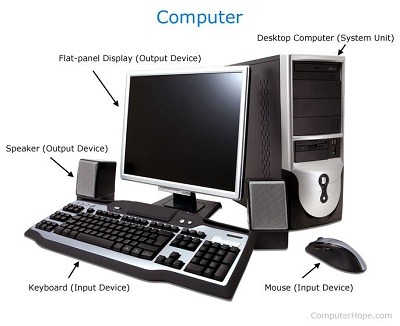
Computers are electronic devices that process, store, and retrieve data. They consist of hardware components, such as the central processing unit (CPU), memory, storage devices, input devices (e.g., keyboard, mouse), output devices (e.g., monitor, printer), and other peripherals.
Here are some basic concepts related to computers:
- Input: Input refers to the data or commands entered into a computer. It can be done through various devices like a keyboard, mouse, microphone, or touchscreen.
- Processing: Processing involves manipulating, calculating, or transforming data. The CPU is the primary component responsible for executing instructions and performing calculations.
- Memory: Computers use memory to store data and instructions that are currently being processed. The two main types of memory are RAM (Random Access Memory) and ROM (Read-Only Memory). RAM is volatile memory and provides temporary storage, while ROM contains permanent instructions and data that cannot be modified.
- Storage: Computers use storage devices to store data and programs even when the power is turned off. Hard disk drives (HDD), solid-state drives (SS D), and external storage devices like USB flash drives are commonly used for long-term storage.
- Output: Output refers to the information or results produced by a computer. It can be displayed on a monitor, printed on paper using a printer, played as sound through speakers, or communicated through other output devices.
- Software: Software refers to the programs and applications that run on a co mputer. It includes operating systems (e.g., Windows, macO S, Linux) that manage computer resources, as well as application software like word processors, web browsers, and video games.
- Operating System: An operating system is the software that manages computer hardware and software resources. It provides a user interface, controls peripheral devices, manages files and folders, and handles tasks like memory management and process scheduling.
- Networking: Computers can be connected to form networks, allowing them to communicate and share resources. Local Area Networks (LAN s) connect computers in a limited area, while Wide Area Networks (WAN s) connect computers over larger distances, such as the internet.
- Programming: Programming involves writing instructions (code) for a computer to execute. Programming languages like Python, Java, and C++ are used to develop software and create algorithms.
- Algorithms: An algorithm is a step-by-step procedure or a set of rules to solve a specific problem or perform a task. Algorithms are at the core of computer programming and enable computers to carry out complex tasks.
These are just some fundamental concepts related to computers. The field of computer science and technology is vast, encompassing many other areas like computer architecture, data structures, algorithms, artificial intelligence, and more.
What is required Basic of computer
To have a basic understanding of computers, you should familiarize yourself with the following concepts:
- Hardware: Learn about the main components of a computer, such as the CPU, memory, storage devices, input devices, and output devices. Understand their functions and how they work together.
- Operating Systems: Gain knowledge about different operating systems like Windows, macO S, and Linux. Learn about their features, user interfaces, and basic operations like file management.
- Software: Understand the difference between system software (e.g., operating systems, device drivers) and application software (e.g., word processors, web browsers). Learn how to install, run, and manage software applications.
- File Management: Learn how to create, organize, and manage files and folders on a computer. Understand the concept of file extensions and how different file types are associated with specific applications.
- Networking: Learn about computer networks, including LAN s and WAN s, as well as the internet. Understand concepts like IP addresses, routers, and protocols (e.g., TC P/IP). Learn how to connect to the internet and navigate the web.
- Security: Be aware of basic computer security practices, such as setting strong passwords, using antivirus software, and being cautious of phishing scams and malware.
- Basic Troubleshooting: Develop troubleshooting skills to identify and resolve common computer issues. Learn how to perform basic maintenance tasks like software updates, disk cleanup, and system optimization.
- Software Applications: Gain familiarity with common software applications used in everyday tasks, such as word processing, spreadsheet management, email clients, and web browsers.
- Basic Programming Concepts: Understand fundamental programming concepts like variables, data types, control structures (e.g., loops, conditionals), and basic algorithms. This knowledge can be helpful even if you don’t plan on becoming a programmer.
- Online Resources: Explore online tutorials, courses, and resources that provide step-by-step instructions and hands-on exercises to further your understanding of computers.
Remember, these are just the basics, and there is much more to learn depending on your interests and goals. The field of computer science and technology is constantly evolving, so staying curious and open to learning new concepts will be beneficial.
Who is required Basic computer
Basic computer knowledge is beneficial for various individuals and professionals in today’s digital age. Here are some examples of who might benefit from having basic computer skills:
- Students: Basic computer skills are often required for educational purposes, including online research, writing assignments, creating presentations, and using educational software.
- Office Workers: Most office jobs require basic computer skills for tasks such as word processing, spreadsheet management, email communication, data entry, and using office productivity software.
- Small Business Owners: Understanding computers is essential for managing business operations, including bookkeeping, inventory management, marketing, and online presence.
- Job Seekers: Basic computer skills are often listed as prerequisites in job descriptions. Being proficient in word processing, spreadsheet management, email communication, and internet research can enhance employ ability across various industries.
- Senior Citizens: Learning basic computer skills can enable senior citizens to stay connected with family and friends through email, social media, and video calls. It also allows them to access online services, shop online, and explore various hobbies and interests.
- Teachers and Educators: Having computer knowledge helps educators in creating and delivering digital lessons, managing student records, using educational software, and accessing online resources.
- Non-profit Organizations: Basic computer skills are useful for non-profit organizations in managing volunteers, fundraising, online marketing, and maintaining a web presence.
- Home Users: Basic computer skills are valuable for everyday tasks like online banking, online shopping, communicating with friends and family through email or social media, and general internet browsing.
- Entrepreneurs and Freelancers: Individuals starting their own businesses or working as freelancers can benefit from computer skills in managing finances, creating websites, marketing their services, and utilizing online tools and platforms.
- Individuals Seeking Personal Development: Learning basic computer skills can enhance personal productivity, digital literacy, and the ability to adapt to technological advancements in various aspects of life.
It’s important to note that the specific level of computer knowledge required may vary depending on the field or profession. However, having a basic understanding of computers and digital technology is increasingly becoming a necessity in today’s interconnected world.
When is required Basic of computer
Basic computer knowledge is required in various situations and contexts, especially in today’s digital world. Here are some instances when having basic computer skills is necessary:
- Education: Students of all ages need basic computer skills to complete assignments, conduct research, create presentations, and communicate with teachers and classmates. Many educational institutions now incorporate digital tools and platforms into their curriculum.
- Job Applications: When applying for jobs, basic computer skills are often listed as prerequisites. Employers expect candidates to be proficient in tasks such as word processing, spreadsheet management, email communication, and internet research.
- Office Work: Most office jobs require basic computer skills as a foundation. Employees need to use word processing software, manage spreadsheets, send emails, conduct online meetings, and navigate business applications.
- Online Communication: With the increasing reliance on digital communication platforms, having basic computer skills is necessary for activities such as sending emails, using instant messaging apps, participating in video calls, and managing social media accounts.
- Personal Finances: Online banking and financial management tools have become prevalent. Basic computer skills are necessary to access and manage personal financial accounts, track expenses, and make online transactions securely.
- Online Shopping: E-commerce has become a common method of purchasing goods and services. Understanding how to navigate online shopping platforms, compare prices, make online payments, and protect personal information is essential.
- Digital Literacy: Basic computer skills are required to be digitally literate and navigate the internet effectively. This includes searching for information, evaluating online sources, understanding privacy and security concerns, and utilizing online services.
- Personal Productivity: Basic computer skills contribute to personal productivity. Knowledge of word processing software enables creating documents, while spreadsheet skills facilitate organizing data and performing calculations. Understanding file management helps keep digital files organized and easily accessible.
- Creative Pursuits: Basic computer skills are beneficial for pursuing creative activities. These may include editing photos, creating digital artwork, designing websites, editing videos, or composing music using digital tools.
- Adaptability: With technology continuously evolving, having basic computer skills is essential for adapting to new tools, software, and devices. It enables individuals to embrace technological advancements and stay relevant in a rapidly changing digital landscape.
In summary, basic computer skills are required in education, job applications, office work, online communication, personal finances, online shopping, digital literacy, personal productivity, creative pursuits, and adapting to technological advancements. Having a foundation in computer knowledge can significantly enhance one’s participation and success in the digital world.
Where is required Basic of computer
Basic computer knowledge is required in various environments and industries. Here are some specific areas where basic computer skills are essential:
- Education Institutions: Schools, colleges, and universities rely on computers for administrative tasks, teaching, and learning. Students, teachers, and staff need basic computer skills to access online learning platforms, use educational software, create and submit assignments, and communicate digitally.
- Offices and Businesses: Basic computer skills are crucial in office environments across different industries. Employees need to use computers for tasks such as word processing, creating spreadsheets, managing databases, sending emails, conducting online research, and collaborating on projects.
- Healthcare: Computers play a vital role in healthcare settings. Medical professionals use electronic health record systems, medical imaging software, and other digital tools to manage patient information, analyze data, and facilitate communication.
- Retail: Retail businesses use computers for point-of-sale systems, inventory management, and online sales. Basic computer skills are necessary for employees to operate cash registers, process transactions, and manage inventory databases.
- Customer Service: Customer service representatives often use computer systems to access customer information, respond to inquiries, and resolve issues. Basic computer skills are essential for navigating customer relationship management (CR M) software and communication platforms.
- Financial Institutions: Banks, insurance companies, and financial institutions heavily rely on computer systems for transactions, account management, and data analysis. Employees need basic computer skills to handle financial software, use spreadsheets for financial analysis, and provide customer support.
- Government Agencies: Government offices and agencies use computers for administrative tasks, document management, data analysis, and citizen services. Basic computer skills are necessary for government employees to perform their duties efficiently.
- Non-profit Organizations: Non-profit organizations often use computers for fundraising, communication, and administrative tasks. Basic computer skills are required to manage donor databases, create promotional materials, and maintain online presence.
- Libraries: Libraries provide computer access to the public for research, information retrieval, and digital services. Basic computer skills are necessary for patrons to use library resources, conduct internet searches, and access digital archives.
- Remote Work and Freelancing: With the rise of remote work and freelancing, basic computer skills have become even more crucial. Individuals working remotely need computer skills for virtual meetings, file sharing, online collaboration, and project management.
These are just a few examples of where basic computer skills are required. In today’s digital era, computers are ubiquitous in almost every industry and sector, making computer literacy an essential skill for individuals across various professional domains.
How is required Basic of computer
Basic computer skills are typically required in the following ways:
- Job Requirements: Many job postings list basic computer skills as a prerequisite. Employers expect candidates to have a fundamental understanding of computers and be proficient in tasks such as word processing, spreadsheet management, email communication, and internet research.
- Job Performance: Once hired, employees are often expected to utilize computers as part of their regular job duties. Basic computer skills enable individuals to perform tasks efficiently and effectively, such as creating documents, analyzing data, communicating with colleagues and clients, and accessing information online.
- Professional Development: Basic computer skills are essential for professional development. Individuals who wish to advance in their careers or take on new roles often need to expand their computer knowledge to keep up with evolving technology and industry trends.
- Personal Life: Basic computer skills have become necessary for personal life as well. From online banking and shopping to communication with friends and family through email or social media, computers have become integral to daily life activities. Having basic computer skills enhances personal productivity, digital literacy, and the ability to navigate the digital world.
- Lifelong Learning: Learning basic computer skills serves as a foundation for lifelong learning and continuous self-improvement. As technology advances, individuals need to adapt and learn new tools, software, and digital platforms. Having a basic understanding of computers makes it easier to acquire new skills and explore emerging technologies.
- Access to Information and Services: Computers and the internet have revolutionized access to information and services. Basic computer skills enable individuals to search for information, access online resources, complete online forms, apply for jobs or benefits, and utilize various online services conveniently.
- Digital Communication: Basic computer skills are essential for digital communication. Whether it’s sending emails, participating in video calls, or using instant messaging apps, having computer knowledge ensures effective and efficient communication in the digital realm.
- Digital Citizenship: Basic computer skills contribute to being a responsible digital citizen. Understanding concepts like online privacy, security, and ethical use of technology helps individuals navigate the digital world safely and ethically.
- Personal Creativity and Hobbies: Basic computer skills open up opportunities for personal creativity and pursuing hobbies. Whether it’s creating digital artwork, editing photos or videos, designing websites, or exploring coding, computers provide tools for personal expression and creative endeavors.
- Problem-Solving and Critical Thinking: Basic computer skills enhance problem-solving and critical thinking abilities. Computers offer a platform for individuals to analyze data, find solutions, and explore different perspectives through research and information gathering.
Having basic computer skills is increasingly important in today’s interconnected world. It empowers individuals to navigate the digital landscape, participate fully in the modern workforce, and engage meaningfully in personal and professional endeavors.
Case study on Basic of computer
Case Study: Basic Computer Skills in a Small Business Setting
Background: XY Z Consulting is a small business providing consulting services to clients. The company has a team of consultants who work remotely and occasionally meet in the office for collaborative sessions. The management team recognizes the importance of basic computer skills for their employees and has implemented initiatives to enhance their digital literacy.
Challenge: Many consultants at XYZ Consulting come from diverse backgrounds, and not all of them have strong computer skills. This creates challenges when it comes to performing tasks efficiently, collaborating effectively, and utilizing digital tools and resources.
Solution: To address this challenge, XY Z Consulting implements a comprehensive training and support program to enhance the basic computer skills of their employees. Here’s how they approach it:
- Training Workshops: The company organizes regular training workshops covering essential computer skills. These workshops cover topics such as basic computer operations, file management, word processing, spreadsheet management, email communication, and internet research. The sessions are interactive and provide hands-on exercises to reinforce learning.
- Online Learning Resources: XY Z Consulting provides access to online learning resources, such as video tutorials and interactive modules, that employees can access at their convenience. These resources cover a wide range of computer skills and allow employees to learn at their own pace.
- One-on-One Coaching: The company assigns a dedicated IT support person to provide one-on-one coaching and support to employees who require additional assistance. This ensures that individual needs and learning styles are catered to, and employees can receive personalized guidance to strengthen their computer skills.
- Collaborative Tools and Platforms: XY Z Consulting encourages the use of collaborative tools and platforms to facilitate effective teamwork and communication. Employees are trained on using project management software, file-sharing platforms, and video conferencing tools to enhance collaboration and streamline workflows.
- Ongoing Support: The company establishes an IT help desk or support ticket system where employees can seek assistance whenever they encounter computer-related issues or have questions. The IT support team promptly responds to these requests and provides guidance and solutions to address the concerns.
Results: By implementing these initiatives, XY Z Consulting experiences several positive outcomes:
- Improved Efficiency: Employees become more proficient in using computers, leading to increased productivity and efficiency in their day-to-day tasks. They can create and edit documents more effectively, manage data efficiently, and communicate seamlessly through digital channels.
- Enhanced Collaboration: Basic computer skills enable consultants to collaborate more effectively using digital tools and platforms. They can share files, work on documents simultaneously, and communicate with colleagues and clients more efficiently, regardless of their physical location.
- Better Client Service: Consultants with improved computer skills can leverage digital resources and tools to provide better service to clients. They can conduct in-depth online research, analyze data effectively, and deliver more polished and professional outputs.
- Increased Digital Literacy: The training and support program contribute to enhancing employees’ digital literacy. They become more comfortable using computers and are more adaptable to new technologies, ensuring they can keep pace with the evolving digital landscape.
- Employee Satisfaction: The company’s investment in training and support demonstrates its commitment to employee development. Employees feel supported and empowered to enhance their skills, leading to increased job satisfaction and engagement.
Conclusion: Through its comprehensive training and support program, XY Z Consulting successfully addresses the challenge of basic computer skills among its employees. By investing in enhancing their digital literacy, the company experiences improved productivity, enhanced collaboration, better client service, increased digital literacy, and higher employee satisfaction. These outcomes contribute to the overall success and competitiveness of the small business in the consulting industry.
White paper on Basic of computer
Title: The Importance and Benefits of Basic Computer Skills in the Digital Age
Abstract: In today’s digital age, basic computer skills have become essential for individuals across various industries and sectors. This white paper explores the significance of basic computer skills, their benefits, and their impact on personal, professional, and societal levels. It provides an overview of the key components of basic computer skills and highlights the importance of acquiring and developing these skills. Additionally, the paper discusses the challenges faced by individuals lacking basic computer knowledge and offers recommendations for promoting and enhancing computer literacy.
- Introduction 1.1 Background 1.2 Objectives of the White Paper
- The Components of Basic Computer Skills 2.1 Hardware Knowledge and Familiarity 2.2 Operating Systems and Software Applications 2.3 File Management and Organization 2.4 Internet and Web Browsing Skills 2.5 Communication and Collaboration Tools 2.6 Cyber security Awareness
- The Importance of Basic Computer Skills 3.1 Employment and Career Opportunities 3.2 Digital Literacy and Lifelong Learning 3.3 Personal Productivity and Efficiency 3.4 Access to Information and Services 3.5 Participation in the Digital Economy 3.6 Empowerment and Inclusion
- Benefits of Acquiring Basic Computer Skills 4.1 Enhanced Job Prospects and Employ ability 4.2 Improved Work Performance and Efficiency 4.3 Effective Communication and Collaboration 4.4 Expanded Opportunities for Education and Self-Development 4.5 Empowerment and Independence in Everyday Life 4.6 Bridging the Digital Divide
- Challenges Faced by Individuals Lacking Basic Computer Skills 5.1 Limited Access to Opportunities 5.2 Reduced Participation in the Digital Society 5.3 Increased Vulnerability to Scams and Cyber Threats 5.4 Economic and Social Disadvantages
- Promoting and Enhancing Computer Literacy 6.1 Integration into Educational Curricula 6.2 Workplace Training Programs 6.3 Community-based Initiatives and Digital Literacy Programs 6.4 Online Resources and Self-Study Opportunities 6.5 Collaboration between Governments, NGOs, and the Private Sector
- Conclusion 7.1 Summary of Key Findings 7.2 Recommendations for Individuals, Organizations, and Policy-Makers
References
This white paper aims to provide a comprehensive understanding of the importance of basic computer skills in today’s digital era. It emphasizes the benefits of acquiring and developing these skills and highlights the need for concerted efforts to promote computer literacy. By fostering basic computer skills, individuals can enhance their employability, productivity, and participation in the digital society, ultimately contributing to personal growth and socioeconomic development.