
Basic of computer
Computers are electronic devices that are capable of performing a variety of tasks by executing instructions. They consist of hardware components and software programs that work together to process information.
Here are the basic components and concepts related to computers:
- Hardware Components:
- Central Processing Unit (CPU): It is the brain of the computer that performs most of the calculations and executes instructions.
- Memory (RAM): It stores data and instructions that the CPU needs to access quickly.
- Storage Devices: Hard disk drives (HDD) or solid-state drives (SSD) store data for long-term use.
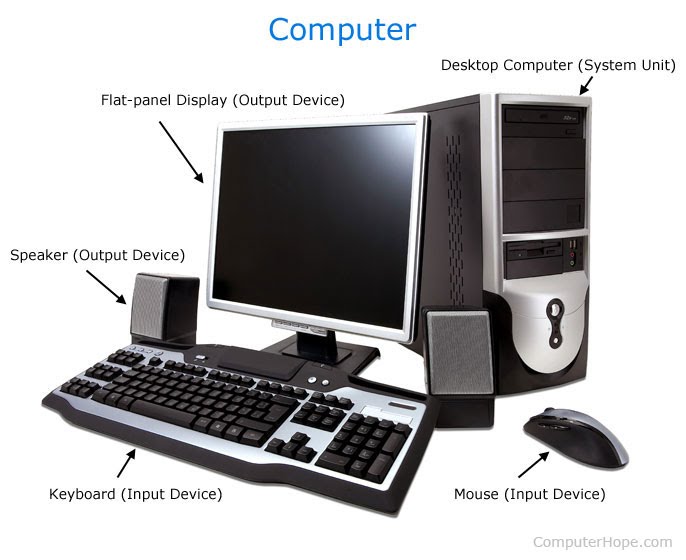
- Input Devices: Examples include keyboards, mice, scanners, and microphones, which allow users to input data into the computer.
- Output Devices: Examples include monitors, printers, and speakers, which display or produce the results of computer processing.
- Motherboard: It connects and allows communication between various hardware components.
- Graphics Processing Unit (GPU): It specializes in handling graphics and is commonly used for gaming and other visually intensive tasks.
- Software:
- Operating System (OS): It manages computer hardware and provides a user interface to interact with the system. Examples include Windows, macOS, and Linux.
- Applications: These are software programs designed to perform specific tasks, such as word processing, web browsing, or image editing.
- Programming Languages: They are used to write software programs and communicate instructions to the computer.
- Data Representation:
- Binary System: Computers use a binary system with two digits, 0 and 1, to represent and process data. Binary digits are called bits, and a group of 8 bits is called a byte.
- ASCII and Unicode: These are character encoding standards that assign numerical values to characters, allowing computers to represent and process text.
- Computer Operations:
- Input: The process of entering data or instructions into the computer system.
- Processing: The CPU performs calculations, logical operations, and manipulations on data based on the instructions provided.
- Output: The computer presents the processed data or results to the user through output devices.
- Storage: Data is saved on storage devices for later use.
- Networking and the Internet:
- Networking: Computers can be connected to form a network, allowing them to share data, resources, and communicate with each other.
- Internet: A global network of interconnected computers that enables communication, information sharing, and access to various online services.
These are just the basics of computers, and the field of computer science covers a wide range of topics and complexities. Computers have become an integral part of our daily lives, powering various industries, communication systems, entertainment, and much more.
What is required Basic of computer
To have a basic understanding of computers, you should be familiar with the following concepts:
- Computer Hardware:
- Understand the main hardware components of a computer, such as the CPU, memory, storage devices, input devices, and output devices.
- Know how these components interact and contribute to the overall functioning of a computer system.
- Operating Systems:
- Learn about different operating systems and their roles in managing computer hardware and providing a user interface.
- Understand how to navigate and use the basic features of an operating system.
- Software Applications:
- Be familiar with common software applications used for various tasks, such as word processing, web browsing, and multimedia playback.
- Understand how to install and use software applications.
- Data Representation:
- Learn about the binary system and how computers represent and process data using 0s and 1s.
- Understand character encoding standards like ASCII and Unicode for representing text.
- Computer Operations:
- Know the basic operations of a computer, including input, processing, output, and storage.
- Understand how data flows through these operations and how it is processed and stored.
- Networking and Internet:
- Understand the basics of computer networks and how computers can be connected to share data and resources.
- Learn about the internet, its structure, and its role in communication and information sharing.
- Security and Privacy:
- Gain awareness of basic computer security practices, such as using strong passwords, avoiding suspicious links, and keeping software up to date.
- Understand the importance of protecting personal information and maintaining privacy online.
- Troubleshooting:
- Develop problem-solving skills for identifying and resolving common computer issues.
- Learn how to perform basic troubleshooting steps, such as restarting the computer or checking connections.
By having a grasp of these fundamental concepts, you will be better equipped to use and understand computers effectively. Remember that computer technology is constantly evolving, so it’s essential to continue learning and staying updated with the latest developments in the field.
Who is required Basic of computer
The basic understanding of computers is beneficial for various individuals and can be considered essential in today’s digital age. Here are some groups of people who would benefit from having a basic knowledge of computers:
- Students: Computer literacy is crucial for students of all ages. It helps them with their academic work, research, and online learning. Basic computer skills are often required for completing assignments, creating presentations, and accessing educational resources.
- Professionals: In most workplaces, computers are integral to daily operations. Having a basic understanding of computers enables professionals to perform tasks efficiently, communicate effectively through email or online platforms, and utilize software applications relevant to their field.
- Job Seekers: Many job positions require basic computer skills as a prerequisite. Proficiency in word processing, spreadsheet management, and internet usage is often expected. Familiarity with computers can enhance employment prospects across various industries.
- Seniors: As technology becomes more prevalent in society, seniors can benefit from learning basic computer skills. It can help them stay connected with family and friends through email or social media, access online services, and explore new hobbies or interests.
- Entrepreneurs and Small Business Owners: Understanding computers allows entrepreneurs and small business owners to manage their operations efficiently. They can utilize software applications for accounting, marketing, inventory management, and online communication with clients or customers.
- Home Users: Basic computer knowledge is useful for everyday tasks at home. It enables individuals to manage personal finances, shop online, access entertainment platforms, and communicate with others using email or video calls.
- Individuals with Limited Access to Resources: In some communities, access to computers and the internet may be limited. Acquiring basic computer skills can empower individuals to make the most of available resources and bridge the digital divide.
Overall, having a basic understanding of computers is valuable for individuals from various backgrounds and can significantly enhance their personal and professional lives in today’s technology-driven world.
When is required Basic of computer
A basic understanding of computers is required in various situations and can be beneficial at different stages of life. Here are some instances when basic computer knowledge becomes essential:
- Education: Basic computer skills are often required throughout a person’s education journey. Students need to use computers for research, writing papers, creating presentations, and accessing online learning resources. Computer literacy is valuable from elementary school all the way through higher education.
- Job Applications and Employment: Many job applications and positions require basic computer skills. Proficiency in word processing, spreadsheet management, email communication, and internet usage is often expected in today’s workplace. Basic computer knowledge can increase employ ability and open up opportunities across different industries.
- Everyday Life: Computers have become an integral part of daily life. Basic computer skills are needed for various tasks, such as online banking, shopping, booking appointments, and accessing entertainment platforms. Being able to navigate the internet, use search engines effectively, and understand basic online security measures is crucial in modern society.
- Communication and Social Interaction: Computers play a significant role in communication and social interaction. Basic computer knowledge allows individuals to send emails, use messaging apps, participate in video calls, and engage in social media platforms. Understanding these tools facilitates staying connected with friends, family, and colleagues.
- Personal Finances: Computers are commonly used for managing personal finances, including online banking, budgeting, and tax preparation. Basic computer skills enable individuals to navigate financial software and online platforms securely, ensuring efficient money management.
- Entrepreneurship and Small Business: Starting a business or running a small business often requires basic computer skills. Entrepreneurs can utilize computers for various purposes, including creating business plans, managing finances, marketing products or services online, and communicating with clients or customers.
- Lifelong Learning: As technology continues to advance, having a basic understanding of computers allows individuals to adapt and continue learning throughout their lives. It enables them to acquire new skills, stay updated with technological advancements, and explore new areas of interest.
While the specific timing may vary, acquiring basic computer skills early on in education or during the formative years can provide a strong foundation for future endeavors. However, it’s never too late to learn basic computer skills, as resources and training opportunities are widely available for individuals of all ages.
Where is required Basic of computer
A basic understanding of computers is required in various settings where computer usage is prevalent. Here are some common places where basic computer knowledge is necessary:
- Schools and Educational Institutions: Computers are extensively used in educational settings. Students need basic computer skills to complete assignments, access online resources, and use educational software. Teachers and educators also require computer proficiency to facilitate instruction and manage administrative tasks.
- Workplace: Computers are integral to most modern workplaces. Basic computer skills are required for tasks such as word processing, data entry, email communication, creating presentations, and using industry-specific software. Proficiency in computers enhances productivity and efficiency in the workplace.
- Libraries: Libraries provide access to computers and the internet for research, online resources, and educational purposes. Basic computer skills are necessary to utilize library services, search for information, and access digital materials.
- Internet Cafes: Internet cafes or cyber cafes offer public computer access and internet services. Visitors need basic computer skills to use the computers, browse the internet, and access online services or applications.
- Community Centers: Community centers often provide computer facilities for various purposes, such as job searching, online learning, or accessing government services. Basic computer skills are essential for community members to make use of these resources effectively.
- Public Service Centers: Government offices, social service centers, and other public service institutions often rely on computers for various administrative tasks. Basic computer knowledge is necessary for employees and individuals accessing these services.
- Home: Computers are commonly used in households for personal tasks, such as online shopping, communication, managing finances, and entertainment. Basic computer skills are important for individuals to navigate the digital world effectively and safely from the comfort of their homes.
- Cyber security: With the increasing prevalence of cyber security threats, basic computer knowledge is required to protect personal information and devices. Understanding best practices for online security, such as using strong passwords, identifying phishing attempts, and keeping software updated, is crucial across all settings.
In general, basic computer skills are necessary wherever computers are used, whether it’s for personal, educational, professional, or recreational purposes. As technology continues to advance, computer literacy becomes increasingly important for individuals to participate fully in today’s digital society.
How is required Basic of computer
Basic computer knowledge is acquired through various means and can be obtained in different ways. Here are some common methods of acquiring a basic understanding of computers:
- Formal Education: Schools and educational institutions often include computer literacy as part of their curriculum. Students may receive structured computer courses or participate in computer science programs that cover the basics of computer hardware, software, and operations.
- Online Courses and Tutorials: There are numerous online platforms that offer free or paid courses and tutorials specifically designed to teach basic computer skills. These courses cover a wide range of topics, from computer basics to specific software applications and programming languages. Platforms like Course ra, U demy, and Code cademy offer a variety of computer-related courses for learners of all levels.
- Community Centers and Libraries: Local community centers, libraries, and adult education programs often provide computer literacy classes or workshops. These programs are designed to teach basic computer skills to individuals who may not have access to formal education or prefer in-person learning environments.
- Self-Study: Many individuals acquire basic computer knowledge through self-study using books, online resources, and tutorials. There are numerous beginner-friendly books and online guides available that cover computer basics and provide step-by-step instructions for various tasks.
- Peer Learning and Mentoring: Learning from others who have basic computer knowledge can be valuable. Friends, family members, or colleagues who are proficient in computers can provide guidance and teach essential skills through informal interactions or mentoring.
- On-the-Job Training: In some cases, individuals learn basic computer skills while on the job. Many workplaces offer training programs or provide resources to help employees acquire necessary computer proficiency for their specific job roles.
- Continuing Education Programs: Adult education centers, vocational schools, and professional development programs often offer computer courses or workshops tailored to specific industries or job requirements. These programs can help individuals enhance their computer skills and stay updated with advancements in technology.
Regardless of the method chosen, practicing and applying computer skills in real-world scenarios is crucial for consolidating knowledge and gaining proficiency. Regular use of computers, exploration of different software applications, and hands-on experience with various tasks contribute to the development of a strong foundation in computer basics.
Remember, computer technology is continually evolving, so it’s important to keep learning and adapting to stay current with the latest advancements and trends in the field.
Case study on Basic of computer
Case Study: Mary’s Journey to Computer Literacy
Introduction: Mary is a 45-year-old individual who had limited exposure to computers in the past. As technology became increasingly prevalent in her personal and professional life, Mary recognized the need to acquire basic computer skills. This case study follows her journey towards computer literacy.
Background: Mary worked as a receptionist in a small medical clinic where paper-based systems were predominantly used for patient records and scheduling. However, the clinic management decided to transition to an electronic health records system, which required Mary to develop computer proficiency.
Phase 1: Recognizing the Need and Motivation Mary realized that her job performance and career prospects would be limited without basic computer skills. She recognized the importance of adapting to technological advancements and decided to take proactive steps towards computer literacy.
Phase 2: Enrolling in Basic Computer Skills Course Mary researched local community centers and discovered a basic computer skills course offered by a nearby adult education center. The course covered topics such as computer fundamentals, operating systems, word processing, and internet usage. Excited by the opportunity, Mary enrolled in the course.
Phase 3: Structured Learning and Practice The basic computer skills course provided a structured learning environment for Mary. She attended weekly classes where she learned about computer hardware, software applications, and common tasks such as creating documents, managing files, and using email. The instructor guided the students through hands-on exercises and assignments to reinforce the learning.
Phase 4: Supplementing Learning with Online Resources To complement her classroom learning, Mary explored online resources. She found beginner-friendly tutorials and video lessons that helped her grasp concepts at her own pace. Online platforms like Khan Academy and YouTube tutorials proved to be valuable sources for additional practice and reinforcement.
Phase 5: Applying Skills in the Workplace As Mary gained confidence in her computer skills, she began applying them in her workplace. She took the initiative to familiarize herself with the new electronic health records system. She practiced entering patient data, scheduling appointments electronically, and generating reports. She sought guidance from her colleagues and supervisors whenever she encountered challenges.
Phase 6: Continuous Learning and Growth Mary recognized that technology is ever-evolving, and there is always more to learn. She continued to expand her knowledge by attending workshops and seminars on advanced computer skills and industry-specific software applications. She also joined online forums and communities where she could connect with fellow learners and seek advice.
Outcome: Mary’s commitment and determination paid off. With her newfound computer literacy, she became proficient in tasks that were previously challenging. She efficiently managed patient records, scheduled appointments, and collaborated with colleagues using digital tools. Mary’s improved computer skills not only enhanced her job performance but also opened doors for career advancement opportunities within the clinic.
Conclusion: Mary’s journey from limited computer exposure to computer literacy demonstrates the importance of recognizing the need for basic computer skills and taking proactive steps to acquire them. By enrolling in a basic computer skills course, supplementing learning with online resources, and applying skills in the workplace, Mary transformed her capabilities and expanded her professional horizons. Her experience highlights the value of continuous learning and adaptability in an increasingly technology-driven world.
White paper on Basic of computer
[Title: Understanding the Basics of Computers: A White Paper]
Abstract: This white paper aims to provide a comprehensive understanding of the basics of computers. It explores the fundamental concepts, components, and operations that form the foundation of computer technology. By delving into topics such as computer hardware, software, data representation, and computer operations, this white paper serves as a valuable resource for individuals seeking to develop their knowledge and competence in the field of computers.
- Introduction
- Overview of the importance of computer literacy in today’s digital age.
- Objectives of the white paper.
- Computer Hardware
- Explanation of the main hardware components, including the CPU, memory, storage devices, input devices, and output devices.
- Discussion on the interaction and collaboration between hardware components.
- Software and Operating Systems
- Definition of software and its role in computer operations.
- Introduction to operating systems and their functions in managing hardware and providing a user interface.
- Overview of application software and system software.
- Data Representation
- Introduction to the binary system and its significance in computer technology.
- Discussion on how computers represent and process data using binary digits.
- Overview of character encoding standards such as ASCII and Unicode.
- Computer Operations
- Explanation of the key operations involved in computer functioning: input, processing, output, and storage.
- Understanding how data flows through these operations and the role of the CPU in executing instructions.
- Networking and the Internet
- Overview of computer networks and their importance in connecting devices and sharing information.
- Introduction to the internet, its structure, and its impact on communication and information access.
- Security and Privacy
- Discussion on the significance of computer security and privacy in protecting personal information and preventing unauthorized access.
- Overview of common security practices and measures to ensure a secure computing environment.
- Troubleshooting and Maintenance
- Introduction to basic troubleshooting techniques for identifying and resolving common computer issues.
- Discussion on the importance of regular maintenance, including software updates and hardware checks.
- Conclusion
- Recap of the key points covered in the white paper.
- Emphasis on the importance of continuous learning and exploration in the field of computers.
This white paper provides a comprehensive overview of the basics of computers, equipping readers with the knowledge and understanding necessary to navigate the world of computer technology. It serves as a foundation for further exploration and specialization in various computer-related domains. By fostering computer literacy, individuals can confidently embrace the opportunities and challenges presented by the digital era.