
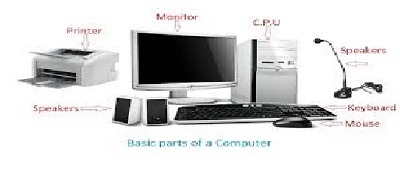
Basic of computer
Sure! Let’s cover the basics of computers. Computers are electronic devices capable of processing data and executing instructions to perform various tasks. Here are some fundamental components and concepts related to computers:
- Hardware: The physical components of a computer that you can touch and see. Key hardware components include:
- Central Processing Unit (CPU): The “brain” of the computer that carries out instructions and performs calculations.
- Memory: RAM (Random Access Memory) allows the computer to temporarily store data and programs that are currently in use. The hard drive or SSD (Solid State Drive) is for long-term storage of data and software.
- Input Devices: Devices used to enter data into the computer, such as the keyboard and mouse.
- Output Devices: Devices used to display or produce information from the computer, such as the monitor and printer.
- Motherboard: The main circuit board that connects and allows communication between all the components.
- Graphics Processing Unit (GPU): Specialized hardware responsible for rendering graphics and images, commonly used in gaming and multimedia tasks.
- Power Supply: Provides electrical power to the computer components.
- Software: The non-physical, intangible instructions and data that tell the computer what to do. There are two main types of software:
- Operating System (OS): Software that manages computer hardware and provides a user interface to interact with the computer. Common OS examples include Windows, macOS, Linux, and Android.
- Applications/Programs: Software designed to perform specific tasks, such as word processing, web browsing, image editing, and games.
- Data: Information processed by a computer, which can be in the form of text, images, audio, video, or any other digital representation.
- Binary Code: Computers use binary code, a system based on 0s and 1s, to represent and process data. Each digit is called a “bit” (short for binary digit). Multiple bits form a “byte.”
- Input, Process, Output: The fundamental operation of a computer involves three steps:
- Input: Data is entered into the computer through input devices.
- Process: The CPU performs calculations and manipulates data according to instructions from software.
- Output: The processed data is presented to the user through output devices.
- Algorithm: A step-by-step procedure or set of rules used to solve a specific problem or accomplish a task. Algorithms are at the core of how software and computers function.
- Programming Languages: Languages used to write instructions (code) for computers. Examples include Python, Java, C++, and JavaScript.
- Internet: A global network of interconnected computers and servers that allows users to access and share information worldwide.
These are just some of the fundamental concepts of computers. As you delve deeper into the world of computing, you’ll encounter more advanced topics and specialized fields. Computers have revolutionized the modern world, making tasks more efficient and enabling groundbreaking innovations in various industries.
What is required Basic of computer
To understand the basics of computers, you don’t need any prior technical knowledge or experience. Here are the essential concepts and topics you should familiarize yourself with:
- Hardware Components: Learn about the main components of a computer, such as the CPU, memory, storage devices, motherboard, input devices (keyboard, mouse), and output devices (monitor, printer).
- Operating Systems: Understand the purpose and functions of operating systems like Windows, macOS, and Linux. Learn how to navigate through the operating system’s user interface.
- Software and Applications: Know the difference between system software (e.g., operating systems) and application software (e.g., web browsers, word processors). Get familiar with common software applications used for everyday tasks.
- Binary System: Learn about the binary number system (0s and 1s) and how computers represent and process data using binary digits.
- Data Storage: Understand the concept of data storage, including the differences between RAM and storage devices (hard drives, SSDs).
- Input and Output: Learn how data is input into a computer using various input devices and how the computer produces output through display and other output devices.
- Algorithm and Programming: Gain a basic understanding of what algorithms are and how they are used to instruct computers. Explore simple programming concepts and languages like Scratch or Python.
- Internet and Networking: Familiarize yourself with the internet, its importance, and how computers are connected in a network.
- Computer Security: Learn about the basics of computer security, such as setting strong passwords and recognizing common cybersecurity threats.
- Computer Ethics: Understand ethical considerations related to computer use, including respecting privacy, avoiding plagiarism, and using technology responsibly.
You can find numerous online resources, tutorials, and beginner-friendly courses that cover these topics. Additionally, visiting a local library or bookstore can be helpful to find introductory books on computers and technology. Don’t be afraid to experiment with a computer hands-on to reinforce your understanding of these basics. The more you practice and explore, the more comfortable and confident you will become in using computers and technology effectively.
Who is required Basic of computer
Understanding the basics of computers is essential for various groups of people, given the widespread use of technology in today’s world. Here are some individuals who might find it necessary to have a basic understanding of computers:
- Students: Basic computer knowledge is crucial for students of all ages, as computers are widely used for educational purposes, research, and online learning platforms.
- Professionals: In most modern workplaces, computer skills are essential, regardless of the profession. From office tasks to specialized software used in specific industries, having a basic understanding of computers is almost always required.
- Job Seekers: Many job opportunities require applicants to have basic computer proficiency. Basic skills like using email, word processing, and navigating through an operating system are often considered essential in the job market.
- Entrepreneurs and Business Owners: Understanding computers is vital for managing businesses efficiently, communicating with clients, and utilizing digital marketing and online tools.
- Senior Citizens: Older adults can benefit from basic computer skills to stay connected with family, access information online, and perform daily tasks more efficiently.
- Teachers and Educators: A basic understanding of computers is necessary for educators to use technology effectively in the classroom, create digital teaching materials, and interact with students online.
- Parents and Guardians: Parents and guardians can support their children’s education better if they have basic computer knowledge, especially in the context of online learning and helping with school assignments.
- Casual Users: Even if someone doesn’t use computers extensively for work or study, basic computer skills are valuable for everyday tasks like online banking, shopping, communication, and entertainment.
- Community Leaders: People involved in community activities, local organizations, and social services can use computers to reach out to their community, organize events, and manage resources efficiently.
In today’s digital age, computers play a significant role in various aspects of our lives. Therefore, having a basic understanding of computers is becoming increasingly important for individuals from all walks of life, irrespective of age or profession. It empowers people to adapt to the changing technological landscape and take advantage of the numerous benefits that computers and technology offer.
When is required Basic of computer
The requirement for basic computer knowledge arises in numerous situations and contexts in today’s digital world. Here are some specific scenarios when having a basic understanding of computers becomes necessary:
- Education: Basic computer skills are required for students to complete assignments, conduct research, and access learning resources online. Many educational institutions also use digital tools and platforms for teaching and assessments.
- Job Applications: In the job market, basic computer proficiency is often a prerequisite for various positions. Most job applications require candidates to have at least some knowledge of using computers, including email, word processing, and internet navigation.
- Workplace Productivity: Computers are prevalent in most workplaces. Employees need basic computer skills to perform their job duties efficiently, communicate with colleagues, and use software applications relevant to their roles.
- Personal Finance: Basic computer skills are essential for managing personal finances, such as online banking, budgeting, and tax filing.
- Digital Communication: Computers are integral to modern communication. Basic computer knowledge is necessary for sending emails, using messaging apps, and participating in online meetings.
- Internet Usage: Understanding computers is crucial for using the internet to search for information, read news, shop online, and access social media.
- Online Services: Many services, such as booking travel tickets, ordering food, and scheduling appointments, are done through online platforms that require basic computer skills.
- Accessing Information: Computers are a primary source of information. Knowing how to use search engines and browse the web is essential for gathering knowledge on various topics.
- Online Learning: With the rise of e-learning platforms, basic computer skills are necessary for individuals to participate in online courses and workshops.
- Digital Entertainment: Basic computer knowledge is valuable for accessing digital entertainment content, such as streaming movies, playing games, and listening to music online.
- Staying Connected: Computers and the internet facilitate staying connected with friends and family through social media, email, and video calls.
In essence, the requirement for basic computer knowledge is pervasive in our digital society. Whether it’s for personal, educational, or professional purposes, having a fundamental understanding of computers and digital technology empowers individuals to navigate the modern world effectively and take advantage of the numerous opportunities it offers.
Where is required Basic of computer
The requirement for basic computer knowledge exists in a wide range of settings and contexts due to the ubiquitous use of computers and technology in today’s world. Here are some specific places and situations where having a basic understanding of computers is essential:
- Educational Institutions: Basic computer skills are necessary for students in schools, colleges, and universities to participate in digital learning, research, and assignments.
- Workplaces: Virtually all modern workplaces require employees to have basic computer proficiency. From office jobs to industries like healthcare, finance, engineering, and retail, computers are integral to daily operations and productivity.
- Libraries: Libraries often provide computer access to the public, allowing users to browse the internet, access educational resources, and learn basic computer skills.
- Internet Cafes: People visiting internet cafes may require basic computer knowledge to access the internet, use software applications, or print documents.
- Community Centers: Community centers may offer computer classes to help individuals learn basic computer skills, particularly for senior citizens or underserved populations.
- Public Services: Government agencies and public service centers may use computers for various tasks, and citizens may need basic computer skills to access government websites and services.
- Hospitals and Clinics: Healthcare professionals often use computers for patient records, medical imaging, and research, while patients may need basic computer skills to access health-related information.
- Banks and Financial Institutions: Basic computer knowledge is essential for customers to access online banking services, check account balances, and perform transactions.
- Retail Stores: Computers are commonly used in retail environments for point-of-sale systems, inventory management, and customer support.
- Internet-Based Businesses: Entrepreneurs running internet-based businesses or e-commerce stores require computer skills to manage their operations.
- Remote Work Settings: With the rise of remote work, employees need basic computer skills to collaborate online, attend virtual meetings, and use project management tools.
- Cyber Cafes: Similar to internet cafes, cyber cafes provide computer access to customers who may require basic computer skills.
- Public Events and Workshops: Events and workshops that involve technology or digital aspects may expect participants to have basic computer proficiency.
- Personal Use at Home: Even in the comfort of one’s home, basic computer skills are essential for day-to-day tasks like online communication, shopping, and entertainment.
- Job Interviews: Job seekers are often required to demonstrate basic computer skills during interviews or through computer-based assessments.
In summary, the need for basic computer knowledge is pervasive across various places and situations. Whether for personal, educational, or professional purposes, having a fundamental understanding of computers and technology is crucial for effectively navigating the modern world.
How is required Basic of computer
The requirement for basic computer knowledge varies depending on the context and individual needs. Here’s how basic computer skills are generally required and how they can be beneficial:
- Education: In educational settings, students are often required to have basic computer skills to access digital learning resources, complete assignments, and communicate with teachers and peers.
- Job Applications: Basic computer proficiency is a common requirement in job applications, as many job roles involve using computers for tasks like data entry, communication, and using office productivity software.
- Workplace Productivity: Employees need basic computer skills to perform their job duties efficiently and effectively. Knowledge of word processing, spreadsheets, and email is often essential in various workplaces.
- Digital Communication: In both personal and professional settings, knowing how to use email and messaging apps is crucial for effective communication.
- Internet Usage: Basic computer knowledge is necessary for navigating the internet, using search engines to find information, and engaging with online content.
- Online Services: Many services, such as banking, shopping, and booking appointments, are done online, requiring basic computer skills for users to access and utilize them.
- Personal Finance: Basic computer skills are essential for managing personal finances, including online banking, budgeting software, and tax preparation.
- Online Learning: With the increasing popularity of e-learning platforms, basic computer skills enable individuals to participate in online courses and gain new knowledge and skills.
- Digital Entertainment: Knowing how to access and use digital entertainment platforms allows individuals to enjoy movies, music, games, and other entertainment online.
- Staying Connected: Basic computer skills are necessary for staying connected with friends and family through social media and video calling.
- Personal Development: Learning basic computer skills can be empowering, allowing individuals to explore new interests, access information, and enhance their digital literacy.
- Access to Information: In today’s information-driven society, basic computer skills are vital for accessing news, research, and educational materials online.
- Remote Work and Freelancing: With the rise of remote work and freelancing opportunities, basic computer proficiency is often necessary for working independently and collaborating with remote teams.
- Entrepreneurship: Aspiring entrepreneurs need basic computer knowledge to set up and manage online businesses, create websites, and use digital marketing tools.
- Digital Citizenship: Understanding computers and technology helps individuals become responsible digital citizens, making informed decisions and navigating online spaces safely.
Overall, having a basic understanding of computers is increasingly required in various aspects of modern life. It empowers individuals to participate fully in the digital age, take advantage of opportunities, and engage meaningfully with the evolving technological landscape. Additionally, basic computer skills can enhance employability, productivity, and overall digital literacy, making them essential in today’s interconnected world.
Case study on Basic of computer
Case Study: Enhancing Digital Literacy for Seniors at a Community Center
Background: The “Golden Haven Community Center” is a non-profit organization dedicated to providing support, social activities, and learning opportunities for senior citizens in the local community. As part of their mission, they recognized the increasing importance of digital literacy for seniors in today’s digital age. Many seniors expressed interest in learning basic computer skills to stay connected with loved ones, access online resources, and engage with the digital world.
Challenge: The organization identified that a significant number of their members had limited or no prior experience with computers. The challenge was to design and implement a program that could effectively teach basic computer skills to seniors, considering their unique learning needs and potential apprehensions about technology.
Solution: The community center collaborated with local technology enthusiasts and volunteers to create a “Digital Literacy Program for Seniors.” The program was structured with the following key components:
- Assessment: Before starting the program, a survey was conducted to gauge the participants’ existing knowledge and apprehensions related to computers. This helped tailor the curriculum to meet their specific needs.
- Creating a Welcoming Environment: The program was conducted in a friendly and supportive environment, addressing seniors’ concerns and emphasizing that it was okay to make mistakes while learning.
- Gradual Progression: The curriculum began with the absolute basics, such as understanding the parts of a computer, using a mouse and keyboard, and navigating the desktop. As participants gained confidence, more advanced topics were introduced.
- Hands-on Learning: Each senior was provided with a personal computer to practice what they were learning. The hands-on approach allowed them to familiarize themselves with the technology at their own pace.
- Real-Life Applications: The program incorporated practical applications of basic computer skills, such as setting up email accounts to communicate with family and friends, accessing online news, and using video calling platforms.
- Visual Aids and Simplicity: The curriculum used large, clear visuals and simplified explanations to cater to seniors with varying degrees of eyesight and hearing.
- One-on-One Support: Trained volunteers were available to provide one-on-one support and answer questions throughout the program. This personalized attention helped build trust and encouraged seniors to ask for help without hesitation.
- Reinforcement and Practice: Regular practice sessions were organized, where seniors could reinforce their learning and receive additional support if needed.
- Celebrating Success: The program celebrated milestones and successes, acknowledging the progress each senior made. This positive reinforcement motivated participants to continue learning.
Results: The “Digital Literacy Program for Seniors” at Golden Haven Community Center was a resounding success. Many seniors who were initially hesitant about technology became proficient in basic computer skills and started using computers confidently in their daily lives. They were able to connect with family and friends through email and video calls, access online resources, and engage with social media to stay connected with their community.
The program not only enhanced the digital literacy of the seniors but also contributed to increased social interaction and reduced feelings of isolation. The participants expressed gratitude for the opportunity to learn and stay connected with the changing world around them. The success of this program has motivated the community center to continue offering digital literacy initiatives, ensuring that seniors remain active and engaged in today’s digitally connected society.
White paper on Basic of computer
Title: Understanding the Basics of Computers: A Comprehensive Guide
Abstract: This white paper aims to provide a comprehensive overview of the basics of computers, covering essential concepts, components, and operations. The increasing integration of computers in various aspects of modern life necessitates a foundational understanding of their functioning. This paper is designed to be a valuable resource for individuals with limited or no prior knowledge of computers, as well as educators and organizations seeking to impart basic computer skills.
Table of Contents:
- Introduction 1.1 Overview of Computers 1.2 Importance of Basic Computer Knowledge
- Computer Components 2.1 Central Processing Unit (CPU) 2.2 Memory (RAM and Storage) 2.3 Input Devices (Keyboard, Mouse, etc.) 2.4 Output Devices (Monitor, Printer, etc.) 2.5 Motherboard and Peripheral Devices 2.6 Graphics Processing Unit (GPU)
- Operating Systems 3.1 Definition and Purpose 3.2 Common Operating Systems (Windows, macOS, Linux, etc.) 3.3 User Interface and Navigation
- Software and Applications 4.1 System Software vs. Application Software 4.2 Common Applications (Word Processors, Web Browsers, etc.)
- Binary Code and Data Representation 5.1 Introduction to Binary System (0s and 1s) 5.2 Binary Digits and Bytes 5.3 Data Representation in Computers
- Input, Process, Output 6.1 The Core Function of Computers 6.2 Understanding Algorithms and Instructions
- Programming Basics 7.1 What is Programming? 7.2 Introduction to Programming Languages 7.3 Basic Coding Concepts
- Internet and Networking 8.1 The Internet and its Functions 8.2 Connecting Computers in a Network 8.3 Internet Safety and Security
- Computer Ethics 9.1 Responsible Computer Use 9.2 Privacy and Security Considerations
- Digital Literacy and Lifelong Learning 10.1 Importance of Digital Literacy 10.2 Strategies for Continuous Learning
- Conclusion 11.1 Recap of Key Concepts 11.2 The Significance of Basic Computer Knowledge
Conclusion: Understanding the basics of computers is a fundamental skill in the digital age. This white paper serves as a comprehensive guide, introducing readers to the essential components, operations, and concepts of computers. By grasping these fundamental principles, individuals can unlock the potential of computers to enhance their personal and professional lives. Emphasizing the importance of digital literacy, this paper encourages continuous learning and highlights the role of basic computer knowledge in empowering individuals to thrive in an increasingly connected world. Through education, practice, and exploration, anyone can gain the confidence and skills needed to navigate the realm of computers effectively.