
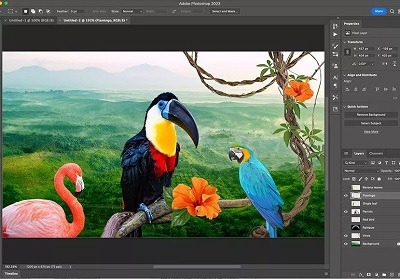
Adobe photoshop
Adobe Photoshop is a popular and widely used raster graphics editing software developed by Adobe Inc. It is part of the Adobe Creative Cloud suite of applications and is primarily designed for image editing, retouching, and manipulation tasks. Photoshop provides a wide range of tools and features that enable users to create, enhance, and edit images for various purposes, including graphic design, digital art, photography, and more.
Key features of Adobe Photoshop include:
- Layers: Photoshop allows users to work with layers, which are individual elements stacked on top of each other. This enables non-destructive editing and the ability to control different elements separately.
- Selection Tools: Photoshop offers various selection tools like the Marquee, Lasso, and Magic Wand, which allow you to isolate specific areas of an image for editing.
- Brushes and Painting Tools: It includes a variety of brushes and painting tools that allow you to simulate traditional artistic techniques digitally.
- Retouching and Healing Tools: These tools help you to remove blemishes, wrinkles, and other imperfections from photos.
- Filters and Effects: Photoshop offers a wide range of filters and effects that can dramatically alter the appearance of an image, from simple adjustments to complex transformations.
- Text Editing: You can add, edit, and format text within images using Photoshop’s text tools.
- Smart Objects: Smart Objects allow you to work with complex elements in a non-destructive way, maintaining their original quality and editability.
- 3D Editing: Photoshop provides basic 3D editing capabilities, allowing users to create and manipulate 3D objects and scenes.
- Color Correction: You can adjust colors, hues, saturation, and contrast to enhance the overall look of an image.
- Image Export and Formats: Photoshop supports various file formats, including JPEG, PNG, GIF, TIFF, and PSD (Photoshop’s native format), and offers options for optimizing images for web or print.
- Integration with Adobe Creative Cloud: Photoshop is part of the Adobe Creative Cloud subscription, which provides access to other Adobe applications like Illustrator, InDesign, and Premiere Pro. It also enables seamless integration between these applications.
Photoshop is used by a wide range of professionals, including graphic designers, photographers, digital artists, web designers, and marketers. It’s considered an industry standard for image editing and manipulation, and its capabilities have grown significantly over the years through various updates and new versions.
What is required Adobe photoshop
To run Adobe Photoshop on your computer, there are certain system requirements that you need to meet. Keep in mind that these requirements might change with newer versions of the software, so it’s always a good idea to check the official Adobe website for the most up-to-date information. As of my last update in September 2021, here are the general system requirements for Adobe Photoshop:
Windows:
- Operating System: Windows 10 (64-bit) version 1809 or later
- Processor: Intel or AMD processor with 64-bit support; 2 GHz or faster processor
- RAM: 8 GB or more
- Graphics: NVIDIA GeForce GTX 1050 or equivalent; NVIDIA GeForce GTX 1660 or Quadro T1000 recommended for GPU acceleration
- Hard Disk Space: 3.1 GB of available hard-disk space for 64-bit installation; additional free space required during installation (cannot be installed on a volume that uses a case-sensitive file system)
macOS:
- Operating System: macOS 10.15 (Catalina) or later
- Processor: Multicore Intel processor with 64-bit support
- RAM: 8 GB or more
- Graphics: macOS: Multicore Intel processor with 64-bit support; Macs with M1 chip are also supported
- Hard Disk Space: 4 GB of available hard-disk space for installation; additional free space required during installation (cannot be installed on a volume that uses a case-sensitive file system)
Additional Requirements:
- An internet connection is required for software activation, validation of subscriptions, and access to online services.
- A monitor with a resolution of 1280×800 or greater is recommended.
- OpenGL 2.0–capable system for GPU-related functionality.
Remember that these are general requirements and may vary depending on the specific version of Adobe Photoshop you are using. Additionally, using Photoshop with more powerful hardware may provide better performance, especially when working with larger files or using complex features.
It’s advisable to visit Adobe’s official website or the Adobe Creative Cloud application for the most accurate and up-to-date system requirements for the version of Adobe Photoshop you intend to use.
Who is required Adobe photoshop
Adobe Photoshop is used by a wide range of individuals, professionals, and industries for various purposes related to image editing, design, and digital art. Some of the individuals and industries that commonly require Adobe Photoshop include:
- Photographers: Photographers use Photoshop for retouching, enhancing, and editing their photos to achieve the desired aesthetic and quality.
- Graphic Designers: Graphic designers utilize Photoshop for creating logos, advertisements, posters, brochures, web graphics, and other visual materials.
- Digital Artists: Digital artists create digital illustrations, paintings, and concept art using Photoshop’s extensive set of drawing and painting tools.
- Web Designers: Web designers use Photoshop to design website layouts, user interfaces, icons, and other web graphics.
- UI/UX Designers: User interface (UI) and user experience (UX) designers use Photoshop to design and prototype user interfaces for websites and mobile applications.
- Advertising and Marketing Professionals: Professionals in advertising and marketing use Photoshop to create compelling visuals for marketing campaigns, including banners, social media posts, and promotional materials.
- Film and Video Industry: Photoshop is used in the film and video industry for creating visual effects, compositing, and designing movie posters and promotional materials.
- Print and Publishing Industry: Photoshop is used for preparing images for print publications, such as magazines, books, and newspapers.
- Fashion Industry: Photoshop is used for retouching fashion photographs, creating fashion designs, and developing visual materials for fashion campaigns.
- Architects and Interior Designers: Photoshop can be used to create visualizations and renderings of architectural and interior design concepts.
- Educators and Students: Many educational institutions teach Photoshop as part of their design, art, and photography programs, and students use it to complete assignments and projects.
- Hobbyists and Enthusiasts: Individuals who enjoy photography, digital art, or design as a hobby often use Photoshop to enhance their skills and create personal projects.
These are just a few examples, as the versatility of Adobe Photoshop makes it applicable in various creative and professional domains. Whether you’re a professional designer, a photographer, an artist, or someone who enjoys working with images, Photoshop provides a wide range of tools and features to meet your needs.
When is required ADOBE PHOTOSHOP
Adobe Photoshop is often required in situations where image editing, manipulation, and design tasks need to be performed. Here are some common scenarios where Adobe Photoshop might be required:
- Photo Editing and Retouching: When you need to enhance, retouch, or modify photographs to improve their quality or remove imperfections.
- Graphic Design: Adobe Photoshop is essential for creating various types of graphic designs, such as logos, posters, banners, business cards, and more.
- Web Design and UI/UX: Web designers use Photoshop to design website layouts, user interfaces, and user experience elements.
- Digital Art: If you’re a digital artist creating illustrations, concept art, or digital paintings, Photoshop provides the tools you need for your creative work.
- Photography Post-Processing: Photographers use Photoshop to fine-tune their images after capturing them, adjusting colors, exposure, and other aspects.
- Advertising and Marketing: Photoshop is required to create visually appealing graphics for marketing materials, social media campaigns, and online advertisements.
- Print Design: For preparing images and graphics for print materials like brochures, magazines, books, and packaging.
- Visual Effects and Compositing: In the film and video industry, Photoshop is used for creating visual effects, compositing multiple images together, and designing movie posters.
- Fashion Industry: Designers in the fashion industry use Photoshop for creating digital designs, retouching fashion photographs, and producing promotional materials.
- Architectural Visualization: Architects and interior designers utilize Photoshop to enhance renderings and create visualizations of their design concepts.
- Educational Purposes: Students, educators, and online course creators use Photoshop to teach or learn about image editing, design principles, and digital art techniques.
- Personal Projects: Whether you’re designing invitations for an event, creating a digital scrapbook, or editing photos for your personal portfolio, Photoshop can be valuable.
- Social Media Content Creation: Photoshop is commonly used to create eye-catching visuals for social media platforms, helping individuals and businesses engage their audiences.
- Professional Presentations: Professionals use Photoshop to create compelling visuals for presentations, reports, and business documents.
- Product Design: Designers working on product packaging, labels, and promotional materials use Photoshop to create impactful visuals.
These are just a few instances where Adobe Photoshop might be required. Its versatility and comprehensive set of tools make it a go-to software for a wide range of image-related tasks across various industries and personal projects.
Where is required Adobe photoshop
Adobe Photoshop is required in a variety of industries, professions, and contexts where image editing, design, and manipulation are crucial. Here are some specific places and situations where Adobe Photoshop is commonly required:
- Photography Studios: Professional photographers use Adobe Photoshop to edit and enhance their photos before delivering them to clients.
- Graphic Design Agencies: Graphic designers use Photoshop to create logos, branding materials, marketing collateral, and other visual designs for clients.
- Web Design and Development Companies: Web designers and developers utilize Photoshop to design website layouts, user interfaces, and web graphics.
- Advertising and Marketing Agencies: Photoshop is essential for creating visually appealing advertisements, social media graphics, and promotional materials.
- Print and Publishing Houses: In the print industry, Photoshop is used to prepare images for magazines, newspapers, books, brochures, and packaging.
- Film and Video Production Studios: Visual effects artists and filmmakers use Photoshop to create and manipulate images for movie posters, special effects, and compositing.
- Fashion and Apparel Industry: Designers use Photoshop for creating fashion illustrations, digital fabric patterns, and retouching fashion photography.
- Architectural and Interior Design Firms: Photoshop is used to enhance architectural renderings, create visualizations, and design presentations.
- Education Institutions: Many educational institutions teach Photoshop as part of art, design, and multimedia programs to prepare students for creative careers.
- Freelance Professionals: Freelancers in various creative fields, such as photographers, designers, and artists, use Photoshop to manage their projects.
- Online Content Creators: YouTubers, bloggers, and social media influencers use Photoshop to create thumbnails, banners, and graphics for their online content.
- E-commerce Platforms: Photoshop is used to create product images, banners, and promotional visuals for online stores.
- Medical and Scientific Imaging: Photoshop can be used to enhance medical images, create scientific illustrations, and visualize data.
- Entertainment and Gaming Industry: Photoshop is used for designing game assets, creating concept art, and producing promotional materials for entertainment media.
- Personal Projects and Hobbies: Individuals use Photoshop for personal creative projects, like designing invitations, creating digital art, and editing family photos.
These are just a few examples of the many places where Adobe Photoshop is required. Its versatile capabilities make it an indispensable tool across a wide range of industries and contexts where visual content plays a significant role.
How is required Adobe photoshop
Required Adobe Photoshop” doesn’t quite form a complete question or statement, so I’ll provide a few interpretations based on common queries related to Adobe Photoshop:
- How is Adobe Photoshop used? Adobe Photoshop is used for a wide range of image editing, design, and manipulation tasks. Users employ its various tools and features to retouch photos, create graphics, design websites, generate digital art, and much more. It’s an essential tool for professionals in photography, graphic design, web design, and other creative fields.
- How can I get Adobe Photoshop? To get Adobe Photoshop, you generally need to subscribe to Adobe Creative Cloud, which is Adobe’s subscription service that provides access to various Adobe software, including Photoshop. You can choose a plan that suits your needs (e.g., single app subscription or the full Creative Cloud suite) and pay a monthly or annual fee to access the software.
- How do I learn Adobe Photoshop? Learning Adobe Photoshop involves practice and training. You can start with online tutorials, video courses, and written guides. Adobe also provides official learning resources. Many community colleges and online platforms offer courses in Photoshop and graphic design. Experimentation and hands-on practice are essential for mastering the software.
- How important is Adobe Photoshop in design and photography? Adobe Photoshop is extremely important in design and photography. It’s considered the industry standard for image editing and manipulation. Designers use it to create visual materials, and photographers use it for post-processing and retouching. Its versatility makes it an essential tool for professionals in these fields.
- How much does Adobe Photoshop cost? The cost of Adobe Photoshop depends on your subscription plan. Adobe Creative Cloud offers different pricing tiers, which may vary based on your location and the plan you choose. Adobe occasionally offers promotions or discounts for students and educators. Be sure to check the current pricing on Adobe’s official website.
If you have a specific question in mind related to Adobe Photoshop, please provide more context, and I’ll be happy to assist further.
Case study on Adobe photoshop
Certainly, here’s a fictional case study that demonstrates how Adobe Photoshop could be used in a real-world scenario:
Case Study: Enhancing a Fashion Magazine Cover with Adobe Photoshop
Client: A high-end fashion magazine known for its visually striking covers.
Challenge: The magazine’s creative team wants to design a captivating cover for their upcoming issue featuring a well-known model. However, the original photo of the model has minor imperfections and lacks the desired impact.
Solution: The creative team utilizes Adobe Photoshop to transform the original photo into a stunning magazine cover that aligns with their brand’s aesthetic.
- Photo Selection: The team selects a high-resolution image of the model from their photo shoot.
- Retouching and Skin Enhancement: Photoshop’s retouching tools are used to remove blemishes, wrinkles, and other imperfections on the model’s skin. The Healing Brush tool and Clone Stamp tool help achieve a flawless complexion while maintaining a natural look.
- Color Correction: The colors in the photo are adjusted to match the magazine’s signature color scheme. Levels, Curves, and Hue/Saturation adjustments are applied to achieve the desired color balance and vibrancy.
- Background Enhancement: The background in the original photo is slightly distracting. Using the Background Eraser tool and Layer Masks, the creative team removes the distracting elements and replaces the background with a gradient that complements the model’s attire.
- Enhancing Details: The model’s hair and clothing are further refined using Dodge and Burn tools to add depth and dimension to the image.
- Text and Typography: The magazine’s logo and cover text are added using Photoshop’s text tools. The team experiments with different fonts, sizes, and placements to create a visually appealing composition.
- Special Effects: To add a touch of drama, the creative team applies subtle lighting effects using layers and blend modes. This enhances the overall atmosphere and creates a more dynamic image.
- Magazine Layout: Once the cover image is perfected, it is integrated into the magazine’s layout using Adobe InDesign. The team ensures that the cover aligns with the magazine’s design guidelines and incorporates necessary branding elements.
Outcome: The final magazine cover is transformed from a basic photograph into a captivating visual masterpiece. The model’s flawless appearance, combined with the enhanced colors and background, creates a cover that grabs the audience’s attention and effectively represents the magazine’s brand.
Impact: The enhanced cover receives positive feedback from readers, advertisers, and stakeholders. The magazine gains increased visibility and recognition for its high-quality visuals. This case study showcases how Adobe Photoshop plays a vital role in elevating the aesthetics of a fashion magazine cover and contributing to its success.
Please note that this case study is fictional and created for illustrative purposes. It demonstrates how Adobe Photoshop can be used creatively in a specific context.
Title: The Evolution and Impact of Adobe Photoshop: A Comprehensive White Paper
Abstract: This white paper explores the evolution, impact, and enduring significance of Adobe Photoshop in the world of digital imaging, design, and creativity. With a focus on its history, features, use cases, and contributions to various industries, this document provides an in-depth analysis of how Adobe Photoshop has shaped visual communication and transformed creative workflows.
Table of Contents:
- Introduction
- Background and Purpose
- Scope and Objectives
- A Brief History of Adobe Photoshop
- Origins and Early Versions
- Key Milestones and Innovations
- Core Features and Tools
- Layers and Non-Destructive Editing
- Selection and Masking Tools
- Retouching and Healing Tools
- Filters and Effects
- Text and Typography Tools
- 3D and Graphics Editing
- Versatility and Industry Applications
- Photography: Post-Processing and Enhancement
- Graphic Design: Creating Visual Identity
- Web Design: Designing User Interfaces
- Digital Art: Fostering Creative Expression
- Print Design: Preparing Visuals for Publication
- Film and Video: Visual Effects and Compositing
- Fashion and Advertising: Creating Visual Campaigns
- Impact on Visual Communication
- Standardization of Image Editing
- Democratization of Design
- Influence on Visual Aesthetics
- Technological Advancements
- Integration with Creative Cloud
- AI and Machine Learning Features
- Mobile and Tablet Versions
- Educational and Training Initiatives
- Role in Creative Education
- Online Learning Resources
- Future Trends and Challenges
- Continued Integration of AI
- Accessibility and Inclusivity
- Addressing Misuse and Manipulation
- Conclusion
- Legacy and Ongoing Relevance
- Shaping the Creative Landscape
References:
- Academic and industry sources related to Adobe Photoshop’s history, features, and impact.
Acknowledgments: We extend our gratitude to the creators, developers, and innovators behind Adobe Photoshop for their contributions to the world of digital creativity.