
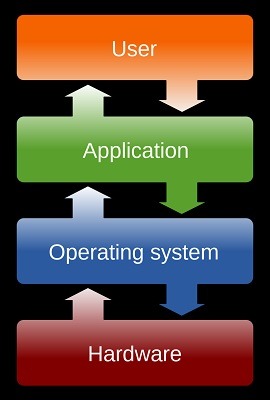
Fundamental Operating System
A fundamental operating system, often referred to as an “OS,” is a core software component that manages computer hardware and provides essential services to software applications and users. It serves as an intermediary between the hardware and the software, allowing applications to run efficiently and enabling users to interact with the computer system. Here are the key functions and components of a fundamental operating system:
- Hardware Abstraction:
- The OS abstracts and manages the underlying hardware components, including the CPU, memory, storage devices, input/output (I/O) devices, and network interfaces. This abstraction shields application programs from the complexities of hardware details.
- Process Management:
- The OS manages processes, which are individual program instances running on the computer. It allocates CPU time, memory, and other resources to processes, ensuring fair execution and preventing conflicts.
- Memory Management:
- Memory management involves allocating and deallocating memory space for running processes. The OS tracks available memory, manages virtual memory, and handles memory protection to prevent unauthorized access.
- File System Management:
- The OS manages files and directories, providing a hierarchical structure for organizing and storing data. It handles file creation, deletion, reading, writing, and access control.
- Device Management:
- The OS controls and coordinates communication between software applications and hardware devices, such as keyboards, mice, displays, printers, and network adapters. Device drivers are software components that facilitate this interaction.
- User Interface:
- Many operating systems include a user interface (UI) that allows users to interact with the system. This can be a command-line interface (CLI) or a graphical user interface (GUI). The UI provides a means to launch applications, manage files, and configure system settings.
- Security and Access Control:
- OSes enforce security policies and access control mechanisms to protect the system from unauthorized access and malicious software. This includes user authentication, permissions, and encryption.
- Networking and Communication:
- Operating systems provide networking capabilities, enabling communication between devices on a network and internet access. Network protocols and services, such as TCP/IP, are managed by the OS.
- Error Handling and Recovery:
- OSes handle errors and exceptions that may occur during program execution, hardware failures, or other unexpected events. They provide mechanisms for error reporting and recovery.
- Resource Allocation and Scheduling:
- The OS allocates system resources, such as CPU time, memory, and I/O devices, to processes based on scheduling algorithms. This ensures efficient resource utilization and responsiveness.
- System Services:
- OSes offer a range of system services and utilities, including clock synchronization, event handling, print spooling, and power management.
- Kernel:
- The core of the operating system, known as the kernel, is responsible for managing hardware resources and providing essential system services. It operates at the most privileged level of the system.
- Utilities and Shell:
- Operating systems often include utility programs and a shell for interacting with the OS. The shell is a command-line interface or a graphical interface that allows users to execute commands and manage files.
Examples of fundamental operating systems include:
- Microsoft Windows: Windows operating systems (e.g., Windows 10, Windows Server) are widely used on personal computers and servers.
- Linux: Linux is an open-source OS kernel used in various distributions (e.g., Ubuntu, CentOS, Fedora) that serve a wide range of purposes, from desktop computing to servers and embedded systems.
- macOS: Apple’s macOS is designed for Macintosh computers and offers a user-friendly GUI.
- UNIX: UNIX is an older, multi-user, and multitasking operating system that has influenced many modern OSes, including Linux and macOS.
These fundamental operating systems provide the foundation for countless software applications and play a crucial role in the functioning of modern computer systems.
What is required Fundamental Operating System
A fundamental operating system (OS) is a critical component of modern computing environments, and several requirements are necessary for its proper functioning and effectiveness. Here are the key requirements for a fundamental operating system:
- Hardware Abstraction: The OS must abstract and manage underlying hardware components, providing a consistent interface to software applications regardless of the underlying hardware. This abstraction allows software to run on different hardware platforms with minimal modification.
- Process and Task Management: Effective process management is essential. The OS should allocate CPU time, memory, and other resources to processes, ensuring efficient multitasking and preventing conflicts among running programs.
- Memory Management: The OS should manage system memory efficiently, allocating and deallocating memory as needed, and ensuring protection against unauthorized access to memory areas.
- File System: A file system is required to organize and manage data storage efficiently. The OS should provide mechanisms for file creation, deletion, reading, writing, and access control.
- Device Management: The OS should manage communication between software applications and hardware devices, including input/output (I/O) devices like keyboards, mice, displays, printers, and network adapters. Device drivers are needed to facilitate this communication.
- User Interface: Many operating systems include a user interface (UI) that allows users to interact with the system. This can be a command-line interface (CLI) or a graphical user interface (GUI), providing ways to launch applications, manage files, and configure system settings.
- Security and Access Control: Strong security measures are essential. The OS should enforce access control, user authentication, and data encryption to protect the system from unauthorized access and malware.
- Networking and Communication: Networking capabilities are necessary for communication between devices on a network and internet access. The OS should support network protocols and services, such as TCP/IP.
- Error Handling and Recovery: Operating systems should handle errors and exceptions that may occur during program execution, hardware failures, or unexpected events. They should provide mechanisms for error reporting and recovery.
- Resource Allocation and Scheduling: The OS should allocate system resources, such as CPU time, memory, and I/O devices, to processes based on scheduling algorithms. This ensures efficient resource utilization and system responsiveness.
- System Services: OSes offer various system services and utilities, including clock synchronization, event handling, print spooling, and power management.
- Kernel: The core of the operating system, known as the kernel, is responsible for managing hardware resources and providing essential system services. It operates at the most privileged level of the system.
- Utilities and Shell: Operating systems often include utility programs and a shell for interacting with the OS. The shell is a command-line interface or a graphical interface that allows users to execute commands and manage files.
- Compatibility and Interoperability: An OS should ensure compatibility with existing software applications and hardware devices, allowing users to leverage existing resources and investments.
- Scalability: The OS should be scalable to accommodate various hardware configurations, from personal computers to large-scale server farms.
- Reliability and Fault Tolerance: High reliability is essential to ensure uninterrupted operation. Fault tolerance mechanisms should be in place to handle hardware or software failures gracefully.
- Performance Optimization: The OS should be designed for optimal performance, with mechanisms for resource optimization and load balancing.
- Documentation and Support: Comprehensive documentation and support services help users and administrators understand and troubleshoot issues with the OS.
These requirements collectively enable an operating system to provide a stable, secure, and user-friendly environment for running software applications and managing computer hardware. The specific implementation of these requirements may vary among different operating systems, but they form the foundation of any effective OS.
Who is required Fundamental Operating System
A fundamental operating system (OS) is required by a wide range of entities, including individuals, businesses, organizations, and institutions. Here’s a breakdown of who requires a fundamental operating system:
- Individual Users:
- Individuals who own personal computers, laptops, smartphones, and tablets rely on fundamental operating systems like Windows, macOS, Linux distributions, iOS, and Android to run applications, browse the internet, manage files, and perform various tasks.
- Small and Medium-Sized Businesses:
- Small and medium-sized businesses use operating systems to power their office computers, servers, and network infrastructure. These OSes enable employees to perform work-related tasks, store and share data, and run business applications.
- Large Enterprises:
- Large enterprises and corporations heavily depend on operating systems to manage their extensive IT infrastructure, including data centers, cloud computing resources, and server farms. Operating systems like Windows Server, Linux, and UNIX are common choices for these environments.
- Government Agencies:
- Government agencies at various levels (local, regional, national) utilize operating systems to run administrative systems, databases, and critical infrastructure. Security and reliability are paramount in government IT environments.
- Educational Institutions:
- Schools, colleges, and universities use operating systems to support academic and administrative tasks. These OSes power computer labs, manage student records, and facilitate online learning platforms.
- Healthcare Organizations:
- Healthcare institutions require robust operating systems to manage electronic health records (EHRs), medical imaging systems, and patient management software. Security and compliance are critical in healthcare IT.
- Scientific and Research Institutions:
- Research organizations rely on operating systems to control scientific instruments, process data, and run simulations. Specialized OSes are used in fields like high-performance computing (HPC).
- Nonprofit Organizations:
- Nonprofits use operating systems to manage their IT infrastructure, run websites, and support their mission-related activities. Cost-effective OS choices are often favored in nonprofit environments.
- Manufacturing and Industrial Sectors:
- Manufacturing and industrial facilities employ operating systems to control machinery, automation systems, and production processes. Real-time operating systems (RTOS) are common in these environments.
- Aerospace and Defense:
- The aerospace and defense sectors rely on operating systems for mission-critical applications, including aircraft systems, satellite control, and defense systems.
- Financial Institutions:
- Banks, investment firms, and financial institutions use operating systems to manage transactions, secure customer data, and run trading platforms. Reliability and security are paramount in financial IT.
- Web Hosting and Cloud Providers:
- Web hosting companies and cloud service providers rely on operating systems to manage their data centers and provide hosting services to clients. Linux-based OSes are prevalent in this industry.
- Gaming and Entertainment Industry:
- The gaming and entertainment sector uses operating systems for game development, console gaming, and streaming platforms. Customized OSes are often created for gaming consoles.
- IoT (Internet of Things):
- IoT devices, such as smart appliances, wearables, and industrial sensors, often run embedded operating systems to manage their functions and connect to networks.
- Embedded Systems and Devices:
- A wide range of embedded systems, including automotive control units, home automation devices, and consumer electronics, rely on embedded operating systems for control and functionality.
In essence, fundamental operating systems are a foundational component of modern computing across diverse industries and sectors. They enable users, organizations, and institutions to perform essential tasks, manage resources, and run applications efficiently and securely. The choice of an operating system depends on specific needs, requirements, and the nature of the computing environment.
When is required Fundamental Operating System
A fundamental operating system (OS) is required in various situations and scenarios. The need for an OS arises in the following contexts and at specific times:
- When Setting Up a New Computer:
- When you purchase a new personal computer, laptop, server, or mobile device, an operating system is required to be installed to make the hardware functional. This is typically done during the initial setup.
- During Computer Assembly or Build:
- Individuals who build their own custom PCs or servers from individual components need to install an operating system as part of the setup process.
- When Replacing or Upgrading Hardware:
- When you upgrade or replace critical hardware components in an existing computer, such as the motherboard or hard drive, you may need to reinstall or configure the OS to work with the new hardware.
- Setting Up Servers:
- In enterprise environments, operating systems like Windows Server, Linux distributions, or specialized server OSes are required to set up and manage server hardware for various purposes, including web hosting, database management, and file sharing.
- Deploying Virtual Machines:
- When creating virtual machines (VMs) in virtualization environments, each VM typically runs an OS. These VMs can serve various purposes, from testing software to running isolated server instances.
- Initializing IoT Devices:
- Internet of Things (IoT) devices require embedded operating systems to control their functionality and connect to networks. These OSes are often pre-installed on the devices during manufacturing.
- Starting a Computer or Device:
- Every time you power on your computer, the OS is loaded into memory and becomes active, allowing you to interact with the system and run applications.
- Recovery and Reinstallation:
- When a computer experiences software issues, malware infections, or system crashes, it may require a reinstallation or recovery of the operating system to restore functionality.
- Operating System Updates:
- Operating systems periodically release updates and patches to address security vulnerabilities and improve functionality. Users and organizations need to update their OSes to stay secure and up to date.
- Adding New Devices:
- When connecting new hardware devices to a computer, the OS may require drivers or additional software to recognize and work with the new hardware. This is often the case with peripherals like printers and graphics cards.
- Upgrading to a New OS Version:
- Users and organizations may choose to upgrade to a newer version of the operating system to access new features, improved security, and better performance.
- Software Development and Testing:
- Software developers require various OS environments for coding, testing, and debugging software applications. Different OSes are needed to ensure compatibility with diverse user environments.
- Creating and Managing Virtual Environments:
- System administrators and developers use virtualization technologies to create and manage virtual environments for testing, development, and sandboxing. Each virtual environment typically runs an OS.
In summary, the requirement for a fundamental operating system occurs at various stages, from the initial setup of a computer or device to ongoing maintenance, upgrades, and specialized use cases like software development and virtualization. Operating systems are essential for managing hardware resources and enabling the execution of software applications.
Where is required Fundamental Operating System
A fundamental operating system (OS) is required in various physical and virtual computing environments across different locations and settings. Here are common places and scenarios where a fundamental OS is required:
- Personal Computers (PCs):
- Fundamental OSes like Microsoft Windows, macOS, and various Linux distributions are required on desktop and laptop computers used by individuals for personal or work-related tasks.
- Servers:
- Operating systems are essential for servers deployed in data centers, cloud environments, and enterprise settings. Server OSes, such as Windows Server, Linux server distributions, and specialized server OSes, are used to manage and host web services, databases, applications, and more.
- Mobile Devices:
- Smartphones and tablets require mobile operating systems like Android, iOS, and iPadOS to provide the user interface, run applications, and manage hardware components.
- Embedded Systems:
- Embedded operating systems are necessary for various embedded systems and devices, including automotive control units, industrial automation, home appliances, and consumer electronics. These OSes are built into the firmware of the devices.
- Internet of Things (IoT) Devices:
- IoT devices, such as smart thermostats, security cameras, and wearable devices, rely on embedded OSes to control their functions and connect to the internet or other networks.
- Data Centers:
- Large-scale data centers house numerous servers and infrastructure equipment, all of which require server OSes to operate. Virtualization technologies also allow multiple virtual machines (VMs) to run on a single physical server, each with its OS.
- Cloud Computing Platforms:
- Cloud service providers offer virtual machines and containers that require OSes to run applications and services in the cloud. Users can select OS templates when provisioning cloud resources.
- Workstations and Workstations Clusters:
- High-performance computing (HPC) environments, used for scientific research, engineering simulations, and complex data analysis, rely on fundamental OSes to manage workstation clusters.
- Educational Institutions:
- Schools, colleges, and universities use OSes on computers and servers for academic and administrative purposes, including student computer labs, research, and administration.
- Healthcare Facilities:
- Hospitals and healthcare organizations use OSes to manage electronic health records (EHRs), medical imaging equipment, patient monitoring systems, and administrative tasks.
- Manufacturing and Industrial Settings:
- Industrial control systems (ICS) and supervisory control and data acquisition (SCADA) systems run embedded or real-time operating systems to control machinery, manufacturing processes, and automation.
- Government and Defense:
- Government agencies and defense organizations use OSes for various applications, including secure communications, data analysis, and mission-critical operations.
- Web Servers and Hosting Providers:
- Web hosting companies and providers of cloud-based services require OSes to manage their infrastructure and provide web hosting, email hosting, and other online services.
- Gaming Consoles:
- Gaming consoles like Xbox, PlayStation, and Nintendo Switch have their own custom operating systems tailored for gaming and multimedia entertainment.
- Vehicles and Transportation Systems:
- Modern vehicles, airplanes, and transportation systems rely on embedded OSes for navigation, entertainment, safety features, and engine control.
- Space Exploration and Aerospace:
- Space missions, satellites, and spacecraft are equipped with specialized operating systems to control various functions, including navigation and communication.
- Research Laboratories:
- Research institutions and laboratories use OSes for data collection, analysis, and controlling scientific instruments.
In summary, fundamental operating systems are required in a wide range of physical and virtual environments, spanning from personal computing devices and home appliances to critical infrastructure, research facilities, and specialized industries. These OSes are the foundational software that enables the management of hardware resources and the execution of software applications.
How is required Fundamental Operating System
A fundamental operating system (OS) is essential for the operation of a computer or computing device. It serves as an intermediary between the hardware components and the software applications, providing a platform for managing resources and executing tasks. Here’s how a fundamental operating system is required:
- Resource Management:
- The OS is responsible for managing hardware resources, including the central processing unit (CPU), memory (RAM), storage devices (hard drives, SSDs), and input/output (I/O) devices (keyboard, mouse, display, network interfaces). It allocates these resources to running processes efficiently.
- Process Management:
- The OS controls the execution of processes (programs) on the computer. It schedules processes to run on the CPU, allocates memory for their data and code, and ensures that processes do not interfere with each other.
- Memory Management:
- The OS manages system memory, including allocating memory to processes, swapping data in and out of RAM when needed, and protecting memory regions from unauthorized access.
- File System Management:
- It provides a file system that allows for the creation, organization, and management of files and directories on storage devices. This includes handling file permissions and access control.
- Device Management:
- The OS communicates with and manages hardware devices, such as printers, scanners, and network adapters, by using device drivers. It ensures that these devices function correctly and that data can be exchanged between software and hardware.
- User Interface:
- In many cases, the OS provides a user interface (UI) that allows users to interact with the computer or device. This can be a graphical user interface (GUI) or a command-line interface (CLI).
- Security and Access Control:
- The OS enforces security measures, such as user authentication, file permissions, and encryption, to protect data and resources from unauthorized access and malware.
- Networking and Communication:
- For devices connected to a network or the internet, the OS provides networking capabilities, enabling communication with other devices and services. It manages network protocols and configurations.
- Error Handling and Recovery:
- The OS handles errors, exceptions, and system failures gracefully. It provides mechanisms for error reporting, logging, and recovery to ensure system stability.
- Resource Allocation and Scheduling:
- The OS allocates CPU time, memory, and I/O resources to processes based on scheduling algorithms. This ensures that resources are used efficiently and that the system remains responsive.
- System Services:
- It offers a range of system services and utilities, including timekeeping, event handling, printing services, and power management.
- Kernel:
- The kernel is the core component of the OS, responsible for low-level hardware interactions and resource management. It runs in privileged mode and is the first part of the OS to load during system boot.
- Utilities and Shell:
- Operating systems include utility programs and a shell (in the case of CLI interfaces) to facilitate user interactions and system administration.
In essence, a fundamental operating system is required to provide an environment in which software applications can run efficiently and reliably. It abstracts the hardware complexities, offers a user-friendly interface, ensures resource management, and provides essential services for users and applications. The specific features and capabilities of the OS may vary depending on the type and purpose of the computing device and the OS itself.
Case Study on Fundamental Operating System
Certainly! Let’s consider a case study involving the implementation and impact of a fundamental operating system (OS) in a real-world scenario:
Case Study: Deployment of a Fundamental OS in an Enterprise Environment
Background: XYZ Corporation is a large multinational company with offices and operations in multiple countries. The company was facing significant challenges in managing its IT infrastructure due to the absence of a standardized operating system. Various departments and regions were using different OS versions, leading to compatibility issues, security vulnerabilities, and increased IT support costs.
Challenges:
- Compatibility Issues: Different departments were using OSes from different vendors, making it challenging to ensure compatibility between software applications and hardware devices.
- Security Vulnerabilities: The lack of a standardized OS made it difficult to implement consistent security policies and updates across the organization. This exposed the company to potential security breaches.
- High IT Support Costs: IT support teams had to manage a diverse range of OSes, leading to increased training costs and longer resolution times for technical issues.
Solution: XYZ Corporation decided to implement a standardized fundamental operating system across its entire enterprise. After careful evaluation, they chose to deploy Windows 10 as the corporate OS due to its widespread compatibility, security features, and ease of management. The deployment plan involved the following steps:
- Assessment: The IT department conducted a thorough assessment of the existing infrastructure, hardware, and software applications to ensure compatibility with Windows 10.
- Pilot Testing: A pilot project was initiated in one department to test the compatibility of existing software and hardware with the new OS. Any issues that arose during testing were addressed and resolved.
- Deployment Strategy: XYZ Corporation developed a phased deployment strategy. They divided the organization into manageable groups and rolled out Windows 10 to each group sequentially, starting with the departments that were most compatible with the new OS.
- Training: Comprehensive training programs were conducted for employees to ensure a smooth transition to Windows 10. Training covered basic OS usage, security best practices, and troubleshooting.
- Security Enhancements: The IT team implemented enhanced security measures, including centralized patch management, group policies, and endpoint security solutions to protect the organization from cyber threats.
- Monitoring and Support: The IT support team set up monitoring systems to track the performance and security of Windows 10 devices. They also provided ongoing support to address user issues and concerns.
Results: The deployment of Windows 10 as the standardized fundamental operating system yielded several positive outcomes for XYZ Corporation:
- Improved Compatibility: Standardizing on one OS eliminated compatibility issues, making it easier for employees to use software applications and hardware devices.
- Enhanced Security: Centralized security management and regular updates reduced the company’s vulnerability to security breaches and ensured compliance with industry regulations.
- Cost Savings: By reducing the complexity of managing multiple OSes and streamlining IT support processes, the company realized significant cost savings in IT operations.
- Increased Productivity: Employees benefited from a consistent and familiar OS environment, leading to increased productivity and a decrease in user-related issues.
- Scalability: The standardized OS made it easier to scale the IT infrastructure as the company expanded globally, reducing deployment and management complexities.
In conclusion, the deployment of a fundamental operating system (Windows 10) in an enterprise environment helped XYZ Corporation overcome compatibility issues, enhance security, reduce IT support costs, and improve overall productivity. Standardizing the OS contributed to a more efficient and scalable IT ecosystem, supporting the company’s growth and global operations.
White Paper on Fundamental Operating System
Creating a full white paper on a fundamental operating system would require in-depth technical details, analysis, and research. However, I can provide you with an outline and key points that you can use as a foundation to create a white paper on this topic.
White Paper: The Role and Impact of Fundamental Operating Systems
Table of Contents
- Abstract
- Brief summary of the white paper’s objectives and findings.
- Introduction
- Background information on the importance of operating systems.
- Purpose of the white paper.
- Overview of the structure.
- Chapter 1: Understanding Fundamental Operating Systems
- Definition and role of operating systems.
- Historical context and evolution of operating systems.
- Categories of operating systems (e.g., desktop, server, mobile, embedded).
- Chapter 2: Core Functions of a Fundamental Operating System
- Resource management (CPU, memory, storage).
- Process and task management.
- File system management.
- Device management.
- User interfaces.
- Security and access control.
- Chapter 3: Types of Fundamental Operating Systems
- Microsoft Windows: An overview and its use cases.
- macOS: Features and applications.
- Linux: An open-source alternative.
- Mobile OSes: Android and iOS.
- Specialized OSes: Real-time, embedded, and others.
- Chapter 4: The Impact of Fundamental Operating Systems
- Economic impact on businesses and industries.
- Enabler of technological advancements (cloud computing, IoT, etc.).
- Influence on user experiences and productivity.
- Implications for cybersecurity and data privacy.
- Chapter 5: Challenges and Evolving Trends
- Challenges in OS development and management.
- Emerging trends, including containerization, virtualization, and edge computing.
- The move toward open-source OS solutions.
- Chapter 6: Case Studies
- Real-world examples of organizations benefiting from fundamental operating systems.
- Case study summaries showcasing the impact of OS adoption.
- Chapter 7: Future Outlook
- Predictions for the future of fundamental operating systems.
- The role of OS in emerging technologies (AI, quantum computing, etc.).
- Conclusion
- Summary of key findings.
- The enduring significance of fundamental operating systems.
- References
- Cite sources and references used throughout the white paper.
- Appendices
- Additional technical details, charts, graphs, and data if applicable.