
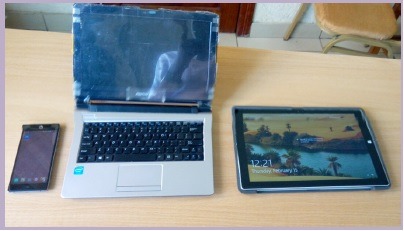
Fundamental Laptop and Portable Devices
Fundamental laptop and portable devices information typically encompasses the basics of these devices, including their features, components, and how to use them effectively. Here’s an overview of fundamental information about laptops and portable devices:
1. Laptop Overview:
- Definition of a laptop: A portable computer that combines the functionality of a desktop computer with portability.
- Key features: Compact design, built-in keyboard and display, battery-powered, and suitable for various tasks.
2. Laptop Components:
- Central Processing Unit (CPU): The brain of the laptop, responsible for executing instructions and running software.
- Random Access Memory (RAM): Provides temporary storage for running programs and data.
- Storage Devices: Hard Disk Drives (HDD s) and Solid State Drives (SSD s) for data storage.
- Display: The laptop screen, which can vary in size and resolution.
- Keyboard: Input device for typing text and commands.
- Touch pad or Mouse: Pointing devices for navigation.
- Battery: Provides power for portable use.
- Ports and Connectivity: USB, HDMI, audio, and wireless connectivity options.
- Operating System: Software that manages the laptop’s hardware and runs applications.
3. Types of Laptops:
- Discuss various laptop types, including ultra books, 2-in-1 convertibles, gaming laptops, and business laptops.
- Highlight their specific features and use cases.
4. Operating System Basics:
- Introduction to popular operating systems like Windows, mac OS, and Linux.
- How to navigate the interface, install and uninstall software, and perform basic system tasks.
5. Using a Laptop:
- Powering on and off.
- Navigating the desktop or interface.
- Basic file management, including creating, opening, and saving files.
- Web browsing, using email, and managing documents.
6. Portable Devices Overview:
- Definition and types of portable devices, including smartphones, tablets, and e-readers.
7. Portable Device Features:
- Discuss common features like touchscreens, app stores, cameras, and sensors found in portable devices.
8. Operating Systems for Portable Devices:
- Introduction to mobile operating systems like iOS (Apple), Android (Google), and their respective app ecosystems.
9. Using Portable Devices:
- Basic operations like unlocking, navigating the interface, and accessing apps.
- Making calls, sending messages, and managing contacts on smartphones.
- Using apps, browsing the internet, and reading e-books on tablets.
10. Connectivity and Synchronization: – Explaining wireless connectivity options like Wi-Fi, Bluetooth, and mobile data. – How to sync portable devices with other devices, such as laptops or the cloud.
11. Security and Privacy: – Overview of security measures, including passwords, bio metrics, and software security. – Privacy considerations when using laptops and portable devices.
12. Troubleshooting and Maintenance: – Common issues and how to troubleshoot them, like dealing with software crashes, network problems, and battery issues. – Basic maintenance tips to keep laptops and portable devices in good working condition.
13. Future Trends: – Briefly discuss emerging technologies and trends, such as augmented reality, virtual reality, and the Internet of Things (IoT).
14. Conclusion: – Summarize the importance of understanding laptops and portable devices in our daily lives and staying informed about technological advancements.
This fundamental information provides a basic understanding of laptops and portable devices, making it easier for users to operate and make the most of these devices in various contexts.
What is required Fundamental Laptop and Portable Devices
To understand the fundamental aspects of laptops and portable devices, you need to grasp the following key concepts and information:
1. Laptop Basics:
- Definition and purpose of laptops as portable computers.
- Differentiation from desktop computers based on portability and form factor.
2. Laptop Components:
- An understanding of the essential hardware components of laptops, including the CPU, RAM, storage (HDD and SS D), display, keyboard, touch pad or mouse, battery, and various ports (e.g., USB, HDMI, audio).
3. Laptop Types:
- Knowledge of various laptop categories, such as ultra books, 2-in-1 convertibles, gaming laptops, and business laptops.
- How to choose the right type based on specific needs and preferences.
4. Operating Systems:
- An introduction to popular laptop operating systems like Windows, mac OS, and Linux.
- Basic knowledge of navigating the interface, installing software, and performing system tasks.
5. Laptop Use:
- Basic laptop operations, including powering on/off, navigating the desktop or interface, and managing files.
- Usage for common tasks like web browsing, email, document creation, and multimedia.
6. Portable Device Basics:
- A definition of portable devices, including smartphones, tablets, and e-readers.
- Identification of key characteristics that make these devices portable and user-friendly.
7. Portable Device Features:
- An overview of typical features found in portable devices, such as touchscreens, app stores, cameras, and sensors.
8. Mobile Operating Systems:
- Familiarity with mobile operating systems like iOS (Apple) and Android (Google).
- Understanding app ecosystems and compatibility.
9. Using Portable Devices:
- Basic operations for portable devices, such as unlocking, navigating the interface, and accessing apps.
- Usage for making calls, sending messages, and managing contacts on smartphones.
- App usage, internet browsing, and e-book reading on tablets.
10. Connectivity and Synchronization: – Understanding wireless connectivity options like Wi-Fi, Bluetooth, and mobile data. – Synchronization of portable devices with other devices and cloud services.
11. Security and Privacy: – Awareness of security measures, including password protection, bio metrics (fingerprint/face recognition), and software security (e.g., antivirus). – Consideration of privacy issues when using portable devices, such as data privacy and app permissions.
12. Troubleshooting and Maintenance: – Knowledge of common issues and how to troubleshoot them, including dealing with software glitches, network problems, and battery concerns. – Basic maintenance practices to ensure the optimal performance and longevity of laptops and portable devices.
13. Future Trends: – An awareness of emerging technologies and trends in the world of laptops and portable devices, such as augmented reality, virtual reality, and the Internet of Things (IoT).
Understanding these fundamental aspects of laptops and portable devices is essential for users to make informed decisions, use these devices effectively, and stay up-to-date with technological advancements in the ever-evolving world of technology.
Who is required Fundamental of Laptop and Portable Devices
The fundamental knowledge of laptops and portable devices is beneficial and often required for a wide range of individuals. Here are some of the individuals who may require this fundamental knowledge:
- Students: Students at various levels of education use laptops and portable devices for research, assignments, and studying. Understanding how to operate and maintain these devices is essential for academic success.
- Professionals: Professionals in almost every industry use laptops and portable devices for work-related tasks, communication, and productivity. They need to be proficient in using these tools to perform their job responsibilities effectively.
- IT and Tech Professionals: IT professionals, including system administrators and support specialists, require a deep understanding of laptops and portable devices to troubleshoot issues, perform maintenance, and ensure network security.
- Teachers and Educators: Educators use laptops and portable devices to create and deliver instructional content. They need to be proficient in using these tools to facilitate learning in the digital age.
- Business Owners and Entrepreneurs: Business owners and entrepreneurs use laptops and portable devices for various aspects of their businesses, including communication, marketing, and financial management.
- Healthcare Professionals: Doctors, nurses, and healthcare staff often use portable devices to access medical records, communicate with colleagues, and research medical information. Proficiency in these tools is vital for healthcare delivery.
- Parents and Caregivers: Parents and caregivers use laptops and portable devices for managing household tasks, helping with children’s education, and entertainment. Basic knowledge is essential for these roles.
- Researchers and Scientists: Researchers and scientists use laptops and portable devices for data analysis, simulations, and documentation of research findings. Proficiency is crucial in these knowledge-intensive fields.
- Creative Professionals: Artists, designers, writers, and other creative professionals often use laptops and portable devices for content creation, design work, and digital art. Understanding these tools is integral to their creative process.
- Seniors and Retirees: Even individuals in their retirement years may use laptops and portable devices for various purposes, including staying in touch with family, engaging in hobbies, and accessing information.
- Job Seekers: Job seekers need to create and submit digital resumes, search for jobs online, and communicate with potential employers. Proficiency in using laptops and portable devices can improve their job search.
- Nonprofit and Social Sector Workers: Individuals working in nonprofit organizations often use technology for fundraising, advocacy, and project management. They require these skills for effective work.
- Volunteers: Many volunteers use laptops and portable devices for organizing events, coordinating activities, and communicating with their organizations. Basic knowledge is valuable for volunteers.
- Global Travelers: Travelers often use portable devices for navigation, communication, and entertainment during their journeys. Familiarity with these tools can enhance their travel experiences.
- Anyone Interested in Personal Growth: Individuals interested in personal growth and development often use laptops and portable devices for self-education, skill building, and pursuing personal interests.
In today’s digital age, laptops and portable devices are ubiquitous, and basic knowledge of their operation is beneficial for a broad spectrum of individuals in both personal and professional contexts.
When is required Fundamental of Laptop and Portable Devices
The need for fundamental knowledge of laptops and portable devices arises in various situations and stages of life. Here are some common scenarios when this knowledge is required:
- Education:
- Students of all ages, from primary school to higher education, require this knowledge to complete assignments, research, and engage in digital learning.
- Workplace:
- Employees in various professions and industries need this knowledge to perform job-related tasks, communicate, and use specialized software and tools.
- Job Searching:
- Job seekers use laptops and portable devices to search for job opportunities, create resumes, and participate in virtual job interviews.
- Business and Entrepreneurship:
- Business owners and entrepreneurs require this knowledge to manage their businesses, conduct online marketing, and handle finances.
- Digital Communication:
- Individuals use laptops and portable devices for email communication, video calls, and instant messaging.
- Remote Work:
- The rise of remote work has made knowledge of laptops and portable devices essential for individuals working from home or other remote locations.
- Healthcare and Tele medicine:
- Healthcare professionals use portable devices for tele medicine, electronic health records, and medical research.
- Research and Academia:
- Researchers, academics, and students in research institutions rely on laptops and portable devices for data analysis, writing research papers, and accessing academic resources.
- Creative Industries:
- Artists, designers, writers, and content creators use these tools for creative work and content production.
- Parenting and Care giving:
- Parents and caregivers utilize laptops and portable devices for various parenting tasks, such as managing schedules, educational resources, and entertainment for children.
- Retirement and Senior Living:
- Even in retirement, seniors often use these devices for social connection, entertainment, and managing their finances.
- Hobbies and Interests:
- Individuals pursuing hobbies and interests, such as gaming, photography, or digital art, require knowledge of the devices relevant to their interests.
- Community Engagement:
- Active community members use laptops and portable devices for organizing events, connecting with neighbors, and participating in civic activities.
- Travel and Exploration:
- Travelers use laptops and portable devices for trip planning, navigation, communication, and sharing their experiences.
- Personal Growth and Lifelong Learning:
- Those interested in personal development and lifelong learning use laptops and portable devices for self-study, skill development, and accessing educational resources.
In essence, the need for fundamental knowledge of laptops and portable devices is pervasive in today’s society. It is crucial for personal and professional purposes, and it often arises at different stages of life and career, depending on individual circumstances and goals.
Where is required Fundamental of Laptop and Portable Devices
The requirement for fundamental knowledge of laptops and portable devices extends to various locations and settings. Here are some common places where this knowledge is needed:
- Educational Institutions:
- Schools, colleges, and universities are primary locations where students and educators need to use laptops and portable devices for learning, research, and teaching.
- Workplaces:
- Offices, business premises, and corporate settings rely heavily on laptops and portable devices for day-to-day work activities.
- Home:
- Personal knowledge of laptops and portable devices is essential for managing daily tasks, communication, entertainment, and personal productivity within the home environment.
- Remote Work Settings:
- As remote work becomes more prevalent, knowledge of using laptops and portable devices is crucial for individuals working from home or other remote locations.
- Public Libraries:
- Libraries offer public access to laptops and portable devices for research, job searching, and educational purposes, making it essential for library users.
- Cyber Cafes and Internet Centers:
- Users at cyber cafes and internet centers require knowledge of these devices for various online activities, such as web browsing and online gaming.
- Coffee Shops and Public Spaces:
- People often use laptops and portable devices in public spaces like coffee shops, airports, and parks for work, study, or leisure.
- Business Meetings and Conferences:
- Business professionals need to be adept at using laptops and portable devices for presentations, data sharing, and communication at meetings and conferences.
- Healthcare Facilities:
- Healthcare professionals use portable devices for patient care, medical records, and communication in hospitals and clinics.
- Research and Laboratories:
- Researchers in academic and industry laboratories rely on laptops and portable devices for data analysis and research documentation.
- Creative Studios and Workshops:
- Artists, designers, and writers use these devices in creative studios and workshops for content creation and artistic work.
- Travel and Tourism Locations:
- Travelers use laptops and portable devices for trip planning, navigation, communication, and sharing travel experiences in hotels, airports, and tourist destinations.
- Community Centers:
- Community centers offer access to laptops and portable devices for various community activities, such as skill-building workshops and social engagement.
- Retail Stores:
- Retail employees often use portable devices for inventory management, point-of-sale systems, and customer interactions.
- Job Fairs and Employment Centers:
- Job seekers require knowledge of laptops and portable devices when using computers at job fairs and employment centers for job applications and resume creation.
- Volunteer Organizations:
- Volunteers working for nonprofit and community organizations use these devices for organizing events, coordinating activities, and communication.
- Parks and Recreation Facilities:
- In recreational areas, knowledge of laptops and portable devices is useful for visitors who use these devices for leisure and entertainment.
- Personal Gatherings and Social Events:
- Knowledge of these devices is essential for attendees at personal gatherings and social events who use them for various activities and entertainment.
The requirement for fundamental knowledge of laptops and portable devices is diverse, and it applies in a wide range of public and private settings, reflecting the pervasive role of these devices in modern life.
How is required Fundamental of Laptop and Portable Devices
The knowledge of fundamental laptop and portable device usage is required to effectively use these devices for various purposes. Here’s how this knowledge is typically acquired and utilized:
1. Formal Education:
- In many educational institutions, students are introduced to laptops and portable devices as part of their curriculum. They learn how to use these devices for research, assignments, and digital learning.
2. On-The-Job Training:
- Many workplaces provide training for employees on how to use laptops and portable devices for job-related tasks. This training can include software-specific instruction.
3. Self-Study:
- Individuals often teach themselves how to use laptops and portable devices through self-study, exploration, and trial-and-error. Online tutorials, user manuals, and instructional videos can be valuable resources.
4. Workshops and Classes:
- Some community centers, libraries, and tech training centers offer workshops and classes on laptop and portable device usage for people of all ages.
5. Tech Support and Customer Service:
- Users can seek guidance from tech support and customer service for specific devices or software when encountering issues or needing assistance.
6. Online Resources:
- There are abundant online resources, including blogs, forums, and tech websites, where users can find tips, guides, and troubleshooting information.
7. Peer Learning:
- Many individuals learn from their peers, friends, or family members who are more experienced with laptops and portable devices.
8. Continuous Learning:
- As technology evolves, staying up to date with new features and software updates is important. Users often engage in continuous learning to keep their knowledge current.
Once individuals acquire this fundamental knowledge, they can apply it to various settings and use their laptops and portable devices for education, work, personal tasks, and entertainment. Additionally, they are better equipped to troubleshoot issues and adapt to new technologies as they emerge.
Case Study on Fundamental Laptop and Portable Devices
Case Study: Empowering Remote Learning with Fundamental Laptop and Portable Device Knowledge
Background: In response to the COVID-19 pandemic, a large urban school district was forced to transition to remote learning. This shift posed significant challenges for students, teachers, and parents who needed to adapt to laptops and portable devices for education.
Challenges:
- Digital Divide: Not all students had access to laptops or portable devices.
- Technical Proficiency: Many teachers and students were not familiar with using these devices for remote learning.
- Connectivity Issues: Inadequate internet access in some households hindered participation.
Solution: The school district recognized the importance of fundamental knowledge of laptops and portable devices for successful remote learning. They implemented a multi-faceted solution:
1. Access to Devices:
- Provided laptops or tablets to students who lacked the necessary devices, ensuring equitable access to technology.
2. Training and Support:
- Organized online and in-person training sessions for teachers, students, and parents on using laptops and portable devices for remote learning.
- Created a help desk for technical support and troubleshooting.
3. Connectivity Solutions:
- Collaborated with internet service providers to offer discounted or free internet access to families without adequate connectivity.
4. Digital Literacy Curriculum:
- Developed a digital literacy curriculum to teach students and parents the basics of using laptops and portable devices for education.
5. Content Accessibility:
- Ensured that educational content and platforms were accessible to students with varying levels of technical proficiency.
Results: The implementation of these solutions led to positive outcomes:
- Improved Access: Every student had access to a laptop or portable device, reducing the digital divide.
- Enhanced Proficiency: Students, teachers, and parents became proficient in using these devices for remote learning, facilitating a smoother transition.
- Increased Participation: Connectivity solutions and digital literacy initiatives increased student participation in remote classes.
- Digital Inclusion: The school district fostered digital inclusion, ensuring that all students could benefit from remote learning.
Conclusion: This case study highlights the critical role of fundamental knowledge of laptops and portable devices in education. By providing access, training, and support, the school district empowered students, teachers, and parents to adapt to remote learning during challenging times. This approach not only addressed immediate obstacles but also promoted digital literacy and inclus ivity in education, reinforcing the importance of such knowledge in today’s world.
White Paper on Fundamental of Laptop and Portable Devices
Creating a comprehensive white paper on the fundamentals of laptops and portable devices requires a structured approach. Below is an outline for a white paper that provides in-depth information on this topic. You can expand upon each section to create a detailed document.
Title: “Mastering Mobility: A White Paper on the Fundamentals of Laptops and Portable Devices”
Abstract:
- A concise summary of the white paper’s content, objectives, and key takeaways.
Table of Contents:
- Introduction
- Overview of the importance of laptops and portable devices in contemporary life.
- Objectives and scope of the white paper.
- The Evolution of Laptops and Portable Devices
- Historical background on the development of laptops and portable devices.
- Key milestones and technological advancements.
- Types of Laptops and Portable Devices
- Detailed exploration of laptop categories, including ultra books, 2-in-1 convertibles, gaming laptops, and business laptops.
- An overview of other portable devices, such as tablets, smartphones, and e-readers.
- Hardware Components: The Building Blocks
- In-depth examination of essential hardware components in laptops, including the CPU, RAM, storage (HDD and SSD), display, keyboard, touch pad or mouse, battery, and connectivity ports.
- Key hardware features found in portable devices, like touchscreens, cameras, and sensors.
- Operating Systems: The Heart of the Machine
- Introduction to popular laptop operating systems like Windows, mac OS, and Linux.
- Overview of mobile operating systems, such as iOS (Apple) and Android (Google).
- Using Laptops: The Essentials
- Basic operations for laptops, including turning on and off, navigating the desktop or interface, and managing files.
- Common tasks like internet browsing, email usage, and word processing.
- Using Portable Devices: Mastering Mobility
- Basic operations for portable devices, such as unlocking, navigating the interface, and accessing applications.
- Tasks specific to portable devices, like making calls, sending messages, and using apps.
- Connectivity and Communication: Staying in Touch
- Exploring wireless connectivity options like Wi-Fi, Bluetooth, and mobile data.
- Strategies for staying connected while on the move.
- Security and Privacy: Protecting Your Digital World
- Understanding the importance of data security and privacy.
- Best practices for securing laptops and portable devices, including strong passwords, encryption, and antivirus software.
- Maintenance and Troubleshooting: Ensuring Reliability
- Tips for maintaining laptops and portable devices, including cleaning, battery care, and software updates.
- Troubleshooting common issues, such as software crashes and connectivity problems.
- Applications and Software: Unlocking Functionality
- Overview of essential software and applications for laptops and portable devices, covering productivity tools, creative software, and entertainment apps.
- Adaptability and Emerging Trends: Navigating the Future
- A look at emerging technologies that are shaping the future of laptops and portable devices, including fold able screens and 5G connectivity.
- Sustainability and Environmental Impact: A Green Perspective
- Considerations of the environmental impact of laptops and portable devices, with a focus on responsible disposal and eco-friendly initiatives.
- Case Studies: Real-World Applications
- Real-world examples of individuals, businesses, and organizations effectively using laptops and portable devices for various purposes.
- Conclusion: Navigating the Digital World
- A summary of key takeaways and the ongoing importance of laptops and portable devices in our daily lives.
- Recommendations: Mastering Mobility
- Practical suggestions for individuals and organizations to make the most of laptops and portable devices while maintaining security and sustainability.
- References: Further Exploration
- Cite all sources and references used in the white paper.