
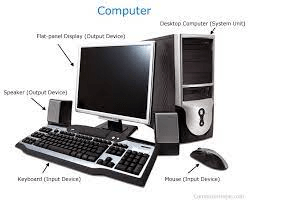
Basic of Computer
Certainly! Here are some basics of computers:
- Definition of a Computer:
- A computer is an electronic device that processes data and performs tasks according to a set of instructions called a program.
- Basic Components of a Computer:
- Central Processing Unit (CPU): Often referred to as the brain of the computer, the CPU carries out instructions of a computer program.
- Memory (RAM): Random Access Memory temporarily stores data and instructions that the CPU uses during operation.
- Storage (Hard Drive, SSD): Provides long-term storage for data, programs, and the operating system.
- Input Devices: Such as keyboards and mice, allow users to input data into the computer.
- Output Devices: Such as monitors and printers, display or produce results from the computer.
- Software and Hardware:
- Software: Refers to the programs and applications that run on a computer, including the operating system (e.g., Windows, macOS, Linux).
- Hardware: Encompasses the physical components of a computer, such as the CPU, memory, storage devices, and peripherals.
- Operating System:
- An operating system (OS) manages computer hardware and provides services for computer programs. Common operating systems include Microsoft Windows, macOS, and Linux.
- Data and Information:
- Data: Raw facts and figures that are processed by the computer.
- Information: Data that has been processed and organized to have meaning.
- Binary System:
- Computers use a binary system, which consists of only two digits, 0 and 1. All data is represented in binary code.
- Types of Computers:
- Personal Computers (PC): Designed for individual use, such as desktops and laptops.
- Servers: Computers that provide services to other computers on a network.
- Mainframes: Powerful computers used for large-scale data processing.
- Supercomputers: Extremely powerful computers designed for complex calculations and simulations.
- Networks:
- Computers can be connected to form networks, allowing them to share resources and communicate with each other.
- Internet:
- A global network of interconnected computers and networks, providing access to information, communication, and various online services.
- Computer Security:
- Measures and practices to protect computer systems and data from unauthorized access, attacks, and damage.
These are just some fundamental concepts related to computers. The field of computing is vast and continually evolving with advancements in technology. If you have specific questions or if there’s a particular aspect you’d like to know more about, feel free to ask!
The basics of computers encompass a range of fundamental concepts that are essential for understanding how computers work and how to use them effectively. Here’s a list of what is generally considered essential for a basic understanding of computers:
- Computer Components:
- Understanding the basic hardware components, including the Central Processing Unit (CPU), memory (RAM), storage devices (hard drives, SSDs), input devices (keyboard, mouse), and output devices (monitor, printer).
- Operating Systems:
- Familiarity with the concept of an operating system, which is software that manages hardware resources and provides services for computer programs. Common operating systems include Windows, macOS, and Linux.
- Software:
- Awareness of the distinction between system software (e.g., operating systems) and application software (e.g., word processors, web browsers).
- File Management:
- Basic knowledge of how files and folders are organized on a computer, including creating, moving, and deleting files.
- Basic Computer Skills:
- Proficiency in using a keyboard and mouse for navigation and data input.
- Understanding common keyboard shortcuts and mouse operations.
- Internet and Web Browsing:
- Basic knowledge of internet concepts, such as browsers, websites, and URLs.
- Ability to perform web searches and navigate websites.
- Email:
- Understanding how to use email, including composing, sending, and receiving messages, as well as managing contacts.
- Security Awareness:
- Basic understanding of computer security practices, such as using strong passwords, recognizing phishing attempts, and keeping software up-to-date.
- Troubleshooting:
- Ability to perform basic troubleshooting, such as restarting a computer, identifying common issues, and seeking help when needed.
- Word Processing:
- Familiarity with basic word processing software for creating and editing documents.
- Spreadsheets:
- Basic understanding of spreadsheet software and the ability to create simple spreadsheets.
- Basic Concepts of Data:
- Understanding the difference between data and information, and the concept of binary representation in computers.
These basics provide a foundation for more advanced computer skills and can empower individuals to use computers for a variety of personal and professional tasks. Keep in mind that technology is continually evolving, so staying open to learning new skills is also important for keeping up with advancements in computing.
A basic understanding of computers is increasingly essential in today’s technologically driven world. Here are some groups of people who might benefit from having a basic knowledge of computers:
- Students:
- Students at various levels of education often need basic computer skills for research, assignments, and communication.
- Professionals:
- Many jobs require basic computer proficiency, whether for office tasks, data analysis, communication, or industry-specific software.
- Job Seekers:
- Basic computer skills are often listed as prerequisites for many job positions. Knowledge of common software and online tools can enhance employability.
- Entrepreneurs:
- Individuals starting their own businesses benefit from computer skills for tasks like managing finances, creating documents, and promoting their ventures online.
- Senior Citizens:
- Learning basic computer skills can help seniors stay connected with family and friends, access online resources, and engage in lifelong learning.
- Parents and Caregivers:
- Parents can support their children’s education by assisting with computer-based assignments and understanding online safety.
- Community Members:
- In community settings, basic computer skills can facilitate communication, access to information, and participation in various activities.
- Tech Novices:
- Individuals who are new to technology or have limited exposure to computers can benefit from learning the basics to navigate the digital world more comfortably.
- Nonprofit Organizations:
- Staff and volunteers in nonprofit organizations often need computer skills for tasks like managing databases, creating promotional materials, and communicating with stakeholders.
- Anyone Seeking Personal Development:
- Learning basic computer skills is a valuable form of personal development, enabling individuals to harness the power of technology for personal and professional growth.
- Remote Workers:
- With the rise of remote work, individuals who can effectively use digital tools and online collaboration platforms have a distinct advantage.
- Technology Enthusiasts:
- Those with an interest in technology and innovation can build a foundation for more advanced skills and stay informed about the latest developments in the field.
In summary, having a basic understanding of computers is beneficial for a wide range of individuals in different personal and professional contexts. It empowers people to navigate the digital landscape, communicate effectively, and access the vast resources available online.
A basic understanding of computers is required in various situations and contexts. Here are some scenarios where having basic computer skills is particularly valuable:
- Education:
- Students at all levels, from elementary school to higher education, need basic computer skills for research, assignments, and collaborative projects.
- Employment:
- Many jobs across different industries require basic computer proficiency. From office tasks to using industry-specific software, computer skills are often listed as essential qualifications.
- Job Applications:
- When applying for jobs, having basic computer skills is a common prerequisite. Resumes and job applications are often submitted online, and familiarity with digital tools is expected.
- Career Advancement:
- As individuals progress in their careers, they may encounter tasks that require more advanced computer skills. Basic proficiency is often a stepping stone for ongoing career development.
- Entrepreneurship:
- Individuals starting their own businesses need basic computer skills for tasks like managing finances, creating documents, and establishing an online presence.
- Communication:
- With the prevalence of email, messaging platforms, and video conferencing tools, basic computer skills are crucial for effective communication in both personal and professional settings.
- Information Access:
- The ability to use search engines, navigate websites, and access online information is vital for staying informed and conducting research.
- Personal Finances:
- Managing personal finances often involves online banking, budgeting software, and other digital tools that require basic computer skills.
- Remote Work:
- The rise of remote work has made computer skills essential for individuals who work from home or use digital collaboration platforms.
- Daily Life:
- Basic computer skills are increasingly relevant in everyday life, from filling out online forms to accessing healthcare information and government services.
- Lifelong Learning:
- Learning new skills, whether through online courses, tutorials, or educational platforms, often requires basic computer proficiency.
- Social Connections:
- Staying connected with family and friends through social media, messaging apps, and video calls is facilitated by basic computer skills.
- Problem Solving:
- Knowing how to troubleshoot common computer issues is valuable for resolving problems independently.
In today’s digital age, having a foundational knowledge of computers is not only beneficial but often essential for full participation in education, work, and daily life. It opens up opportunities for personal and professional growth and empowers individuals to navigate an increasingly digital world.
A basic understanding of computers is required in various environments and industries due to the widespread integration of technology in modern society. Here are some specific areas where basic computer skills are often necessary:
- Education:
- Students at all levels, from primary school to higher education, need basic computer skills for research, assignments, and online learning platforms.
- Workplace:
- In virtually every industry, employees are expected to have basic computer skills for tasks such as email communication, data entry, word processing, and using industry-specific software.
- Job Applications:
- Many job applications are submitted online, and the ability to navigate online application systems, attach resumes, and communicate via email is essential.
- Entrepreneurship:
- Individuals starting their own businesses need basic computer skills for tasks like managing finances, creating documents, and establishing an online presence.
- Healthcare:
- The healthcare industry relies on computer systems for patient records, appointment scheduling, and communication among healthcare professionals.
- Finance:
- Online banking, budgeting software, and financial transactions often require basic computer skills for personal and professional financial management.
- Government Services:
- Accessing government services, submitting forms, and interacting with official websites frequently involve basic computer skills.
- Remote Work:
- With the increase in remote work, employees need to be proficient in using online collaboration tools, video conferencing, and project management platforms.
- Communication:
- Basic computer skills are crucial for effective communication through email, messaging apps, and social media.
- Research and Information Access:
- Navigating the internet, conducting online research, and accessing information from various online sources are common tasks that require basic computer skills.
- Library and Information Services:
- Libraries and information services increasingly use computer systems for cataloging, accessing digital resources, and assisting patrons.
- Retail:
- Point-of-sale systems, inventory management, and customer service often involve the use of computers in retail environments.
- Manufacturing and Industry:
- Computer-controlled machinery and systems are prevalent in manufacturing and industrial settings, requiring operators to have basic computer skills.
- Transportation:
- Various aspects of transportation, including logistics, scheduling, and navigation, involve the use of computer systems.
- Agriculture:
- In modern agriculture, farmers may use computers for crop management, data analysis, and equipment monitoring.
- Social Services:
- Social workers and organizations in social services often use computer systems for case management, record-keeping, and communication.
These examples highlight the ubiquity of computer technology across diverse sectors, making basic computer skills essential for effective participation in many aspects of contemporary life and work.
The requirement for basic computer skills varies depending on the context and the specific tasks or responsibilities associated with a particular role or situation. However, here are some general ways in which a basic understanding of computers is often required:
- Education:
- Students at all levels may be required to use computers for research, assignments, and accessing educational resources online.
- Job Applications:
- Many job applications are submitted online. Understanding how to navigate online application systems, attach resumes, and communicate via email is often necessary.
- Workplace:
- In the workplace, basic computer skills are usually required for tasks such as word processing, spreadsheet usage, email communication, and possibly industry-specific software.
- Communication:
- Basic computer skills are essential for effective communication, whether it’s through email, messaging apps, or other online collaboration tools.
- Remote Work:
- With the rise of remote work, employees need to be proficient in using online collaboration tools, video conferencing platforms, and project management software.
- Internet Usage:
- Knowing how to use web browsers, search engines, and navigate websites is a fundamental skill for accessing information and resources.
- Basic Software Usage:
- Understanding how to use common software applications such as word processors and spreadsheet programs is often required in many professional settings.
- Digital Literacy:
- Basic computer skills contribute to digital literacy, enabling individuals to critically evaluate and use digital information effectively.
- Financial Transactions:
- Online banking and financial management often require basic computer skills for personal financial tasks.
- Healthcare Access:
- Patients may need basic computer skills to schedule appointments online, access health records, or communicate with healthcare providers through digital platforms.
- Government Services:
- Accessing government services and information often involves online interactions, making basic computer skills necessary.
- Entrepreneurship:
- Individuals starting their own businesses may need basic computer skills for tasks such as creating documents, managing finances, and establishing an online presence.
- Social Services:
- Professionals in social services may use computer systems for case management, reporting, and communication.
- Retail:
- In retail, employees may need basic computer skills for tasks such as operating point-of-sale systems, managing inventory, and providing customer service.
- Library and Information Services:
- Libraries increasingly use computer systems for cataloging, accessing digital resources, and assisting patrons.
- Manufacturing and Industry:
- Computer-controlled machinery and systems are prevalent in manufacturing and industrial settings, requiring operators to have basic computer skills.
These examples highlight that basic computer skills are integral to various aspects of modern life, from education and employment to communication and accessing essential services. Developing and maintaining these skills is beneficial for personal and professional success in today’s technology-driven world.
Title: Bridging the Digital Divide: Empowering Communities through Basic Computer Education
Background: In a rural community with limited access to technology, a local nonprofit organization recognized the importance of empowering residents with basic computer skills. The majority of the population had little exposure to computers, hindering their ability to access educational resources, employment opportunities, and essential services.
Objectives:
- Digital Literacy: Introduce basic computer skills to community members to enhance digital literacy.
- Access to Information: Enable residents to access educational content, job opportunities, and government services online.
- Empowerment: Empower individuals to use technology as a tool for personal and professional development.
Challenges:
- Limited access to computers and the internet in the community.
- Low awareness and understanding of the benefits of computer literacy.
- Diverse age groups with varying levels of familiarity with technology.
Implementation:
- Assessment:
- Conducted a needs assessment to understand the level of computer literacy in the community and identify specific areas for improvement.
- Resource Acquisition:
- Secured funding and resources to establish a community computer center with donated computers and internet connectivity.
- Curriculum Development:
- Developed a basic computer skills curriculum covering topics such as:
- Introduction to computers and their components.
- Operating systems and file management.
- Internet usage and web browsing.
- Email communication.
- Basic word processing and spreadsheet skills.
- Developed a basic computer skills curriculum covering topics such as:
- Community Engagement:
- Organized awareness campaigns to highlight the benefits of computer literacy, targeting residents of all ages.
- Training Sessions:
- Conducted regular training sessions at the community computer center, offering hands-on learning experiences.
- Tailored Programs:
- Designed specialized programs for different age groups, considering the unique learning needs of children, adults, and seniors.
- Community Events:
- Organized community events, workshops, and contests to foster a sense of camaraderie and motivate participation in the computer literacy program.
- Partnerships:
- Collaborated with local schools, businesses, and government agencies to create additional learning opportunities and job placement programs for participants.
Outcomes:
- Increased Digital Literacy:
- Participants gained confidence in using computers, navigating the internet, and utilizing basic software applications.
- Access to Opportunities:
- Residents could access online educational resources, explore job opportunities, and apply for government services, improving overall community well-being.
- Community Empowerment:
- Computer literacy became a catalyst for community empowerment, with residents actively participating in digital initiatives and advocating for further technological integration.
- Job Placement:
- Several participants secured employment opportunities, demonstrating the direct impact of computer literacy on economic empowerment.
Lessons Learned:
- Tailored Approach:
- Recognizing the diverse needs of different age groups allowed for the creation of tailored programs that were more effective.
- Community Involvement:
- Involving the community in the planning and implementation process fostered a sense of ownership and increased the program’s effectiveness.
- Continued Support:
- Providing ongoing support and resources, such as refresher courses and access to advanced training, ensured sustained learning.
- Technology as a Tool for Change:
- The project highlighted the transformative power of basic computer skills in bridging the digital divide and empowering individuals and communities.
This case study illustrates the positive impact of a basic computer education initiative in a community, showcasing how technology can be a powerful tool for empowerment and inclusion.
Title: Empowering Individuals through Basic Computer Literacy: A White Paper on the Fundamentals of Computer Education
Abstract:
As technology continues to shape our personal and professional lives, basic computer literacy has become an essential skill for individuals across diverse demographics. This white paper explores the importance of basic computer education, its impact on various aspects of society, and the strategies to enhance digital literacy on a global scale.
Table of Contents:
- Introduction
- Defining Basic Computer Literacy
- Significance in the Digital Age
- The Digital Divide: Understanding Disparities
- Analyzing the Impact of Limited Computer Literacy
- Socioeconomic Implications
- Benefits of Basic Computer Literacy
- Educational Advancements
- Employment Opportunities
- Access to Information and Services
- Challenges in Promoting Computer Literacy
- Barriers in Access to Technology
- Overcoming Technological Anxiety
- Addressing Varied Learning Styles
- Global Initiatives for Digital Inclusion
- Case Studies on Successful Computer Literacy Programs
- Government and Nonprofit Contributions
- Core Components of Basic Computer Literacy Programs
- Understanding Computer Hardware and Software
- Introduction to Operating Systems
- Internet Navigation and Safety
- Basic Software Applications: Word Processing and Spreadsheets
- Email Communication Skills
- Target Audiences for Basic Computer Literacy Programs
- Students in Educational Institutions
- Job Seekers and the Workforce
- Senior Citizens and Digital Inclusion
- Rural and Underserved Communities
- Pedagogical Approaches to Computer Education
- Hands-on Learning and Practical Applications
- Tailoring Programs to Different Age Groups
- Collaborative and Interactive Learning
- The Role of Industry in Promoting Computer Literacy
- Corporate Social Responsibility Initiatives
- Partnerships with Educational Institutions
- Skill-Building Programs for Employees
- Measuring Success: Metrics and Evaluation
- Assessing Proficiency Levels
- Tracking Educational and Employment Outcomes
- Looking Ahead: Future Trends in Computer Literacy
- Integration of Emerging Technologies
- Lifelong Learning and Continuous Skill Development
- Adapting to Evolving Digital Landscapes
- Conclusion
- Reiterating the Importance of Basic Computer Literacy
- Call to Action for Stakeholders in Education, Industry, and Government
Appendix: Resources for Computer Literacy
- List of online resources, courses, and tools for individuals seeking to enhance their computer literacy.
References:
- Citations and references for studies, articles, and sources used in the white paper.
This white paper aims to provide a comprehensive overview of the importance of basic computer literacy, strategies for promoting digital inclusion, and the role of various stakeholders in fostering a digitally literate society.