
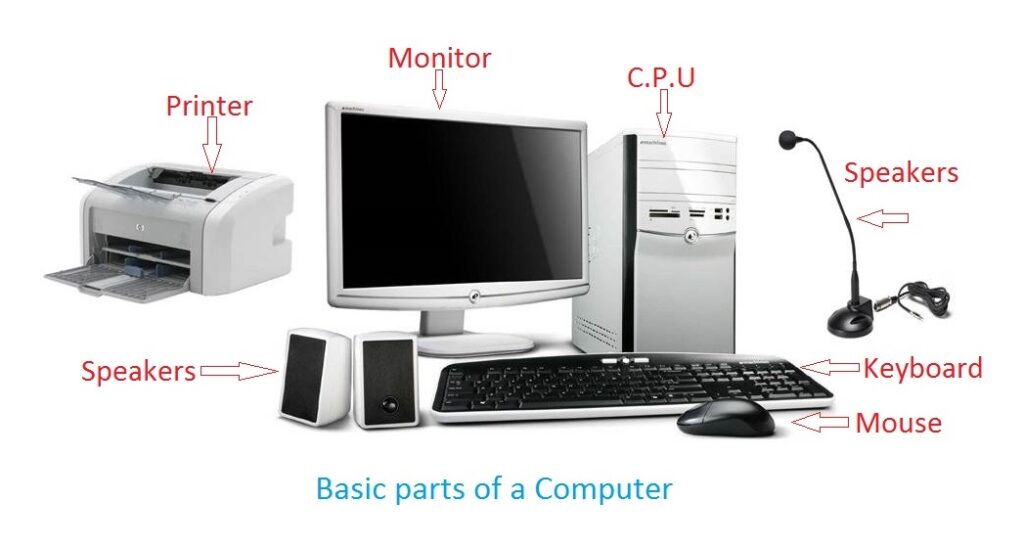
Computer and its components
A computer is an electronic device that can perform various tasks by executing instructions provided by the user or pre-programmed software. It consists of several key components that work together to enable its functionality. Here are the primary components of a typical computer:
- Central Processing Unit (CPU): Also known as the processor, the CPU is the “brain” of the computer. It carries out instructions and performs calculations, managing the operations of the entire system.
- Memory: Computers have two main types of memory: RAM (Random Access Memory) and storage memory. RAM provides temporary storage for data and instructions that the CPU needs to access quickly. Storage memory (such as hard disk drives or solid-state drives) stores data and software files persistently.
- Motherboard: The motherboard is the main circuit board that connects and provides communication between various components of the computer. It houses the CPU, memory modules, storage interfaces, expansion slots, and other essential connectors.
- Graphics Processing Unit (GPU): The GPU is responsible for rendering and displaying images, videos, and animations. It offloads graphics-related tasks from the CPU, making it essential for gaming, video editing, and other graphics-intensive applications.
- Input Devices: These include devices used to input data or commands into the computer, such as the keyboard, mouse, touch pad, stylus, and microphone. They allow users to interact with the computer and provide input for processing.
- Output Devices: Output devices display or provide information to the user. Common examples include the monitor (display), speakers, headphones, and printers.
- Storage Devices: Apart from the main storage memory, computers may have additional storage devices like external hard drives, USB flash drives, and optical drives (CD/DVD/Blu-ray) for additional data storage and backup purposes.
- Power Supply Unit (PS U): The PS U converts electrical power from an outlet into a form usable by the computer components. It supplies power to the motherboard, CPU, and other internal hardware.
- Expansion Cards: These cards can be added to the motherboard to enhance the computer’s capabilities. Examples include graphics cards, sound cards, and networking cards.
- Cooling System: Computers generate heat during operation, so cooling systems, such as fans or liquid cooling solutions, are used to dissipate heat and keep the components within their operating temperature range.
These are the primary components of a computer, but there are many other peripheral devices and connectors that can be connected to expand its functionality, such as network adapters, Wi-Fi cards, webcams, scanners, and more.
What is required Computer and its components
To assemble a functional computer, you would typically need the following components:
- CPU (Central Processing Unit)
- Motherboard
- Memory (RAM)
- Storage device (Hard Disk Drive or Solid-State Drive)
- Power Supply Unit (PS U)
- Graphics Processing Unit (GPU) (optional if the CPU has integrated graphics)
- Input devices (keyboard and mouse)
- Output devices (monitor or display, speakers or headphones)
- Computer case or chassis
- Cooling system (fans or liquid cooling)
- Cables and connectors for internal and external connections
Additionally, you may need the following items:
- Operating System (such as Windows, macO S, or Linux)
- Software applications for various tasks (e.g., office suite, web browser, media player, etc.)
- Additional peripheral devices (e.g., printer, scanner, webcam, etc.)
- Internet connectivity (via Ethernet or Wi-Fi)
It’s important to ensure compatibility between the components, such as choosing a compatible CPU for the motherboard’s socket, matching the type and speed of RAM supported by the motherboard, and selecting a power supply with adequate wattage to support the components.
Building a computer requires knowledge of assembling the hardware components and installing the necessary software. If you’re not familiar with the process, it’s recommended to consult guides or seek assistance from someone experienced in computer assembly.
Who is required Computer and its components
Computer and its components are required by a wide range of individuals and organizations. Here are some examples of who may need a computer and its components:
- Individuals: Computers are used by individuals for various purposes, such as personal computing, entertainment, communication, and education. People use computers for tasks like web browsing, word processing, gaming, multimedia consumption, online communication, creative work, and more.
- Students: Computers are essential for students of all levels, from elementary school to university. Students use computers for research, writing papers, creating presentations, accessing online learning resources, and collaborating with peers.
- Professionals: Computers are crucial tools for professionals in various fields. They are used by professionals in business, finance, engineering, design, healthcare, journalism, programming, and many other industries. Computers enable professionals to perform tasks like data analysis, graphic design, software development, project management, accounting, and more.
- Businesses: Computers are the backbone of modern businesses. They are used for tasks such as communication, data management, accounting, inventory management, customer relationship management, marketing, and running specialized software for specific industries. Businesses often require multiple computers and a network infrastructure to support their operations.
- Researchers and Scientists: Researchers and scientists rely on computers for data analysis, simulations, modeling, and running complex algorithms. High-performance computers, often with specialized components like powerful CPU s and GPU s, are used in scientific research, weather forecasting, computational biology, and other data-intensive fields.
- Government and Institutions: Governments, public institutions, and organizations such as hospitals, libraries, and research institutes use computers for administrative tasks, record keeping, data management, communication, and providing services to the public.
- Creative Professionals: Artists, designers, photographers, filmmakers, and musicians heavily rely on computers for their creative work. Specialized software and high-performance hardware components are used for tasks like image and video editing, 3D modeling, audio production, and animation.
- Gamer s: Gaming enthusiasts and professional gamer s use powerful computers with high-performance graphics cards to play the latest video games. These computers often require advanced cooling systems and gaming peripherals such as gaming keyboards, mice, and monitors.
These are just a few examples of the wide range of individuals and organizations that require computers and their components. Computers have become an integral part of our personal and professional lives, enabling us to perform a multitude of tasks efficiently and effectively.
When is required Computer and its components
Computers and their components are required in various situations and scenarios. Here are some common instances when computers and their components are needed:
- Personal Use: Individuals require computers for personal use, such as browsing the internet, accessing email, social media, entertainment (movies, music, gaming), word processing, and general computing tasks.
- Education: Students and educators rely on computers for research, online learning, accessing educational resources, writing papers, creating presentations, and collaborating with peers.
- Work and Professional Use: Computers are essential for professionals in almost every industry. They are used for tasks such as data analysis, project management, communication, accounting, document creation, software development, design work, and more.
- Business Operations: Computers play a vital role in business operations. They are used for tasks like inventory management, customer relationship management (CR M), financial transactions, record-keeping, employee management, marketing, and running specialized software for specific industries.
- Scientific Research: Researchers and scientists use computers for data analysis, simulations, modeling, and running complex algorithms. High-performance computers are often required for scientific research, weather forecasting, genetic analysis, and other data-intensive tasks.
- Creative Work: Professionals in creative fields such as graphic design, video editing, animation, and music production rely on computers and their components for their work. Specialized software and hardware are necessary to handle the demands of these creative tasks.
- Gaming: Gaming enthusiasts and professional gamers require high-performance computers with powerful graphics cards and other components to play the latest video games.
- Government and Institutions: Governments, public institutions, and organizations use computers for administrative tasks, record-keeping, data management, communication, and providing services to the public.
- Communication and Connectivity: Computers and their components are essential for internet connectivity, email communication, video conferencing, online collaboration, and accessing cloud-based services.
- Research and Development: Companies and organizations involved in research and development rely on computers for designing and testing new products, running simulations, and conducting experiments.
These are just a few examples of situations and scenarios where computers and their components are required. The versatility and functionality of computers make them indispensable in many aspects of modern life.
Where is required Computer and its components
Computers and their components are required in various locations and environments. Here are some common places where computers are necessary:
- Homes: Many households have at least one computer for personal use, whether it’s for work, education, entertainment, or communication purposes.
- Offices: Computers are ubiquitous in office environments. They are used for tasks like word processing, data analysis, email communication, project management, and accessing company resources.
- Schools and Educational Institutions: Educational institutions rely heavily on computers for teaching, learning, research, and administration. Computers are used in classrooms, computer labs, libraries, and administrative offices.
- Libraries: Libraries provide public access to computers and the internet for research, studying, and accessing educational resources.
- Retail Stores: Computers are used in retail stores for inventory management, point-of-sale systems, and customer service tasks.
- Banks and Financial Institutions: Computers are essential in the banking and finance industry for tasks like online banking, transactions, account management, and financial analysis.
- Healthcare Facilities: Computers play a crucial role in healthcare settings. They are used for patient records, medical imaging, laboratory tests, research, and other medical applications.
- Research Facilities: Research institutions, laboratories, and scientific facilities require computers for data analysis, simulations, modeling, and running specialized software for research purposes.
- Manufacturing and Industrial Settings: Computers are utilized in manufacturing and industrial environments for tasks like process control, automation, quality control, and inventory management.
- Entertainment Venues: Computers are used in entertainment venues such as cinemas, concert halls, and gaming centers for ticketing, multimedia playback, sound systems, and gaming stations.
- Government Institutions: Government offices, agencies, and departments use computers for administrative tasks, record-keeping, data management, and communication.
- Internet Cafes: Internet cafes provide public access to computers and the internet for browsing, gaming, and general computer use.
- Public Spaces: Computers are sometimes available in public spaces such as airports, train stations, and community centers for public use.
- Research Centers and Scientific Facilities: Research centers, scientific institutions, and space agencies rely on powerful computers and specialized components for scientific research, simulations, and analysis.
These are just a few examples of the places where computers and their components are required. In essence, computers are used wherever there is a need for data processing, communication, access to information, and automation in various domains of life.
How is required Computer and its components
The process of acquiring and setting up a computer and its components can vary depending on the specific requirements and circumstances. Here is a general overview of how computers and their components are typically acquired and set up:
- Assessing Needs: Determine the purpose and intended use of the computer. Consider factors such as processing power, memory capacity, storage requirements, and any specific hardware or software needs.
- Research and Selection: Research available options for CPU s, motherboards, memory, storage devices, graphics cards, power supplies, and other necessary components. Consider factors like compatibility, performance, budget, and user reviews. Select the components that meet your requirements.
- Purchase: Purchase the selected components from reputable vendors or online retailers. Ensure compatibility between the components, such as matching the socket type of the CPU with the motherboard, selecting the right type and speed of RAM, and choosing appropriate storage capacity.
- Assembly: If you are comfortable and knowledgeable about computer assembly, you can assemble the components yourself. Otherwise, seek assistance from someone experienced or consider professional assembly services. Carefully follow the manufacturer’s instructions and ensure proper handling to prevent damage to the components.
- Installation: Install the CPU onto the motherboard, attach the memory modules, connect the storage devices, install the power supply, and connect all necessary cables and connectors. Install the graphics card if required. Ensure all connections are secure.
- Operating System and Software: Install the operating system (such as Windows, macO S, or Linux) on the storage device. Follow the installation instructions provided by the operating system. Install necessary drivers and software applications based on your needs.
- Setup and Configuration: Power on the computer and follow the on-screen instructions to complete the initial setup of the operating system. Configure settings such as language, time zone, network connections, and user accounts.
- Updates and Security: Install any available updates for the operating system, drivers, and software applications to ensure optimal performance and security. Install reliable antivirus and security software to protect the computer from malware and other threats.
- Peripheral Setup: Connect and set up input devices such as the keyboard, mouse, and any other peripherals like printers, scanners, or webcams. Connect the monitor or display and adjust the resolution and display settings as needed.
- Testing and Troubleshooting: Power on the computer and run tests to ensure all components are functioning correctly. Troubleshoot any issues that may arise, such as driver conflicts, hardware malfunctions, or connectivity problems.
- Regular Maintenance: Keep the computer and its components clean and free from dust. Regularly update software, perform backups, and maintain proper cooling to prevent overheating.
Remember, the specific process may vary based on the components, operating system, and individual requirements. It is essential to refer to the documentation provided by the component manufacturers and follow proper safety measures during assembly and installation.
Case study on Computer and its components
Case Study: Setting up a Gaming Computer
Background: Alex is an avid gamer and wants to build a high-performance gaming computer to enjoy the latest video games with optimal graphics and smooth game play. Alex has some experience with computer hardware and wants to assemble the system by themselves. They have a budget of $2,000 for the components.
Requirements:
- Powerful CPU and GPU for smooth gaming performance.
- Sufficient RAM for multitasking and running demanding games.
- Fast and spacious storage for game installations.
- A reliable power supply to handle the system’s power requirements.
- A gaming-oriented motherboard with necessary expansion slots and connectivity options.
- A high-quality gaming monitor and gaming peripherals.
Solution:
- Research and Selection: Alex researches various components and reads reviews to select the best options within their budget. They choose the following components:
- CPU: AMD Ryze n 7 5800 X
- GPU: NVIDIA Ge Force RT X 307 0
- Motherboard: ASU S ROG Strix B 5 50-F Gaming
- RAM: Corsair Vengeance R GB Pro 16 GB (2 x 8 GB) DD R 4
- Storage: Samsung 980 PRO 500 GB NV Me SS D for OS and crucial applications, Seagate Barracuda 2 TB HDD for game storage
- Power Supply: Corsair RM 750 x
- Case: NZ X T H 510
- Monitor: AS US TU F Gaming VG 27 A Q
- Keyboard and Mouse: Logitech G 502 HERO and Logitech G 513 Carbon
- Purchase: Alex purchases the components from different online retailers and ensures compatibility between them.
- Assembly: Alex carefully assembles the components, following the manufacturer’s instructions and taking necessary precautions to avoid static discharge. They install the CPU, attach the cooler, insert the RAM modules, connect the storage devices and power supply, and mount the GPU. They securely connect all cables and ensure proper airflow within the case.
- Operating System and Software: Alex installs Windows 10 on the SS D and updates the necessary drivers and software.
- Setup and Configuration: After powering on the computer, Alex completes the initial setup, configures language and region settings, connects to the internet, and creates a user account.
- Peripheral Setup: Alex connects the gaming monitor using Display Port, configures the display settings, and adjusts the refresh rate and resolution for optimal gaming experience. They connect the gaming keyboard and mouse, ensuring the drivers are installed.
- Testing and Troubleshooting: Alex powers on the system and runs stress tests to ensure stability and proper performance. They check for any driver conflicts, update firmware, and troubleshoot any issues that arise during the testing process.
- Completion: Alex now has a fully functional gaming computer ready to deliver an immersive gaming experience with high graphics settings and smooth game play.
Conclusion: By researching and carefully selecting the components, Alex successfully builds a gaming computer that meets their requirements within the given budget. They can now enjoy their favorite games with excellent performance and visual quality. Regular maintenance and updates will ensure the longevity and optimal performance of the system.
White paper on Computer and its components
Title: A Comprehensive Overview of Computers and Their Components
Abstract: This white paper provides a comprehensive overview of computers and their components. It explores the fundamental concepts behind computers, the key components that make up a computer system, and their functionalities. The paper aims to educate readers about the essential aspects of computer hardware and foster a better understanding of how computers function.
Table of Contents:
- Introduction 1.1 Definition and Importance of Computers 1.2 Evolution of Computers
- Computer Architecture 2.1 Von Neum ann Architecture 2.2 CPU (Central Processing Unit) 2.3 Memory (RAM) 2.4 Storage Devices 2.5 Input and Output Devices 2.6 Motherboard 2.7 Power Supply Unit
- Central Processing Unit (CPU) 3.1 Components and Functionality 3.2 CPU Types and Architectures 3.3 Clock Speed and Performance 3.4 Cache Memory
- Memory (RAM) 4.1 Role of RAM in Computer Systems 4.2 Types of RAM 4.3 RAM Capacity and Performance 4.4 RAM Upgrades and Considerations
- Storage Devices 5.1 Hard Disk Drives (HDD) 5.2 Solid-State Drives (SS D) 5.3 Optical Drives 5.4 Flash Memory 5.5 External Storage Options
- Graphics Processing Unit (GPU) 6.1 Role of GPU in Computer Systems 6.2 GPU Architecture and Processing Power 6.3 Integrated vs. Dedicated GPU s
- Input and Output Devices 7.1 Keyboards and Mice 7.2 Monitors and Displays 7.3 Printers and Scanners 7.4 Audio Devices 7.5 Other Input and Output Devices
- Motherboard 8.1 Function and Components 8.2 Form Factors and Compatibility 8.3 Expansion Slots and Ports 8.4 BIOS and UEF I
- Power Supply Unit (PS U) 9.1 Importance and Functionality 9.2 Wattage and Efficiency 9.3 Power Connectors and Safety Considerations
- Conclusion
The white paper provides an in-depth exploration of each component, discussing their functionalities, types, performance considerations, and relevant factors to consider during selection and configuration. It aims to equip readers with a solid understanding of computer hardware and its role in overall system performance.
By delving into the core components of computers, readers will gain the knowledge necessary to make informed decisions when building or upgrading computer systems, troubleshoot common issues, and better comprehend the interplay between various components.
Note: This white paper provides a comprehensive overview of computers and their components. It is intended for educational purposes and does not delve into the specifics of advanced or specialized computer systems.