
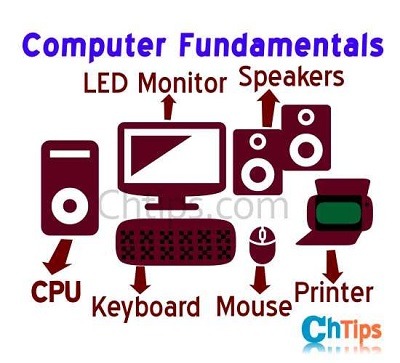
Computer fundamentals
Computer fundamentals encompass the basic concepts and components that form the foundation of modern computing. Understanding these fundamentals is crucial for anyone seeking to develop a solid grasp of computer technology. Here are some key aspects of computer fundamentals:
- Hardware:
- Central Processing Unit (CPU): The CPU is the brain of the computer, responsible for executing instructions and performing calculations.
- Memory: Both primary memory (RAM) and secondary memory (hard drives, solid-state drives) store data and instructions for processing.
- Input Devices: Devices like keyboards, mice, and scanners enable users to input data and commands into the computer.
- Output Devices: Devices like monitors, printers, and speakers display or produce the results of computer processing.
- Storage Devices: Devices such as hard drives, solid-state drives, and optical drives store data and programs for long-term use.
- Software:
- Operating System: The operating system (e.g., Windows, macO S, Linux) manages hardware resources, provides user interfaces, and runs applications.
- Application Software: Programs like word processors, spreadsheets, web browsers, and media players designed for specific tasks.
- Programming Languages: Languages like Python, Java, and C++ allow developers to write software applications and systems.
- Data Representation:
- Binary System: Computers use the binary number system, which consists of 0s and 1 s, to represent and process data.
- Bits and Bytes: A bit is the smallest unit of data in computing, representing either 0 or 1. A byte consists of 8 bits and is the basic unit for storing and processing data.
- Computer Architecture:
- Von Neumann Architecture: The theoretical model on which most modern computers are based, with separate components for processing, memory, input/output, and control.
- Input-Process-Output Cycle: The computer receives input, processes it using the CPU and memory, and produces output through output devices.
- Networking:
- Local Area Network (LAN) and Wide Area Network (WAN): LAN connects devices within a limited area, while WAN connects devices over larger geographical distances.
- Protocols: Communication protocols like TC P/IP govern the transmission and reception of data across networks.
- Internet: The global network of interconnected networks that allows communication and access to information worldwide.
- Security:
- Cyber security: Measures and practices to protect computer systems, networks, and data from unauthorized access, damage, or theft.
- Malware: Malicious software, such as viruses, worms, and ransomware, designed to disrupt or gain unauthorized access to computers and networks.
- Computer Organization:
- Input-Output Devices: Devices that allow users to interact with the computer and provide input or receive output.
- Memory Hierarchy: The organization of memory systems, from high-speed and small-capacity cache memory to larger and slower main memory and secondary storage.
- Arithmetic and Logic Unit (AL U): The component of the CPU that performs arithmetic calculations and logical operations.
Understanding computer fundamentals provides a solid foundation for exploring more advanced topics in computer science, programming, and IT. Whether you’re a user, developer, or aspiring IT professional, a grasp of these fundamentals is essential for effectively working with computers and related technologies.
What is required Computer fundamentals
Computer fundamentals encompass the foundational knowledge and understanding of the basic concepts, components, and operations of computers. These fundamentals are essential for anyone looking to navigate and work with computer technology effectively. Here are some key aspects of required computer fundamentals:
- Hardware:
- Central Processing Unit (CPU): The primary component that carries out instructions and performs calculations in a computer.
- Memory: Both primary memory (Random Access Memory or RAM) and secondary memory (hard drives, solid-state drives) used for storing data and instructions.
- Input Devices: Devices such as keyboards, mice, scanners, and touchscreens used to input data and commands into the computer.
- Output Devices: Devices like monitors, printers, speakers, and projectors used to display or produce the results of computer processing.
- Storage Devices: Devices like hard drives, solid-state drives, and optical drives used for long-term data storage.
- Software:
- Operating System: Software that manages computer hardware resources, provides a user interface, and allows users to run applications.
- Application Software: Programs designed for specific tasks, such as word processors, spreadsheets, web browsers, and media players.
- Programming Languages: Languages like Python, Java, C++, and JavaScript used to develop software applications and systems.
- Data Representation:
- Binary System: The numerical system used by computers, consisting of 0s and 1s, which represent data and instructions.
- Bits and Bytes: Bits are the smallest units of data in computing, and bytes are made up of eight bits and serve as the basic unit of storage and processing.
- Computer Architecture:
- Von Neum ann Architecture: The foundational design concept of most modern computers, characterized by the separation of memory, processing, input/output, and control units.
- Input-Process-Output Cycle: The sequence of events in which the computer receives input, processes it using the CPU and memory, and produces output through output devices.
- Networking:
- Local Area Network (LAN) and Wide Area Network (WAN): LAN connects devices within a limited area, while WAN connects devices over larger geographical distances.
- Protocols: Communication protocols like TC P/IP that govern the transmission and reception of data across networks.
- Internet: The global network of interconnected networks that enables communication and access to information worldwide.
- Security:
- Cyber security: Measures and practices employed to protect computer systems, networks, and data from unauthorized access, damage, or theft.
- Malware: Malicious software, such as viruses, worms, and ransomware, designed to disrupt computer operations or gain unauthorized access.
- Computer Organization:
- Input-Output Devices: Devices that allow users to interact with the computer and provide input or receive output.
- Memory Hierarchy: The organization of memory systems, from high-speed but small-capacity cache memory to larger but slower main memory and secondary storage.
- Arithmetic and Logic Unit (AL U): The component of the CPU responsible for performing arithmetic calculations and logical operations.
Understanding computer fundamentals provides a solid foundation for further exploration of advanced topics in computer science, programming, and IT. Whether you are a user, a developer, or aspiring IT professional, a strong grasp of these fundamentals is essential for effectively working with computers and leveraging their capabilities.
Who is required Computer fundamentals
Computer fundamentals are required by a wide range of individuals who interact with computers and rely on computer technology in their personal or professional lives. Here are some specific roles and groups that require computer fundamentals:
- Students and Learners: Students at all levels of education, from primary school to university, benefit from understanding computer fundamentals. It helps them navigate digital learning platforms, perform research, create presentations, and develop basic programming skills.
- Professionals in Information Technology (IT): IT professionals, including system administrators, network administrators, software developers, and cyber security experts, require a strong understanding of computer fundamentals to effectively manage computer systems, networks, software, and data.
- Business Professionals: Professionals in various fields, such as marketing, finance, human resources, and operations, rely on computer technology for data analysis, communication, project management, and productivity tools. Understanding computer fundamentals allows them to leverage technology to perform their job responsibilities efficiently.
- Entrepreneurs and Small Business Owners: Individuals starting or running their own businesses need computer fundamentals to set up and manage computer systems, utilize business software, and make informed decisions regarding technology investments.
- Digital Professionals: Professionals working in digital marketing, web development, graphic design, content creation, and other digital fields require computer fundamentals to utilize specialized software, create digital content, and understand the technical aspects of online platforms and systems.
- Home Users: Computer fundamentals are essential for everyday home computer users who rely on computers for communication, entertainment, online shopping, financial management, and personal productivity. Understanding computer fundamentals helps them troubleshoot basic issues, protect their systems from threats, and make informed decisions when purchasing and using technology.
- Job Seekers: In today’s job market, computer skills and knowledge are highly sought after by employers. Understanding computer fundamentals enhances job prospects across various industries and positions, as employers increasingly require computer literacy and familiarity with basic software applications.
It’s worth noting that while the level of required computer fundamentals may vary depending on the specific role or context, having a solid understanding of the basic concepts and components of computers is beneficial for everyone in the digital age.
When is required Computer fundamentals
Computer fundamentals are required in various situations and contexts. Here are some common scenarios where computer fundamentals are necessary:
- Education: Computer fundamentals are essential for students at all levels of education. From elementary school to higher education, students need a foundational understanding of computers to complete assignments, conduct research, and engage in digital learning platforms.
- Professional Careers: In today’s digital world, computer fundamentals are required in many professional careers. Whether you work in IT, business, marketing, healthcare, finance, or any other field, having a solid understanding of computers is crucial for tasks such as data analysis, communication, project management, and utilizing specialized software.
- Technology-related Roles: If you are pursuing a career in information technology (IT), computer science, software development, cyber security, or any technology-related field, computer fundamentals are a prerequisite. These roles involve working directly with computer systems, networks, programming languages, and software applications.
- Digital Professions: Professions that involve digital marketing, web development, graphic design, content creation, and other digital fields require computer fundamentals. These roles involve using specialized software, understanding web technologies, and working with digital platforms and tools.
- Entrepreneurship and Small Business: If you are starting your own business or working as a small business owner, computer fundamentals are necessary for setting up and managing computer systems, utilizing business software, and leveraging technology for business operations.
- Job Applications: When applying for jobs, computer fundamentals are often listed as a requirement or a desirable skill. Employers expect candidates to have basic computer literacy and proficiency in using common software applications such as word processors, spreadsheets, and presentation tools.
- Everyday Life: Even in non-professional contexts, computer fundamentals are necessary for everyday tasks such as using email, browsing the internet, managing personal finances, and utilizing digital communication tools. Understanding computer fundamentals helps individuals navigate and make the most of technology in their daily lives.
It’s important to note that the specific level of computer fundamentals required may vary depending on the situation and the role. Basic computer literacy is a minimum expectation in most cases, while more specialized knowledge may be necessary for technical roles or advanced applications.
Where is required Computer fundamentals
Computer fundamentals are required in various settings and industries where computers are utilized. Here are some specific areas where computer fundamentals are necessary:
- Information Technology (IT) Departments: IT departments in organizations of all sizes require professionals with a solid understanding of computer fundamentals. These professionals handle tasks such as managing computer networks, troubleshooting hardware and software issues, implementing security measures, and maintaining system performance.
- Software Development: Computer fundamentals are crucial for software developers who create applications, websites, and other software solutions. Understanding computer architecture, programming languages, data structures, and algorithms is essential for writing efficient and functional code.
- Networking and Telecommunications: Professionals working in networking and telecommunications need computer fundamentals to design, implement, and maintain computer networks. This includes tasks such as configuring routers and switches, troubleshooting network connectivity issues, and ensuring data security.
- Data Analysis and Data Science: Data analysts and data scientists rely on computer fundamentals to manipulate and analyze large datasets using software tools and programming languages. Understanding data representation, databases, statistical analysis, and machine learning algorithms is essential for these roles.
- Cyber security: Computer fundamentals are vital for professionals working in cyber security. They need to understand computer architecture, network protocols, software vulnerabilities, encryption techniques, and security best practices to protect computer systems and networks from threats.
- Research and Development: Researchers and scientists across various disciplines, including engineering, physics, biology, and social sciences, require computer fundamentals to conduct experiments, analyze data, and simulate models using computational tools.
- Education and Training: Computer fundamentals are taught in educational institutions at various levels. Teachers and instructors need a strong understanding of these fundamentals to effectively deliver computer-related courses and guide students in developing their skills.
- Digital Media and Design: Professionals in the digital media and design industry, such as graphic designers, animators, and video editors, rely on computer fundamentals to work with specialized software tools, create visual content, and optimize media files for different platforms.
- E-commerce and Online Businesses: With the rise of e-commerce, understanding computer fundamentals is essential for managing online stores, processing online payments, optimizing websites for search engines, and utilizing digital marketing strategies.
- Healthcare and Medical Technology: Healthcare professionals and medical technicians often work with computer systems, electronic medical records, medical imaging devices, and other technology-driven tools. Understanding computer fundamentals helps ensure accurate data management, efficient workflows, and effective use of medical technology.
These are just a few examples of the many industries and sectors where computer fundamentals are required. In today’s digital age, computer literacy and a strong understanding of computer fundamentals are increasingly important across a wide range of professional domains.
How is required Computer fundamentals
Computer fundamentals are required in various ways to effectively interact with and utilize computer technology. Here are some key aspects of how computer fundamentals are necessary:
- Computer Operation: Understanding computer fundamentals is crucial for basic computer operation. This includes knowledge of the power button, operating system interface, file management, and using input and output devices like keyboards, mice, and monitors.
- Software Usage: Computer fundamentals are necessary to effectively use software applications. This includes tasks such as creating and editing documents, spreadsheets, and presentations; navigating web browsers; using email clients; and utilizing specialized software for specific tasks like graphic design or video editing.
- Troubleshooting and Problem-Solving: Computer fundamentals enable individuals to identify and troubleshoot common hardware and software issues. This includes diagnosing connectivity problems, resolving software conflicts, and understanding error messages to find solutions.
- Data Management: Computer fundamentals are required for managing data efficiently. This includes organizing files and folders, creating backups, understanding file formats, and ensuring data security through practices like password protection and encryption.
- Internet and Online Communication: Understanding computer fundamentals is essential for navigating the internet, searching for information, and engaging in online communication. This includes using web browsers, understanding URLs, setting up internet connections, and utilizing communication tools like email, messaging platforms, and video conferencing software.
- Digital Security and Privacy: Computer fundamentals play a crucial role in maintaining digital security and privacy. This includes knowledge of safe browsing practices, avoiding phishing scams, understanding malware threats, setting up firewalls, and using antivirus software.
- Basic Programming Concepts: Computer fundamentals often involve an introduction to basic programming concepts. Understanding programming constructs like variables, loops, conditionals, and functions helps individuals automate tasks, solve problems, and gain a deeper understanding of how software works.
- Digital Literacy: Computer fundamentals contribute to digital literacy, which encompasses the ability to use technology effectively, evaluate digital information critically, and engage responsibly in the digital world. This includes understanding online ethics, copyright laws, digital citizenship, and responsible use of technology.
- Adaptation to Technological Advancements: Computer fundamentals provide a foundation for adapting to technological advancements. As technology evolves, having a solid understanding of computer fundamentals enables individuals to quickly learn and adapt to new tools, software, and devices.
- Collaboration and Communication: Computer fundamentals facilitate effective collaboration and communication in digital environments. This includes sharing files, collaborating on documents, using project management tools, and understanding online etiquette for professional communication.
Computer fundamentals are required in various aspects of personal and professional life, as technology continues to play a central role in our interconnected world. Whether it’s performing basic computer tasks, utilizing software applications, troubleshooting issues, or engaging in digital communication, a strong understanding of computer fundamentals is essential for efficient and effective computer usage.
Case study on Computer fundamentals
Here’s a case study that demonstrates the importance of computer fundamentals in a business setting:
Case Study: Company X and Computer Fundamentals
Company X is a medium-sized retail business that operates both brick-and-mortar stores and an online e-commerce platform. The company relies heavily on computer technology for various aspects of its operations, including inventory management, sales tracking, customer support, and marketing.
Challenge: The management team at Company X noticed that employees were encountering difficulties with computer-related tasks, leading to inefficiencies and errors. They realized that many employees lacked a solid understanding of computer fundamentals, hindering their ability to leverage technology effectively.
Solution: To address the challenge, Company X implemented a computer fundamentals training program for its employees. The program aimed to enhance their knowledge and skills in using computers and common software applications.
- Basic Computer Operation: The training program started with the fundamentals of computer operation, teaching employees how to power on and shut down computers, navigate the operating system, and use input and output devices.
- Software Applications: Employees received training on commonly used software applications such as word processors, spreadsheets, and email clients. They learned essential skills like creating and editing documents, formatting spreadsheets, and managing email effectively.
- File Management: Understanding file management was emphasized, including organizing files and folders, creating backups, and retrieving files efficiently. This helped employees maintain organized and accessible data.
- Internet and Online Communication: Employees were trained on safe internet browsing practices, effective search techniques, and responsible online communication. They learned about online security threats, phishing scams, and the importance of protecting sensitive information.
- Troubleshooting and Problem-Solving: The training program included modules on basic troubleshooting techniques to help employees address common hardware and software issues. They learned how to identify and resolve connectivity problems, software conflicts, and printer errors.
Results: After implementing the computer fundamentals training program, Company X observed several positive outcomes:
- Improved Efficiency: Employees became more proficient in using computers and software applications, leading to increased efficiency in their day-to-day tasks. They were able to complete assignments and process data more quickly and accurately.
- Reduced Errors: With a better understanding of computer fundamentals, employees made fewer errors in data entry, document formatting, and other computer-based tasks. This resulted in improved accuracy and minimized the need for error corrections.
- Increased Collaboration: The training program enhanced employees’ ability to collaborate digitally. They were able to share files, collaborate on documents, and communicate effectively using digital platforms. This improved teamwork and streamlined communication within the organization.
- Enhanced Problem-Solving Skills: Employees developed basic problem-solving skills related to computer issues. They were more confident in troubleshooting and resolving minor hardware and software problems independently, reducing dependence on IT support.
- Adaptability to Technological Changes: Equipped with a strong foundation in computer fundamentals, employees were better prepared to adapt to technological changes. They quickly grasped new software tools and features, enabling the organization to leverage advancements in technology more effectively.
Conclusion: This case study highlights the importance of computer fundamentals in a business setting. By investing in employee training and improving their understanding of computer fundamentals, Company X was able to enhance efficiency, reduce errors, foster collaboration, and promote adaptability to technological changes. A solid grasp of computer fundamentals proved crucial in maximizing the benefits of technology and driving overall business success.
White paper on Computer Fundamentals
Title: A Comprehensive Guide to Computer Fundamentals
Abstract: This white paper provides a comprehensive overview of computer fundamentals, covering the essential concepts and components that form the foundation of modern computer technology. It aims to serve as a resource for individuals seeking to understand the fundamental principles behind computers and their operation. The paper covers topics such as computer architecture, operating systems, hardware components, software applications, networking, and data management. By delving into these key areas, readers will gain a solid understanding of computer fundamentals and be better equipped to navigate the digital landscape.
- Introduction
- Importance of Computer Fundamentals
- Objectives of the White Paper
- Computer Architecture
- Overview of Computer Architecture
- Central Processing Unit (CPU)
- Memory (RAM and ROM)
- Input and Output Devices
- Storage Devices
- Operating Systems
- Definition and Functions of Operating Systems
- Types of Operating Systems (Windows, macO S, Linux)
- User Interfaces (GUI vs. Command Line)
- Software Applications
- Overview of Software Applications
- Types of Software (Operating Systems, Productivity Tools, Multimedia Software, etc.)
- Software Licensing and Distribution Models
- Computer Networks
- Introduction to Computer Networks
- Network Components (Routers, Switches, Modems)
- Network Protocols (TCP/IP, HTTP, DN S)
- Local Area Networks (LAN) and Wide Area Networks (WAN)
- Data Management
- Data Representation (Binary, Hexadecimal)
- File Systems and File Management
- Databases and Database Management Systems
- Data Backup and Recovery
- Security and Privacy
- Overview of Computer Security
- Common Security Threats (Malware, Phishing, Social Engineering)
- Security Best Practices (Passwords, Firewalls, Encryption)
- Data Privacy and Protection
- Emerging Technologies and Trends
- Cloud Computing
- Internet of Things (Io T)
- Artificial Intelligence (AI)
- Blockchain Technology
- Practical Applications and Case Studies
- Real-world examples showcasing the application of computer fundamentals in different industries and contexts.
- Conclusion
- Recap of Key Points
- Importance of Continual Learning and Adaptation in the Evolving Digital Landscape
By the end of this white paper, readers will have a solid understanding of computer fundamentals, enabling them to navigate the digital world more effectively, make informed decisions regarding technology usage, and lay a foundation for further exploration and specialization in specific areas of computer science and technology.
Note: This is a suggested structure for a white paper on computer fundamentals. The content and depth of each section can be tailored based on the target audience and specific objectives of the document.