
Introduction to personal computer
Introduction to Personal Computers
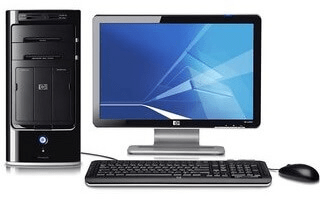
Personal computers (PCs) have become an integral part of our daily lives, revolutionizing the way we work, communicate, and access information. A personal computer is a general-purpose device designed for individual use, typically consisting of a computer tower or desktop unit, a monitor, a keyboard, and a mouse. It allows users to perform a wide range of tasks, from basic word processing and web browsing to complex data analysis and graphic design.
The evolution of personal computers can be traced back to the 1970 s when the first microcomputers were introduced. These early models were basic in terms of processing power and storage capacity compared to today’s PCs. However, they laid the foundation for the rapid advancement of technology and the widespread adoption of personal computers.
Components of a Personal Computer:
- Central Processing Unit (CPU): The CPU is the “brain” of the computer, responsible for executing instructions and performing calculations. It consists of a microprocessor that interprets and carries out instructions from software programs.
- Memory (RAM): Random Access Memory (RAM) is a temporary storage area that holds data and instructions while the computer is running. RAM allows for fast access to data, facilitating smooth multitasking and efficient program execution.
- Storage Devices: PCs utilize various storage devices to store and retrieve data. Hard Disk Drives (HDD s) and Solid-State Drives (SSD s) are commonly used for long-term storage of files, documents, and applications. Additionally, optical drives (such as CD/DVD drives) and USB flash drives enable data transfer and backup.
- Input and Output Devices: Input devices allow users to provide commands and data to the computer. Common input devices include keyboards, mice, touch pads, and scanners. Output devices, such as monitors, printers, and speakers, display or produce the results of computer processing for users.
- Operating System (OS): The operating system is the software that manages and controls the basic functions of a computer. It provides a user interface for interacting with the computer, manages hardware resources, and allows software applications to run.
- Software Applications: Personal computers are capable of running a wide range of software applications, including word processors, spreadsheets, presentation software, web browsers, graphic design tools, and more. These applications enable users to perform specific tasks and fulfill their computing needs.
Uses and Benefits of Personal Computers:
- Productivity: PCs empower users to complete tasks efficiently, such as creating documents, managing spreadsheets, and conducting research. They offer tools for communication (email, video conferencing), collaboration, and project management.
- Education: Personal computers are widely used in educational institutions, facilitating research, learning, and online educational resources. They provide access to digital libraries, educational software, and interactive learning materials.
- Entertainment: PCs offer a wide range of entertainment options, including streaming movies and TV shows, playing video games, listening to music, and accessing online content platforms. They also serve as a platform for creative pursuits, such as digital art, music production, and video editing.
- Communication: PCs enable users to connect with others around the world through email, social media platforms, instant messaging, and video calls. They serve as a hub for online communication and networking.
- Information Access: Personal computers provide access to vast amounts of information through the internet. Users can browse websites, search for information, and access online resources for research, news, and learning.
- Personal Organization: PCs offer tools for personal organization and time management, including calendars, to-do lists, reminders, and note-taking applications.
- Personal ization: Personal computer s allow users to customize their computing experience by selecting software, adjusting settings, and personalizing the desktop appearance to suit their preferences.
Conclusion: Personal computers have
What is required Introduction to personal computer
To provide a comprehensive introduction to personal computers, the following key elements should be covered:
- Definition and Purpose: Clearly define what a personal computer is and explain its primary purpose, which is to perform various tasks and functions for individual users.
- Evolution and History: Provide a brief overview of the historical development and evolution of personal computers, highlighting key milestones and advancements that have shaped their current form and capabilities.
- Components and Hardware: Explain the essential components that make up a personal computer, including the central processing unit (CPU), memory (RAM), storage devices, input and output devices, and the role they play in computer operation.
- Operating Systems: Introduce the concept of an operating system and its significance in enabling users to interact with a personal computer. Discuss popular operating systems used on PCs, such as Windows, macO S, and Linux.
- Software Applications: Describe the wide range of software applications available for personal computers, including productivity tools, web browsers, multimedia applications, and specialized software for various tasks and industries.
- Connectivity and Networking: Discuss how personal computers can connect to the internet and other devices, emphasizing the importance of networking and the various technologies involved, such as Ethernet, Wi-Fi, and Bluetooth.
- User Interface: Explain the graphical user interface (GUI) and how it allows users to interact with the computer through icons, menus, and windows. Discuss the role of input devices like keyboards, mice, and touchscreens in navigating the user interface.
- Common Uses and Benefits: Highlight the practical applications and benefits of personal computers in areas such as productivity, education, entertainment, communication, information access, and personal organization.
- Security and Privacy: Address the importance of computer security and privacy, emphasizing the need for antivirus software, strong passwords, data encryption, and safe online practices to protect personal information and mitigate risks.
- Emerging Trends and Future Developments: Touch upon emerging technologies and trends in the realm of personal computers, such as cloud computing, artificial intelligence, virtual reality, and the impact they may have on the future of personal computing.
By covering these key points, an introduction to personal computers can provide readers with a solid foundation of knowledge to understand the purpose, components, functionality, and potential of these ubiquitous devices in our modern digital age.
Who is required Introduction to personal computer
An introduction to personal computers is valuable and relevant for various individuals, including:
- Beginners: Individuals who have little to no prior experience with personal computers can benefit from an introduction that provides them with a basic understanding of what a personal computer is, how it functions, and how it can be used for various tasks.
- Students: Students at all levels of education, from primary school to university, can benefit from an introduction to personal computers. It equips them with the necessary knowledge and skills to utilize computers for research, assignments, online learning, and collaboration.
- Professionals: Many professions require the use of personal computers for tasks such as document creation, data analysis, project management, communication, and accessing specialized software applications. An introduction to personal computers helps professionals maximize their productivity and effectively utilize computer resources.
- Job Seekers: In today’s digital world, computer literacy is often a prerequisite for many job positions. An introduction to personal computers helps job seekers understand the basic concepts and terminology related to computers, which can enhance their employ ability and enable them to adapt to digital work environments.
- Senior Citizens: Older adults who may not have grown up with personal computers can benefit from an introduction that familiarizes them with the basics. It can help them stay connected with family and friends through digital communication platforms, access online services, and engage in lifelong learning.
- Technological Enthusiasts: Individuals with an interest in technology or those seeking to delve deeper into the workings of personal computers can use an introduction as a stepping stone to further explore computer architecture, programming, hardware components, and advanced software applications.
- Home Users: Everyday users who rely on personal computers for various purposes, such as browsing the internet, managing personal finances, organizing photos, or streaming media, can benefit from an introduction that enhances their understanding and skills in utilizing their computer effectively and safely.
Overall, an introduction to personal computers is required for anyone who wants to navigate the digital world, harness the power of technology, and make the most of the capabilities offered by personal computers in their personal, educational, or professional lives.
When is required Introduction to personal computer
An introduction to personal computers is required in various situations and scenarios, including:
- Educational Settings: Introduction to personal computers is often included in educational curricula, especially at the elementary and secondary levels. It helps students develop digital literacy skills, familiarize themselves with computer basics, and prepares them for future academic and professional endeavors.
- Workplaces: Many workplaces require employees to have a basic understanding of personal computers. An introduction to personal computers is often necessary when on boarding new employees or when transitioning to new technologies or software applications within an organization.
- Job Training: Individuals undergoing job training in fields that involve computer usage, such as administrative roles, customer service, data entry, or office management, may need an introduction to personal computers to ensure they have the necessary skills to perform their job duties effectively.
- Technology Courses and Workshops: Institutes or organizations offering technology courses or workshops may include an introduction to personal computers as a foundational component. This allows participants to familiarize themselves with computer basics before diving into more advanced topics.
- Self-Learning and Skill Development: Individuals who want to enhance their computer literacy or acquire new skills may seek out introductions to personal computers through online tutorials, courses, or self-study resources. This is particularly useful for self-directed learners or those looking to transition into technology-related fields.
- Senior Citizen Programs: Programs aimed at assisting senior citizens in adapting to the digital age often include an introduction to personal computers. It helps older adults understand the basic concepts of computer usage, navigate the internet, and communicate with family and friends online.
- Community Centers and Libraries: Community centers and libraries often offer workshops or classes on computer basics, including an introduction to personal computers. These resources enable community members to develop essential computer skills and access digital services.
- Personal Interest: Individuals who have a personal interest in understanding and utilizing personal computers may seek out introductions to expand their knowledge and proficiency. This includes hobbyists, enthusiasts, or individuals who want to explore new ways to leverage technology in their personal lives.
In summary, an introduction to personal computers is required whenever individuals need to gain a foundational understanding of computer basics, whether for educational purposes, professional development, adapting to technology in the workplace, or personal interest in digital literacy.
Where is required Introduction to personal computer
An introduction to personal computers is required in various settings and contexts, including:
- Schools and Educational Institutions: Introduction to personal computers is often integrated into school curricula, computer science courses, and technology education programs. It is essential for students to develop computer literacy skills and understand the basics of personal computers to support their learning and future academic pursuits.
- Workplace and Business Environments: Many workplaces require employees to have a basic understanding of personal computers. This is especially true in office settings where computer usage is prevalent. Employees need to be familiar with computer operations, software applications, and basic troubleshooting to perform their job responsibilities effectively.
- Vocational and Technical Training Institutes: Institutes offering vocational and technical courses often include an introduction to personal computers as part of their programs. This ensures that students acquire the necessary computer skills and knowledge relevant to their chosen fields, such as computer-aided design (CAD), programming, or digital marketing.
- Community Centers and Libraries: Community centers and libraries frequently provide computer literacy programs and workshops to help community members enhance their computer skills. An introduction to personal computers in these settings allows individuals to gain basic computer knowledge, access digital resources, and improve their digital literacy.
- Senior Centers and Retirement Communities: Senior centers and retirement communities often offer classes and workshops specifically designed to introduce older adults to personal computers. These programs aim to bridge the digital divide and empower seniors to use computers for communication, accessing information, and engaging in online activities.
- Online Learning Platforms: Introduction to personal computers is available through various online learning platforms. These platforms offer self-paced courses, tutorials, and resources for individuals to learn computer fundamentals from the comfort of their own homes.
- Technology Support Services: Technology support services, such as computer repair shops and customer service centers, may offer introductory sessions to help customers understand the basics of personal computers, troubleshoot common issues, and make informed decisions when it comes to purchasing or upgrading their computer systems.
- Personal and Home Use: Individuals who have recently acquired a personal computer for home use may seek out introductory resources to familiarize themselves with its functionalities, software applications, and basic maintenance. This allows them to make the most of their personal computer for various tasks, such as internet browsing, communication, entertainment, and productivity.
In summary, an introduction to personal computers is required in educational institutions, workplaces, vocational training centers, community centers, senior centers, online learning platforms, technology support services, and for personal use. The aim is to provide individuals with the necessary knowledge and skills to understand, operate, and leverage personal computers in their respective contexts.
How is required Introduction to personal computer
An introduction to personal computers is required to provide individuals with the knowledge and skills necessary to understand, operate, and make effective use of personal computers. Here’s how it is required:
- Foundational Knowledge: An introduction to personal computers helps individuals develop foundational knowledge about the basic components, functionalities, and operation of personal computers. This includes understanding the role of the central processing unit (CPU), memory, storage devices, input/output devices, and the operating system.
- Computer Literacy: Introduction to personal computers is essential for developing computer literacy skills. It helps individuals understand common computer terminologies, navigate the user interface, and perform basic tasks such as file management, using software applications, and connecting to networks.
- Digital Skills: In today’s digital era, being proficient with personal computers is crucial for various tasks and activities. An introduction to personal computers equips individuals with digital skills, such as using word processing software, spreadsheets, presentation tools, web browsing, and email communication.
- Productivity and Efficiency: Knowing how to effectively use personal computers enhances productivity and efficiency in various domains. Whether it’s creating documents, organizing files, managing schedules, or utilizing productivity tools, an introduction to personal computers enables individuals to work more efficiently.
- Problem Solving: Personal computers can encounter technical issues or errors, and an introduction to personal computers helps individuals develop problem-solving skills to troubleshoot common problems. This includes basic troubleshooting techniques, understanding error messages, and seeking appropriate support when needed.
- Digital Safety and Security: An introduction to personal computers emphasizes the importance of digital safety and security. It educates individuals about safe online practices, the risks of malware and phishing, the importance of strong passwords, and data backup strategies to protect personal information.
- Adaptation to Technological Advancements: The field of personal computers is constantly evolving, with new technologies, software, and trends emerging. An introduction to personal computers helps individuals stay updated with technological advancements and adapt to new features and functionalities.
- Personal and Professional Development: Understanding personal computers is valuable for personal growth and professional development. It expands opportunities for career advancement, improves job prospects, and enables individuals to leverage technology in various fields and industries.
- Empowering Individuals: An introduction to personal computers empowers individuals to take advantage of the digital world, access online resources, engage in e-learning, connect with others globally, and utilize technology to enhance their personal and professional lives.
Overall, an introduction to personal computers is required to equip individuals with the foundational knowledge, skills, and confidence to effectively use personal computers, navigate the digital landscape, and adapt to technological advancements for personal, educational, and professional purposes.
Case Study: Introduction to Personal Computers in an Educational Setting
Introduction: This case study explores the implementation of an introductory course on personal computers in a high school setting. The aim of the course is to provide students with a foundational understanding of personal computers, develop essential digital skills, and prepare them for future academic and professional pursuits.
Background: The high school identified the need to enhance students’ computer literacy skills to align with the increasing importance of technology in various fields. The introduction to personal computers course was designed to address this need and empower students with the knowledge and skills required to navigate the digital landscape confidently.
Implementation:
- Curriculum Development: The school formed a team of educators, technology specialists, and curriculum developers to create a comprehensive curriculum for the introduction to personal computers course. The curriculum was designed to cover fundamental concepts, hardware components, operating systems, software applications, internet usage, and digital safety.
- Course Structure: The course was structured as a semester-long elective, open to students from all grade levels. It consisted of both theoretical and practical components to provide a well-rounded learning experience. Theoretical lessons included lectures, discussions, and multimedia presentations, while practical sessions focused on hands-on computer activities and projects.
- Learning Resources: A variety of learning resources were curated, including textbooks, online tutorials, interactive websites, and instructional videos. These resources supplemented the lessons, allowing students to explore topics at their own pace and reinforce their understanding of personal computers.
- Hands-on Experience: To ensure students gained practical experience, the school provided a dedicated computer lab equipped with personal computers. Students had regular lab sessions where they applied their knowledge, practiced using software applications, and developed digital skills through assignments and projects.
- Collaborative Learning: The course emphasized collaborative learning and teamwork. Students were encouraged to engage in group projects, problem-solving activities, and presentations, fostering collaboration and communication skills alongside computer literacy.
- Assessments: Various assessment methods were employed to evaluate students’ understanding and progress. These included quizzes, practical exams, project presentations, and written assignments. The assessments aimed to measure both theoretical knowledge and practical skills acquired during the course.
Results:
- Enhanced Computer Literacy: The introduction to personal computers course significantly enhanced students’ computer literacy. Students developed a strong foundation in computer concepts, gained proficiency in using software applications, and became familiar with computer hardware components.
- Digital Skills Development: Through practical sessions and project work, students developed essential digital skills, such as word processing, data analysis, multimedia editing, internet research, and effective online communication.
- Increased Confidence: Students’ confidence in using personal computers and technology grew throughout the course. They felt more comfortable navigating the user interface, troubleshooting minor issues, and exploring new software applications.
- Academic and Career Readiness: The course prepared students for future academic pursuits and career opportunities that required computer literacy. Students felt more confident in using computers for research, creating presentations, and collaborating on digital platforms.
- Positive Feedback: Both students and parents provided positive feedback on the course, expressing gratitude for the practical skills gained and the relevance of the content in today’s digital world. The course became increasingly popular among students, leading to high enrollment rates in subsequent semesters.
Conclusion: The implementation of an introduction to personal computers course in a high school setting proved to be successful in enhancing students’ computer literacy, developing essential digital skills, and preparing them for academic and professional endeavors. By providing a strong foundation in personal computers, the school equipped students with the knowledge and confidence needed to navigate the digital landscape effectively and adapt to future technological advancements.
White paper on Introduction to Personal Computer
Title: Introduction to Personal Computers: A Comprehensive White Paper
Abstract: This white paper serves as an introduction to personal computers (PCs) and provides a comprehensive overview of their history, components, operating systems, and usage. It aims to familiarize readers with the fundamental concepts and characteristics of personal computers, enabling them to develop a solid foundation of knowledge in this domain. Whether you are a beginner seeking to understand PCs or a technology enthusiast looking to refresh your understanding, this white paper will serve as a valuable resource.
Table of Contents:
- Introduction 1.1 Definition and Evolution 1.2 Importance and Impact
- History of Personal Computers 2.1 Predecessors to Personal Computers 2.2 The Microcomputer Revolution 2.3 Advancements and Milestones
- Components of a Personal Computer 3.1 Central Processing Unit (CPU) 3.2 Random Access Memory (RAM) 3.3 Storage Devices 3.4 Input and Output Devices 3.5 Motherboard and Expansion Cards 3.6 Power Supply 3.7 Cooling Systems
- Operating Systems for Personal Computers 4.1 Introduction to Operating Systems 4.2 Popular Operating Systems 4.2.1 Microsoft Windows 4.2.2 macOS 4.2.3 Linux
- Software and Applications 5.1 Productivity Software 5.2 Multimedia Software 5.3 Gaming Software 5.4 Web Browsers and Internet Applications
- Personal Computer Usage 6.1 Home and Personal Use 6.2 Business and Work Applications 6.3 Education and Learning 6.4 Entertainment and Media 6.5 Gaming
- Security Considerations 7.1 Malware and Antivirus Software 7.2 Data Protection and Backup 7.3 Network Security
- Future Trends and Emerging Technologies 8.1 Artificial Intelligence and Machine Learning 8.2 Virtual Reality and Augmented Reality 8.3 Internet of Things (IoT) 8.4 Quantum Computing
- Conclusion
This white paper provides an in-depth exploration of personal computers, from their historical roots to modern-day applications. By delving into the components, operating systems, software, and security considerations, readers will gain a comprehensive understanding of PCs and their significance in today’s digital age. With insights into emerging technologies, this white paper also offers a glimpse into the future of personal computing.