
Fundamental of computers and operating system
Fundamentals of Computers and Operating Systems
Computers and operating systems are fundamental components of modern technology and play a critical role in various aspects of our lives. Understanding the basics of computers and operating systems is essential for anyone seeking to navigate the digital world and work with technology effectively. Here, we’ll cover the key concepts and components of computers and operating systems:
1. Computers: A computer is an electronic device that processes and stores data to perform various tasks. It consists of hardware and software components.
Hardware Components:
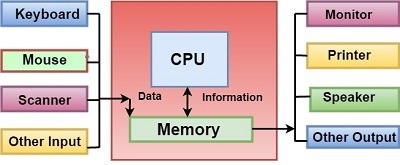
- Central Processing Unit (CPU): The brain of the computer, responsible for executing instructions and performing calculations.
- Memory (RAM): Temporary storage that holds data and instructions that the CPU is currently using.
- Storage Devices: Hard drives (HDDs) and solid-state drives (SSDs) store data, programs, and the operating system.
- Input Devices: Keyboard, mouse, touchscreen, etc., allow users to input data and commands.
- Output Devices: Monitor, printer, speakers, etc., display or output processed information.
Software Components:
- Operating System (OS): Software that manages hardware resources, provides user interfaces, and allows applications to run.
- Applications: Software programs that perform specific tasks, such as word processing, web browsing, and gaming.
- Utilities: Tools that help maintain and optimize the computer’s performance and security.
2. Operating Systems: An operating system is a software layer that acts as an intermediary between hardware and software, managing computer resources and providing a user interface.
Key Functions of an Operating System:
- Process Management: Allocates CPU time to different tasks (processes) and ensures efficient multitasking.
- Memory Management: Manages system memory to optimize performance and ensure proper allocation to processes.
- File System Management: Organizes and manages files and directories on storage devices.
- Device Management: Controls communication between hardware devices (e.g., printers, disks) and the computer.
- User Interface: Provides interfaces for users to interact with the computer, such as command-line interfaces (CLI) or graphical user interfaces (GUI).
- Security and Access Control: Protects the system from unauthorized access and enforces user permissions.
Types of Operating Systems:
- Single-User, Single-Tasking: Older systems that allow one user to perform one task at a time.
- Single-User, Multi-Tasking: Modern systems that enable one user to run multiple applications simultaneously.
- Multi-User: Supports multiple users, each with their own environment and applications.
- Real-Time: Designed for time-sensitive applications like industrial control systems or medical equipment.
Popular Operating Systems:
- Windows: Microsoft’s OS known for its widespread use on personal computers.
- macOS: Apple’s OS for Macintosh computers, known for its user-friendly interface and design.
- Linux: Open-source OS available in various distributions, widely used in servers and embedded systems.
Conclusion: Understanding the fundamentals of computers and operating systems is crucial for using technology effectively, troubleshooting issues, and making informed decisions about hardware and software. Whether you’re a casual user or a budding IT professional, having a grasp of these concepts will empower you to navigate the digital world with confidence.
What is required Fundamentals of computers and operating system
To grasp the fundamentals of computers and operating systems, you’ll need to cover a range of topics that provide a foundational understanding of how computers work and how operating systems manage their resources. Here’s what’s required to build a solid understanding:
1. Basic Computer Architecture:
- Understand the main components of a computer, including the CPU, memory, storage devices, input/output devices, and their roles in processing and storing data.
2. Data Representation:
- Learn about binary and hexadecimal number systems, how computers represent data using bits, and the concept of bytes.
3. Computer Organization:
- Explore concepts like machine language, assembly language, and how instructions are executed by the CPU.
4. Memory and Storage:
- Understand the difference between RAM (random access memory) and storage devices (HDDs, SSDs), and how data is stored and retrieved.
5. Operating System Basics:
- Learn about the purpose of an operating system, its functions, and how it manages hardware resources and provides a user interface.
6. Process Management:
- Understand how an operating system manages processes, multitasking, and CPU scheduling to ensure efficient use of resources.
7. Memory Management:
- Learn how an operating system handles memory allocation, virtual memory, and memory protection to optimize system performance.
8. File System Management:
- Explore how files and directories are organized, stored, and managed by the operating system.
9. Input/ Output Management:
- Understand how the operating system interacts with input and output devices to facilitate data exchange.
10. User Interfaces: – Learn about different types of user interfaces, including command-line interfaces (CLI) and graphical user interfaces (GUI).
11. System Security and Access Control: – Explore how operating systems enforce security measures, manage user accounts, and control access to resources.
12. Types of Operating Systems: – Familiarize yourself with different types of operating systems, including single-user, multi-user, real-time, and networked systems.
13. Popular Operating Systems: – Gain an understanding of widely used operating systems such as Windows, macOS, and various Linux distributions.
14. Troubleshooting and Maintenance: – Learn basic troubleshooting techniques for identifying and resolving common computer and operating system issues.
15. Evolution of Computers and Operating Systems: – Study the historical development of computers and operating systems, and how they have evolved over time.
16. Basic Command-Line Usage: – Acquire some familiarity with command-line interfaces to perform simple tasks and navigate the file system.
17. Industry Trends and Advances: – Stay informed about current trends in computer hardware, software, and operating system technologies.
18. Practical Application: – Apply your knowledge by experimenting with basic tasks, setting up a simple operating system, or exploring virtualization tools.
19. Continuous Learning: – Keep up-to-date with advancements in computer architecture, operating systems, and technology by reading books, articles, and online resources.
Building a strong foundation in the fundamentals of computers and operating systems will equip you with the knowledge necessary to interact with technology effectively, troubleshoot issues, and potentially pursue further studies or careers in IT and computer science.
Who is required Fundamental Computer and operating system
The understanding of fundamental computer concepts and operating systems is beneficial for a wide range of individuals, including:
- Students:
- Those pursuing degrees in computer science, information technology, or related fields.
- Students of engineering, science, or any discipline that involves computing and technology.
- Professionals in IT and Technical Fields:
- IT professionals, system administrators, network engineers, and technical support staff.
- Software developers and programmers who need a foundational understanding of computer architecture and operating systems.
- Business and Management Professionals:
- Managers and decision-makers who work with technology teams or oversee IT projects.
- Business analysts who need to understand the basics of technology infrastructure.
- Casual Computer Users:
- Anyone who uses computers and wants to have a better understanding of how they work.
- Individuals who want to troubleshoot basic computer issues on their own.
- Entrepreneurs and Startups:
- Individuals starting technology-focused businesses who need a broad understanding of computer systems and operating systems.
- Educators:
- Teachers and educators who want to introduce computer science and technology concepts to students.
- Career Changers:
- Individuals transitioning into IT or technology-related fields from other professions.
- Curious Learners:
- Anyone interested in technology and computers as a hobby or for personal enrichment.
- Web Developers and Designers:
- Professionals working with websites and web applications, as an understanding of operating systems and computer architecture can aid in optimizing web performance.
- Cybersecurity Professionals:
- Those working in cybersecurity and information security, as a solid grasp of computer fundamentals helps in understanding security measures.
- Researchers and Academics:
- Researchers in fields such as artificial intelligence, data science, and computational biology who use computers extensively in their work.
- Medical and Scientific Professionals:
- Medical researchers, scientists, and engineers who use computers for data analysis and simulations.
In essence, a foundational understanding of fundamental computer concepts and operating systems is valuable across various industries and professions, enabling individuals to interact effectively with technology, make informed decisions, and adapt to the rapidly evolving digital landscape.
Understanding the fundamentals of computers and operating systems is required in various scenarios and contexts, especially in today’s technology-driven world. Here are some situations when this knowledge becomes essential:
- Education and Academics:
- When pursuing a degree or certification in computer science, information technology, engineering, or any field involving technology.
- While teaching or studying computer-related subjects at the school, college, or university level.
- Professional IT and Tech Careers:
- For IT professionals, including system administrators, network engineers, and cybersecurity experts.
- When working as a software developer, programmer, or web developer.
- While working in technical support or helpdesk roles.
- When involved in IT project management and decision-making.
- Casual Computer Use:
- To enhance your ability to use computers for everyday tasks like browsing the internet, using applications, and managing files.
- When troubleshooting basic computer issues without relying on external help.
- Entrepreneurship and Business:
- When starting a technology-focused business or managing one that relies on computer systems and applications.
- To make informed decisions about technology purchases, upgrades, and infrastructure.
- Cybersecurity and Privacy:
- When concerned about online security, data protection, and safe computing practices.
- To understand potential vulnerabilities and protect against cyber threats.
- Personal Enrichment and Hobbies:
- If you have a general interest in technology and want to understand how computers work.
- When engaging in hobbies like building custom computers or experimenting with programming.
- Transitioning to New Careers:
- If you are changing careers and need to acquire foundational tech knowledge for your new role.
- Teaching and Training:
- When instructing others on using computers and technology effectively.
- If you’re involved in training employees or clients on software applications or systems.
- Research and Data Analysis:
- For professionals conducting research or data analysis that involves computational methods.
- Scientific and Engineering Fields:
- When working with simulations, modeling, or data analysis in scientific and engineering domains.
- Art and Creativity:
- For artists and designers who use computers for digital art, graphic design, animation, and multimedia projects.
- Healthcare and Medical Research:
- When working with medical imaging, data analysis, or simulations in medical research.
- Media and Content Creation:
- For content creators, journalists, and media professionals who use computers for writing, editing, and multimedia production.
In essence, the fundamentals of computers and operating systems are required whenever you engage with technology, whether in your career, personal life, education, or creative pursuits. It empowers you to navigate the digital world confidently, make informed decisions, and effectively use the tools at your disposal.
Where is required Fundamental of Computers and Operating system
The understanding of fundamentals of computers and operating systems is required in a wide range of contexts and industries where technology plays a significant role. Here are some specific situations and fields where this knowledge is essential:
- Information Technology (IT) and Computer Science:
- IT professionals and computer scientists need a strong foundation in computer architecture and operating systems to design, develop, and manage technology solutions.
- Software Development and Programming:
- Programmers and software developers rely on computer fundamentals to write efficient and optimized code, develop applications, and troubleshoot issues.
- System Administration and Networking:
- System administrators and network engineers require knowledge of operating systems and computer hardware to maintain and manage IT infrastructure.
- Cybersecurity and Information Security:
- Cybersecurity experts need a deep understanding of computer systems and operating systems to identify vulnerabilities and protect against cyber threats.
- Web Development and Design:
- Web developers and designers use computer fundamentals to create responsive websites, optimize user interfaces, and ensure compatibility across devices.
- Data Science and Analytics:
- Professionals in data science and analytics rely on computer knowledge to process and analyze large datasets, develop algorithms, and build predictive models.
- Digital Marketing and E-Commerce:
- Marketers and e-commerce professionals use computer skills to manage online campaigns, analyze user behavior, and optimize user experiences.
- Education and Academia:
- Educators and researchers need a solid understanding of computer basics to teach and conduct research in various disciplines.
- Business Management and Decision-Making:
- Business leaders and managers require computer fundamentals to make informed technology-related decisions and manage IT projects.
- Healthcare and Medical Research:
- Medical professionals and researchers use computers to analyze medical data, conduct simulations, and advance medical research.
- Media and Creative Industries:
- Professionals in graphic design, animation, multimedia production, and digital art use computers for creative projects.
- Engineering and Manufacturing:
- Engineers and manufacturers utilize computer-aided design (CAD) software and simulations for product development and testing.
- Gaming and Entertainment:
- Game developers, designers, and testers need computer knowledge to create, optimize, and troubleshoot video games.
- Telecommunications and Networking:
- Professionals in telecommunications and networking rely on computer fundamentals to maintain and optimize communication systems.
- Scientific Research and Exploration:
- Scientists in various fields use computers for simulations, data analysis, and complex calculations.
- Aerospace and Engineering:
- Engineers and researchers in aerospace and engineering industries use computer simulations and modeling for design and testing.
In summary, the understanding of computer fundamentals and operating systems is required in virtually every industry and sector where technology is utilized. It forms the basis for effective interaction with digital tools, enables innovation, and empowers professionals to contribute meaningfully to their respective fields.
How is required Fundamentals of Computers and Operating system
The understanding of fundamentals of computers and operating systems is required in various ways, depending on your goals, interests, and career path. Here’s how this knowledge is necessary and beneficial:
1. Career Advancement:
- Many technical roles in IT, software development, system administration, and cybersecurity require a deep understanding of computer architecture and operating systems. This knowledge is essential for solving complex problems, optimizing performance, and ensuring system security.
2. Problem Solving and Troubleshooting:
- When technical issues arise, a solid foundation in computer fundamentals helps you diagnose and resolve problems efficiently. Whether it’s a software glitch or a hardware malfunction, your understanding of computers aids in finding effective solutions.
3. Software Development:
- If you’re a programmer or software developer, knowing how computers execute code and manage memory is crucial for writing efficient and reliable software. It also helps you create applications compatible with different operating systems.
4. System Administration:
- System administrators are responsible for managing and maintaining servers and networks. Knowledge of operating systems allows you to configure systems, install software, and ensure smooth operations.
5. Cybersecurity:
- In the realm of cybersecurity, understanding how operating systems work helps you identify vulnerabilities and potential attack vectors. It allows you to implement effective security measures and protect systems from threats.
6. Web Development and Design:
- Web developers need to optimize websites for performance and compatibility across various devices and browsers. Knowledge of computer fundamentals helps you design responsive, user-friendly interfaces.
7. Data Analysis and Science:
- Professionals in data analysis and science rely on computers to process and interpret large datasets. Understanding how computers handle data and perform calculations is essential for accurate analysis.
8. Effective Communication:
- When working in technology-related roles, being able to communicate technical concepts to non-technical stakeholders is crucial. A solid grasp of computer fundamentals helps you convey ideas clearly.
9. Adapting to New Technology:
- As technology evolves, new operating systems and computing paradigms emerge. Understanding the fundamentals makes it easier to learn and adapt to new technologies and platforms.
10. Personal Enrichment: – Beyond professional applications, knowledge of computers and operating systems enhances your ability to use technology effectively in your personal life. It allows you to troubleshoot issues, make informed purchasing decisions, and engage with digital tools confidently.
11. Career Flexibility: – Even if your current role doesn’t seem heavily technical, having a foundation in computer fundamentals can open doors to technical opportunities and make you a more versatile and valuable team member.
In essence, the knowledge of computer fundamentals and operating systems is required for various aspects of technology-driven careers, problem-solving, effective communication, and personal empowerment in the digital age. Whether you’re aiming for a technical role, a managerial position, or simply want to be tech-savvy, this knowledge forms the backbone of your interaction with computers and technology.
Case study on Fundamentals of Computers and operating system
Case Study: Implementing Computer Fundamentals and Operating System Principles in a Small Business Setup
Background: Imagine a small business, “TechSolutions,” offering IT services to local clients, including hardware and software troubleshooting, network setup, and data backup solutions. The company recognizes the importance of computer fundamentals and operating system principles to deliver efficient and effective services.
Challenges: TechSolutions faces several challenges that highlight the need for a solid understanding of computer fundamentals and operating systems:
- Hardware Troubleshooting: The company encounters diverse hardware issues, from malfunctioning components to compatibility problems.
- Software Compatibility: Clients use various software applications, leading to compatibility issues and software crashes.
- Data Security: Ensuring the security of client data and preventing data loss are critical concerns.
- Network Setup and Management: TechSolutions must set up and manage networks for clients, requiring a robust understanding of networking protocols and configurations.
- Efficient Resource Allocation: Properly allocating hardware resources is vital for optimizing system performance.
Solution: TechSolutions decides to apply computer fundamentals and operating system principles to address these challenges:
- Hardware Troubleshooting:
- Understanding computer architecture helps the team diagnose hardware issues accurately.
- Knowledge of components and their interactions enables efficient repair and replacement.
- Software Compatibility:
- Familiarity with operating systems helps identify compatibility issues and recommend appropriate solutions.
- Knowledge of software installation and updates ensures smooth operation of applications.
- Data Security:
- Implementing encryption, user access controls, and regular data backups based on operating system security features.
- Applying principles of secure data storage and management to protect client information.
- Network Setup and Management:
- Utilizing network protocols and configurations to set up reliable and secure networks for clients.
- Applying operating system networking tools for effective troubleshooting and management.
- Efficient Resource Allocation:
- Understanding memory management principles to optimize system performance by allocating memory effectively.
- Using operating system monitoring tools to track resource usage and identify bottlenecks.
Results: By applying computer fundamentals and operating system principles, TechSolutions achieves the following results:
- Enhanced Service Quality: TechSolutions can diagnose and resolve hardware and software issues more efficiently, leading to improved service quality and customer satisfaction.
- Data Security: Client data is better protected through secure storage practices, access controls, and regular backups.
- Efficient Network Management: TechSolutions sets up and manages networks more effectively, reducing downtime and connectivity issues for clients.
- Resource Optimization: Operating system principles are applied to allocate hardware resources efficiently, resulting in improved system performance.
- Client Trust and Loyalty: TechSolutions gains a reputation for reliable and knowledgeable services, leading to increased client trust and loyalty.
Conclusion: This case study demonstrates how a small business, TechSolutions, leveraged computer fundamentals and operating system principles to overcome challenges and enhance its IT services. By applying these principles, the company achieved better service quality, data security, network management, resource optimization, and client satisfaction. This highlights the practical importance of understanding computer fundamentals and operating systems in real-world business scenarios.
White paper on Fundamental of Computer and operating system
White Paper: Fundamentals of Computers and Operating Systems
Abstract: In the rapidly evolving digital landscape, a solid grasp of the fundamentals of computers and operating systems is essential for individuals and professionals alike. This white paper explores the core concepts, principles, and significance of computer fundamentals and operating systems in various contexts, from personal use to professional applications. By delving into the foundational knowledge that underpins modern technology, this paper aims to empower readers to navigate the digital world confidently and make informed decisions.
Table of Contents:
- Introduction 1.1. Importance of Computer Fundamentals and Operating Systems 1.2. Overview of Key Concepts
- Computer Fundamentals: Building Blocks of Technology 2.1. Computer Architecture and Components 2.2. Data Representation: Binary and Beyond 2.3. Evolution of Computing Paradigms
- Operating Systems: Orchestrators of Digital Experiences 3.1. The Role and Functions of Operating Systems 3.2. Process Management and Multitasking 3.3. Memory Management and Virtualization 3.4. File System Organization and Management
- User Interfaces: Bridging Humans and Machines 4.1. Command-Line Interfaces (CLI) vs. Graphical User Interfaces (GUI) 4.2. Human-Centered Design Principles 4.3. Accessibility and Inclusivity
- Computer Security and Privacy: Safeguarding the Digital Realm 5.1. Operating System Security Features 5.2. User Authentication and Access Controls 5.3. Data Encryption and Secure Communication
- Software Ecosystem: Applications and Compatibility 6.1. Software Installation, Updates, and Uninstallation 6.2. Software Compatibility and Troubleshooting 6.3. Open Source vs. Proprietary Software
- Networking and Connectivity: Interconnected Digital Worlds 7.1. Network Protocols and Communication 7.2. Internet Basics and Web Technologies 7.3. Cloud Computing and Virtualization
- Digital Transformation: Implications and Opportunities 8.1. Impact on Industries and Professions 8.2. Adapting to Technological Shifts 8.3. Future Trends and Emerging Technologies
- Educational Applications: Fostering Digital Literacy 9.1. Integrating Computer Fundamentals into Curricula 9.2. Lifelong Learning and Upskilling
- Conclusion: Empowering Digital Citizens 10.1. The Everlasting Relevance of Computer Fundamentals and Operating Systems 10.2. Navigating the Digital Landscape with Confidence
Acknowledgments: The authors extend their gratitude to experts in the fields of computer science, information technology, and education who contributed insights and expertise to enrich this white paper.
This comprehensive white paper delves into the fundamental principles that underpin modern computing and operating systems. By understanding these core concepts, readers are equipped to navigate the complexities of the digital world, make informed decisions, and adapt to the ever-changing technological landscape. Through education, practical application, and continuous learning, individuals and professionals can harness the power of computer fundamentals and operating systems to thrive in the digital age.