
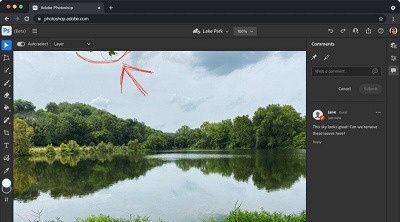
Adobe photoshop
Adobe Photoshop is a powerful and widely used raster graphics editing software developed by Adobe Inc. It is part of the Adobe Creative Cloud suite, which includes various creative tools used by professionals and enthusiasts alike. Photoshop is primarily used for image editing, retouching, and creating digital artwork. Its versatility makes it a valuable tool for photographers, graphic designers, web designers, artists, and many other creative professionals.
Key features of Adobe Photoshop include:
- Image Editing: Photoshop allows users to manipulate and enhance digital images with a wide range of tools, such as cropping, resizing, color correction, and exposure adjustments.
- Layers: One of the fundamental features of Photoshop is its support for layers. Layers enable users to work with different elements of an image separately, making it easier to edit and modify specific parts without affecting the entire image.
- Filters and Effects: Photoshop provides an extensive collection of filters and effects that can be applied to images to achieve various artistic and stylistic looks.
- Brushes: Photoshop offers a wide range of customizable brushes, including regular brushes, special effects brushes, and brush sets that cater to various creative needs.
- Selection Tools: Precise selection tools, like the lasso, magic wand, and quick selection tool, allow users to select and isolate specific areas in an image for editing or manipulation.
- Text and Typography: Photoshop supports adding and formatting text, making it suitable for creating graphics with text overlays, posters, banners, and more.
- 3D Capabilities: Photoshop has 3D capabilities, allowing users to create and manipulate 3D objects and add them to their compositions.
- Smart Objects: Smart Objects enable users to work non-destructively by embedding linked objects into their projects, which can be edited independently.
- Batch Processing: Photoshop offers the ability to apply the same adjustments or actions to multiple images simultaneously, streamlining workflow for repetitive tasks.
- Integration with other Adobe products: As part of the Adobe Creative Cloud suite, Photoshop can seamlessly integrate with other Adobe software like Adobe Illustrator, Adobe InDesign, and Adobe Lightroom.
It’s worth noting that Adobe may release updates and new features to Photoshop regularly. As of my last update in September 2021, this information reflects the core functionalities available in Adobe Photoshop.
What is required Adobe photoshop
To use Adobe Photoshop, you need a computer system that meets the minimum requirements specified by Adobe. Keep in mind that the requirements may change with new versions of the software, so it’s always best to check the official Adobe website for the most up-to-date information. As of my last update in September 2021, the basic system requirements for Adobe Photoshop are as follows:
For Windows:
- Processor: Intel® or AMD processor with 64-bit support; 2 GHz or faster processor
- Operating System: Microsoft Windows 10 (64-bit) versions 1809 and later
- RAM: 8 GB or more
- Hard Disk Space: 3.1 GB of available hard-disk space for installation; additional free space required during installation (installation on removable flash storage devices is not supported)
- Display: 1280 x 800 display resolution (at 100% scale factor)
- Graphics: NVIDIA GeForce GTX 1050 or equivalent; NVIDIA GeForce GTX 1660 or Quadro T1000 is recommended
- Video RAM: 2 GB of VRAM (4 GB recommended)
- OpenGL: OpenGL 4.0
- Internet: An internet connection is required for software activation and access to online services.
For macOS:
- Processor: Multicore Intel processor with 64-bit support
- Operating System: macOS version 10.15 (Catalina) and later
- RAM: 8 GB or more
- Hard Disk Space: 4 GB of available hard-disk space for installation; additional free space required during installation (installation on a volume that uses a case-sensitive file system, or on removable flash storage devices, is not supported)
- Display: 1280 x 800 display resolution (at 100% scale factor)
- Graphics: NVIDIA GeForce GTX 1050 or equivalent; NVIDIA GeForce GTX 1660 or Quadro T1000 is recommended
- Video RAM: 2 GB of VRAM (4 GB recommended)
- OpenGL: OpenGL 4.0
- Internet: An internet connection is required for software activation and access to online services.
Remember that these are minimum requirements, and for optimal performance, especially when working with large and complex files, more powerful hardware is recommended.
Additionally, you need to subscribe to Adobe’s Creative Cloud service to access and use Adobe Photoshop. The Creative Cloud subscription gives you access to Photoshop and other Adobe applications, cloud storage, and various other features and services offered by Adobe.
Who is required Adobe photoshop
I apologize, but I’m not sure I fully understand your question. If you meant to ask, “Who needs Adobe Photoshop?” then the answer would be:
Adobe Photoshop is a versatile tool used by various individuals and professionals across different industries. Some of the primary users who may need Adobe Photoshop include:
- Photographers: Photographers use Photoshop for retouching and enhancing their photos, adjusting colors, removing blemishes, and creating stunning visual effects.
- Graphic Designers: Graphic designers rely on Photoshop for creating logos, illustrations, posters, banners, and other graphic elements for both print and digital media.
- Web Designers: Web designers use Photoshop to design website layouts, create web graphics, and optimize images for web use.
- Digital Artists: Digital artists and illustrators utilize Photoshop’s drawing and painting tools to create digital artwork and illustrations.
- UI/UX Designers: User Interface (UI) and User Experience (UX) designers use Photoshop to create mockups, prototypes, and visual designs for websites and mobile applications.
- Marketing Professionals: Marketing professionals use Photoshop to design promotional materials, social media graphics, and advertising campaigns.
- Video Editors: Photoshop’s video editing capabilities allow video editors to perform basic video editing tasks, create animations, and work on video-related graphics.
- Architects and Interior Designers: Photoshop is used by architects and interior designers to create visualizations and renderings of buildings and interior spaces.
- Academic and Educational Purposes: Photoshop is also utilized in educational settings for teaching graphic design, digital art, and other visual-related courses.
- Hobbyists and Enthusiasts: Many individuals who have an interest in image editing, photography, or digital art use Photoshop for personal projects and creative endeavors.
Adobe Photoshop’s wide range of features and capabilities make it an essential tool for anyone working with digital images and graphics, whether professionally or as a hobbyist. However, it’s worth noting that there are other alternatives to Photoshop available, depending on specific needs and budget constraints.
When is required Adobe photoshop
Adobe Photoshop is required whenever you need to perform tasks related to image editing, graphic design, and digital artwork. It is the go-to software for a wide range of professionals and creative enthusiasts in various industries. Here are some common scenarios when Adobe Photoshop is required:
- Image Editing and Retouching: When you want to edit, enhance, or retouch photographs, Photoshop provides a powerful set of tools and features to accomplish these tasks. This could include adjusting colors, removing blemishes, adding effects, and more.
- Graphic Design: For creating graphics, logos, illustrations, posters, banners, and other visual elements for print or digital media, Photoshop is an essential tool. It allows designers to work with layers, text, shapes, and various effects.
- Web Design: Web designers use Photoshop to create website layouts, mockups, and optimize images for web use. It’s valuable for designing user interfaces and components for websites and applications.
- Digital Art and Illustration: Photoshop’s drawing and painting tools make it a popular choice for digital artists and illustrators to create artwork from scratch or manipulate existing images.
- Photography and Post-Processing: Photographers often use Photoshop for post-processing their images, adjusting exposure, color correction, applying filters, and making other enhancements to achieve their desired look.
- UI/UX Design: User Interface (UI) and User Experience (UX) designers utilize Photoshop to create visual designs and prototypes for websites and mobile apps.
- Marketing and Advertising: Marketers and advertisers use Photoshop to create graphics and visuals for promotional materials, social media campaigns, and advertisements.
- Video Editing and Animation: Photoshop’s video editing capabilities allow users to work on video-related graphics, create animations, and add visual effects to video projects.
- Architectural Visualization: Architects and interior designers use Photoshop to create visualizations and renderings of buildings and interior spaces.
- Academic and Educational Purposes: Educational institutions use Photoshop for teaching digital art, graphic design, and related courses.
Adobe Photoshop’s versatility and feature-rich environment make it a valuable tool in various professional fields and personal projects where image manipulation, digital artwork, and graphic design are involved. Whether you are a professional designer, photographer, artist, or a hobbyist with creative interests, Photoshop offers a wide range of capabilities to help you achieve your goals.
Where is required Adobe photoshop
Adobe Photoshop is required on a compatible computer or device where you intend to perform tasks related to image editing, graphic design, and digital artwork. It is a desktop application, so you need to install it on your computer to use it. Adobe offers versions of Photoshop for both Windows and macOS operating systems.
You can access Adobe Photoshop through a subscription to Adobe’s Creative Cloud service. With a Creative Cloud subscription, you can download and install Adobe Photoshop on your computer and receive regular updates and new features as they become available.
Adobe Photoshop is used in various places, including:
- Professional Settings: Adobe Photoshop is widely used in professional settings by graphic designers, photographers, web designers, illustrators, marketing professionals, video editors, and many other creative industries.
- Educational Institutions: Many educational institutions, such as schools, colleges, and universities, use Adobe Photoshop in their graphic design, digital art, and media-related courses.
- Personal Use: Many enthusiasts and hobbyists also use Adobe Photoshop for personal projects, creative endeavors, and social media content creation.
- Businesses: Businesses use Adobe Photoshop to create marketing materials, promotional graphics, and other visual content.
- Printing and Publishing: In the printing and publishing industries, Photoshop is used to prepare images for print, create illustrations, and design book covers, magazines, and other publications.
- Web Development: Web developers and designers use Photoshop to create website layouts, mockups, and optimize images for web use.
In essence, Adobe Photoshop is required anywhere that involves image editing, graphic design, or digital artwork. It’s a highly versatile and widely used application in various fields, making it an essential tool for professionals and enthusiasts who work with visual content.
How is required Adobe photoshop
It seems there might be a misunderstanding in the phrasing of your question. If you are asking “How is Adobe Photoshop required?” or “How is Adobe Photoshop used?” the answer would be as follows:
Adobe Photoshop is required or used in various ways and by a diverse range of professionals and creative enthusiasts. Here are some common ways Adobe Photoshop is utilized:
- Image Editing and Retouching: Adobe Photoshop is extensively used for editing and retouching digital images. It allows users to adjust colors, remove blemishes, correct exposure, and manipulate various aspects of an image to achieve the desired visual result.
- Graphic Design: Graphic designers rely on Adobe Photoshop to create logos, posters, banners, brochures, social media graphics, and other visual elements. Photoshop’s versatile tools and layers enable designers to work with complex compositions and achieve high-quality designs.
- Digital Art and Illustration: Many digital artists and illustrators use Adobe Photoshop to create stunning digital artwork. It offers a wide range of brushes, blending modes, and drawing tools to bring ideas to life on a digital canvas.
- Web Design and UI/UX: Web designers and UI/UX professionals use Photoshop to design website layouts, create user interface elements, and produce web-ready graphics.
- Photography and Post-Processing: Photographers utilize Adobe Photoshop for post-processing their images. It enables them to enhance photographs, adjust colors, and apply filters to achieve specific looks.
- 3D Design and Visualization: Adobe Photoshop offers 3D capabilities, allowing designers to work with 3D models and create 3D artwork and visualizations.
- Text and Typography: Photoshop provides tools to work with text, enabling users to create typographic designs and combine text with images seamlessly.
- Collage and Montage: Photoshop’s layering system makes it easy to create photo collages and montages by blending multiple images together.
- Special Effects and Visual Enhancements: Adobe Photoshop is commonly used to apply various special effects and enhance visual elements in images and designs.
- Batch Processing: For tasks that involve repetitive actions, Photoshop offers batch processing capabilities to apply the same adjustments or effects to multiple images simultaneously, saving time and effort.
Adobe Photoshop’s versatility and powerful toolset make it an indispensable tool for professionals in design, photography, and digital art. It caters to a wide range of creative needs, allowing users to express their ideas and achieve stunning visual results.
Case study on Adobe photo shop
As an AI language model, I don’t have access to real-time data or specific case studies. However, I can provide you with a hypothetical case study illustrating how Adobe Photoshop might be used in a real-world scenario. Let’s consider a fictional scenario involving a small business that specializes in custom t-shirt design and printing:
Case Study: Custom T-Shirt Design Business
Background: The business, “Creative Tees,” is a small start-up that offers personalized t-shirt design and printing services. They work with various clients, including individuals, teams, and small businesses, to create custom t-shirts for events, promotions, and merchandise sales.
Challenge: Creative Tees wants to enhance their design capabilities and offer more creative and unique t-shirt designs to attract a broader customer base. They also aim to streamline their design process to accommodate more orders and maintain high-quality output.
Solution: To address these challenges, Creative Tees decides to incorporate Adobe Photoshop into their design workflow. They purchase a Creative Cloud subscription that includes Adobe Photoshop, enabling them to access the latest version of the software and receive regular updates.
Implementation:
- Design Team Training: The design team at Creative Tees undergoes training on Adobe Photoshop to familiarize themselves with the software’s tools and features. They learn about image editing, creating vector graphics, using brushes, and utilizing layers for non-destructive editing.
- Creative Design Exploration: With Adobe Photoshop, the design team can now explore a wide range of creative possibilities. They experiment with different design elements, typography, color schemes, and image compositions to come up with unique and appealing t-shirt designs.
- Client Collaboration: Adobe Photoshop allows the design team to collaborate effectively with clients. They can share design concepts, mockups, and prototypes for feedback and revisions. The team uses smart objects to create mockups with the clients’ artwork on realistic t-shirt templates.
- Image Editing and Enhancement: Clients often provide photographs or existing artwork for their custom t-shirts. Adobe Photoshop’s powerful image editing tools enable the team to enhance these images, adjust colors, and ensure they are suitable for printing.
- Vector Graphics: Adobe Photoshop’s vector capabilities are utilized to create scalable and high-quality graphics for t-shirts. The team designs vector-based logos, icons, and artwork that can be easily resized without losing quality.
- Batch Processing: To handle a high volume of t-shirt orders, Creative Tees utilizes Adobe Photoshop’s batch processing feature. They create actions to apply specific design elements or effects to multiple t-shirt designs simultaneously, saving time and effort.
Results: By implementing Adobe Photoshop into their workflow, Creative Tees achieves the following results:
- Expanded Design Capabilities: The design team can create more diverse and unique t-shirt designs, attracting a broader customer base and meeting a wider range of design preferences.
- Improved Efficiency: Streamlining the design process using Photoshop’s features allows the team to handle more orders efficiently without compromising on quality.
- Enhanced Client Satisfaction: Clients are impressed with the realistic mockups and the ability to see their designs come to life. The collaboration process becomes smoother, resulting in higher client satisfaction.
- Brand Recognition: Creative Tees gains a reputation for delivering high-quality, creative, and personalized t-shirts, leading to increased brand recognition and customer referrals.
In conclusion, the integration of Adobe Photoshop into Creative Tees’ design workflow has proven to be instrumental in enhancing their capabilities, efficiency, and customer satisfaction, ultimately contributing to the success and growth of their custom t-shirt design business.
White paper on Adobe photoshop
Title: Adobe Photoshop: A Comprehensive White Paper
Abstract: This white paper provides an in-depth analysis of Adobe Photoshop, a leading raster graphics editing software widely used by professionals and enthusiasts in various creative industries. The paper explores the history, key features, benefits, applications, and future trends of Adobe Photoshop. It also discusses its impact on digital art, graphic design, photography, and other visual media, emphasizing its role as a versatile and essential tool in modern creative workflows.
Table of Contents:
- Introduction
- Overview of Adobe Photoshop
- Historical Background
- Key Features and Functionality
- Image Editing and Manipulation
- Layers and Non-Destructive Editing
- Filters and Effects
- Brushes and Painting Tools
- Typography and Text Editing
- 3D Capabilities
- Smart Objects and Smart Filters
- Selection Tools
- Integration with Adobe Creative Cloud
- Applications and Use Cases
- Photography and Post-Processing
- Graphic Design and Illustration
- Web Design and User Interface (UI) Design
- Digital Art and Painting
- Video Editing and Animation
- Architectural Visualization
- Marketing and Advertising
- Benefits and Advantages
- Versatility and Wide Range of Applications
- User-Friendly Interface
- Extensive Library of Presets and Resources
- Integration with Other Creative Cloud Apps
- Regular Updates and Improvements
- Extensive Community and Support
- Evolution and Technological Advancements
- Photoshop Versions and Milestones
- Transition to Subscription Model
- Cloud-Based Collaboration and Storage
- AI and Machine Learning Integration
- Challenges and Limitations
- Learning Curve for Beginners
- Hardware Requirements and Performance
- Software Complexity and Bloat
- Competition and Alternatives
- Future Trends and Predictions
- Continued Integration with AI and Automation
- Augmented Reality (AR) and Virtual Reality (VR)
- Cloud-Based Rendering and Processing
- Mobile and Tablet Enhancements
- Improved Cross-Platform Collaboration
- Conclusion
- Recap of Adobe Photoshop’s Impact
- Future Prospects and Recommendations
Conclusion: Adobe Photoshop has become an indispensable tool for designers, photographers, artists, and other creative professionals worldwide. Its continuous development and integration with emerging technologies have kept it at the forefront of the industry. This white paper provides a comprehensive understanding of Adobe Photoshop’s key features, applications, advantages, and future trends. As technology evolves, Photoshop is expected to maintain its relevance and continue shaping the future of digital art and visual media. Whether for photography, graphic design, web development, or digital art, Adobe Photoshop remains a powerful and versatile choice for creative expression and professional projects.