
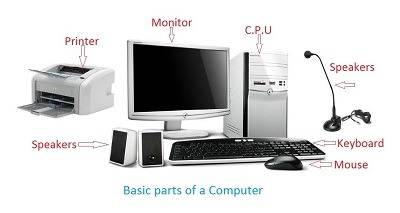
Basic of computer
Computers are complex machines that are used to process, store, and retrieve information. They consist of hardware and software components that work together to perform various tasks. Here are some basics of computer systems:
- Hardware: It refers to the physical components of a computer system. The main hardware components include:
- Central Processing Unit (CPU): It is the “brain” of the computer responsible for executing instructions and performing calculations.
- Memory: Computers have different types of memory, including Random Access Memory (RAM) for temporary data storage and Read-Only Memory (ROM) for storing firmware and boot instructions.
- Storage Devices: Hard disk drives (HDD s), solid-state drives (SSD s), and optical drives are used for long-term data storage.
- Input and Output Devices: Examples include keyboards, mice, monitors, printers, and speakers, which allow users to interact with the computer and receive output.
- Software: It refers to the programs and instructions that tell the hardware what to do. Software can be divided into two main categories:
- System Software: This includes the operating system (e.g., Windows, macO S, Linux), which manages computer resources and provides a user interface. Device drivers and utility programs are also part of system software.
- Application Software: These are programs designed for specific tasks or purposes, such as word processors, web browsers, graphic design tools, and video games.
- Operating System (OS): It is the primary software that manages computer hardware and software resources and provides common services to other software applications. It controls the execution of programs, manages memory and storage, handles input and output, and provides a user interface.
- Data Representation: Computers use binary code (0s and 1 s) to represent and process data. Each 0 or 1 is called a bit, and eight bits form a byte. Different combinations of bits represent characters, numbers, and instructions.
- Computer Networks: Computers can be connected to form networks, allowing them to communicate and share resources. Local Area Networks (LAN s) connect computers in close proximity, while Wide Area Networks (WAN s) connect computers across larger distances, often through the internet.
- Algorithms and Programming: Algorithms are step-by-step procedures or instructions for solving problems or performing specific tasks. Programming involves writing code using programming languages to create software applications and systems.
These basics provide a general understanding of computer systems. However, the field of computer science and technology is vast and constantly evolving, with many specialized areas and concepts to explore.
What is required Basic of computer
To have a basic understanding of computers, you should familiarize yourself with the following concepts:
- Hardware Components: Learn about the main hardware components of a computer, such as the CPU, memory, storage devices, input/output devices, and their functions.
- Operating System: Understand the role of an operating system and become familiar with common operating systems like Windows, macO S, and Linux.
- Software: Gain an understanding of the difference between system software and application software. Learn about different types of software applications and their purposes.
- Data Representation: Learn about binary code and how computers represent and process data using 0 s and 1s.
- Computer Networks: Understand the basics of computer networks, including LAN s, WAN s, and the internet. Learn about IP addresses, protocols, and network devices like routers and switches.
- Algorithms and Programming: Get acquainted with the concept of algorithms and their importance in solving problems. Learn about programming languages and their use in developing software applications.
- Basic Troubleshooting: Learn how to identify and resolve common computer issues like software errors, hardware malfunctions, and connectivity problems.
- Computer Security: Understand the importance of computer security, including concepts like passwords, encryption, malware, and best practices for protecting your computer and data.
- File Management: Learn how to organize and manage files and folders on your computer, including copying, moving, renaming, and deleting files.
- Basic Computer Skills: Develop practical skills such as using a keyboard and mouse efficiently, navigating through the operating system, managing windows, and using common software applications like web browsers and word processors.
By understanding these basic concepts, you will have a solid foundation to build upon and explore more advanced topics in computer science and technology.
Who is required Basic of computer
Basic computer knowledge is beneficial for various individuals in today’s digital age. Here are some examples of people who may find it useful to have a basic understanding of computers:
- Students: Computer literacy is essential for students of all ages. It helps them with research, writing assignments, creating presentations, and accessing online learning resources.
- Office Workers: Most office environments rely heavily on computers for tasks like email communication, word processing, data entry, and spreadsheet management. Basic computer skills are often required for administrative roles.
- Professionals: Many professions, such as accountants, engineers, graphic designers, and healthcare workers, utilize computer applications and specialized software in their work. Understanding computers enhances their efficiency and productivity.
- Entrepreneurs and Small Business Owners: Basic computer skills are essential for managing business operations, maintaining records, creating digital marketing materials, and communicating with clients and customers.
- Job Seekers: Having basic computer knowledge is often listed as a prerequisite for various job positions. It can significantly improve job prospects and open up opportunities in today’s tech-driven job market.
- Senior Citizens: Computer literacy is increasingly important for seniors as technology becomes more prevalent in daily life. It allows them to stay connected with family and friends, access online services, and engage in lifelong learning.
- Home Users: Basic computer skills are useful for everyday tasks like internet browsing, online shopping, email communication, social media use, and managing personal finances.
- Teachers and Educators: Understanding computers enables educators to integrate technology into their teaching methods, create digital learning resources, and engage students effectively in a digital learning environment.
- Parents: Basic computer knowledge helps parents guide and monitor their children’s online activities, assist with homework, and ensure safe and responsible internet use.
- Individuals Interested in Technology: Even if someone does not have a specific professional need, having a basic understanding of computers allows them to interact with technology more confidently, troubleshoot common issues, and explore new opportunities in the digital world.
In summary, basic computer knowledge is beneficial for a wide range of individuals across various personal, professional, and educational contexts. It empowers individuals to navigate the digital landscape with ease and take advantage of the numerous opportunities provided by technology.
When is required Basic of computer
Basic computer knowledge is required in various situations and scenarios. Here are some common instances when having a basic understanding of computers is necessary:
- Education: Basic computer skills are increasingly essential in education. Students need computer knowledge to complete assignments, conduct research, communicate with teachers and classmates, and access online learning resources. It is also becoming more common for educational institutions to use digital tools and learning management systems.
- Employment: Many jobs today require at least basic computer proficiency. From office work to customer service roles, computer skills are often necessary for tasks such as data entry, document creation, email communication, and using industry-specific software. Job applicants who lack computer skills may find it challenging to compete in the job market.
- Personal Finances: Managing personal finances often involves using computer software or online banking platforms. Basic computer skills enable individuals to access and navigate financial applications, manage budgets, pay bills online, and track expenses.
- Digital Communication: In the age of email, social media, and online messaging platforms, basic computer skills are necessary for effective communication. Understanding how to use email, create and send messages, attach files, and navigate social media platforms allows individuals to stay connected with others in a digital world.
- Internet Usage: The internet has become a vital resource for information, entertainment, and communication. Having basic computer knowledge enables individuals to browse the web, conduct online searches, access websites, and utilize online services safely and efficiently.
- Personal Productivity: Basic computer skills can enhance personal productivity by enabling individuals to use software applications such as word processors, spreadsheets, and presentation tools. These skills help in creating documents, organizing information, and presenting ideas effectively.
- Troubleshooting: Computers may encounter issues from time to time, such as software errors or connectivity problems. Basic computer knowledge allows individuals to troubleshoot common issues, perform basic maintenance tasks, and seek assistance when needed.
- Online Security: Understanding basic computer security practices is crucial to protect personal information and prevent cyber threats. Individuals with computer knowledge can implement measures like strong passwords, antivirus software, and safe browsing habits to safeguard their digital presence.
- Lifelong Learning: Having a basic understanding of computers enables individuals to engage in lifelong learning. Online courses, tutorials, and educational resources are readily available, and computer skills allow individuals to take full advantage of these learning opportunities.
- Personal Enrichment: Basic computer knowledge can enrich one’s personal life by providing access to entertainment platforms, creative tools, and digital content. It allows individuals to explore hobbies, create digital artwork, edit photos and videos, and enjoy multimedia experiences.
In summary, basic computer knowledge is required in various aspects of life, including education, employment, personal finances, communication, internet usage, personal productivity, troubleshooting, online security, lifelong learning, and personal enrichment. It empowers individuals to navigate the digital world with confidence and take advantage of the benefits that computers and the internet offer.
Where is required Basic of computer
Basic computer knowledge is required in various environments and settings. Here are some common places where having a basic understanding of computers is necessary:
- Schools and Educational Institutions: Basic computer skills are essential for students at all levels of education. Schools often incorporate technology into their curriculum, and students need computer knowledge to complete assignments, research, and access digital learning resources.
- Offices and Workplaces: Virtually all modern workplaces require basic computer skills. From administrative tasks to specialized roles, employees need computer proficiency to use email, create documents, manage spreadsheets, communicate effectively, and utilize industry-specific software.
- Libraries and Learning Centers: Libraries and learning centers often provide public access to computers and the internet. Basic computer knowledge allows individuals to use these resources for research, online learning, job searches, and accessing digital content.
- Internet Cafes and Public Computing Centers: These venues offer public access to computers and the internet. Basic computer skills are necessary to make use of the available resources for browsing, communication, and accessing online services.
- Homes and Personal Environments: Basic computer knowledge is beneficial in personal settings. Individuals need computer skills for tasks like online banking, shopping, communication, managing personal documents, and entertainment.
- Cybercafes and Gaming Centers: These establishments provide computer access for gaming and internet browsing. Basic computer skills are required to navigate gaming interfaces, use online platforms, and connect with other players.
- Community Centers and Senior Centers: Basic computer knowledge is increasingly important in community centers and senior centers. It allows individuals to access information, connect with others through social media, engage in online communities, and participate in digital literacy programs.
- Entrepreneurial Ventures and Small Businesses: Entrepreneurs and small business owners require computer skills to manage operations, handle finances, create digital marketing materials, and communicate with customers and clients.
- Job Interviews and Employment Opportunities: Basic computer knowledge is often a requirement for job applications and interviews. Employers seek candidates who can demonstrate proficiency in using computers and common software applications.
- Online Platforms and Digital Services: From social media platforms to online shopping websites, basic computer skills are necessary to navigate and utilize various online platforms and digital services.
In summary, basic computer knowledge is required in educational institutions, workplaces, libraries, public computing centers, homes, cybercafes, community centers, small businesses, job interviews, and online platforms. It is an essential skill set in today’s technology-driven world and empowers individuals to effectively interact with computers and utilize digital resources.
How is required Basic of computer
Having a basic understanding of computers is necessary for several reasons:
- Everyday Tasks: Computers have become an integral part of our daily lives. Basic computer skills enable individuals to perform essential tasks such as browsing the internet, sending emails, creating documents, managing files and folders, and using various software applications.
- Education and Learning: Computers are widely used in education for research, online learning platforms, and accessing educational resources. Basic computer knowledge allows students to effectively engage with digital learning materials, collaborate with peers, and develop important technology skills for future academic and professional endeavors.
- Employment Opportunities: In today’s job market, basic computer skills are often considered a prerequisite. Many job roles require proficiency in using computers, including tasks like data entry, document preparation, communication, and working with specialized software. Having basic computer knowledge expands employment opportunities and enhances employ ability.
- Digital Communication: Computers are a primary means of communication, and basic computer skills are essential for sending emails, using messaging apps, participating in online forums, and engaging with social media platforms. Understanding computer-mediated communication is crucial for staying connected with others.
- Online Services and Transactions: Basic computer skills are necessary for online banking, shopping, and accessing various online services. Being able to navigate websites securely and efficiently ensures individuals can utilize the convenience and benefits of digital services.
- Problem Solving and Troubleshooting: Computers may encounter issues or errors from time to time. Basic computer knowledge allows individuals to troubleshoot common problems, perform basic maintenance tasks, and seek appropriate support when needed. This skill set helps users overcome obstacles and maintain the smooth functioning of their computers.
- Digital Citizenship and Safety: Basic computer knowledge includes understanding online safety practices, privacy concerns, and responsible digital behavior. It empowers individuals to protect their personal information, recognize potential threats, and navigate the online world safely and ethically.
- Personal Creativity and Productivity: Computers offer various creative tools and software applications for graphic design, photo and video editing, music production, and more. Basic computer skills enable individuals to explore their creative interests and enhance personal productivity using digital tools.
- Lifelong Learning: With the rapid advancement of technology, ongoing learning and adapting to new digital tools and platforms have become necessary. Basic computer knowledge provides a foundation for lifelong learning, allowing individuals to acquire new skills, keep up with technological advancements, and stay digitally literate.
- Access to Information and Resources: The internet is a vast repository of information and resources. Basic computer skills are essential for effectively searching for information, evaluating sources, and utilizing online databases, libraries, and educational platforms.
In summary, basic computer skills are required to navigate the digital world, access information and resources, communicate effectively, engage in various tasks and services, enhance employ ability, and adapt to the evolving technological landscape. They empower individuals to participate fully in today’s digital society and make the most of the opportunities provided by computers and the internet.
Case study on Basic of computer
Case Study: Enhancing Basic Computer Skills for a Non-Profit Organization
Background: Imagine a non-profit organization that focuses on providing educational support to under served communities. The organization aims to empower individuals by equipping them with basic computer skills that are increasingly necessary in today’s digital world. However, many of the individuals they serve have limited or no exposure to computers. The organization recognizes the importance of basic computer knowledge and wants to design a program to bridge the digital divide and empower their beneficiaries.
Objective: The objective of the case study is to develop and implement a basic computer skills program for the non-profit organization’s beneficiaries, enabling them to effectively utilize computers and digital resources.
Steps Taken:
- Needs Assessment: The organization conducts a needs assessment to understand the current computer literacy levels of their beneficiaries. Surveys, interviews, and observations are used to gather information about the existing knowledge gaps and the specific skills required.
- Curriculum Development: Based on the needs assessment, a curriculum is developed to address the identified knowledge gaps. The curriculum includes modules on computer basics, operating systems, file management, internet usage, email communication, and common software applications such as word processors and spreadsheets.
- Training Materials and Resources: Training materials and resources are created to support the curriculum. These may include instructional guides, video tutorials, interactive online modules, and practice exercises. The materials are designed to be user-friendly and accessible, considering the diverse learning styles and literacy levels of the beneficiaries.
- Training Sessions: The non-profit organization conducts regular training sessions, either in-person or through virtual platforms, to deliver the basic computer skills program. Trainers who have expertise in computer literacy and experience working with under served communities are responsible for delivering the training.
- Hands-on Practice: The beneficiaries are provided with opportunities for hands-on practice to reinforce their learning. This may involve dedicated computer labs or access to computers during the training sessions. Practice exercises and real-life scenarios are used to simulate practical computer usage and problem-solving.
- Progress Evaluation: The organization periodically assesses the progress of the beneficiaries throughout the program. This evaluation can be done through quizzes, practical assessments, or demonstrations of acquired computer skills. Feedback from the beneficiaries is also collected to ensure the program meets their needs.
- Follow-up Support: After the completion of the program, the organization provides follow-up support to the beneficiaries. This support can include additional training sessions, access to online resources, or mentorship programs to continue building their computer skills and address any ongoing challenges.
Results and Impact:
- Increased Computer Literacy: The beneficiaries develop basic computer skills and gain confidence in using computers and digital resources effectively.
- Expanded Opportunities: With enhanced computer skills, the beneficiaries are better equipped to pursue education, employment, and personal development opportunities that require computer proficiency.
- Empowerment: The program empowers individuals by bridging the digital divide, enabling them to participate more actively in the digital world and access the resources and benefits it offers.
- Community Impact: The program has a positive impact on the broader community as individuals with improved computer skills can share their knowledge, assist others, and contribute to the growth of digital literacy in their communities.
- Sustainability: The non-profit organization establishes partnerships and collaborations to ensure the sustainability of the basic computer skills program. This can involve securing funding, engaging volunteers, and establishing connections with local educational institutions and technology companies.
By designing and implementing a basic computer skills program, the non-profit organization successfully empowers under served individuals with the necessary skills to navigate the digital landscape, opening doors to education, employment, and personal growth.
White paper on Basic of computer
Title: Bridging the Digital Divide: Empowering Individuals through Basic Computer Skills
Abstract: This white paper aims to explore the importance of basic computer skills in today’s digital age and the impact they have on individuals and communities. With technology becoming increasingly pervasive in all aspects of life, a lack of basic computer knowledge can create a significant barrier to education, employment, and access to information. This paper examines the benefits and challenges associated with basic computer skills and presents recommendations for organizations, educational institutions, and policymakers to address the digital divide and empower individuals through computer literacy.
- Introduction:
- Overview of the digital divide and its impact on individuals and communities.
- Importance of basic computer skills in accessing opportunities and resources.
- Objectives and structure of the white paper.
- The Significance of Basic Computer Skills:
- Evolution of technology and its impact on daily life.
- Role of basic computer skills in education, employment, and personal development.
- Digital citizenship and online safety considerations.
- Challenges in Accessing Basic Computer Skills:
- Disparities in computer access and internet connectivity.
- Socioeconomic and geographical factors contributing to the digital divide.
- Language and literacy barriers in acquiring computer knowledge.
- Benefits of Basic Computer Skills:
- Improved employability and career prospects.
- Enhanced educational opportunities and digital learning.
- Increased access to information, services, and resources.
- Personal empowerment and digital inclusion.
- Recommendations for Bridging the Digital Divide:
- Collaboration between governments, NGOs, and private sectors.
- Expanding computer literacy programs in educational institutions.
- Addressing infrastructure gaps to ensure equitable access.
- Promoting digital skills training and certifications.
- Supporting community-based initiatives and digital inclusion projects.
- Encouraging public-private partnerships for technology accessibility.
- Case Studies:
- Successful examples of basic computer skills programs and initiatives.
- Impact and outcomes achieved through digital literacy efforts.
- Conclusion:
- Recap of key points and findings.
- Call to action for organizations, institutions, and policymakers to prioritize computer literacy.
- Importance of ongoing research and evaluation in addressing the digital divide.
By recognizing the significance of basic computer skills and taking proactive measures to bridge the digital divide, organizations, educational institutions, and policymakers can empower individuals, foster digital inclusion, and pave the way for a more equitable and connected society. Through collaborative efforts and a commitment to computer literacy, we can ensure that no one is left behind in the digital revolution.