
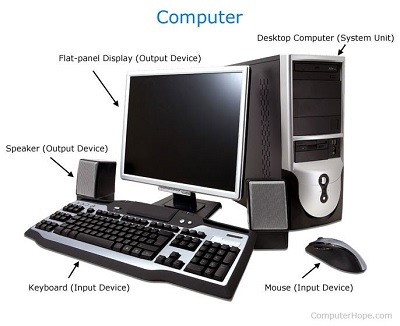
Basic of computer
Computers are complex machines that process and store information. They consist of several key components working together to perform various tasks. Here are some fundamental concepts about computers:
- Hardware: The physical components of a computer, including the central processing unit (CPU), memory (RAM), storage devices (hard drives or solid-state drives), input devices (keyboard, mouse), output devices (monitor, printer), and other peripherals.
- Software: The non-physical instructions that control and coordinate the hardware components. Software includes operating systems (e.g., Windows, macO S, Linux), applications (e.g., word processors, web browsers, games), and programming languages.
- Central Processing Unit (CPU): Often referred to as the “brain” of the computer, the CPU executes instructions, performs calculations, and manages data movement within the computer.
- Memory (RAM): Random Access Memory stores data that the CPU needs to access quickly. It is volatile memory, meaning its contents are lost when the computer is powered off.
- Storage: Computers use various types of storage to permanently store data, such as hard disk drives (HDD s) and solid-state drives (SSD s). Unlike RAM, storage retains data even when the computer is turned off.
- Input and Output: Input devices allow users to provide data to the computer, such as keyboards, mice, and microphones. Output devices display or present processed information, such as monitors, speakers, and printers.
- Operating System (OS): The operating system is the software that manages computer hardware and software resources. It provides a user interface, controls system operations, and enables communication between applications and hardware.
- Algorithms: Algorithms are step-by-step instructions or procedures used to solve problems or perform specific tasks. They form the foundation of programming and software development.
- Networking: Computers can connect to each other through networks, allowing data transfer and communication. Local Area Networks (LAN s) connect devices within a limited area, while Wide Area Networks (WAN s) connect devices across larger distances, such as the Internet.
- Programming: Programming involves writing instructions in a programming language to create software. Programmers use programming languages like Python, Java, C++, and others to develop applications, websites, and other software.
These concepts provide a basic understanding of computers. However, the field of computer science is vast, and there are numerous advanced topics and sub fields to explore, including computer architecture, data structures, algorithms, artificial intelligence, cyber security, and more.
What is required Basic computer
To have a basic computer setup, you will need the following components:
- Central Processing Unit (CPU): This is the main component responsible for executing instructions and performing calculations. It can be a standalone processor or integrated into the motherboard.
- Memory (RAM): Random Access Memory temporarily stores data and instructions that the CPU needs to access quickly. Having sufficient RAM allows for smooth multitasking and faster program execution.
- Storage: You will need a storage device to store your operating system, applications, files, and data. This can be a hard disk drive (HDD) or a solid-state drive (SSD). SS D s are generally faster but more expensive than HDD s.
- Motherboard: The motherboard is the main circuit board that connects and allows communication between various components of the computer, such as the CPU, RAM, storage, and other peripherals.
- Power Supply Unit (PSU): The PS U supplies power to all the components in the computer. It converts the AC (alternating current) power from the wall outlet to DC (direct current) power required by the computer.
- Display: A monitor or screen is needed to view and interact with the computer’s graphical interface.
- Keyboard and Mouse: Input devices like a keyboard and mouse allow you to provide commands and interact with the computer.
- Operating System: You will need an operating system (e.g., Windows, macO S, Linux) to manage the computer’s resources, provide a user interface, and run applications.
- Internet Connectivity: If you want to connect to the internet, you will need a network interface card (NI C) or built-in networking capabilities on your motherboard.
These components form the basic foundation of a computer. Depending on your needs, you may also require additional peripherals like speakers, printers, webcams, and other devices for specific tasks or purposes.
Who is required Basic of computer
To understand the basics of computers, it is beneficial for anyone who wants to learn about them. Here are some groups of people who might find it particularly useful to have a basic understanding of computers:
- Beginners: Individuals who are new to computers and want to familiarize themselves with the fundamental concepts and components.
- Students: Students studying computer science, information technology, or related fields will require a solid understanding of computer basics as a foundation for further learning.
- Professionals in Non-Technical Fields: Many professions today rely on computers for various tasks. Having a basic understanding of computers can help professionals in fields such as business, finance, marketing, healthcare, and more, to effectively utilize technology in their work.
- Entrepreneurs and Small Business Owners: Understanding computer basics can be valuable for entrepreneurs and small business owners who need to make informed decisions about their technological needs and effectively utilize computers in their operations.
- Senior Citizens: Older adults who may not have grown up with computers but want to engage with technology can benefit from learning the basics. It can help them navigate the digital world, communicate with others, access information, and perform day-to-day tasks more efficiently.
- Anyone Interested in Technology: Computers are pervasive in modern society, and having a basic understanding of how they work can benefit anyone interested in technology, gadgets, or digital advancements.
Remember, computer literacy is becoming increasingly important in today’s digital age, and having a basic understanding of computers can enhance your personal and professional capabilities, regardless of your background or occupation.
When is required Basic of computer
A basic understanding of computers is required in various situations and scenarios. Here are some instances when computer basics are beneficial:
- Personal Use: Knowing the basics of computers is essential for personal use, such as browsing the internet, sending emails, using productivity software (word processors, spreadsheets), managing files and folders, and staying safe online.
- Education: Students of all levels, from primary school to university, often need to use computers for research, writing papers, creating presentations, and accessing online learning resources. Understanding computer basics enables students to effectively use technology for their educational needs.
- Professional Development: In many professions, computer skills are highly valued. Having a basic understanding of computers can enhance your employ ability and open up opportunities for career advancement. It is particularly relevant in fields like information technology, finance, marketing, design, and administration.
- Job Applications: When applying for jobs, computer literacy is often listed as a required or preferred skill. Basic computer knowledge is essential for navigating online job portals, submitting electronic applications, and performing basic tasks required by many jobs.
- Entrepreneurship and Small Business: If you are starting your own business or working as a freelancer, having computer basics is crucial. It allows you to create a professional online presence, manage finances, communicate with clients, and utilize software and tools relevant to your industry.
- Digital Citizenship: In today’s digital world, understanding computer basics is vital for being a responsible digital citizen. It involves knowing how to protect your privacy, identify and avoid online scams, engage in safe online behavior, and critically evaluate information found on the internet.
- Problem-solving and Troubleshooting: Having a basic understanding of computers helps you troubleshoot common issues that may arise, such as software errors, connectivity problems, or basic hardware malfunctions. It empowers you to diagnose problems and seek appropriate solutions.
- Lifelong Learning: Computer technology continues to evolve rapidly, and having a basic understanding of computers allows you to adapt to new technologies and learn new software and tools as they emerge.
In summary, computer basics are required in various personal, educational, professional, and everyday life situations. They enable you to navigate the digital world, utilize technology effectively, and stay informed in an increasingly technology-driven society.
Where is required Basic of computer
A basic understanding of computers is required in numerous contexts and environments. Here are some common places where computer basics are essential:
- Homes: Computers have become an integral part of daily life in many households. Basic computer knowledge is necessary for tasks like accessing the internet, managing personal finances, online shopping, social media usage, multimedia consumption, and maintaining digital files.
- Schools and Educational Institutions: Educational institutions at all levels incorporate computers into their curricula. Students need basic computer skills to complete assignments, conduct research, create presentations, collaborate on projects, and communicate with teachers and peers.
- Workplaces: Computers are prevalent in most workplaces, regardless of the industry. Employees need computer literacy to perform tasks like word processing, data entry, spreadsheet usage, email communication, using specialized software, and accessing company intranets.
- Libraries and Community Centers: Public libraries and community centers often provide computer access to the public. Basic computer knowledge is necessary for individuals who want to use these facilities for research, job searches, online learning, or personal tasks.
- Internet Cafes: Internet cafes or cyber cafes offer computer and internet access to individuals who may not have access at home. Having a basic understanding of computers allows users to navigate the internet, use productivity tools, communicate online, and access online services.
- Training Centers and Workshops: Many training centers and workshops offer computer literacy courses to individuals who want to learn the basics. These programs provide instruction on computer usage, software applications, internet navigation, and basic troubleshooting.
- Public Services: Government offices, hospitals, banks, and other public service institutions heavily rely on computers for their operations. Understanding computer basics enables individuals to interact with these services, access online resources, and use self-service kiosks.
- Community Initiatives and Nonprofit Organizations: Various community initiatives and nonprofit organizations offer computer literacy programs to under served populations. Basic computer skills help bridge the digital divide and empower individuals to participate fully in the digital world.
- Remote Work and Telecommuting: The rise of remote work and telecommuting has made computer literacy even more essential. Employees working from home need to be proficient in using video conferencing tools, collaboration platforms, cloud storage, and other remote work technologies.
- Entrepreneurship and Startups: Aspiring entrepreneurs and startup founders require computer basics to develop their business plans, create websites, manage online marketing, and utilize various digital tools for business operations.
In summary, computer basics are required in homes, schools, workplaces, public facilities, training centers, community initiatives, and various other settings where computers play a central role in personal, educational, and professional activities.
How required Basic of computer
A basic understanding of computers is highly necessary in today’s digital age. Here are some reasons why computer basics are required:
- Everyday Tasks: Computers are integrated into our daily lives, from communicating via email and social media to shopping online, banking, and accessing information. Having computer basics allows you to navigate these tasks efficiently and securely.
- Education: Computer skills are vital for students at all levels of education. Basic computer knowledge enables them to conduct research, complete assignments, create presentations, collaborate on projects, and utilize educational software.
- Employment Opportunities: Most job roles today require some level of computer literacy. Employers expect candidates to have basic computer skills, such as using productivity software, navigating the internet, and communicating electronically. Understanding computer basics enhances employ ability and career prospects.
- Digital Communication: Email, messaging apps, and video conferencing have become common methods of communication. Basic computer knowledge enables you to effectively communicate online, share documents, and collaborate with others remotely.
- Online Safety: Understanding computer basics helps you protect yourself online. It includes recognizing phishing scams, using secure passwords, understanding privacy settings, and being aware of potential cyber security threats.
- Problem Solving: Computers can encounter issues, and having basic computer knowledge allows you to troubleshoot common problems. It empowers you to resolve minor software glitches, resolve connectivity issues, and seek appropriate technical support when needed.
- Adaptation to New Technologies: Technology evolves rapidly, and having a foundation in computer basics makes it easier to adapt to new technologies and software. It enables you to learn new tools and applications efficiently.
- Personal Organization: Computers offer tools for managing personal information, schedules, and tasks. Basic computer skills allow you to use productivity applications, calendar tools, note-taking software, and other organizational resources effectively.
- Digital Creativity: Computers provide platforms for creative expression, such as digital art, graphic design, music production, and video editing. Basic computer knowledge allows you to explore and utilize these creative tools.
- Lifelong Learning: Technology is continually evolving, and having computer basics is essential for lifelong learning. It enables you to explore new digital resources, engage in online courses, and stay informed in an increasingly digital world.
In summary, computer basics are required for everyday tasks, education, employment, online safety, problem-solving, adaptation to new technologies, personal organization, digital creativity, and lifelong learning. Having a solid understanding of computers empowers individuals to fully participate in the digital age and leverage technology for personal and professional growth.
Case study on Basic of computer
Case Study: Basic Computer Skills for Professional Development
Background: Sarah is a recent college graduate who has just entered the job market. While she possesses excellent academic qualifications, she realizes that having basic computer skills is crucial for career advancement in today’s digital workplace. She decides to focus on developing her computer skills to enhance her professional opportunities.
Challenges:
- Limited Computer Knowledge: Sarah has a basic understanding of computers but lacks proficiency in essential software applications and digital tools commonly used in the workplace.
- Online Collaboration: With remote work becoming increasingly common, Sarah needs to acquire skills for effective online collaboration, including using video conferencing platforms, document sharing tools, and project management software.
- Digital Communication: Sarah recognizes the need to improve her digital communication skills, including professional email writing, online etiquette, and virtual meeting etiquette.
- Productivity and Organization: Sarah wants to enhance her productivity by learning how to efficiently manage tasks, calendars, and documents using software applications.
Solution and Implementation:
- Online Tutorials and Courses: Sarah explores online tutorials and courses on platforms like LinkedIn Learning, Course ra, and Udem y to acquire basic computer skills. She starts with courses on Microsoft Office Suite (Word, Excel, PowerPoint) to improve her proficiency in these essential applications.
- Virtual Workshops and Webinars: Sarah attends virtual workshops and webinars offered by professional organizations and industry associations. These sessions cover a range of computer skills, such as project management tools, collaborative platforms, and online communication etiquette.
- Practice and Hands-on Experience: Sarah sets aside dedicated time each day to practice her newly acquired skills. She creates sample documents, presentations, and spreadsheets to gain familiarity and confidence in using the software applications.
- Networking and Mentoring: Sarah reaches out to professionals in her desired industry through networking events and platforms like LinkedIn. She seeks guidance and advice on the specific computer skills that are in demand and learns from experienced individuals in her field.
Results and Benefits:
- Improved Employ ability: Sarah’s enhanced computer skills make her more competitive in the job market. She includes her proficiency in software applications on her resume and confidently discusses her computer skills during interviews.
- Efficient Remote Collaboration: With her newfound knowledge of online collaboration tools, Sarah can effectively participate in virtual meetings, share and edit documents with colleagues, and contribute to remote team projects.
- Enhanced Productivity: Sarah’s improved understanding of productivity tools allows her to streamline her work processes. She manages her tasks and schedules more efficiently, leading to increased productivity and better time management.
- Professional Communication: Sarah’s enhanced digital communication skills enable her to write clear and professional emails, engage in virtual meetings confidently, and effectively communicate with colleagues and clients.
- Continuous Learning: Sarah recognizes the importance of ongoing learning and continues to explore new software applications and tools relevant to her industry. She stays updated with emerging technologies and seeks opportunities to further develop her computer skills.
Conclusion: By focusing on developing her basic computer skills, Sarah successfully enhances her professional development and career prospects. Her improved proficiency in software applications, online collaboration tools, digital communication, and productivity software equips her to excel in the digital workplace. Sarah’s dedication to continuous learning ensures she remains adaptable and prepared for future technological advancements.
White paper on Basic of computer
Title: Understanding the Basics of Computers: A Comprehensive White Paper
Abstract: This white paper provides an in-depth exploration of the fundamental concepts and components that form the basis of computer systems. It aims to educate readers with limited or no prior knowledge about computers, covering topics such as hardware, software, operating systems, networking, and computer security. By delving into the basics of computers, this white paper equips readers with a solid foundation to navigate and understand the increasingly digital world we live in.
Table of Contents:
- Introduction 1.1 Background and Purpose 1.2 Scope and Structure
- Computer Hardware 2.1 Central Processing Unit (CPU) 2.2 Memory (RAM) 2.3 Storage Devices 2.4 Input and Output Devices 2.5 Motherboard and Expansion Cards
- Software 3.1 Operating Systems 3.2 Application Software 3.3 Programming Languages
- Operating Systems 4.1 Functions and Types of Operating Systems 4.2 User Interface and File Management 4.3 Multitasking and Process Management
- Computer Networks 5.1 Local Area Networks (LAN s) 5.2 Wide Area Networks (WAN s) 5.3 Internet and Cloud Computing 5.4 Network Protocols and Communication
- Computer Security 6.1 Overview of Computer Security 6.2 Threats and Vulnerabilities 6.3 Security Measures and Best Practices
- Emerging Technologies 7.1 Artificial Intelligence (AI) 7.2 Internet of Things (IoT) 7.3 Blockchain Technology
- Conclusion 8.1 Summary of Key Concepts 8.2 Importance of Computer Basics in the Digital Age
- References
Introduction: The introduction provides an overview of the white paper’s purpose and scope. It emphasizes the importance of understanding computer basics in today’s digital landscape and outlines the subsequent sections of the white paper.
Computer Hardware: This section delves into the various components that constitute computer hardware, including the CPU, RAM, storage devices, input/output devices, and the motherboard. It explains their functions and interconnections, providing readers with a comprehensive understanding of computer hardware.
Software: The software section explores the different types of software, focusing on operating systems, application software, and programming languages. It elucidates their roles and highlights their significance in computer systems.
Operating Systems: This section delves deeper into operating systems, covering their functions, types, user interfaces, and process management capabilities. It helps readers grasp the fundamental role of operating systems in computer operations.
Computer Networks: The network section provides an introduction to computer networking, discussing local area networks (LAN s), wide area networks (WAN s), the internet, and cloud computing. It elucidates network protocols and their importance in facilitating communication.
Computer Security: This section emphasizes the importance of computer security, outlining common threats and vulnerabilities. It provides an overview of security measures and best practices to mitigate risks and protect computer systems and data.
Emerging Technologies: This section highlights the impact of emerging technologies such as artificial intelligence (AI), the Internet of Things (IoT), and blockchain on computer systems. It offers insights into their potential applications and implications.
Conclusion: The conclusion summarizes the key concepts covered in the white paper, emphasizing the significance of understanding computer basics in the digital age. It reinforces the importance of ongoing learning and adaptation to evolving technologies.
References: The reference section lists the sources used in the white paper, providing readers with the opportunity for further exploration and research.
By providing a comprehensive overview