
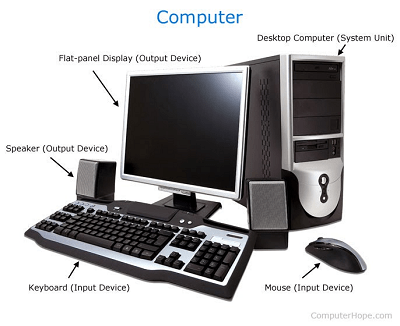
Basic of computer
The basics of computer networks refer to the fundamental concepts and components that are essential for understanding how networks work. Some of the key basics of computer networks include:
- Network Architectures: This refers to the overall design and structure of a network, including the arrangement of devices, protocols, and communication methods. Common network architectures include client-server, peer-to-peer, and cloud-based architectures.
- Protocols: Protocols are sets of rules and standards that govern how data is transmitted and received across a network. Common network protocols include Ethernet, TCP/IP, HTTP, and DNS, among others.
- Network Topo logies: Network topology refers to the physical or logical layout of a network. Common network topo logies include bus, star, ring, mesh, and hybrid topo logies, which determine how devices are interconnected in a network.
- Network Devices: These are the physical components that make up a network, such as switches, routers, hubs, access points, and network cables. These devices are responsible for directing data traffic, managing network resources, and ensuring communication between devices.
- Network Addressing: Network addressing involves assigning unique identifiers, such as IP addresses, to devices on a network to enable their identification and communication. IP addresses are used to route data packets across networks and facilitate communication between devices.
- Network Security: Network security is a critical aspect of computer networks, involving measures to protect data and network resources from unauthorized access, tampering, or interception. Common network security measures include firewalls, encryption, authentication, and access controls.
- Network Management: Network management involves monitoring, configuring, and maintaining network resources to ensure optimal performance and reliability. This includes tasks such as network monitoring, configuration management, troubleshooting, and performance optimization.
Understanding these basics of computer networks is essential for designing, configuring, managing, and securing networks effectively. It forms the foundation for more advanced concepts and technologies in the field of computer networking.
The basics of computer refer to the fundamental knowledge and skills needed to understand and work with computers effectively. These basics include:
- Computer Hardware: Understanding the basic components of a computer system, such as the central processing unit (CPU), memory (RAM), storage devices (e.g., hard drives, SSD s), input/output devices (e.g., keyboard, mouse, monitor), and peripherals (e.g., printers, scanners).
- Operating Systems: Familiarity with operating systems (OS), which are software programs that manage and control computer hardware and software resources. Common operating systems include Windows, macO S, Linux, and mobile OS s such as Android and iOS.
- Computer Software: Knowledge of different types of software, including system software (e.g., operating systems, device drivers) and application software (e.g., word processors, spreadsheets, web browsers). Understanding how to install, configure, and use software applications is essential.
- Computer Networking: Basic understanding of computer networks, including concepts such as IP addresses, protocols, network topo logies, network devices, and network security. This includes understanding how data is transmitted and received over networks, and how devices communicate and share resources.
- File Management: Understanding how to create, organize, and manage files and folders on a computer system. This includes basic file operations such as creating, deleting, copying, moving, and renaming files and folders.
- Internet and Web Browsing: Familiarity with the internet, including understanding how it works, how to use web browsers to access websites, search for information, and use online services such as email and social media.
- Computer Security: Knowledge of basic computer security principles, including how to protect your computer system from malware, viruses, and other security threats. This includes using strong passwords, keeping software up-to-date, and being cautious with online activities.
- Troubleshooting: Basic troubleshooting skills to identify and resolve common computer issues, such as hardware or software problems, connectivity issues, and error messages.
Having a solid understanding of these basics of computer is crucial for effectively using and managing computer systems, troubleshooting common issues, and engaging in further learning and skill development in more advanced areas of computing.
The knowledge of the basics of computer is essential for various individuals who work with or use computers in their personal or professional lives. Some of the individuals who may require a basic understanding of computers include:
- Students: Basic computer literacy is often a requirement for students in schools, colleges, and universities. Students need to have a basic understanding of computers to complete assignments, research, and collaborate on projects, as well as to access online resources and educational tools.
- Office Workers: Many office workers use computers as part of their daily work routine. They may need to create and edit documents, send and receive emails, use spreadsheets, presentations, and other office productivity software, and perform other computer-related tasks to carry out their job responsibilities effectively.
- Professionals: Professionals in various fields such as business, healthcare, finance, engineering, and others may use computers to perform tasks specific to their profession. This may include using specialized software, accessing databases, analyzing data, or conducting research.
- Job Seekers: Basic computer skills are often listed as a requirement for many job positions. Job seekers need to have a basic understanding of computers to submit online job applications, create resumes, and communicate with potential employers via email or other online platforms.
- Entrepreneurs and Small Business Owners: Entrepreneurs and small business owners may use computers to manage their business operations, communicate with clients and customers, create marketing materials, manage finances, and perform other business-related tasks.
- Home Users: Many individuals use computers for personal use, such as browsing the internet, communicating with friends and family, managing personal finances, and entertainment purposes. Basic computer skills are essential for these activities.
- Seniors: Older adults may also benefit from having basic computer skills to stay connected with family and friends, access online resources, and engage in online activities for personal enrichment or leisure.
In today’s digital world, having a basic understanding of computers is increasingly becoming a necessary skill for individuals across different walks of life to effectively navigate the modern technological landscape.
The requirement for basic computer knowledge can arise in various situations, including:
- Education: Basic computer literacy is often required in educational settings, from primary schools to higher education institutions. Students may need to use computers for research, assignments, online learning platforms, and other educational purposes.
- Employment: Many job positions require basic computer skills as a prerequisite. This can include office-based jobs where computer use is essential for tasks such as data entry, word processing, and email communication, as well as specialized roles that require knowledge of specific software or tools.
- Career Advancement: Basic computer skills may be necessary for career advancement or professional development in many fields. As technology continues to play a central role in various industries, having a basic understanding of computers can enhance job prospects and open up opportunities for career growth.
- Personal Use: Computers are widely used for personal purposes, such as managing finances, communication, online shopping, and entertainment. Basic computer skills are required for individuals who want to effectively use computers for these activities.
- Entrepreneurship: Entrepreneurs and small business owners may need basic computer skills to manage their business operations, communicate with clients and customers, create marketing materials, and handle online transactions.
- Digital Citizenship: In today’s digital world, basic computer literacy is important for responsible digital citizenship. This includes understanding online safety, privacy, and security practices to protect oneself and others while using digital technologies.
- Daily Life: Basic computer skills can be beneficial in everyday life, from managing personal finances, accessing information online, communicating with others, and utilizing online services for various purposes.
Overall, basic computer knowledge is becoming increasingly important in various aspects of modern life, including education, employment, personal use, entrepreneurship, digital citizenship, and daily life activities. Having a solid understanding of computers and their basic functionalities can greatly enhance one’s ability to navigate the digital world effectively.
The requirement for basic computer knowledge can arise in various settings, including:
- Education: Basic computer literacy is often required in educational institutions, from primary schools to higher education. Students may need to use computers for research, assignments, online learning platforms, and other educational purposes.
- Workplace: Many job positions across different industries require basic computer skills. This can include office-based jobs where computer use is essential for tasks such as data entry, word processing, and email communication, as well as specialized roles that require knowledge of specific software or tools.
- Business: Entrepreneurs and small business owners may need basic computer skills to manage their business operations, such as accounting, inventory management, and online marketing.
- Home: Computers are widely used for personal purposes, such as managing personal finances, communication, online shopping, and entertainment. Basic computer skills are required for individuals who want to effectively use computers for these activities.
- Online Activities: Basic computer knowledge is necessary for various online activities such as social media, online banking, online shopping, and accessing information through search engines or websites.
- Government Services: Many government services, such as applying for licenses, paying taxes, and accessing government information, are now available online, requiring basic computer skills for effective use.
- Personal Development: Basic computer literacy can be beneficial for personal development, including learning new skills, staying connected with family and friends, accessing online resources for self-improvement, and staying informed about current events.
- Travel and Transportation: Many travel and transportation services, such as booking flights, hotels, and rental cars, are done online, requiring basic computer skills for planning and organizing travel.
Overall, basic computer knowledge is increasingly required in various aspects of modern life, including education, workplace, business, home, online activities, government services, personal development, and travel and transportation. Having a solid understanding of computers and their basic functionalities can greatly enhance one’s ability to participate in today’s digital world effectively.
How is required Basic of computer
The requirement for basic computer knowledge can vary depending on the specific context and purpose. Here are some common ways in which basic computer skills may be required:
- Practical Skills: Basic computer skills typically include knowing how to operate a computer, use a keyboard and mouse, navigate a graphical user interface (GUI), and manage files and folders.
- Software Usage: Basic computer skills may involve using common software applications, such as word processors, spreadsheets, email clients, web browsers, and multimedia players. This includes understanding how to create, edit, and save documents, send and receive emails, browse the internet, and use basic multimedia features.
- Online Communication: Basic computer skills may include using online communication tools, such as email, instant messaging, and social media, to send and receive messages, share files, and interact with others online.
- Internet Usage: Basic computer skills may involve using web browsers to search for information, navigate websites, and use online services such as online banking, online shopping, and online booking.
- Security and Privacy: Basic computer skills may include understanding how to protect one’s computer and personal information from security threats, such as malware, phishing, and identity theft. This includes using antivirus software, setting up strong passwords, and being aware of safe online practices.
- Troubleshooting: Basic computer skills may involve identifying and resolving common computer issues, such as restarting a computer, troubleshooting basic hardware or software problems, and seeking help when needed.
- Digital Literacy: Basic computer skills may include understanding digital literacy concepts, such as evaluating the credibility of online information, critically assessing digital media, and understanding online privacy and security risks.
- Adaptability: Basic computer skills may also involve being adaptable and able to learn new software and tools as technology evolves, as well as being able to troubleshoot and problem-solve independently when encountering new challenges.
Overall, basic computer skills encompass a range of practical abilities and knowledge that enable individuals to effectively use computers and digital technologies for various purposes. The specific level of required computer skills may vary depending on the context, but having a solid foundation in basic computer literacy can be beneficial in today’s technology-driven world.
Case Study: Basic Computer Skills for Senior Citizens
Background: A senior citizen community center in a suburban area offers various programs and services to support the well-being of older adults. One of the challenges identified by the center is the lack of basic computer skills among their members, which hinders their ability to fully participate in today’s digital world. Many senior citizens are interested in learning basic computer skills to stay connected with family and friends, access online resources, and engage in online activities.
Objective: The center decides to initiate a basic computer skills training program to empower their senior citizen members with essential digital literacy skills. The objective of the program is to provide basic computer training that is tailored to the needs and abilities of senior citizens, so they can effectively use computers for communication, information access, and online activities.
Implementation: The center collaborates with local volunteers who have expertise in computer skills and digital literacy to design and deliver the basic computer skills training program. The program includes the following components:
- Needs Assessment: The center conducts a survey and holds focus group discussions with senior citizen members to identify their specific needs and challenges related to computer skills. This helps in understanding their current level of knowledge, preferred learning methods, and areas they are interested in learning.
- Customized Curriculum: Based on the needs assessment, the program develops a customized curriculum that focuses on basic computer skills, including operating a computer, using a keyboard and mouse, navigating the internet, sending and receiving emails, and using common software applications such as word processors and web browsers. The curriculum is designed to be age-friendly, with large font sizes, simple language, and step-by-step instructions.
- Hands-on Training: The program conducts small-group training sessions in a computer lab, where senior citizens can practice their computer skills in a supportive environment. The training includes hands-on activities, such as using a computer, typing, navigating the internet, sending emails, and creating documents.
- One-on-One Support: The program provides one-on-one support to participants who need additional assistance or have specific questions. Volunteers are available to provide personalized guidance and help with individual needs and challenges.
- Ongoing Support: The program offers ongoing support to participants even after the initial training sessions. This includes providing access to computers and the internet, offering follow-up workshops on advanced topics, and providing assistance with specific tasks or activities that participants want to learn.
Title: Empowering Individuals with Basic Computer Skills: A White Paper
Introduction: In today’s digital age, basic computer skills have become essential for individuals to effectively participate in various aspects of life, including education, employment, communication, and accessing information. However, not everyone possesses these skills, and there are still significant gaps in digital literacy, particularly among certain populations. This white paper aims to highlight the importance of basic computer skills, their relevance in today’s world, and the benefits of empowering individuals with these skills.
Importance of Basic Computer Skills: Basic computer skills are fundamental to navigating the digital landscape. They include the ability to operate a computer, use a keyboard and mouse, navigate the internet, send and receive emails, use word processors and web browsers, and understand basic online safety and security measures. These skills are crucial for individuals to access information, communicate with others, perform online tasks, and participate in online activities such as online learning, job searches, and e-commerce.
Relevance of Basic Computer Skills: Basic computer skills are relevant in various aspects of life. In education, students need these skills to access online resources, complete assignments, and collaborate with peers. In employment, computer skills are increasingly required for many job opportunities, from basic data entry tasks to advanced digital skills required in various industries. Basic computer skills are also relevant for communication, as many people rely on email, social media, and other online platforms to connect with others. Furthermore, basic computer skills are essential for accessing government services, healthcare information, financial services, and other online resources that are increasingly becoming digitized.
Benefits of Empowering Individuals with Basic Computer Skills: Empowering individuals with basic computer skills can have numerous benefits for individuals and society as a whole. These benefits include:
- Increased Opportunities: Basic computer skills provide individuals with more opportunities for education, employment, communication, and accessing information. They can participate more effectively in the digital world, access online resources, and engage in online activities.
- Improved Employability: Computer skills are increasingly required in the job market. Individuals with basic computer skills are more employable and can access a wider range of job opportunities, leading to better employment prospects and economic empowerment.
- Enhanced Communication: Basic computer skills enable individuals to communicate more effectively through email, social media, and other online platforms. This can help them stay connected with family and friends, participate in online communities, and access information and support.
- Increased Access to Information: Basic computer skills allow individuals to access a wealth of information and resources available online. They can search for information, access educational resources, and stay informed about current events, leading to increased knowledge and empowerment.
- Improved Digital Citizenship: Basic computer skills also include understanding online safety, security, and privacy measures. Empowering individuals with these skills helps them become responsible digital citizens, aware of potential risks and how to protect themselves online.
Conclusion: In today’s digital world, basic computer skills are essential for individuals to effectively participate in various aspects of life. Empowering individuals with these skills can lead to increased opportunities, improved employability, enhanced communication, increased access to information, and improved digital citizenship. It is crucial to invest in basic computer skills training programs and initiatives to bridge the digital literacy gap and ensure that all individuals have the necessary skills to thrive in the digital age.