
Basic of computer
Computers are electronic devices capable of performing a variety of tasks by executing instructions given to them. They consist of hardware components that provide the physical resources for computing and software programs that enable the execution of specific tasks. Here are some basic concepts related to computers:
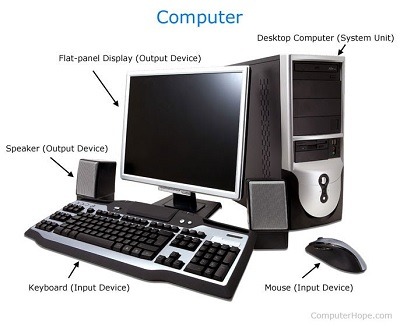
- Hardware: The physical components of a computer, including the central processing unit (CPU), memory (RAM), storage devices (such as hard drives or solid-state drives), input devices (e.g., keyboard, mouse), output devices (e.g., monitor, printer), and other peripheral devices (e.g., speakers, webcam).
- Software: Programs or instructions that tell the computer what tasks to perform. Software can be categorized into two main types: system software (operating systems, device drivers) that manage and control the computer hardware, and application software (word processors, web browsers) that perform specific tasks for users.
- Central Processing Unit (CPU): Often referred to as the “brain” of the computer, the CPU carries out instructions and performs calculations. It executes the machine code instructions of a program, performs arithmetic and logical operations, and manages data transfers between different parts of the computer.
- Memory (RAM): Random Access Memory is a temporary storage area that stores data and instructions that the CPU needs to access quickly. It provides fast access to data but is volatile, meaning it loses its contents when the computer is powered off.
- Storage: Computer storage refers to long-term data storage. It can be in the form of hard disk drives (HDD s), solid-state drives (SS D s), optical discs (CDs, DVDs), or flash memory. Storage devices are used to store operating systems, software programs, and user data.
- Input and Output: Input devices allow users to enter data and commands into the computer, such as keyboards, mice, and microphones. Output devices display or provide results to the user, including monitors, printers, and speakers.
- Operating System (OS): The software that manages and controls the computer’s hardware and software resources, enabling communication between software and hardware components. Examples of popular operating systems include Microsoft Windows, macO S, and Linux.
- Networking and Internet: Computers can be connected together to form networks, enabling them to share resources and communicate with each other. The Internet is a global network of networks that allows computers worldwide to connect and share information.
- Algorithms: A step-by-step procedure or a set of rules used to solve a specific problem or perform a task. Algorithms form the basis of computer programming and enable the computer to process data and perform operations efficiently.
- Programming Languages: Languages used to write instructions and programs for computers. Examples include Python, Java, C++, and JavaScript. Each language has its syntax and set of rules for writing code.
These are just some of the basic concepts related to computers. The field of computer science and technology is vast and continuously evolving, offering numerous areas of specialization and further study.
What is required Basic of computer
The basic requirements for a computer system typically include:
- Central Processing Unit (CPU): The CPU is the brain of the computer and performs most of the processing inside the computer. It carries out instructions and performs calculations.
- Memory (RAM): Random Access Memory (RAM) is the temporary storage area where the computer stores data and instructions that are currently being used. It allows for fast access to data, which enhances overall system performance.
- Storage: Computers require storage to permanently store data, programs, and operating systems. This can be in the form of hard disk drives (HDD), solid-state drives (SS D), or other storage media.
- Input Devices: These devices allow users to interact with the computer system. Common input devices include keyboards, mice, touchscreens, and microphones.
- Output Devices: These devices display or present the results of computer processing. Common output devices include monitors, printers, speakers, and projectors.
- Operating System (OS): An operating system is the software that manages computer hardware and software resources and provides common services for computer programs. Popular operating systems include Windows, macO S, and Linux.
- Software: Various software applications enable users to perform specific tasks on a computer, such as word processing, spreadsheet calculations, web browsing, and multimedia playback.
- Connectivity: Computers often require connectivity to communicate with other devices or access the internet. This can be achieved through wired connections (e.g., Ethernet cables) or wireless technologies (e.g., Wi-F i, Bluetooth).
- Power Supply: Computers need a reliable power source to operate. This is typically provided through a power outlet, and computers may also have a built-in battery for portable use.
- Basic Peripherals: Additional peripherals like webcams, speakers, and external storage devices can enhance the computer’s functionality and user experience.
These are the fundamental components and elements necessary for a basic computer system. Depending on the specific requirements and intended use, additional components or specialized hardware may be necessary.
Who is required Basic of computer
The basic knowledge of computers is beneficial for various individuals in today’s digital age. Some of the people who may find it helpful to have a basic understanding of computers include:
- Students: Computer literacy is essential for students at all levels of education. Basic computer skills enable them to conduct research, create and edit documents, use educational software, and effectively communicate and collaborate with peers and teachers.
- Office Workers: Many jobs require basic computer skills, such as using productivity software (word processing, spreadsheets, presentations), sending emails, utilizing online tools, and accessing information from the internet. Proficiency in these areas can improve productivity and efficiency in the workplace.
- Job Seekers: Having basic computer skills is often a requirement or an advantage in today’s job market. Many job applications and interviews are conducted online, and familiarity with computers and common software applications is expected in various industries.
- Senior Citizens: As technology becomes more prevalent in daily life, older adults can benefit from basic computer knowledge to stay connected with loved ones through email, social media, and video calls. It can also provide access to online resources, entertainment, and learning opportunities.
- Entrepreneurs and Small Business Owners: Basic computer skills are crucial for entrepreneurs and small business owners to manage finances, create marketing materials, maintain a website, and communicate with clients or customers.
- Home Users: Basic computer knowledge is valuable for individuals using computers at home for personal purposes, such as online banking, shopping, entertainment, and staying informed through news websites and social media.
- Teachers and Educators: Educators who possess basic computer skills can integrate technology into their teaching methods, use educational software and resources, and effectively manage digital classrooms.
- Professionals in Various Fields: Professionals in fields such as medicine, engineering, design, and research often rely on computers and specialized software for their work. Understanding the basics of computers allows them to utilize these tools effectively.
While these are some examples of individuals who may benefit from basic computer knowledge, in reality, computer literacy is becoming increasingly important for people from all walks of life, as technology continues to advance and permeate various aspects of our society.
When is required Basic of computer
Basic computer knowledge is required in various situations and scenarios. Here are some common situations where having a basic understanding of computers is necessary:
- Education: Basic computer skills are often required in educational settings, from elementary school to higher education. Students need to use computers for research, word processing, creating presentations, accessing online learning platforms, and more.
- Employment: Many job positions require at least basic computer literacy. From office administration to customer service, sales, marketing, and even manual labor jobs, the ability to use computers and common software applications is often expected. This includes tasks such as using email, word processing, spreadsheets, and accessing online resources.
- Everyday Life: Computers are now an integral part of daily life. Basic computer skills are useful for tasks such as online banking, shopping, communication through email or social media, managing personal finances, and accessing information from the internet.
- Personal Growth and Development: Learning basic computer skills can empower individuals to explore new interests, access online learning platforms, pursue hobbies, and stay connected with friends and family through various digital platforms.
- Entrepreneurship and Small Business: Basic computer knowledge is crucial for entrepreneurs and small business owners who need to manage finances, create marketing materials, communicate with clients, and utilize digital tools and platforms for business growth.
- Emergencies and Crisis Situations: In emergency situations, having basic computer skills can be valuable. It allows individuals to access emergency services online, communicate important information to authorities or loved ones, and stay informed through official websites and social media updates.
- Technology-Dependent Professions: Many professions, such as software development, data analysis, graphic design, and digital marketing, require advanced computer skills. However, having a basic understanding of computers is often a prerequisite to pursuing these careers.
In essence, basic computer knowledge is increasingly required in various aspects of life due to the pervasive use of technology. Whether it is for educational purposes, employment opportunities, personal use, or navigating everyday tasks, having a basic understanding of computers can greatly enhance one’s ability to thrive in the modern world.
Where is required Basic of computer
Basic computer knowledge is required in various places and environments. Here are some common areas where basic computer skills are necessary:
- Schools and Educational Institutions: Basic computer literacy is essential for students of all ages. Schools often have computer labs or provide access to computers in classrooms. Students need to learn basic skills such as using word processors, internet research, creating presentations, and utilizing educational software.
- Workplaces: Basic computer skills are highly valued in most workplaces. From office settings to retail, hospitality, healthcare, and manufacturing industries, computers are used for various tasks. Employees may need to use email, word processing, spreadsheets, databases, and industry-specific software.
- Public Libraries: Public libraries often offer computer access to the community. Basic computer skills are necessary for individuals to make use of library resources, search the internet, and access online library catalogs and databases.
- Internet Cafes: Internet cafes provide public access to computers and the internet. Basic computer knowledge is required to utilize these facilities for browsing the internet, checking emails, or completing online tasks.
- Community Centers: Community centers may offer computer labs or computer classes for residents. These centers aim to bridge the digital divide by providing access to computers and teaching basic computer skills to individuals who may not have access to technology at home.
- Cyber Cafes: Similar to internet cafes, cyber cafes offer computer access to individuals who do not have their own computers. Basic computer skills are needed to use these facilities for internet browsing, gaming, or other computer-based activities.
- Self-Employment and Entrepreneurship: Individuals starting their own businesses or working as freelancers require basic computer skills. From creating websites to managing online marketing and communication, computer literacy is vital for running a successful venture.
- Community Training Programs: Many community organizations and non-profits offer computer training programs to empower individuals with basic computer skills. These programs may target specific groups, such as seniors, immigrants, or job seekers, to help them adapt to the digital world.
- Home and Personal Use: Basic computer skills are essential for everyday tasks at home. From managing personal finances to online shopping, communication, entertainment, and accessing information, having computer literacy improves one’s ability to navigate and make the most of technology.
- Remote Work and Telecommuting: With the increasing trend of remote work, having basic computer skills is crucial for individuals working from home or other remote locations. These skills enable employees to collaborate with colleagues, use digital tools, and access company resources.
In summary, basic computer knowledge is required in educational institutions, workplaces, public facilities, community centers, and personal settings. It is an essential skill set for individuals to thrive in today’s digitally connected world.
How is required Basic of computer
Having a basic understanding of computers is important for various reasons. Here’s how basic computer knowledge is beneficial:
- Communication: Computers and the internet are widely used for communication through email, instant messaging, video calls, and social media. Basic computer skills enable individuals to effectively communicate and stay connected with others in both personal and professional settings.
- Digital Information Access: Computers provide access to a vast amount of information available on the internet. With basic computer skills, individuals can search for information, read news articles, access educational resources, and stay informed on various topics.
- Productivity: Basic computer skills enhance productivity by allowing individuals to create and edit documents, spreadsheets, and presentations. These skills enable efficient organization, data management, and automation of repetitive tasks.
- Online Transactions: E-commerce has become a significant part of our lives, and basic computer knowledge is essential for online shopping, banking, and financial management. Understanding how to navigate secure websites, make online payments, and protect personal information is crucial for safe and convenient online transactions.
- Job Opportunities: Basic computer literacy is often a prerequisite for many jobs across different industries. Employers expect candidates to have skills such as using email, word processing, and basic software applications. Having these skills expands employment opportunities and improves job prospects.
- Digital Creativity: Computers provide tools for creative expression, such as graphic design, photo editing, video editing, and music production. Basic computer skills allow individuals to explore and express their creativity using these digital tools.
- Problem Solving: Basic computer knowledge enhances problem-solving abilities. It helps individuals troubleshoot common computer issues, navigate software interfaces, and find solutions to technical challenges that may arise in various situations.
- Lifelong Learning: Computers offer access to online courses, tutorials, and educational platforms. With basic computer skills, individuals can engage in self-directed learning, acquire new knowledge and skills, and stay up to date with technological advancements.
- Digital Safety and Security: Basic computer knowledge includes understanding online safety practices, such as creating strong passwords, avoiding phishing scams, and protecting personal information. This knowledge helps individuals stay safe and secure while using computers and the internet.
- Digital Citizenship: Basic computer skills contribute to being a responsible digital citizen. It involves understanding ethical behavior, respecting copyright and intellectual property, and practicing good online etiquette.
In summary, having a basic understanding of computers is essential for effective communication, accessing information, improving productivity, exploring job opportunities, engaging in creative endeavors, problem-solving, continuous learning, ensuring digital safety, and being a responsible digital citizen in today’s digital world.
Case study on Basic of computer
Case Study: Basic Computer Skills for a Small Business Owner
Background: Sarah is a small business owner who runs a boutique clothing store. She has been in business for several years but has limited computer knowledge. Sarah primarily relies on manual processes for inventory management, sales tracking, and communication with customers. As her business grows, she realizes the need to improve her basic computer skills to enhance productivity, streamline operations, and expand her customer base.
Challenge: Sarah’s lack of basic computer skills poses several challenges for her business:
- Inventory Management: Without computerized inventory management, Sarah struggles to track and manage her inventory effectively. This results in inaccurate stock counts, difficulty in identifying popular items, and challenges in restocking products on time.
- Sales Tracking and Analysis: Sarah manually tracks sales using pen and paper. This makes it difficult for her to analyze sales trends, identify top-selling products, and make data-driven decisions to optimize her business operations.
- Customer Communication: Sarah primarily relies on phone calls and face-to-face interactions for customer communication. She recognizes the need to explore digital communication channels, such as email and social media, to reach a broader audience and engage with her customers more efficiently.
Solution:
- Basic Computer Training: Sarah enrolls in a basic computer skills training program or takes online courses specifically designed for small business owners. The training covers essential skills such as operating a computer, using a web browser, creating and managing documents, and basic spreadsheet usage.
- Inventory Management Software: Sarah researches and invests in user-friendly inventory management software that suits her business needs. She learns how to input and update inventory data, track stock levels, and generate reports. This helps her streamline inventory management, improve accuracy, and make informed purchasing decisions.
- Point-of-Sale System: Sarah adopts a point-of-sale (Po S) system that integrates with her inventory management software. With training and practice, she learns how to process sales, generate receipts, and track sales data automatically. This enables her to analyze sales trends, identify popular products, and manage her pricing strategy more effectively.
- Digital Marketing and Customer Engagement: Sarah explores digital marketing strategies to expand her customer base and improve customer engagement. She learns to create social media profiles for her business and utilizes email marketing tools to reach out to existing and potential customers. Basic graphic design skills help her create visually appealing promotional materials for her store.
Results:
- Improved Inventory Management: With the implementation of inventory management software, Sarah can accurately track her inventory levels, identify popular products, and streamline restocking processes. This reduces the risk of stock outs and overstocking, leading to improved customer satisfaction and increased profitability.
- Data-Driven Decision Making: Sarah’s ability to analyze sales data through the PO S system helps her identify trends, understand customer preferences, and adjust her product offerings accordingly. This data-driven approach leads to better inventory planning, improved product mix, and increased sales.
- Enhanced Customer Communication: By embracing digital communication channels, Sarah expands her reach and engages with customers beyond the physical store. She responds to customer inquiries via email, updates customers about new arrivals and promotions through social media, and utilizes email marketing campaigns to drive repeat business.
- Increased Efficiency and Productivity: Sarah’s basic computer skills enable her to automate manual tasks, such as generating invoices and tracking sales data. This saves time, reduces errors, and allows her to focus on other aspects of her business, such as customer service and product selection.
- Business Growth: With improved inventory management, data-driven decision making, effective customer communication, and increased productivity, Sarah’s boutique clothing store experiences steady growth. She attracts new customers through digital marketing efforts, retains existing customers through personalized communication, and expands her product offerings based on market demand.
Conclusion: This case study illustrates the importance of basic
White paper on Basic of computer
Title: The Importance of Basic Computer Skills in the Digital Age
Abstract: In today’s technologically advanced world, basic computer skills have become essential for individuals from all walks of life. This white paper explores the significance of basic computer skills, their impact on various aspects of personal and professional life, and the benefits they offer to individuals and society as a whole. We delve into the reasons why basic computer literacy is necessary, the areas in which it is required, and the potential challenges individuals face without these skills. Furthermore, we discuss the potential solutions and resources available to help individuals acquire and enhance their basic computer knowledge. This white paper aims to shed light on the importance of basic computer skills and encourage individuals to embrace the digital era.
- Introduction
- Definition of basic computer skills
- Evolution of technology and its impact on society
- Importance of digital literacy in the 21st century
- The Need for Basic Computer Skills
- Growing reliance on computers in various sectors
- Impact on education, employment, and everyday life
- Bridging the digital divide and promoting inclusivity
- Areas Where Basic Computer Skills are Required
- Education: Enhancing learning, research, and collaboration
- Employment: Job market requirements and career advancement
- Personal Use: Communication, information access, and online transactions
- Entrepreneurship: Tools for business management and growth
- Community and Public Services: Accessing government services and resources
- Benefits and Impact of Basic Computer Skills
- Improved communication and connectivity
- Increased productivity and efficiency
- Access to information and online resources
- Enhanced problem-solving and critical thinking abilities
- Facilitation of lifelong learning and personal growth
- Challenges Faced Without Basic Computer Skills
- Limited job opportunities and reduced employ ability
- Inability to access online resources and services
- Difficulty in adapting to technological advancements
- Increased reliance on others for basic tasks
- Solutions and Resources for Acquiring Basic Computer Skills
- Computer training programs and courses
- Online resources and tutorials
- Community centers and libraries
- Collaboration with educational institutions and employers
- Conclusion
- Summary of the importance of basic computer skills
- Encouragement to embrace technology and acquire basic computer knowledge
- Call to action for individuals, educational institutions, and organizations to promote digital literacy
In conclusion, basic computer skills have become indispensable in today’s digital age. Acquiring these skills opens doors to education, employment, and personal growth. It empowers individuals to navigate the digital landscape with confidence, harness the benefits of technology, and contribute to a digitally inclusive society. It is imperative that individuals, educational institutions, and organizations recognize the significance of basic computer skills and work towards providing resources and training to bridge the digital divide. By embracing and promoting digital literacy, we can ensure that everyone has the opportunity to thrive in the modern world.