
Basics of Computer Networks
Computer networks are a fundamental part of modern computing and communication systems. They allow computers and devices to communicate and share resources. Here are the basics of computer networks:
- Definition of a Computer Network:
- A computer network is a collection of interconnected devices (computers, servers, routers, switches, etc.) that can communicate and share data and resources with each other.
- Purposes of Computer Networks:
- Sharing Resources: Networks allow sharing of files, printers, and other resources.
- Communication: They enable communication through email, instant messaging, and video conferencing.
- Internet Access: Most of the world’s population accesses the internet through computer networks.
- Centralized Data Storage: Networks can be used for centralized data storage and backup.
- Types of Computer Networks:
- Local Area Network (LAN): A LAN is a network in a small geographic area, like a home, office, or a single building.
- Wide Area Network (WAN): WANs cover a large geographic area, often connecting LANs in different locations.
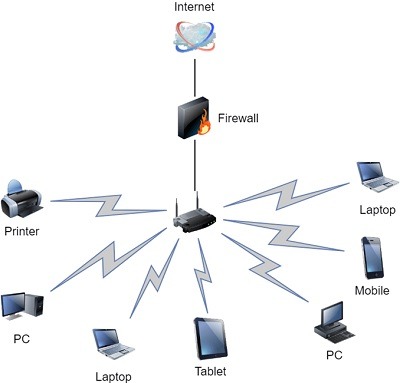
- Wireless Networks: These use wireless technologies like Wi-Fi or cellular networks.
- Internet: The global network of networks, including the World Wide Web.
- Intranet: A private network within an organization that uses internet technologies.
- Network Topologies:
- Bus Topology: All devices are connected to a single central cable.
- Star Topology: All devices are connected to a central hub or switch.
- Ring Topology: Devices are connected in a circular fashion.
- Mesh Topology: Every device is connected to every other device.
- Network Protocols:
- Protocols are rules and conventions for communication between devices on a network.
- Common protocols include TCP/IP (used on the internet), HTTP (for web browsing), and SMTP (for email).
- Networking Hardware:
- Router: Connects different networks and forwards data between them.
- Switch: Connects devices within the same network, making data transfer more efficient.
- Hub: Connects devices within a network but is less efficient than a switch.
- Modem: Connects to the internet, often translating digital data to analog for transmission over phone lines or cable.
- IP Addresses:
- Devices on a network are identified by IP (Internet Protocol) addresses, which can be IPv4 (e.g., 192.168.1.1) or IPv6 (e.g., 2001:0db8:85a3:0000:0000:8a2e:0370:7334).
- Network Security:
- Network security is essential to protect data and resources from unauthorized access. It includes firewalls, encryption, and intrusion detection systems.
- Common Network Services:
- File Sharing: Sharing files and resources across a network.
- Email: Sending and receiving emails within a network or over the internet.
- Web Browsing: Accessing websites on the World Wide Web.
- Remote Access: Accessing a computer or network from a remote location.
- Challenges and Considerations:
- Scalability: Designing networks that can grow as needed.
- Reliability: Ensuring that the network is available when needed.
- Performance: Optimizing network speed and efficiency.
- Security: Protecting data and resources from unauthorized access.
- Cost: Balancing network capabilities with the budget.
These are the fundamental aspects of computer networks, and understanding them is essential for working with modern technology, whether you’re setting up a home network or managing a large corporate network.
What is required Basics of Computer Networks
To understand the basics of computer networks, there are several key concepts and components you should be familiar with. Here’s a list of required basics for a foundational understanding of computer networks:
- Network Definition: Understand that a computer network is a collection of interconnected devices that can communicate and share resources.
- Types of Networks: Be aware of the main types of networks, including LANs (Local Area Networks), WANs (Wide Area Networks), wireless networks, the internet, and intranets.
- Network Topologies: Know the common network topologies, such as bus, star, ring, and mesh, and how they affect network design and connectivity.
- Network Protocols: Familiarize yourself with key networking protocols like TCP/IP, HTTP, and SMTP, which govern data communication between devices.
- Networking Hardware: Understand the role of essential networking hardware, including routers, switches, hubs, modems, and access points.
- IP Addresses: Learn about IP addresses (IPv4 and IPv6) and how they identify devices on a network.
- Subnetting: Understand how subnetting allows you to divide larger IP address spaces into smaller, more manageable segments.
- Network Security: Recognize the importance of network security measures, including firewalls, encryption, and intrusion detection systems.
- Common Network Services: Be aware of common network services like file sharing, email, web browsing, and remote access, and how they work within a network.
- Network Design Considerations: Learn about factors like scalability, reliability, performance, security, and cost, which play a role in network design and management.
- Network Layers: Familiarize yourself with the OSI (Open Systems Interconnection) model, which divides network functionality into seven layers, helping to understand the flow of data within a network.
- Network Troubleshooting: Gain basic knowledge of how to troubleshoot common network issues, including connectivity problems, and the use of tools like ping and traceroute.
- Network Address Translation (NAT): Understand how NAT allows multiple devices on a private network to share a single public IP address for internet access.
- DHCP (Dynamic Host Configuration Protocol): Learn how DHCP is used to assign IP addresses and network configuration information to devices on a network automatically.
- DNS (Domain Name System): Understand the role of DNS in translating human-readable domain names into IP addresses.
- Bandwidth and Latency: Be aware of the concepts of bandwidth (data transfer rate) and latency (delay in data transmission) and their impact on network performance.
These basics are foundational for understanding and working with computer networks. Whether you’re setting up a home network, troubleshooting connectivity issues, or pursuing a career in network administration or IT, a strong grasp of these fundamental concepts is essential.
Who is required Basics of Computer Networks
Understanding the basics of computer networks is valuable for a variety of individuals, including:
- IT Professionals: Network administrators, network engineers, and IT support staff need a deep understanding of computer networks to design, manage, and troubleshoot network infrastructure.
- Software Developers: Understanding network protocols and communication is crucial for those developing software that relies on network connectivity, such as web developers, app developers, and network programmers.
- System Administrators: System administrators often work with networked systems, so a grasp of network basics is essential for managing servers and ensuring network services are running smoothly.
- Cybersecurity Specialists: Those in the field of cybersecurity must understand network vulnerabilities and defenses to protect networks from threats and attacks.
- Students and Educators: Computer science and IT students, as well as educators in these fields, benefit from a foundational knowledge of computer networks.
- Business Professionals: Managers, decision-makers, and business analysts can benefit from understanding network concepts to make informed decisions about technology investments and network-related strategies.
- Home Users: Even casual users can benefit from a basic understanding of computer networks when setting up home networks, troubleshooting connectivity issues, or ensuring online security.
- Freelancers and Entrepreneurs: Independent professionals and business owners may need to manage their own network systems, making network knowledge valuable.
- Researchers: Scientists and researchers often rely on networks for data sharing and communication, and a fundamental understanding of networks can aid in their work.
- Enthusiasts: Anyone interested in technology, whether as a hobby or for personal interest, can gain a deeper appreciation of how the internet and networks work.
In today’s highly connected world, computer networks are a fundamental part of daily life and business operations. Understanding the basics of computer networks is a valuable skill that can be applied in a wide range of professional and personal contexts. It allows individuals to make informed decisions, troubleshoot issues, and leverage technology effectively.
When is required Basics of Computer Networks
The knowledge of the basics of computer networks is required in various situations and for different purposes. Here are some common scenarios when understanding the basics of computer networks is necessary:
- IT and Network Administration Roles: IT professionals, network administrators, and system administrators require a deep understanding of computer networks to set up, manage, and maintain network infrastructure in organizations.
- Software Development: Developers working on applications, websites, or software that rely on network communication need to understand network protocols, data transmission, and security considerations.
- Cybersecurity: Cybersecurity experts need to understand how networks function to identify vulnerabilities and protect against threats and attacks.
- Troubleshooting Network Issues: When network connectivity issues arise, having basic network knowledge is crucial for diagnosing and resolving problems.
- Designing and Implementing Networks: Network architects and designers use their knowledge of network basics to plan and implement network solutions for businesses and organizations.
- Home Network Setup: Even for personal use, understanding computer networks is essential when setting up and managing home Wi-Fi networks, connecting devices, and ensuring network security.
- Business Decision-Making: Managers and decision-makers in businesses often need a foundational understanding of networks to make informed technology-related decisions.
- Technology-Related Professions: Whether you work in tech support, data analysis, cloud computing, or any technology-related field, network knowledge is beneficial.
- Educational and Research Contexts: Students and educators in computer science, information technology, and related fields require network knowledge as part of their coursework or teaching.
- Online Safety and Security: In an era of increasing online activities, individuals need to understand network basics to protect their personal information and privacy.
- Freelancing and Entrepreneurship: Independent professionals, freelancers, and small business owners often need to manage their own network systems.
- Personal Interest and Hobbies: Technology enthusiasts and hobbyists can benefit from understanding how computer networks work, especially if they enjoy setting up home networks, experimenting with networking devices, or building networked systems for fun.
In summary, the need for understanding the basics of computer networks can arise in a wide range of professional, educational, and personal contexts. It is an essential skill in today’s interconnected world, enabling individuals to work more effectively with technology and make informed decisions related to network usage and management.
Where is required Basics of Computer Networks
The knowledge of the basics of computer networks is required in various locations or contexts where computer networks play a significant role. Here are some specific situations and locations where understanding the basics of computer networks is necessary:
- Businesses and Organizations: Computer networks are the backbone of most businesses and organizations, and employees need network knowledge to perform their roles effectively. This includes office environments, factories, retail stores, and more.
- Data Centers: Data centers are critical for hosting servers, storage, and cloud computing services. Professionals working in data centers must have a strong understanding of network infrastructure.
- Telecommunication Companies: Telecommunication providers, including internet service providers (ISPs), rely on extensive networks. Network engineers and technicians are required to maintain and expand these networks.
- Educational Institutions: Schools, colleges, and universities use computer networks for administrative tasks, research, and online learning. IT staff and educators need network knowledge.
- Hospitals and Healthcare Facilities: Healthcare organizations use networks for patient records, communication, and medical equipment. Healthcare IT professionals and medical staff benefit from network understanding.
- Government Agencies: Government agencies and departments use networks for various purposes, including national security, public services, and administrative tasks. IT specialists in government roles need network expertise.
- Home Environments: Understanding computer networks is crucial for setting up and managing home networks, ensuring internet connectivity, and addressing common network issues.
- Remote Work Locations: With the growth of remote work, individuals working from home or other remote locations rely on computer networks to connect to company systems and the internet.
- Retail and E-commerce: Retail stores and e-commerce platforms use networks for point-of-sale systems, inventory management, and online sales. Employees in these environments require network knowledge.
- Manufacturing and Industrial Settings: Industrial networks are essential for automation and control systems in manufacturing facilities. Engineers and technicians working in these environments need network expertise.
- Tech Startups: In the technology startup ecosystem, understanding computer networks is valuable for entrepreneurs and developers creating software and hardware products.
- Cybersecurity Centers: Organizations that focus on cybersecurity rely on network knowledge to identify and address vulnerabilities and threats.
- Research and Development Labs: Scientific research and development often involve the use of computer networks for data sharing and collaboration.
- Internet Service Providers (ISPs): ISPs and network service providers require network engineers and technicians to operate and maintain their infrastructure.
- Cybersecurity and IT Training Centers: Institutions that offer IT and cybersecurity training courses require instructors and students to have a strong foundation in network concepts.
In these and many other contexts, understanding the basics of computer networks is required for effective operations, communication, and problem-solving. The specific requirements and depth of knowledge may vary based on the role and responsibilities within each context.
How is required Basics of Computer Networks
Understanding the basics of computer networks is required in various ways and situations. Here’s how this knowledge is typically required:
- Education: Many academic programs, especially in computer science, information technology, and networking, include courses on computer networks. Students are required to learn the basics of computer networks as part of their curriculum.
- Certifications: Professionals pursuing IT and networking certifications, such as CompTIA Network+, Cisco CCNA, or CompTIA Security+, must demonstrate knowledge of computer networks to earn these credentials.
- Job Requirements: Job descriptions in IT-related roles often specify that candidates should have a strong understanding of computer networks. This is true for positions like network administrators, system administrators, network engineers, and cybersecurity specialists.
- Technical Interviews: During job interviews for IT positions, candidates are commonly asked questions related to computer networks to assess their knowledge and suitability for the role.
- On-the-Job Requirements: Individuals working in IT roles are expected to have a good understanding of computer networks to perform their daily tasks, such as setting up and configuring network devices, troubleshooting network issues, and maintaining network security.
- IT Projects: When working on IT projects, whether it’s setting up a new network, expanding an existing one, or implementing network security measures, knowledge of computer networks is essential to ensure project success.
- Home Network Setup: Individuals setting up and managing their home networks need to have a basic understanding of computer networks to ensure their devices connect properly and that their networks are secure.
- Cybersecurity Awareness: In an age of increasing cyber threats, basic network knowledge is important for anyone to be aware of potential vulnerabilities and security best practices, both at home and in the workplace.
- Troubleshooting: When network issues arise, whether at work or at home, a basic understanding of computer networks is required to diagnose and resolve problems effectively.
- Tech Support: Technical support representatives and help desk personnel need network knowledge to assist users with network-related issues.
- Decision-Making: Business managers, entrepreneurs, and decision-makers often require network knowledge to make informed decisions about technology investments and network-related strategies.
- Personal Development: Some individuals seek to learn the basics of computer networks out of personal interest and a desire to better understand the technology that permeates daily life.
Overall, understanding the basics of computer networks is increasingly essential in our interconnected world, whether for academic and professional purposes, daily life, or personal development. It’s a valuable skill that can be applied in various contexts and career paths.
Case Study on Basics of Computer Networks
Certainly, here’s a simplified case study to illustrate the importance of understanding the basics of computer networks:
Case Study: Improving Office Network Connectivity
Background: A mid-sized office with approximately 50 employees is facing network connectivity issues. Employees have reported slow internet access, frequent dropouts, and difficulty accessing shared resources.
Challenge: To diagnose and resolve the network issues to ensure reliable and efficient network connectivity for all employees.
Steps Taken:
1. Initial Assessment:
- IT staff conducted an initial assessment to understand the extent of the network issues.
- They interviewed employees to gather information about the types and frequency of problems.
2. Network Inventory:
- The IT team reviewed the network infrastructure, including routers, switches, access points, and cabling.
- They documented the network layout and configuration.
3. Basic Network Troubleshooting:
- Using their knowledge of basic network troubleshooting, the IT team conducted tests to identify potential issues. They performed ping tests, checked cable connections, and verified router and switch settings.
4. Identifying the Problem:
- Through their analysis, the IT team identified that the network had an outdated router and an overloaded switch.
- They realized that the router was not able to handle the growing number of connected devices, causing congestion and slow internet access.
5. Solution:
- The IT team proposed a solution that included upgrading the router to a more powerful model.
- They recommended replacing the overloaded switch with a managed switch to improve network traffic management.
- They also planned to update the network cabling to ensure reliability.
6. Implementation:
- The new router, managed switch, and cabling were installed with minimal downtime.
- IT staff configured the new hardware, optimizing network settings.
7. Testing and Optimization:
- After implementation, the IT team thoroughly tested the network to ensure improved connectivity.
- They monitored network performance and made further optimizations, including implementing Quality of Service (QoS) for critical applications.
Outcome: With the network improvements and basic troubleshooting knowledge, the office experienced significant enhancements in network performance. Employees enjoyed faster internet access, reliable connectivity, and improved access to shared resources. Network-related issues were greatly reduced, leading to increased productivity and a more efficient work environment.
In this case study, the understanding of the basics of computer networks, including network troubleshooting, was essential for diagnosing and resolving network issues in an office environment. The successful resolution of these problems highlights the practical application of network knowledge in maintaining a functional and efficient network infrastructure.
White Paper on Basics of Computer Networks
Creating a comprehensive white paper on the basics of computer networks can be an extensive endeavor, so I’ll provide an outline of key sections and topics that you can expand upon to create your white paper.
Title: Understanding the Basics of Computer Networks
Abstract: Provide a brief summary of the white paper’s content and its significance in today’s interconnected world.
1. Introduction
- Define the importance of computer networks in modern society and business.
- State the purpose of the white paper and outline the key topics covered.
2. Fundamentals of Computer Networks
- Define what a computer network is.
- Explain the historical context and evolution of computer networks.
3. Types of Computer Networks
- Discuss the different types of networks, including LANs, WANs, WLANs, the internet, and intranets.
- Explain when each type is typically used and their key characteristics.
4. Network Topologies
- Describe common network topologies like bus, star, ring, and mesh.
- Explain the advantages and disadvantages of each topology.
5. Network Protocols
- Provide an overview of network protocols, focusing on TCP/IP.
- Explain how protocols facilitate data exchange in networks.
6. Networking Hardware
- Discuss key networking hardware components, such as routers, switches, hubs, and modems.
- Explain their roles and how they contribute to network functionality.
7. IP Addresses and Subnetting
- Explain the concept of IP addresses, including IPv4 and IPv6.
- Introduce subnetting and its importance in IP address management.
8. Network Services and Applications
- Explore common network services, including file sharing, email, web browsing, and remote access.
- Explain how these services work within a network.
9. Network Security
- Address the importance of network security and potential threats.
- Discuss security measures like firewalls, encryption, and intrusion detection.
10. Network Troubleshooting
- Provide an overview of network troubleshooting techniques and tools.
- Explain how to diagnose and resolve common network issues.
11. Network Design Considerations
- Discuss factors that influence network design, including scalability, reliability, performance, security, and cost.
12. Emerging Trends in Networking
- Highlight current and future trends in computer networks, such as the rise of IoT and 5G technology.
13. Conclusion
- Summarize the key takeaways from the white paper.
- Reiterate the importance of understanding the basics of computer networks in today’s digital age.
14. References
- Cite sources, books, articles, and websites used in the white paper.
15. Appendices (Optional)
- Include additional materials like diagrams, case studies, or hands-on exercises for readers.
This outline provides a structure for your white paper on the basics of computer networks. You can expand on each section to create a comprehensive document that serves as an educational resource for individuals looking to understand computer networks.