
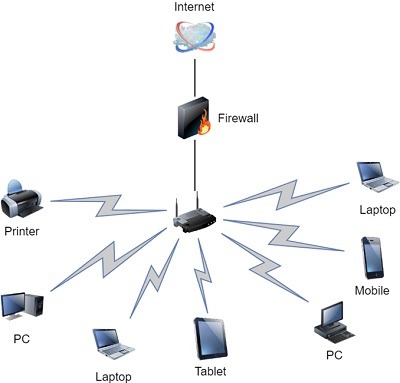
Basic of computer networks
Computer networks are the backbone of modern communication systems, enabling devices and computers to share resources, exchange information, and collaborate with each other. Here are some basics of computer networks:
- Network: A network refers to a collection of interconnected devices, such as computers, servers, printers, routers, switches, and more. These devices are linked together to enable communication and data transfer.
- Nodes: Nodes are the devices connected to a network. They can be computers, servers, switches, routers, or any other network-enabled device.
- Data Transmission: Networks facilitate the transmission of data between devices. Data can be sent in the form of text, images, videos, or any other digital information. The transmission can occur through wired connections (e.g., Ethernet cables) or wireless connections (e.g., Wi-Fi).
- Protocols: Network protocols are a set of rules and procedures that govern the exchange of data between devices in a network. They ensure that information is transmitted reliably and accurately. Examples of network protocols include TC P/IP (Transmission Control Protocol/Internet Protocol), HTTP (Hypertext Transfer Protocol), and SMT P (Simple Mail Transfer Protocol).
- LAN (Local Area Network): A LAN is a network that spans a small geographical area, such as a home, office, or campus. LAN s typically use Ethernet cables or Wi-Fi to connect devices within a limited area.
- WAN (Wide Area Network): A WAN covers a larger geographical area and connects multiple LAN s together. The Internet is an example of a WAN. WAN s use routers and other networking equipment to connect devices across long distances.
- IP Address: An IP (Internet Protocol) address is a unique numeric identifier assigned to each device connected to a network. It enables devices to communicate with each other over the Internet or other networks. There are two versions of IP addresses: IPv 4 (32-bit) and IPv 6 (128-bit), with IPv 6 designed to accommodate the growing number of devices.
- Router: A router is a network device that connects multiple networks together. It receives data packets and determines the most efficient path for the packets to reach their destination. Routers are responsible for directing traffic between different networks.
- Switch: A switch is a network device that connects devices within a network. It receives data packets and forwards them only to the appropriate destination device. Switches improve network performance by reducing unnecessary data transmission.
- Firewall: A firewall is a security device or software that monitors and controls incoming and outgoing network traffic based on predefined security rules. It acts as a barrier between an internal network (e.g., LAN) and external networks (e.g., the Internet), protecting against unauthorized access and potential threats.
These are some fundamental concepts of computer networks, but the field is vast and encompasses various other topics like network topo logies, network layers (such as OS I and TC P/IP models), network security, and more.
What is required Basics of computer networks
To understand the basics of computer networks, it’s helpful to have knowledge in the following areas:
- Networking Concepts: Familiarize yourself with fundamental networking concepts such as data transmission, protocols, network topo logies, and network layers (such as the OS I and TC P/IP models). Understanding how data flows and the various components involved in network communication is crucial.
- Network Devices: Learn about different network devices, their functions, and how they interact with each other. This includes routers, switches, hubs, modems, firewalls, and access points. Understand their roles in facilitating network connectivity and data transfer.
- IP Addresses and Sub netting: Gain an understanding of IP addresses and how they are used to identify devices on a network. Learn about IPv 4 and IPv 6 addressing schemes, sub netting, sub net masks, and the concept of network classes.
- Network Protocols: Learn about common network protocols such as TC P/IP, UD P, HTTP, DN S, SMT P, and FTP. Understand their purposes and how they facilitate communication between devices on a network.
- LAN and WAN Technologies: Explore local area network (LAN) technologies such as Ethernet, Wi-Fi, and VLAN s. Understand their characteristics, advantages, and usage scenarios. Additionally, learn about wide area network (WAN) technologies like leased lines, MPL S, and VP N s, which connect geographically dispersed networks.
- Network Security: Gain knowledge of basic network security principles and concepts. Understand the importance of firewalls, encryption, authentication, access control, and secure protocols in safeguarding network resources and data.
- Network Troubleshooting: Learn basic troubleshooting techniques to identify and resolve common network issues. Understand how to diagnose connectivity problems, check network configurations, and use network diagnostic tools.
- Network Services: Explore network services such as DHC P (Dynamic Host Configuration Protocol), DN S (Domain Name System), and NAT (Network Address Translation). Understand their functions and how they facilitate network operations.
- Network Management: Familiarize yourself with network management concepts, including network monitoring, performance optimization, and network documentation. Understand the importance of network management tools and protocols.
- Stay Updated: Keep up with advancements in networking technologies and industry trends. Networks are constantly evolving, and staying informed about new protocols, technologies, and best practices will help you adapt and enhance your knowledge.
Remember, computer networks can be complex, and there is always more to learn. Start with the basics and gradually build your knowledge and expertise by exploring advanced topics as your understanding grows.
Who is required Basics of computer networks
Basics of computer networks are essential for various professionals and individuals who work with or are interested in networking and related fields. Here are some individuals who can benefit from having a foundational understanding of computer networks:
- Network Administrators: Network administrators are responsible for managing and maintaining computer networks within organizations. They configure network devices, monitor network performance, troubleshoot issues, and ensure network security. Having a solid understanding of computer networks is crucial for their role.
- Network Engineers: Network engineers design, implement, and optimize computer networks. They plan network infrastructures, select appropriate hardware and software components, and ensure network scalability and reliability. A strong foundation in computer networks is essential for network engineering professionals.
- IT Professionals: IT professionals, including system administrators, help desk technicians, and technical support personnel, often deal with network-related issues. Understanding computer networks allows them to diagnose and resolve connectivity problems, configure network settings, and provide effective support to end-users.
- Software Developers: Software developers who work on network-related applications, such as web applications, client-server systems, or network protocols, need a basic understanding of computer networks. This knowledge helps them design and develop applications that communicate over networks efficiently.
- Cyber security Professionals: Cyber security specialists focus on protecting computer networks from threats and vulnerabilities. They need to understand network protocols, network architecture, and common attack vectors to detect and mitigate network security risks effectively.
- Network Analysts: Network analysts analyze network traffic and performance data to identify bottlenecks, optimize network resources, and troubleshoot issues. They require a foundational knowledge of computer networks to interpret and analyze network-related data effectively.
- Students and Researchers: Students pursuing degrees or certifications in computer science, information technology, or related fields should have a basic understanding of computer networks. Researchers in networking fields need this knowledge to conduct experiments, develop protocols, or contribute to the advancement of network technologies.
- General Users: Even for individuals who are not directly involved in network-related professions, having a basic understanding of computer networks is beneficial. It allows them to set up home networks, troubleshoot common connectivity issues, understand security risks, and make informed decisions regarding network devices and services.
Ultimately, anyone who uses computer networks or works in a field related to information technology can benefit from understanding the basics of computer networks. It provides a solid foundation for further learning and specialization in specific network-related areas.
When is required Basics of computer Networks
Understanding the basics of computer networks is required in various situations. Here are some scenarios where having a foundational knowledge of computer networks is beneficial:
- Network Setup and Configuration: When setting up a new network, whether it’s a home network or an office network, understanding the basics of computer networks is essential. This knowledge helps in configuring network devices, establishing connectivity, and ensuring proper network functioning.
- Troubleshooting Network Issues: When network connectivity problems arise, having a basic understanding of computer networks enables individuals to diagnose and resolve common network issues. It helps in identifying faulty network configurations, troubleshooting hardware or software problems, and restoring network connectivity.
- Network Administration and Management: Network administrators and IT professionals require a solid grasp of computer networks to effectively manage and maintain networks. They need to configure network devices, monitor network performance, implement security measures, and handle network-related tasks on a day-to-day basis.
- Network Security: Understanding computer networks is crucial for implementing network security measures. It helps in identifying vulnerabilities, configuring firewalls, implementing secure protocols, and preventing unauthorized access to networks. Network security professionals rely on this knowledge to protect networks from threats and potential breaches.
- Network Infrastructure Planning: When designing and planning network infrastructures, having a foundational knowledge of computer networks is necessary. It enables network engineers to make informed decisions regarding network topologies, device selection, scalability, and performance optimization.
- Developing Network Applications: Software developers working on network-related applications need a basic understanding of computer networks. It helps them design applications that communicate over networks efficiently, implement network protocols, and troubleshoot network-related issues that may arise during development.
- Evaluating Network Technologies and Solutions: When selecting network technologies, equipment, or service providers, understanding the basics of computer networks allows individuals to make informed decisions. It helps in assessing the suitability of different solutions, understanding the impact on network performance, and evaluating the compatibility of network components.
- Pursuing Networking Certifications or Advanced Studies: If you plan to pursue networking certifications or further your studies in networking-related fields, having a solid understanding of computer networks is a prerequisite. It forms the foundation for advanced networking concepts and enables deeper exploration of specialized topics.
In summary, understanding the basics of computer networks is required in various situations, ranging from setting up and managing networks to troubleshooting connectivity issues and implementing network security measures. It is beneficial for network administrators, IT professionals, network engineers, software developers, network security specialists, and individuals working with or relying on computer networks in their personal or professional lives.
Where is required Basics of computer Networks
The knowledge of computer networks is required in various contexts and industries. Here are some areas where the basics of computer networks are necessary:
- Information Technology (IT) Departments: Computer networks are a fundamental component of IT infrastructure. IT departments in organizations of all sizes require professionals who understand computer networks to set up, maintain, and troubleshoot network systems. This includes configuring network devices, managing network security, and ensuring smooth network operations.
- Telecommunications Industry: Telecommunication companies rely heavily on computer networks for their services. Understanding computer networks is crucial for professionals working in areas such as network planning, network design, network operations, and network maintenance.
- Data Centers: Data centers house the infrastructure required for storing and processing large volumes of data. Computer networks are essential for interconnecting servers, storage devices, and networking equipment within data centers. Professionals working in data centers need a solid understanding of computer networks to manage the complex network architecture.
- Internet Service Providers (ISP s): ISP s are responsible for providing Internet connectivity to residential and commercial users. To deliver reliable Internet services, professionals in the ISP industry must possess a deep understanding of computer networks, including network protocols, routing, network security, and network performance optimization.
- Network Equipment Vendors: Companies that manufacture network equipment, such as routers, switches, and firewalls, require professionals who have a thorough understanding of computer networks. These professionals contribute to the design, development, testing, and support of network devices and solutions.
- Network Security and Cyber security: Protecting computer networks from unauthorized access, attacks, and data breaches is crucial. Network security professionals must have a solid foundation in computer networks to design and implement security measures, monitor network traffic for anomalies, and respond to security incidents effectively.
- Cloud Computing: Cloud service providers rely on computer networks to deliver their services over the Internet. Professionals working in cloud computing need to understand network architectures, virtual networks, network security, and network performance optimization to ensure reliable and secure cloud services.
- Network Consulting and Services: Network consulting firms and service providers offer expertise in designing, implementing, and managing computer networks for clients. Professionals in this field require a comprehensive understanding of computer networks to assess client requirements, recommend network solutions, and troubleshoot network issues.
- Educational Institutions: Computer networking is a common subject taught in colleges and universities as part of computer science, information technology, or networking programs. Educators and researchers in the field of computer networks require a solid foundation in the basics to teach and advance the subject.
- Internet of Things (Io T) and Smart Cities: As the Io T continues to grow and smart city initiatives expand, professionals involved in these areas need to understand computer networks. They work with interconnected devices, sensors, and communication protocols to enable smart city infrastructure and Io T applications.
These are just a few examples of where the basics of computer networks are required. In today’s interconnected world, computer networks play a vital role in various industries and domains, making the understanding of networks highly valuable
How is required Basics of computer Networks
Understanding the basics of computer networks is crucial for several reasons. Here’s how this knowledge is required in different aspects:
- Network Setup and Configuration: When setting up a network, whether it’s a small home network or a large enterprise network, having a foundation in computer networks is essential. This knowledge helps in configuring network devices, assigning IP addresses, setting up network services (such as DHC P and DN S), and establishing connectivity between devices.
- Network Troubleshooting and Maintenance: Networks can experience issues like connectivity problems, slow performance, or security breaches. Understanding computer networks enables individuals to troubleshoot these problems effectively. It helps in diagnosing network-related issues, identifying mis configurations, analyzing network traffic, and implementing appropriate solutions.
- Network Security: Knowledge of computer networks is vital for implementing network security measures. It allows individuals to understand common network vulnerabilities, implement firewalls and intrusion detection systems, configure secure protocols, and protect networks from unauthorized access and potential threats.
- Network Optimization and Performance: Understanding computer networks helps optimize network performance. Individuals with this knowledge can analyze network traffic patterns, identify bottlenecks, optimize network configurations, and improve overall network efficiency. This includes techniques like load balancing, Quality of Service (Qo S) implementation, and bandwidth management.
- Network Planning and Design: Before implementing a network, it is crucial to plan and design it effectively. A foundational understanding of computer networks helps in designing network topo logies, selecting appropriate network devices, estimating network capacity requirements, and ensuring scalability and reliability.
- Collaboration and Resource Sharing: Computer networks facilitate collaboration and resource sharing among devices and users. Understanding networks allows individuals to set up shared printers, file servers, and network-attached storage (NA S) devices. It also helps in configuring collaborative tools like shared drives, online document storage, and video conferencing systems.
- Internet Connectivity and Cloud Services: The Internet is a massive computer network that connects devices globally. Understanding computer networks is essential for connecting to the Internet, accessing cloud services, understanding Internet protocols (such as TCP/IP), and utilizing Internet-based applications and resources.
- Developing Network Applications: Software developers working on network-related applications need a strong foundation in computer networks. This knowledge allows them to design and develop applications that communicate effectively over networks, utilize network protocols, and handle network-related challenges like packet loss, latency, and congestion.
- Network Administration and Management: Network administrators and IT professionals responsible for managing networks require a solid understanding of computer networks. This knowledge enables them to configure network devices, monitor network performance, manage network security, and ensure efficient network operations.
- Keeping Pace with Technological Advancements: Computer networks continue to evolve with new technologies and protocols. Having a foundational understanding of computer networks allows individuals to stay updated with advancements, new trends, and emerging technologies in the networking field. It helps them adapt to changing network requirements and embrace new networking concepts.
In summary, a basic understanding of computer networks is required in various aspects of network setup, troubleshooting, security, optimization, planning, collaboration, application development, administration, and staying current with networking advancements. It forms the foundation for effectively working with and managing computer networks in diverse environments.
Case study on Basics of computer Networks
Case Study: Small Business Network Setup
Introduction: ABC Company is a small business that provides IT consulting services. They have recently expanded their operations and require a network setup to facilitate communication, data sharing, and internet connectivity within the organization. They have hired a network administrator to handle the setup and maintenance of the network.
Network Requirements:
- Local Area Network (LAN): The company requires a LAN to connect all the devices within the office, including desktop computers, laptops, printers, and a file server.
- Internet Connectivity: The network should provide reliable and secure internet connectivity to allow employees to access online resources, communicate with clients, and perform research.
- Wireless Access: ABC Company wants to provide wireless access to employees and visitors for convenience and flexibility.
- Network Security: The network should have appropriate security measures in place to protect sensitive company data from unauthorized access or malicious activities.
- Scalability: The network should be scal able to accommodate future growth and the addition of more devices.
Solution:
- Network Topology: The network administrator decides to implement a star topology, which involves connecting all devices to a central switch. This topology provides ease of management, scalability, and flexibility.
- Network Devices: The network administrator selects the following devices:
- Router: To connect the local network to the internet, the network administrator chooses a router that supports the desired internet connection type (e.g., DS L, cable, fiber).
- Switch: A switch with sufficient ports is selected to connect all the devices within the office. The switch allows for fast and reliable data transfer between devices on the LAN.
- Wireless Access Point (WA P): A wireless access point is installed to provide wireless connectivity to employees and visitors. The WA P is secured with encryption and requires authentication for access.
- Firewall: To enhance network security, a firewall is implemented to monitor and control incoming and outgoing network traffic, protecting the network from unauthorized access and potential threats.
- IP Addressing and DHC P: The network administrator configures the router to act as a DHC P (Dynamic Host Configuration Protocol) server. DHC P automatically assigns IP addresses to devices on the network, simplifying network management. The DHC P server ensures that each device receives a unique IP address within the assigned range.
- Network Security: The network administrator implements several security measures:
- Network Segmentation: The LAN is divided into separate sub nets to isolate different departments or sensitive areas of the network. This helps to contain potential security breaches and control access.
- Wi-Fi Security: The wireless network is secured using WPA 2 encryption, and a strong password is set to prevent unauthorized access.
- Access Control: The network administrator sets up user accounts with appropriate access privileges. Strong passwords and periodic password changes are enforced.
- Antivirus and Firewall Software: Each device on the network is equipped with up-to-date antivirus software and personal firewalls to protect against malware and unauthorized network access.
- Internet Connectivity: The router is configured with the necessary information provided by the internet service provider (ISP) to establish internet connectivity. The network administrator ensures that the router firmware is updated regularly to address any security vulnerabilities.
- Network Monitoring and Maintenance: The network administrator sets up network monitoring tools to track network performance, identify potential issues, and proactively address them. Regular maintenance tasks, such as firmware updates, backups, and periodic security audits, are performed to keep the network running smoothly.
Conclusion: By implementing a well-designed network infrastructure, ABC Company can now enjoy seamless communication, secure data sharing, and reliable internet connectivity. The network administrator’s understanding of the basics of computer networks played a crucial role in setting up and maintaining an efficient network environment for the organization. This network setup provides a solid foundation for the company’s ongoing operations and future growth.
White paper on Basics of computer Networks
Title: Basics of Computer Networks: A Comprehensive Guide
Abstract: This white paper provides a comprehensive overview of the basics of computer networks. It covers the fundamental concepts, components, and protocols that form the foundation of modern networking. Starting with an introduction to networks and their significance, the paper explores network types, network architectures, communication models, and common network devices. It also discusses key networking protocols, network addressing, and network security principles. This white paper aims to equip readers with a solid understanding of computer networks and serve as a valuable resource for both beginners and professionals in the field.
- Introduction
- Definition of computer networks
- Importance of computer networks in modern society
- Evolution of computer networks
- Network Types
- Local Area Networks (LAN s)
- Wide Area Networks (WAN s)
- Metropolitan Area Networks (MAN s)
- Wireless Networks
- Internet and Intranets
- Network Architectures
- Peer-to-Peer (P2P) Architecture
- Client-Server Architecture
- Hybrid Architectures
- Communication Models
- OS I (Open Systems Interconnection) Model
- TC P/IP (Transmission Control Protocol/Internet Protocol) Model
- Network Devices
- Switches
- Routers
- Hubs
- Modems
- Network Interface Cards (NIC s)
- Wireless Access Points (WAP s)
- Networking Protocols
- Ethernet
- IP (Internet Protocol)
- TCP (Transmission Control Protocol)
- UD P (User Data gram Protocol)
- DN S (Domain Name System)
- DHC P (Dynamic Host Configuration Protocol)
- HTTP (Hypertext Transfer Protocol)
- HTTP S (Hypertext Transfer Protocol Secure)
- FTP (File Transfer Protocol)
- SMT P (Simple Mail Transfer Protocol)
- Network Addressing
- IP Addresses (IPv 4 and IPv 6)
- Sub netting
- MAC Addresses
- Network Security Principles
- Authentication
- Access Control
- Encryption
- Firewalls
- Intrusion Detection Systems (IDS) and Intrusion Prevention Systems (IP S)
- Virtual Private Networks (VPN s)
- Network Troubleshooting
- Common Network Issues
- Troubleshooting Tools and Techniques
- Network Monitoring and Analysis
- Future Trends in Computer Networks
- Software-Defined Networking (SD N)
- Network Function Virtualization (NF V)
- Internet of Things (Io T)
- 5G Networks
Conclusion: Understanding the basics of computer networks is vital in today’s interconnected world. This white paper has provided a comprehensive overview of network fundamentals, including network types, architectures, protocols, addressing, security principles, and troubleshooting techniques. By grasping these core concepts, readers can build a solid foundation in computer networks, enabling them to design, implement, and manage efficient and secure network infrastructures. The continuous advancement of networking technologies promises exciting opportunities and challenges, making the basics of computer networks an essential knowledge base for both current and future professionals in the field.