
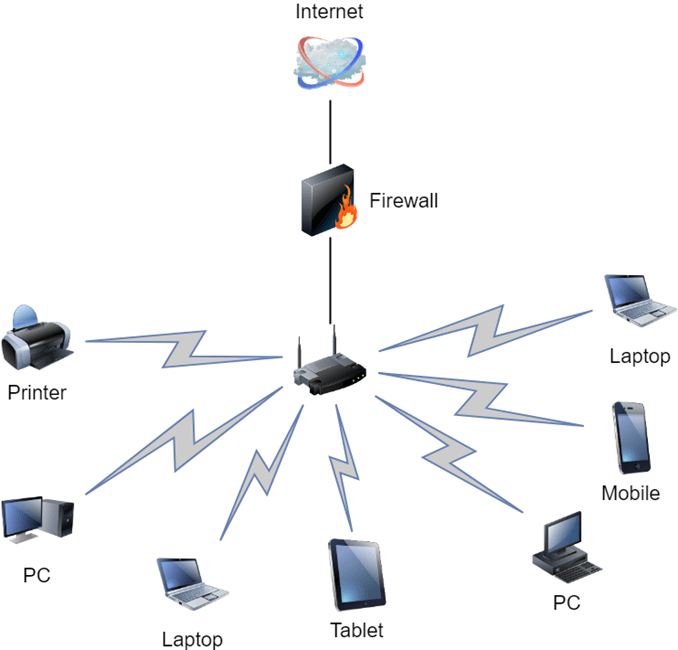
Basics of computer networks
Computer networks are essential for connecting devices and facilitating communication and data sharing between them. They enable the exchange of information, resources, and services across different locations. Here are some basic concepts related to computer networks:
- Network: A network refers to a collection of interconnected devices, such as computers, servers, printers, and switches, that are linked together to share resources and information.
- Nodes: Nodes are the individual devices or computers connected within a network. Each node has a unique address, such as an IP address, which allows it to send and receive data.
- Topology: Network topology describes the physical or logical layout of nodes and the way they are interconnected. Common topologies include bus, star, ring, mesh, and hybrid configurations.
- Protocols: Network protocols are rules and standards that define how devices communicate and exchange data across a network. Examples of protocols include TCP/IP (Transmission Control Protocol/Internet Protocol), HTTP (Hypertext Transfer Protocol), and SMTP (Simple Mail Transfer Protocol).
- LAN (Local Area Network): A LAN is a network that covers a small geographic area, such as a home, office, or building. It allows devices within the network to share resources and communicate with each other.
- WAN (Wide Area Network): A WAN is a network that spans a larger geographic area, connecting multiple LANs or remote sites. The internet is an example of a wide area network.
- Router: A router is a network device that connects different networks together. It directs data packets between networks based on their IP addresses, enabling data to be transmitted between networks.
- Switch: A switch is a network device that connects devices within a network. It uses MAC addresses to direct data packets to the intended recipient device.
- IP Address: An IP address is a unique identifier assigned to each device on a network. It enables devices to send and receive data across the internet or within a local network.
- DNS (Domain Name System): The DNS is a system that translates domain names into IP addresses. It allows users to access websites using human-readable names instead of remembering IP addresses.
- Firewall: A firewall is a security device or software that monitors and controls network traffic based on predetermined security rules. It helps protect networks from unauthorized access and potential threats.
- VPN (Virtual Private Network): A VPN is a secure network connection that allows users to access a private network over a public network, such as the internet. It provides encryption and enhances security when accessing sensitive data remotely.
These are just a few fundamental concepts of computer networks. Networking is a vast field, and there are many more advanced concepts and technologies involved in building and managing complex networks.
What is required Basics of computer networks
To understand the basics of computer networks, you will need to familiarize yourself with the following key concepts:
- Network types: Learn about the different types of networks, such as LAN, WAN, MAN (Metropolitan Area Network), and PAN (Personal Area Network). Understand their characteristics, coverage areas, and use cases.
- Network topologies: Study various network topologies, including bus, star, ring, mesh, and hybrid configurations. Understand how devices are interconnected in each topology and their advantages and disadvantages.
- Network protocols: Gain knowledge about common network protocols like TCP/IP, UDP (User Datagram Protocol), HTTP, DNS, DHCP (Dynamic Host Configuration Protocol), FTP (File Transfer Protocol), and SMTP. Understand their functions, how they operate, and their roles in network communication.
- IP addressing: Learn about IP addresses, both IPv4 and IPv6, and how they are used to uniquely identify devices on a network. Understand the concepts of subnetting and the difference between public and private IP addresses.
- Network devices: Familiarize yourself with various network devices, such as routers, switches, hubs, modems, and access points. Understand their functions and roles within a network.
- Network addressing and routing: Learn how devices communicate with each other using IP addresses and how routers facilitate the routing of data packets between different networks.
- Network security: Study the basics of network security, including concepts like firewalls, VPNs, encryption, authentication, and intrusion detection systems. Understand how to protect networks from unauthorized access and potential threats.
- Network troubleshooting: Gain knowledge of basic network troubleshooting techniques to diagnose and resolve common network issues. Learn how to use network diagnostic tools like ping, traceroute, and ipconfig.
- Network services: Understand common network services like DNS, DHCP, and file sharing. Learn how these services operate and their significance in network functionality.
- Network standards and organizations: Familiarize yourself with standardization bodies and organizations involved in networking, such as the IEEE (Institute of Electrical and Electronics Engineers) and the IETF (Internet Engineering Task Force).
It is important to note that computer networks are a vast and continuously evolving field. To build a strong foundation, consider studying networking textbooks, online resources, and taking relevant courses or certifications to delve deeper into the subject matter. Practical experience through hands-on networking activities and projects can also greatly enhance your understanding.
Who is required Basics of computer networks
Basics of computer networks are required by various individuals in different roles and fields. Here are some examples:
- Network Administrators: Network administrators are responsible for designing, implementing, and managing computer networks within organizations. They need a solid understanding of network basics to configure and maintain network infrastructure, troubleshoot issues, and ensure efficient network operations.
- Network Engineers: Network engineers specialize in the design and implementation of computer networks. They require a strong foundation in network fundamentals to plan and deploy networks, select appropriate hardware and software, optimize network performance, and ensure network security.
- IT Professionals: IT professionals, including system administrators and technical support staff, often work with computer networks as part of their responsibilities. They need a basic understanding of networks to assist with network-related issues, configure network-connected devices, and provide technical support to users.
- Software Developers: Software developers who build network applications, such as web developers or network programmers, need knowledge of computer networks. They should understand network protocols, APIs (Application Programming Interfaces), and network communication principles to develop applications that interact with networks.
- Security Professionals: Network security professionals, such as network security analysts or cybersecurity specialists, require a solid understanding of computer networks to identify vulnerabilities, protect against threats, and implement security measures at the network level.
- IT Managers: IT managers oversee the operations and strategy of an organization’s IT infrastructure. They need a basic understanding of computer networks to make informed decisions about network architecture, investments in networking equipment, and network-related projects.
- Students and Enthusiasts: Students pursuing degrees or certifications in computer science, information technology, or networking, as well as individuals interested in learning about computer networks, can benefit from grasping the basics. It provides them with a foundation to explore advanced networking topics and pursue careers in the field.
While the level of network knowledge required may vary depending on the specific role, having a solid grasp of the basics of computer networks is valuable across various professions that involve working with or managing networks.
What is required Basics of computer networks
To understand the basics of computer networks, you will need the following:
- Familiarity with computers: Basic knowledge of how computers work, including understanding hardware components (e.g., CPU, memory, storage) and software concepts (e.g., operating systems, applications).
- Networking terminology: Learn common networking terms such as LAN, WAN, IP address, router, switch, protocol, and firewall. This will help you understand and communicate effectively within the networking field.
- Internet fundamentals: Gain a basic understanding of how the internet works, including concepts like IP addressing, domain names, DNS, and how data is transmitted across different networks.
- Network protocols: Study key network protocols like TCP/IP, which are fundamental for data transmission over networks. Learn about the roles of protocols such as TCP (Transmission Control Protocol) and IP (Internet Protocol) in ensuring reliable and efficient communication.
- Network architecture and topologies: Understand the different network architectures and topologies commonly used, such as client-server, peer-to-peer, bus, star, ring, and mesh. Comprehend how devices are connected and the advantages and disadvantages of each topology.
- IP addressing and subnetting: Learn about IP addressing, including the structure of IPv4 and IPv6 addresses, subnet masks, and subnetting. Understand how IP addresses are assigned to devices and how subnets are used to divide networks into smaller segments.
- Network devices and equipment: Familiarize yourself with common network devices such as routers, switches, hubs, modems, and access points. Understand their roles, functionalities, and how they interconnect to form a network infrastructure.
- Network services and applications: Learn about common network services and applications, such as DHCP, DNS, HTTP, FTP, and email protocols (SMTP, POP3, IMAP). Understand how these services enable communication, data sharing, and resource access over networks.
- Network security basics: Gain knowledge of basic network security principles, including concepts like firewalls, VPNs, encryption, authentication, and access control. Understand the importance of securing networks and protecting against unauthorized access and threats.
- Troubleshooting network issues: Learn basic network troubleshooting techniques to diagnose and resolve common network problems. Understand how to use tools like ping, traceroute, and network monitoring software to identify and troubleshoot network issues.
To acquire a solid understanding of these basics, you can refer to textbooks, online resources, video tutorials, or enroll in networking courses or certifications. Hands-on experience and practical application of networking concepts through lab exercises or real-world projects can also greatly enhance your understanding.
When is required BASICS OF computer Networks
Basics of computer networks are required in various situations, including:
- Network Planning and Design: When planning and designing a computer network, understanding the basics of computer networks is crucial. This knowledge helps in determining network requirements, selecting appropriate network topologies, deciding on network device placement, and estimating network capacity and performance needs.
- Network Implementation and Configuration: During the implementation phase, network administrators and engineers require a solid foundation in computer networks to set up and configure network devices, establish network connectivity, assign IP addresses, and ensure proper network functionality.
- Network Troubleshooting and Maintenance: When network issues arise, having a grasp of network basics is essential for troubleshooting and resolving problems. Understanding network protocols, device configurations, and common network-related errors helps in diagnosing and rectifying network issues promptly.
- Network Administration and Management: Network administrators and managers need a strong understanding of computer networks to effectively monitor and manage network resources, address security concerns, optimize network performance, and ensure smooth network operations.
- Network Security: Protecting network infrastructure from unauthorized access, data breaches, and other security threats is crucial. Knowledge of network basics enables security professionals to implement appropriate security measures, configure firewalls, set up secure remote access (VPN), and detect and respond to network attacks.
- Career Advancement and Specialization: For individuals seeking careers in network administration, network engineering, network security, or related fields, a solid foundation in computer networks is essential. It forms the basis for further specialization, advanced certifications, and in-depth understanding of specific network technologies and protocols.
- IT Support and Help Desk Roles: IT professionals working in support roles often encounter network-related issues from end-users. Basic knowledge of computer networks helps them diagnose network connectivity problems, provide initial troubleshooting, and escalate more complex issues to network specialists.
- System Integration and Interoperability: When integrating different systems, applications, or devices within a network environment, understanding network basics is crucial. This knowledge allows for seamless interoperability, proper data exchange, and efficient communication between interconnected systems.
Whether you are working with networks directly, managing IT infrastructure, or involved in related fields, having a solid understanding of computer networks is essential to ensure efficient network operations, address issues effectively, and support overall business goals.
Who is required Basics of computer Networks
Basics of computer networks are required by various individuals in different roles and fields. Here are some examples:
- Network Administrators: Network administrators are responsible for designing, implementing, and managing computer networks within organizations. They need a solid understanding of network basics to configure and maintain network infrastructure, troubleshoot issues, and ensure efficient network operations.
- Network Engineers: Network engineers specialize in the design and implementation of computer networks. They require a strong foundation in network fundamentals to plan and deploy networks, select appropriate hardware and software, optimize network performance, and ensure network security.
- IT Professionals: IT professionals, including system administrators and technical support staff, often work with computer networks as part of their responsibilities. They need a basic understanding of networks to assist with network-related issues, configure network-connected devices, and provide technical support to users.
- Software Developers: Software developers who build network applications, such as web developers or network programmers, need knowledge of computer networks. They should understand network protocols, APIs (Application Programming Interfaces), and network communication principles to develop applications that interact with networks.
- Security Professionals: Network security professionals, such as network security analysts or cybersecurity specialists, require a solid understanding of computer networks to identify vulnerabilities, protect against threats, and implement security measures at the network level.
- IT Managers: IT managers oversee the operations and strategy of an organization’s IT infrastructure. They need a basic understanding of computer networks to make informed decisions about network architecture, investments in networking equipment, and network-related projects.
- Students and Enthusiasts: Students pursuing degrees or certifications in computer science, information technology, or networking, as well as individuals interested in learning about computer networks, can benefit from grasping the basics. It provides them with a foundation to explore advanced networking topics and pursue careers in the field.
While the level of network knowledge required may vary depending on the specific role, having a solid grasp of the basics of computer networks is valuable across various professions that involve working with or managing networks.
Case study on Basics of computer Networks
Case Study: Network Setup for a Small Business
Scenario: ABC Company is a small business with 20 employees. They recently moved to a new office space and need to set up their computer network from scratch. The network should provide reliable connectivity, enable file sharing, and support internet access for all employees. They also want to ensure network security and have plans for future expansion.
Solution: To meet the requirements of ABC Company, the following network setup is proposed:
- Local Area Network (LAN) Setup:
- Ethernet cabling: Install Ethernet cabling throughout the office space to provide wired connectivity to each workstation. Use Cat6 or higher grade cables for high-speed data transmission.
- Switch: Install a network switch to connect all the wired devices, such as computers, printers, and servers. A manageable switch with sufficient ports should be selected to accommodate future expansion.
- Wireless Access Points (WAPs): Deploy wireless access points strategically to provide Wi-Fi coverage throughout the office. Use Wi-Fi 6 (802.11ax) or higher standard for improved wireless performance.
- Internet Connectivity:
- Internet Service Provider (ISP): Subscribe to a reliable and high-speed internet service from a reputable ISP. Determine the required bandwidth based on the number of employees, expected internet usage, and future growth plans.
- Modem: Connect the ISP’s internet connection to a broadband modem compatible with the selected internet service. The modem may be provided by the ISP or purchased separately.
- Network Infrastructure:
- Router: Install a router that supports DHCP (Dynamic Host Configuration Protocol) for automatic IP address assignment and network address translation (NAT) for internet connectivity sharing. Ensure the router has firewall capabilities to enhance network security.
- Network Attached Storage (NAS): Set up a NAS device to centralize file storage and enable easy file sharing and backup. This allows employees to access shared files and collaborate efficiently.
- IP Addressing and Network Security:
- IP Addressing: Assign static IP addresses to network infrastructure devices (router, switch, WAPs, NAS) for easy management. Set up DHCP on the router to automatically assign dynamic IP addresses to workstations.
- Firewall: Configure the router’s built-in firewall to protect the network from unauthorized access and external threats. Customize firewall rules to allow or block specific traffic based on security policies.
- Network Services and Management:
- DNS and DHCP: Set up a DNS server to resolve domain names and configure the router to act as a DHCP server for automatic IP address assignment to workstations.
- Network Monitoring: Implement network monitoring tools to track network performance, detect any anomalies, and troubleshoot issues proactively. This can help ensure smooth network operations.
- Network Expansion and Scalability:
- Network Design Considerations: Plan for future growth and scalability by selecting network devices that can accommodate additional users and increased traffic. Consider network design best practices, such as separating network segments for different departments or implementing VLANs (Virtual Local Area Networks) for improved security and traffic control.
By implementing this network setup, ABC Company will have a reliable and secure computer network that meets their current requirements and allows for future expansion. Employees will have access to both wired and wireless connectivity, enabling seamless communication and file sharing. Regular monitoring and security measures will ensure the network operates efficiently and safely.
White paper on Basics of computer Networks
Title: Basics of Computer Networks: A Comprehensive Overview
Abstract: This white paper provides a comprehensive overview of the basics of computer networks. It aims to familiarize readers with fundamental concepts, principles, and components of computer networks. By understanding these basics, readers will gain a solid foundation to explore more advanced networking topics and technologies.
- Introduction
- Definition of computer networks
- Importance and benefits of computer networks
- Network Types and Topologies
- Local Area Networks (LANs)
- Wide Area Networks (WANs)
- Metropolitan Area Networks (MANs)
- Network topologies: bus, star, ring, mesh, hybrid
- Network Protocols
- TCP/IP protocol suite
- OSI (Open Systems Interconnection) model
- Common network protocols: TCP, UDP, IP, HTTP, DNS, DHCP, FTP, SMTP
- IP Addressing and Subnetting
- IPv4 vs. IPv6
- IP address structure and classes
- Subnetting and subnet masks
- Network Devices
- Routers: functions and routing protocols
- Switches: VLANs, MAC addressing, and switching techniques
- Hubs, bridges, modems, and access points
- Network Services and Applications
- DNS (Domain Name System)
- DHCP (Dynamic Host Configuration Protocol)
- Web services (HTTP, HTTPS)
- Email protocols (SMTP, POP3, IMAP)
- File transfer protocols (FTP, SFTP)
- Network Security
- Firewalls and network security policies
- Virtual Private Networks (VPNs) and encryption
- Intrusion Detection Systems (IDS) and Intrusion Prevention Systems (IPS)
- Network access control and authentication mechanisms
- Network Management and Troubleshooting
- Network monitoring and performance optimization
- Troubleshooting common network issues
- Network diagnostic tools and techniques
- Future Trends and Technologies
- Cloud computing and its impact on networking
- Software-Defined Networking (SDN)
- Internet of Things (IoT) and its network implications
- Conclusion
- Recap of key concepts covered
- Importance of continuous learning in the field of computer networks
This white paper aims to provide a comprehensive introduction to the basics of computer networks. It is intended for individuals seeking to develop a foundational understanding of computer networks, including students, IT professionals, network administrators, and enthusiasts. By grasping these fundamental concepts, readers will be better equipped to navigate the ever-evolving landscape of computer networking and explore more advanced networking topics.