
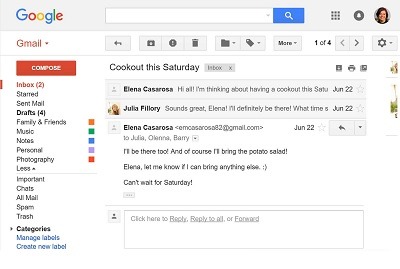
Basics of E-mail.Opening E-mail client
Sure! Email, short for electronic mail, is a method of exchanging digital messages between people using electronic devices such as computers, smartphones, or tablets. An email client is a software application or web-based service that allows users to send, receive, and manage their emails. Here are the basics of using an email client:
- Creating an Email Account: To get started with email, you need to create an email account. There are several email service providers like Gmail, Outlook, Yahoo Mail, etc. Choose one and go to their website to sign up for an account. You will be asked to provide some basic information, create a username (email address), and set a password.
- Accessing the Email Client: Once you have an email account, you can access your email client. There are two main types of email clients:
a. Web-based Email Clients: These are accessed through a web browser. Go to the website of your email service provider (e.g., www.gmail.com) and log in with your email address and password.
b. Desktop Email Clients: These are standalone applications installed on your computer or device. Some popular desktop email clients include Microsoft Outlook, Mozilla Thunderbird, and Apple Mail. You’ll need to set up your email account within the application by providing your email address and password.
- Composing and Sending an Email: To compose a new email, look for a button or link labeled “Compose” or “New Email.” Clicking on it will open a new window where you can write your email. You will need to enter the recipient’s email address in the “To” field, add a subject to your email, write the content of your message in the body area, and click “Send” to send the email.
- Receiving and Reading Emails: When someone sends you an email, you will receive it in your inbox. To read an email, click on the email subject in your inbox, and the email will open in a new window, allowing you to read its content.
- Managing Emails: You can manage your emails by using various features provided by the email client. You can organize emails into folders or labels, mark them as read or unread, archive or delete them, and search for specific emails using keywords.
- Replying and Forwarding: When you receive an email and want to respond to it, click on the “Reply” button to send a response to the original sender. If you want to forward an email to someone else, click on the “Forward” button and enter the recipient’s email address.
- Attachments: Email allows you to send attachments such as documents, images, or videos. Look for an attachment icon (usually a paperclip) in the email composer to add files to your email.
- Logging Out: Always remember to log out of your email account when you are done using it, especially if you are accessing it from a shared or public computer.
That covers the basics of using an email client. It’s a simple yet powerful tool for communication, and it has become an integral part of personal and professional communication in the modern world.
What is required Basics of E-mail.Opening E-mail client
To get started with using an email client, you’ll need a few basic things:
- Device: You’ll need a computer, smartphone, tablet, or any other electronic device with internet connectivity to access your email client.
- Internet Connection: An active internet connection is essential to access your email client, whether it’s a web-based client or a desktop application.
- Email Account: You’ll need to have an email account with an email service provider. As mentioned earlier, there are several options like Gmail, Outlook, Yahoo Mail, etc. You can create an account by signing up on their respective websites.
- Username and Password: When you sign up for an email account, you’ll choose a username (email address) and set a password. You’ll need these credentials to log in to your email client.
- Web Browser (for Web-based Email Clients): If you’re using a web-based email client, you’ll need a web browser like Google Chrome, Mozilla Firefox, Microsoft Edge, or Safari. Make sure your browser is up-to-date for the best experience.
- Desktop Email Client (Optional): If you prefer a desktop email client, you can install one on your computer or device. Popular desktop email clients include Microsoft Outlook, Mozilla Thunderbird, and Apple Mail. These applications need to be set up with your email account using your email address and password.
- Basic Computer Skills: Familiarity with basic computer skills, such as using a keyboard and mouse (or touchpad), navigating web pages or applications, and typing, will be helpful.
- Email Etiquette: Although not a technical requirement, it’s essential to understand basic email etiquette when composing and responding to emails. This includes using appropriate salutations, keeping your messages concise and clear, avoiding unnecessary use of “Reply All,” and being mindful of the tone and content of your emails.
Once you have these basics covered, you can open your email client, log in with your email address and password, and start sending, receiving, and managing your emails.
Remember to keep your email account credentials secure and avoid sharing them with unauthorized individuals to protect your privacy and data. Additionally, regularly update your password and be cautious of suspicious emails or phishing attempts to maintain a secure email experience.
Who is required Basics of E-Mail .Opening E-mail client
The basics of email and opening an email client are essential for anyone who wishes to use email for communication. Email has become a ubiquitous means of communication in both personal and professional settings, and knowing how to use it is crucial for effective communication and staying connected with others.
The following individuals or groups may find it particularly necessary to understand the basics of email and opening an email client:
- Individuals: Everyday users, including students, professionals, homemakers, retirees, and anyone with access to a computer or smartphone, can benefit from knowing how to use email. It allows them to stay in touch with friends, family, colleagues, and receive important information.
- Students: Email is often used in educational settings for communication with teachers, classmates, and educational institutions. Students need to know how to access their email accounts and manage their emails effectively.
- Professionals: Email is a primary communication tool in the business world. Employees use it for internal communication, collaborating with colleagues, sending reports, and interacting with clients and customers.
- Job Seekers: Many employers use email as the primary mode of communication during the job application process. Knowing how to open and respond to emails professionally is essential for job seekers.
- Small Business Owners: Email is an integral part of running a small business. Business owners use it to communicate with customers, suppliers, and other stakeholders.
- Entrepreneurs: Entrepreneurs often rely on email to pitch their ideas, establish partnerships, and communicate with potential investors or clients.
- Senior Citizens: Learning email basics can be beneficial for senior citizens as it allows them to connect with family, friends, and community groups online.
- Remote Workers: With the rise of remote work, knowing how to use email efficiently is essential for remote workers to stay connected with their teams and manage work-related communications.
- Non-Profit Organizations: Non-profits can use email to communicate with donors, volunteers, and members of the community they serve.
- Educators: Teachers and educators use email to communicate with students, parents, and colleagues, making it essential for effective teaching and administration.
In summary, the basics of email and opening an email client are valuable skills for a wide range of individuals, encompassing students, professionals, job seekers, entrepreneurs, and anyone seeking to effectively communicate in the digital age. Email has become an integral part of modern communication, and mastering its fundamentals is highly beneficial in various aspects of life.
When is required Basics of E-mail. Opening E-MAIL Client
The basics of email and opening an email client are required whenever you need to send, receive, and manage electronic messages (emails). Email has become a fundamental mode of communication in today’s digital world, and knowing how to use it is essential in various situations and scenarios. Here are some specific instances when the knowledge of email basics and opening an email client is required:
- Daily Communication: If you want to communicate with friends, family members, colleagues, or anyone else on a regular basis, email is a common and convenient method.
- Job Applications and Professional Communication: When applying for jobs or communicating with potential employers and colleagues in a professional setting, email is often the preferred mode of communication.
- Educational Purposes: Students may need to use email to communicate with their teachers, professors, classmates, or to access important course information.
- Business and Work Communication: In the workplace, email is extensively used for internal communication, coordination among team members, and interaction with clients, suppliers, and customers.
- Remote Work: With the rise of remote work and virtual teams, email plays a critical role in keeping remote workers connected and collaborating effectively.
- Online Services and Accounts: Signing up for various online services, creating accounts on websites, and receiving important updates from service providers often require an email address.
- Receiving Notifications and Newsletters: Many online platforms and websites use email to send notifications, newsletters, and updates to their users.
- Personal Finance and Billing: Email is used by banks, financial institutions, and businesses to send account statements, payment reminders, and transaction notifications.
- Event Invitations and RSVPs: Email is commonly used for sending event invitations and managing RSVPs for social gatherings and professional events.
- Communication with Organizations: Engaging with non-profit organizations, community groups, and government agencies often involves email communication.
- Keeping Records and Documentation: Email is a valuable tool for documenting conversations, storing important information, and having a record of important communications.
- Sharing Files and Attachments: When sharing documents, images, or other files with others, email allows for easy attachment and transmission.
In summary, the basics of email and opening an email client are required in numerous aspects of personal, academic, and professional life. Whether it’s for communication, job applications, educational purposes, or managing online activities, email is a versatile and widely used tool that plays a significant role in modern communication and information exchange.
Where is required Basics of E-mail .Opening E-mail client
The basics of email and opening an email client are required in various situations and settings where digital communication is necessary. Here are some common scenarios where the knowledge of email basics and opening an email client is required:
- Personal Communication: Email is commonly used for personal communication with friends, family members, and acquaintances. Knowing how to open an email client and compose messages is essential for staying in touch with loved ones.
- Professional Communication: In the workplace, email is a primary means of communication. Employees need to open their email clients to send and receive work-related messages, collaborate with colleagues, and interact with clients or customers.
- Job Applications: When applying for jobs, job seekers are often required to communicate with potential employers via email. Knowing how to open an email client and compose professional emails is crucial during the job application process.
- Academic Communication: Students use email to communicate with teachers, professors, classmates, and administrative staff. Understanding email basics is essential for academic purposes.
- Online Services: Many online services, websites, and platforms require users to have an email address for registration and communication purposes. Knowing how to access an email client is essential to receive important updates and notifications.
- Remote Work and Virtual Teams: With the rise of remote work, virtual teams rely heavily on email for communication. Understanding email basics is crucial for remote workers to stay connected and collaborate effectively.
- Business Communication: Entrepreneurs and business owners use email to communicate with clients, suppliers, partners, and other stakeholders. Knowing how to open an email client is essential for managing business communications.
- Event Invitations: Email is often used to send event invitations, RSVPs, and event-related information. Opening an email client is necessary to respond to invitations and stay informed about events.
- Subscription Management: People subscribe to newsletters, updates, and online services. Knowing how to manage emails in an email client is important for organizing and staying updated on various subscriptions.
- Customer Support: Email is a common channel for customer support and inquiries. Knowing how to access an email client allows customers to communicate with businesses and receive assistance.
- Government and Official Communication: Email is used for official communication with government agencies, organizations, and institutions. Being able to open an email client is essential for such interactions.
- Record-Keeping and Documentation: Emails often contain important information and records of conversations. Knowing how to use an email client helps in organizing and storing such documentation.
In summary, the basics of email and opening an email client are required in both personal and professional settings where digital communication is prevalent. Email is a versatile and widely used tool, and understanding its fundamentals is essential for effective communication and staying connected in the modern world.
Who is required Basics of E-mail . Opening E-mail client
The basics of email and opening an email client are required by anyone who wants to use email for communication. Email has become a fundamental and widely adopted method of communication in today’s digital age, and knowing how to use it is beneficial for a broad range of individuals and groups. Here are the main categories of people who may require knowledge of email basics and opening an email client:
- General Users: Everyday individuals, including students, professionals, homemakers, retirees, and people from all walks of life, may need to use email for various personal and social purposes.
- Students: Students at all levels of education, from primary school to university, often need to use email to communicate with teachers, professors, classmates, and educational institutions.
- Professionals: Email is a primary communication tool in the workplace, and professionals need to use it to interact with colleagues, clients, customers, and other stakeholders.
- Job Seekers: When applying for jobs, job seekers often need to communicate with potential employers via email, submit job applications, and respond to interview invitations.
- Entrepreneurs and Business Owners: Email is crucial for entrepreneurs and business owners to communicate with clients, suppliers, partners, and manage various aspects of their businesses.
- Remote Workers: With the increasing trend of remote work, remote workers heavily rely on email to collaborate with their teams and stay connected to the organization.
- Non-Profit Organizations: Non-profit organizations use email to communicate with donors, volunteers, and members of the community they serve.
- Educators and Teachers: Teachers and educators use email to communicate with students, parents, and colleagues, making it an essential tool for education administration.
- Senior Citizens: Email can be valuable for senior citizens to stay in touch with family and friends, access information, and participate in online communities.
- Government and Public Service Employees: Government officials and public service employees often use email for official communication and administrative purposes.
- Online Service Users: Anyone who signs up for online services, platforms, or websites will need an email address to receive notifications and manage their accounts.
- Social and Community Groups: Members of social and community groups use email for communication, event organization, and group updates.
In summary, the basics of email and opening an email client are required by a wide range of individuals and groups across various personal, educational, and professional settings. Email is a versatile and widely used communication tool, and mastering its fundamentals is essential for effective communication and staying connected in the modern world.
Case study on Basics of E-mail .Opening E-mail client
Case Study: Enhancing Digital Communication Skills through Basics of E-mail and Opening E-mail Client
Introduction:
The XYZ Learning Center, an educational institute offering a wide range of courses to students of all ages, noticed a growing need among its students to enhance their digital communication skills. With the increasing importance of online learning, remote work, and virtual collaboration, the ability to use email effectively had become crucial for both academic and professional success. As a result, the center decided to introduce a new module on the basics of e-mail and opening an e-mail client to empower its students with essential digital communication skills.
Objective:
The primary objective of this case study is to illustrate how implementing a module on the basics of e-mail and opening an e-mail client can benefit students, preparing them for effective communication in both their academic and professional lives.
Implementation:
- Curriculum Integration: The XYZ Learning Center integrated the module on e-mail basics into its existing computer literacy course. The course was mandatory for students of all programs, ensuring that every student had an opportunity to learn about e-mail.
- Content Development: The center developed comprehensive content covering the basics of e-mail. The content included explanations on what e-mail is, how it works, and the benefits of using it. Step-by-step guides on opening an e-mail client, creating an account, composing, sending, and managing e-mails were also included.
- Interactive Workshops: To make the learning experience engaging, the center conducted interactive workshops where students could practice opening an e-mail client, creating an e-mail account, and sending sample messages to their peers under the guidance of experienced instructors.
- Real-Life Scenarios: The content and workshops included real-life scenarios to demonstrate the relevance of e-mail in different situations, such as sending a job application, communicating with a professor, or collaborating on a group project.
- Hands-On Exercises: Students were assigned hands-on exercises, like sending e-mails to their instructors or participating in group discussions through e-mail, to reinforce their learning.
Results and Impact:
- Enhanced Communication Skills: The module helped students develop essential digital communication skills. They became proficient in writing professional e-mails, responding promptly, and organizing their inbox effectively.
- Academic Benefits: Students found it easier to communicate with their teachers, submit assignments, and clarify doubts using e-mail. This led to smoother interactions within the academic setting.
- Professional Readiness: As students advanced in their studies and entered the job market, they were well-prepared to communicate with potential employers and colleagues professionally.
- Increased Confidence: Learning the basics of e-mail and opening an e-mail client boosted students’ confidence in their digital skills, making them more adaptable to the changing technology landscape.
- Positive Feedback: Students and parents provided positive feedback about the module, acknowledging its relevance and practicality in today’s digital world.
Conclusion:
The implementation of the module on the basics of e-mail and opening an e-mail client at the XYZ Learning Center proved to be highly beneficial. It equipped students with essential digital communication skills, empowering them to navigate academic and professional challenges effectively. By recognizing the importance of e-mail in the modern world, the center successfully prepared its students for a digital future where effective communication plays a central role in their success.
White paper on Basics of E-mail.Opening E-MAIL client
White Paper: Basics of E-mail – Opening E-mail Client
Abstract:
In today’s interconnected world, email has become an integral part of communication for individuals and businesses alike. Understanding the basics of email and how to open an email client is essential for effective digital communication. This white paper explores the fundamentals of email, the process of opening an email client, and the benefits of using email as a primary means of communication.
1. Introduction:
Email, short for electronic mail, revolutionized communication when it was introduced in the early days of the internet. It provides a quick and efficient way to send and receive messages electronically, enabling people to stay connected regardless of their geographical locations. This white paper delves into the basics of email and guides users through the process of opening an email client.
2. Understanding Email Basics:
Email is a digital messaging system that allows users to send and receive messages through electronic devices connected to the internet. Each user is assigned a unique email address, comprising a username (e.g., johndoe) and a domain name (e.g., example.com). When composing an email, users enter the recipient’s email address in the “To” field, add a subject to the message, write the content in the body, and click “Send” to dispatch the email.
3. Opening an E-mail Client:
An email client is a software application or web-based service that enables users to manage their emails. There are two primary types of email clients: web-based and desktop.
a. Web-based Email Client: Web-based email clients can be accessed through internet browsers. To open a web-based email client, users simply need to type the email service provider’s URL (e.g., www.gmail.com) into the browser’s address bar. Once on the website, they can log in using their email address and password.
b. Desktop Email Client: Desktop email clients are standalone applications installed on users’ computers. To open a desktop email client, users click on the application’s icon on their desktop or in the applications menu. They will then be prompted to enter their email address and password to set up the email account within the application.
4. Benefits of Email:
Email offers numerous advantages, making it a popular choice for communication:
a. Speed and Efficiency: Emails are delivered instantly, allowing for quick communication between parties.
b. Accessibility: Email can be accessed from any internet-connected device, enabling communication on the go.
c. Record-Keeping: Emails serve as a written record of conversations, making it easy to refer back to past communications.
d. File Attachments: Users can attach files such as documents, images, and videos to emails, facilitating the exchange of information.
e. Professionalism: Email is a formal and widely accepted means of communication in both personal and business settings.
5. Conclusion:
Understanding the basics of email and opening an email client is a valuable skill in today’s digital age. Email provides a convenient and effective way to communicate, enabling individuals and businesses to stay connected and collaborate seamlessly. With its speed, accessibility, and numerous benefits, email remains an indispensable tool for communication in the modern world. By mastering the fundamentals of email, users can unlock the full potential of this powerful communication medium.
For those looking to deepen their knowledge of email and email clients, further exploration of advanced features such as email organization, filtering, and security measures can enhance the overall email experience and streamline communication workflows.