
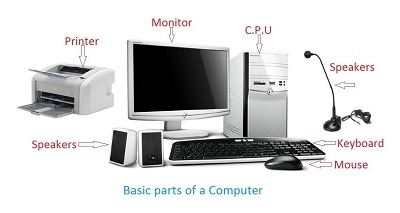
A computer is a complex system that performs various tasks by processing data and executing instructions. It consists of several interconnected components, each with its own function. Here’s an overview of the key components of a computer:
- Central Processing Unit (CPU):
- Often referred to as the brain of the computer, the CPU performs calculations and executes instructions. It interprets and carries out the commands issued by computer programs.
- Memory (RAM – Random Access Memory):
- RAM is volatile memory used to store data and machine code currently being used and processed by the CPU. It allows for fast read and write operations, providing temporary storage for running applications.
- Storage Devices:
- Hard Disk Drive (HDD): A traditional, non-volatile storage device that stores data magnetically on rotating disks.
- Solid State Drive (SSD): A faster and more durable alternative to HDDs, using flash memory for data storage without moving parts.
- Motherboard:
- The motherboard is the main circuit board that connects and facilitates communication between various components, including the CPU, memory, storage, and peripheral devices.
- Power Supply Unit (PSU):
- The PSU converts electrical power from an outlet into a form that the computer components can use. It supplies power to the motherboard, CPU, and other peripherals.
- Input Devices:
- Keyboard: Allows users to input text and commands.
- Mouse or Trackpad: Provides a pointing device for graphical user interfaces.
- Other Input Devices: Includes scanners, webcams, and microphones.
- Output Devices:
- Monitor or Display: Presents visual information to the user.
- Printer: Produces hard copies of documents.
- Speakers: Outputs audio and sound.
- Graphics Processing Unit (GPU):
- The GPU is responsible for rendering graphics and images. It’s crucial for gaming, video editing, and other graphics-intensive tasks.
- Network Interface Card (NIC):
- Allows the computer to connect to a network, either wired (Ethernet) or wireless (Wi-Fi).
- Expansion Cards:
- Additional cards that can be added to the motherboard for specific functions, such as sound cards, video capture cards, or network cards.
- Cooling System:
- Fans, heat sinks, and other cooling mechanisms are crucial to dissipate heat generated by the CPU and other components during operation.
- BIOS/UEFI:
- Basic Input/Output System (BIOS) or Unified Extensible Firmware Interface (UEFI) is firmware that initializes the computer hardware during the boot process and provides an interface between the operating system and the hardware.
- Operating System (OS):
- The software that manages hardware resources and provides services for computer programs. Common operating systems include Windows, macOS, and Linux.
Understanding the role and function of each component helps in assembling, maintaining, and troubleshooting a computer system. Each component plays a vital role in the overall functionality of the computer.
To build a functional computer system, you’ll need a set of essential components. Here’s a list of the core components required to assemble a computer:
- Central Processing Unit (CPU):
- The CPU is the primary processing unit of the computer. It performs calculations and executes instructions.
- Motherboard:
- The motherboard is the main circuit board that provides connections for all other components. It hosts the CPU, memory, storage devices, and other crucial components.
- Memory (RAM):
- Random Access Memory (RAM) provides temporary storage for data and machine code that the CPU is actively using. It is essential for fast access to information.
- Storage Device:
- Choose a storage device for long-term data storage. Options include Hard Disk Drives (HDDs) or Solid State Drives (SSDs).
- Power Supply Unit (PSU):
- The PSU converts electrical power from an outlet into a form suitable for the computer’s components. It supplies power to the motherboard, CPU, and other peripherals.
- Graphics Processing Unit (GPU):
- A GPU is required for rendering graphics and images. While some CPUs have integrated graphics, a dedicated GPU is essential for tasks like gaming and graphics-intensive applications.
- Cooling System:
- To prevent overheating, a cooling system, including fans or heat sinks, is necessary for both the CPU and GPU.
- Computer Case:
- The case houses and protects the internal components. Choose a case that is compatible with your motherboard form factor and has sufficient space for other components.
- Input Devices:
- Include a keyboard and mouse for user input. Other input devices like scanners, webcams, and microphones can be added based on requirements.
- Output Devices:
- A monitor or display is needed to view output, and speakers or headphones for audio output. Printers can be added if hard copies of documents are required.
- Network Interface Card (NIC):
- A NIC allows the computer to connect to a network. Most motherboards come with integrated Ethernet ports, and Wi-Fi adapters can be added if needed.
- Operating System (OS):
- Choose an operating system such as Windows, macOS, or Linux to manage hardware resources and provide a user interface.
- Cables and Connectors:
- Various cables, including power cables, data cables, and peripheral connectors, are required to connect and power the components.
- BIOS/UEFI:
- Basic Input/Output System (BIOS) or Unified Extensible Firmware Interface (UEFI) is firmware that initializes the computer hardware during the boot process.
- Optional Components:
- Depending on specific needs, you might add expansion cards (e.g., sound cards, network cards), additional storage drives, or other peripherals like webcams, printers, or external storage devices.
When selecting components, ensure compatibility between each part, considering factors such as socket types, form factors, and power requirements. Following a systematic approach to assembly and considering the purpose of the computer (e.g., gaming, productivity, content creation) will help you create a well-functioning system.
The term “who is required” can be interpreted in different ways. If you’re asking about the individuals or entities involved in the acquisition, assembly, or use of computers and their components, here are some key stakeholders:
- End Users:
- Individuals or organizations that use computers for various purposes, such as work, education, entertainment, or communication.
- IT Professionals:
- Professionals responsible for managing and maintaining computer systems within an organization. This includes system administrators, network administrators, and IT support staff.
- System Builders:
- Individuals or companies that assemble and build custom computer systems. This can include enthusiasts building their own systems or businesses that provide custom-built computers.
- Manufacturers and Suppliers:
- Companies that produce and supply computer components, such as CPUs, motherboards, memory, storage devices, and other hardware components.
- Retailers:
- Stores or online platforms that sell computer components and pre-built systems to end users.
- Software Developers:
- Individuals or organizations that create software applications and operating systems that run on computers.
- System Integrators:
- Companies that specialize in integrating various hardware and software components to create complete computer systems for specific purposes, such as servers, workstations, or specialized computing solutions.
- Educational Institutions:
- Schools, colleges, and universities that use computers for educational purposes and may be involved in teaching computer-related courses.
- Government Agencies:
- Various government departments and agencies that use computers for administrative, research, and operational purposes.
- Research Institutions:
- Organizations involved in scientific research and development that require computing power for simulations, data analysis, and other computational tasks.
- Home Users:
- Individuals who use computers for personal tasks, entertainment, and communication at home.
Understanding who is involved in the computer ecosystem is essential for effective communication, collaboration, and decision-making related to the acquisition, maintenance, and utilization of computer systems and components. Each stakeholder may have different needs, preferences, and roles in the lifecycle of a computer.
The need for a computer and its components arises in various situations and contexts. Here are some common scenarios when the requirement for computers and their components is prevalent:
- Work and Professional Use:
- When starting a business or a new job: Individuals and organizations often require computers for daily operations, communication, and task management.
- Education:
- Enrollment in educational programs: Students often need computers for research, assignments, and collaborative projects.
- Research and Development:
- Scientific research and development projects: Researchers and scientists use computers for simulations, data analysis, and modeling.
- Entertainment:
- Gaming and multimedia: Enthusiasts and gamers require high-performance computers for gaming and multimedia consumption.
- Home Office Setup:
- Remote work and telecommuting: The increasing trend of remote work has led to a growing demand for home office computer setups.
- Content Creation:
- Graphic design, video editing, and content creation: Professionals and hobbyists in creative fields need powerful computers with specialized components.
- Communication:
- Video conferencing and communication: Computers are essential for video calls, online meetings, and virtual communication.
- Server Infrastructure:
- Building server infrastructure: Organizations require servers for hosting websites, managing databases, and supporting network services.
- Upgrade or Replacement:
- When existing systems become outdated: Users may need to upgrade or replace components to improve performance or meet new software requirements.
- New Technological Trends:
- Adoption of emerging technologies: As technologies like virtual reality, artificial intelligence, and machine learning become more prevalent, there’s an increased demand for computers with specific capabilities.
- Emergency or Disaster Recovery:
- Recovery from data loss or hardware failure: In situations where data is lost or hardware fails, there is a need for new computers or components for recovery.
- Specialized Applications:
- For specific industries and applications: Certain industries, such as healthcare, engineering, and finance, require specialized computers and components for their specific applications.
- Training and Skill Development:
- Learning and skill development: Individuals seeking to acquire new skills or certifications may require computers for online courses and practical exercises.
Understanding the specific use case and requirements is crucial when determining when a computer and its components are needed. Whether for personal, professional, or specialized purposes, the need for computers is diverse and continually evolving with technological advancements.
Computers and their components are required in various locations and settings to meet different needs. Here are some common places where computers and their components are required:
- Homes:
- Many individuals have computers at home for personal use, such as for entertainment, communication, education, and work.
- Offices and Workplaces:
- Computers are a fundamental part of modern offices and workplaces, facilitating tasks such as document creation, communication, data analysis, and project management.
- Educational Institutions:
- Schools, colleges, and universities require computers for educational purposes, including research, online learning, and administrative tasks.
- Research Centers:
- Scientific research centers and laboratories use computers for simulations, data analysis, and computational modeling.
- Healthcare Facilities:
- Hospitals and clinics use computers for patient records, medical imaging, diagnostic tools, and administrative tasks.
- Retail Stores:
- Point-of-sale (POS) systems, inventory management, and other business operations in retail often rely on computers.
- Manufacturing Plants:
- Computers are essential in manufacturing for process control, automation, inventory tracking, and quality control.
- Financial Institutions:
- Banks and financial institutions use computers for transaction processing, account management, and data analysis.
- Entertainment Venues:
- Gaming centers, theaters, and entertainment venues use computers for ticketing, audio-visual systems, and interactive experiences.
- Data Centers:
- Large-scale data centers house numerous computers for web hosting, cloud services, and managing vast amounts of data.
- Remote Locations:
- Computers are used in remote locations for various purposes, such as satellite communication, environmental monitoring, and research expeditions.
- Aircraft and Vehicles:
- Aircraft, automobiles, and other vehicles increasingly incorporate computers for navigation, entertainment, and engine control systems.
- Smart Homes:
- With the rise of the Internet of Things (IoT), homes equipped with smart devices often include computers for home automation and control systems.
- Server Rooms:
- Dedicated rooms within organizations house servers and networking equipment, forming the backbone of IT infrastructure.
- Public Spaces:
- Public libraries, internet cafes, and community centers provide access to computers for public use.
- Telecommunication Centers:
- Telecommunication hubs and data exchange points use computers for managing network traffic and communication services.
- Military and Defense:
- Military operations involve the use of computers for communication, intelligence analysis, and weapon systems control.
Understanding the diverse environments where computers are required highlights the ubiquity and versatility of these devices in modern society. The specific needs and applications in each setting determine the types of computers and components used.
The process of determining how a computer and its components are required involves several steps, depending on the purpose, scale, and context of the computing needs. Here’s a general outline of how the requirement for computers and components is determined:
- Needs Assessment:
- Identify the specific requirements and purposes for which the computers will be used. This could include tasks such as general office work, graphic design, gaming, scientific research, data analysis, or server infrastructure.
- Define User Requirements:
- Understand the needs of the end-users who will be interacting with the computers. Consider factors such as the software applications they will use, the level of performance required, and any specific hardware needs.
- Consider Budget Constraints:
- Determine the budget available for acquiring and maintaining the computer systems. This budget will influence decisions regarding the types of components and systems that can be purchased.
- Assess Environmental Factors:
- Consider the physical environment where the computers will be used. For example, in harsh industrial environments, computers might need additional protection or specialized components for durability.
- Performance Requirements:
- Determine the required performance specifications based on the intended use. This includes considerations such as processing power, memory (RAM), storage capacity, and graphics capabilities.
- Scalability and Future Expansion:
- Assess whether the computing needs are likely to change or expand in the future. Choose components and systems that allow for scalability and easy upgrades.
- Software Compatibility:
- Ensure that the chosen components and systems are compatible with the required software applications. Some specialized applications may have specific hardware requirements.
- Network Connectivity:
- Consider the networking requirements. Determine whether computers need to be connected to a local network, the internet, or other devices.
- Security Considerations:
- Evaluate the security requirements, including the need for encryption, secure access controls, and protection against cyber threats.
- Regulatory Compliance:
- Ensure that the selected components and systems comply with relevant industry regulations and standards, especially in fields like healthcare, finance, and government.
- Vendor Selection:
- Choose reputable vendors for purchasing components. Evaluate factors such as warranty, support services, and the reputation of the manufacturer.
- Customization vs. Off-the-Shelf:
- Decide whether to build custom systems or purchase pre-built solutions. Customization allows for tailoring components to specific needs, while off-the-shelf solutions might be more convenient.
- Procurement and Installation:
- Once the requirements are established, proceed with the procurement of components and the installation of systems. This may involve in-house assembly or working with external vendors.
- Training and Documentation:
- Provide training for end-users on how to use the computers and associated software. Document system configurations and procedures for troubleshooting.
- Monitoring and Maintenance:
- Implement a plan for monitoring system performance and regular maintenance. This includes software updates, security patches, and hardware checks to ensure continued reliability.
By systematically assessing needs, constraints, and considerations, organizations and individuals can determine how computers and their components are required and make informed decisions to meet those requirements effectively.
Title: Enhancing Workplace Productivity through Computer System Upgrade
Background: ABC Corporation, a mid-sized company operating in the financial services sector, recognized the need to enhance its workplace productivity and modernize its IT infrastructure. The existing computer systems were outdated, causing delays in processing transactions, hampering collaboration, and exposing the organization to security risks. To address these challenges, the company decided to undertake a comprehensive upgrade of its computer systems and components.
Challenges:
- Outdated Hardware: The existing computers were several years old, lacking the processing power and memory needed to handle the increasing volume of financial transactions.
- Inefficient Workflows: Employees experienced bottlenecks in their workflows due to slow system performance and outdated software.
- Security Concerns: The outdated systems posed security risks as they were no longer receiving regular updates and patches.
- Collaboration Limitations: The lack of modern communication tools and collaborative software hindered efficient teamwork among different departments.
Solution:
1. Needs Assessment:
- Conducted a thorough analysis of the organization’s computing needs, considering the specific requirements of different departments.
2. Define User Requirements:
- Worked closely with end-users to understand their software needs and hardware preferences.
3. Budget Considerations:
- Established a budget for the upgrade project, considering both immediate needs and long-term scalability.
4. Performance Requirements:
- Specified the required performance parameters, such as faster processors, increased RAM, and SSD storage, to meet the demands of financial data processing.
5. Vendor Selection:
- Engaged with reputable vendors to source modern components, ensuring quality, warranty, and compatibility.
6. Customization vs. Off-the-Shelf:
- Opted for a combination of off-the-shelf solutions for standard office tasks and custom-built systems for departments with specialized software requirements.
7. Network Connectivity:
- Upgraded network infrastructure to accommodate increased data traffic and ensure seamless connectivity.
8. Security Measures:
- Implemented robust security measures, including antivirus software, firewalls, and encryption protocols to safeguard sensitive financial data.
9. Software Compatibility:
- Ensured that all selected software applications were compatible with the upgraded hardware, minimizing compatibility issues.
10. Training and Documentation: – Conducted training sessions for employees to familiarize them with the new systems, software interfaces, and security protocols. Created documentation for troubleshooting and system usage guidelines.
Outcome:
- Improved Performance: The upgraded computers resulted in significantly faster processing speeds, reducing transaction processing times and improving overall workflow efficiency.
- Enhanced Collaboration: The implementation of collaborative tools and communication software improved teamwork and streamlined interdepartmental communication.
- Increased Security: The new security measures successfully mitigated potential risks, ensuring data integrity and compliance with industry regulations.
- Satisfied End-Users: Employees expressed satisfaction with the improved system performance, contributing to a more positive and productive work environment.
Title: Evolving Trends in Computer Architecture: A White Paper on Components, Challenges, and Future Prospects
Executive Summary: The purpose of this white paper is to explore the dynamic landscape of computer architecture, focusing on its essential components, current challenges, and potential future developments. As technology advances, the components of computers are continuously evolving, shaping the way we interact with information technology.
1. Introduction:
- Overview of the importance of computer architecture in the digital age.
- Brief history of computer architecture evolution.
2. Essential Components of a Computer:
- In-depth analysis of key components:
- Central Processing Unit (CPU): Discussing the role of CPUs in processing instructions and their impact on overall system performance.
- Memory (RAM): Examining the significance of volatile memory for storing and accessing data in real-time.
- Storage Devices: Comparing traditional Hard Disk Drives (HDDs) with Solid State Drives (SSDs) and their impact on data storage and retrieval.
3. Graphics Processing Unit (GPU) Revolution:
- Exploring the evolution of GPUs from graphics rendering to parallel processing for general-purpose computing.
- Discussing the role of GPUs in artificial intelligence, machine learning, and scientific simulations.
4. Emerging Trends in Computer Architecture:
- Quantum Computing: An overview of the principles behind quantum computing and its potential applications.
- Neuromorphic Computing: Examining the design principles inspired by the human brain and their implications for future computing systems.
- Edge Computing: Discussing the shift towards decentralized computing and its impact on data processing and latency.
5. Challenges in Modern Computer Architecture:
- Power Consumption: Addressing the increasing power demands of high-performance computing and potential solutions.
- Security Concerns: Analyzing the challenges associated with securing complex computing systems and mitigating potential threats.
- Interconnectivity: Discussing the importance of efficient communication between components and potential bottlenecks.
6. Future Prospects and Innovations:
- Bio-Inspired Computing: Exploring potential advancements by drawing inspiration from biological systems.
- Optical Computing: Discussing the potential of using light for data processing and communication.
- High-Performance Computing (HPC): Examining the role of HPC in solving complex problems and its potential impact on various industries.
7. Considerations for System Integrators and IT Professionals:
- Scalability: Strategies for designing scalable systems that can adapt to evolving computing needs.
- Resource Efficiency: Considering environmentally friendly computing solutions and optimizing resource utilization.
- Adaptability: The importance of designing systems that can quickly adapt to changing technological landscapes.
8. Conclusion:
- Summarizing key findings and emphasizing the importance of ongoing research and collaboration in shaping the future of computer architecture.
9. References:
- Citing relevant research studies, articles, and sources that contribute to the understanding of computer architecture.
This white paper aims to provide a comprehensive overview of the current state of computer architecture, highlight emerging trends, and spark discussions about the future direction of computing systems.