
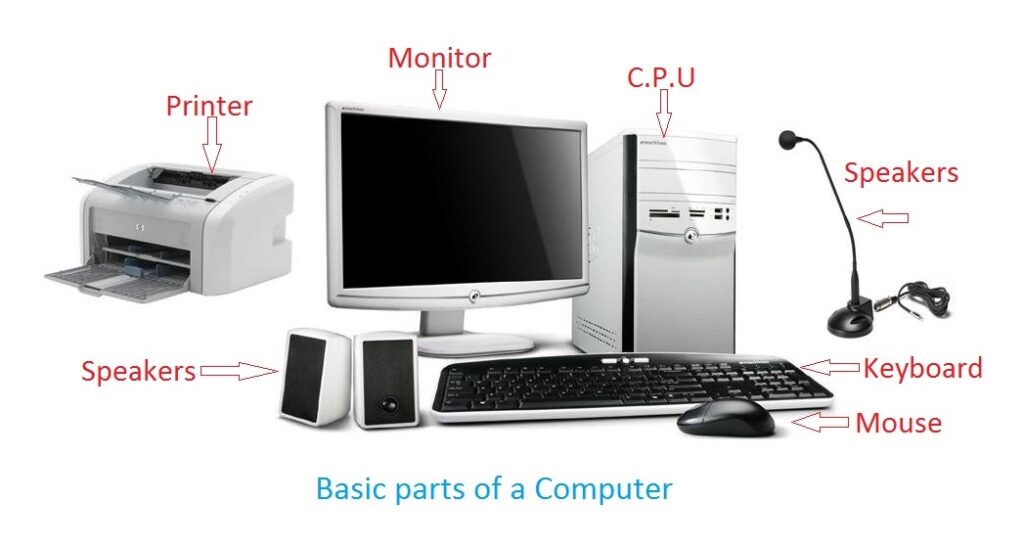
Computer and its components
A computer is an electronic device that processes and stores data, performs calculations, and executes tasks based on instructions provided by the user or pre-programmed software. It consists of various components that work together to perform these functions. Here are the key components of a typical computer system:
- Central Processing Unit (CPU): The CPU, often referred to as the “brain” of the computer, carries out most of the actual processing of data and instructions. It performs arithmetic, logical, control, and input/output (I/O) operations.
- Motherboard: The motherboard is the main circuit board that connects and allows communication between various components of the computer. It provides electrical connections for the CPU, RAM, storage devices, and other peripherals.
- Random Access Memory (RAM): RAM is the primary memory of a computer, used to temporarily store data that the CPU needs to access quickly. It holds data and instructions that are actively being used by the CPU, providing fast access compared to other storage devices.
- Storage Devices: Computers use different types of storage devices to store data permanently or semi-permanently. The most common storage devices are Hard Disk Drives (HDD s) and Solid-State Drives (SSD s), which store data magnetically and electronically, respectively.
- Graphics Processing Unit (GPU): The GPU is a specialized processor primarily designed to handle complex calculations related to graphics and image processing. It is commonly used for tasks such as gaming, video editing, and rendering.
- Power Supply Unit (PS U): The PS U converts and supplies electrical power to all components of the computer system. It takes power from an electrical outlet and distributes it to the various components in the appropriate voltages and currents.
- Input Devices: These devices allow users to input data or commands into the computer. Common input devices include keyboards, mice, touchscreens, scanners, and microphones.
- Output Devices: These devices display or present processed data from the computer to the user. Common output devices include monitors, printers, speakers, and projectors.
- Expansion Cards: These cards are additional circuit boards that can be inserted into slots on the motherboard to provide extra functionality or connectivity. Examples include graphics cards, network interface cards (NIC s), and sound cards.
- Operating System (OS): The operating system is a software that manages computer hardware and software resources, providing a user interface and facilitating the execution of programs. Popular operating systems include Windows, macO S, and Linux.
These components, along with software, form the basis of a computer system. They work together to process, store, and retrieve data, enabling the computer to perform a wide range of tasks and applications.
What is required Computer and its components
To assemble a functioning computer system, you typically need the following components:
- Central Processing Unit (CPU): The CPU is the main processing unit of the computer and is responsible for executing instructions and performing calculations.
- Motherboard: The motherboard is the main circuit board that connects and houses various components of the computer, including the CPU, RAM, storage devices, and expansion cards.
- Random Access Memory (RAM): RAM provides temporary storage for data and instructions that the CPU actively uses. Sufficient RAM is crucial for smooth multitasking and running applications efficiently.
- Storage Devices: You need storage devices to store your operating system, software applications, and user data. Common options include Hard Disk Drives (HDD s) and Solid-State Drives (SSD s).
- Power Supply Unit (PS U): The PS U supplies electrical power to all components of the computer. It is important to have a PSU that can deliver sufficient power to meet the requirements of the entire system.
- Graphics Processing Unit (GPU): A GPU is necessary if you intend to perform graphics-intensive tasks like gaming, video editing, or 3D rendering. However, CPU s often come with integrated graphics that can handle basic display needs.
- Input and Output Devices: Keyboards, mice, and monitors are essential input and output devices for interacting with the computer. Depending on your needs, you may also require additional peripherals such as printers, speakers, or scanners.
- Computer Case: The computer case provides physical protection and houses all the internal components. It should have enough space to accommodate the motherboard and other hardware, as well as adequate cooling options.
- Operating System (OS): You need an operating system to run on your computer. Popular choices include Windows, macO S, and various Linux distributions. The OS manages hardware resources and provides a user interface.
- Cables and Connectors: Various cables and connectors are necessary to connect the components. This includes power cables, data cables (such as SAT A or USB cables), and display cables (e.g., HDMI, Display Port, or VGA).
It’s important to note that these are the basic components required to build a computer system. Depending on your specific needs, you may also consider additional components like expansion cards (e.g., network cards or sound cards), cooling systems (such as fans or liquid cooling), or specialized peripherals.
Who is required Computer and its components
Computer components are required by anyone who wants to build or use a computer system. Here are a few examples of individuals or groups who may require computer components:
- Computer Enthusiasts: People who enjoy building and customizing their own computer systems often purchase individual components to assemble a personalized setup. This can include gamers, hardware enthusiasts, and DIY computer builders.
- Professionals: Many professionals require computer systems for their work. This includes software developers, graphic designers, video editors, engineers, architects, and data analysts, among others. These professionals may need specific hardware configurations tailored to their tasks, such as powerful CPUs, ample RAM, and high-performance graphics cards.
- Businesses and Organizations: Various businesses and organizations rely on computer systems to carry out their operations. This can include office setups, data centers, server rooms, and specialized systems for specific industries, such as healthcare, finance, or research.
- Educational Institutions: Schools, colleges, and universities often require computer systems for educational purposes. Computer labs, classrooms, and libraries may need to acquire or upgrade computer components to support student learning and research.
- Home Users: Many individuals use computers for personal tasks such as web browsing, email, social media, multimedia consumption, and basic productivity. Home users may require computer components when building a new system or upgrading an existing one to meet their needs.
- Gaming Community: Gamers often demand high-performance computers to run modern games smoothly. They may purchase specialized components like powerful CPUs, graphics cards, gaming keyboards, mice, and high-refresh-rate monitors to enhance their gaming experience.
- IT Professionals: IT professionals, including system administrators and network engineers, require computer components for managing and maintaining computer networks, servers, and infrastructure. They may need components like network interface cards (NICs), server-grade CPUs, and storage devices.
- Research and Development: Scientists, researchers, and engineers involved in fields such as artificial intelligence, machine learning, and data science may require powerful computer systems with specialized components to conduct experiments, run simulations, and process large datasets.
These are just a few examples, as computer components have become an integral part of our modern world, used by individuals and organizations in various industries and fields.
When is required Computer and its components
Computers and their components are required in a wide range of situations and contexts. Here are some common scenarios when computers and their components are necessary:
- Personal Use: Individuals require computers for personal tasks like browsing the internet, checking emails, social media, online shopping, entertainment (such as streaming videos or playing games), and productivity (word processing, spreadsheets, etc.).
- Work and Business: Computers are essential in the workplace for tasks such as creating documents, analyzing data, communication, collaboration, project management, accounting, inventory management, and customer relationship management (CR M).
- Education: Educational institutions, from elementary schools to universities, rely on computers for administrative tasks, teaching, research, and learning activities. Computers are used in computer labs, classrooms, libraries, and research facilities.
- Scientific Research and Engineering: Computers and specialized components are necessary for conducting scientific experiments, simulations, data analysis, modeling, and calculations in fields such as physics, chemistry, biology, engineering, and astronomy.
- Creative Industries: Professionals in graphic design, video editing, animation, architecture, and other creative fields rely on powerful computers and components to run resource-intensive software and create high-quality content.
- Gaming: Gaming enthusiasts require computers with capable components, including high-performance CPUs, GPUs, and sufficient RAM, to run modern video games smoothly.
- Server Infrastructure: Data centers and businesses with a need for hosting websites, running applications, or storing and processing large amounts of data require servers and server-grade components.
- Healthcare and Medical Applications: Computers are vital in medical settings for managing patient records, diagnostic imaging, medical research, and running specialized software and equipment.
- Financial and Banking Services: Financial institutions rely on computers and secure components to handle transactions, manage accounts, perform financial analysis, and maintain security.
- Communication and Networking: Computers are essential for establishing and managing computer networks, including servers, routers, switches, firewalls, and other network components.
It’s important to note that computers and their components have become integral to almost every industry and many aspects of our daily lives. The specific requirements may vary depending on the intended use, but computers and their components play a significant role in a wide range of applications.
Where is required Computer and its components
Computers and their components can be found in various places depending on the context. Here are some common locations where you can find computers and their components:
- Homes: Many people have personal computers in their homes for various purposes such as work, entertainment, education, or communication. Home computers and their components can be found in home offices, living rooms, bedrooms, or dedicated computer rooms.
- Offices and Workplaces: Computers are essential in office environments for tasks such as data processing, communication, and productivity. Office buildings and workplaces have computer systems set up on desks or in dedicated IT rooms. Components may be stored in IT departments or supply closets.
- Educational Institutions: Schools, colleges, and universities have computer labs and classrooms equipped with computers for educational purposes. These institutions often have IT departments responsible for managing and maintaining computer systems and their components.
- Retail Stores: Computer components, such as CPUs, memory modules, storage devices, motherboards, and peripherals, are available for purchase in retail stores specializing in electronics or computer hardware. These components are typically displayed in dedicated sections or departments.
- Online Marketplaces: Various online marketplaces and e-commerce websites offer computer components for purchase. Customers can browse and order components online, which are then delivered to their desired location.
- Data Centers: Data centers house large-scale computer systems that store and process massive amounts of data. These centers require high-performance computers and specialized components to ensure reliability and efficiency.
- Server Rooms: Many organizations maintain server rooms or data closets within their premises to house servers and network equipment. These rooms contain racks filled with servers and related components, such as power supplies, networking devices, and storage solutions.
- Specialty Computer Stores: Some stores specialize in selling computers, laptops, and computer components. These stores often have knowledgeable staff who can assist customers in selecting the right components or even provide custom computer assembly services.
It’s important to note that the availability and accessibility of computers and components may vary depending on geographical location, infrastructure, and local market conditions.
How is required Computer and its components
To have a functional computer, you typically need the following components:
- Central Processing Unit (CPU): The CPU is the “brain” of the computer. It performs most of the calculations and executes instructions.
- Memory: Random Access Memory (RAM) provides temporary storage for data and instructions that the CPU needs to access quickly. The more RAM your computer has, the better its performance will be when running multiple applications or handling complex tasks.
- Storage: A computer needs a storage device to store data and programs. This can be a Hard Disk Drive (HDD) or a Solid-State Drive (SSD). HDDs provide larger storage capacities at a lower cost, while SSDs offer faster access times and better performance.
- Motherboard: The motherboard is the main circuit board that connects and allows communication between various components of the computer, such as the CPU, RAM, storage devices, and peripherals.
- Graphics Processing Unit (GPU): A dedicated GPU is necessary for tasks that require intense graphical processing, such as gaming or video editing. However, many CPUs now come with integrated graphics capabilities that are sufficient for basic graphical needs.
- Power Supply Unit (PSU): The PSU supplies power to all components of the computer. It converts the AC power from your wall outlet into the DC power required by the computer.
- Display: A computer requires a monitor or screen to display information and interact with the user. Monitors come in various sizes and resolutions.
- Input devices: Keyboards and mice are the most common input devices for computers. However, other input devices like track pads, touchscreens, and stylus pens can also be used.
- Operating System (OS): The operating system is the software that manages and controls the computer’s hardware and software resources. Examples include Windows, macOS, and Linux.
- Peripherals: Additional peripheral devices can be added to a computer, such as printers, scanners, speakers, webcams, and external storage devices. These devices connect to the computer either through wired or wireless connections.
It’s important to note that the specific components required may vary depending on the intended use of the computer. For example, a gaming computer may require a more powerful CPU and GPU, while a server may require additional storage capacity and network connectivity.
Case study on Computer and its components
Case Study: Building a Gaming Computer
Introduction: In this case study, we will explore the process of building a gaming computer, focusing on the essential components required for optimal gaming performance. Our goal is to create a high-performance system that can handle modern games with ease.
Requirements:
- Central Processing Unit (CPU):
- A high-performance CPU capable of handling the demands of modern games.
- Multi-core processor for improved multitasking and game performance.
- Consider overclocking capabilities for additional performance gains.
- Memory (RAM):
- Sufficient RAM capacity to handle resource-intensive games.
- Opt for fast DD R 4 RAM modules for better performance.
- Aim for at least 16 GB of RAM, but consider 32 GB for future-proofing.
- Storage:
- Include a high-speed Solid-State Drive (SS D) for quick boot times and faster game loading.
- Consider a secondary Hard Disk Drive (HDD) for additional storage capacity.
- Aim for a minimum of 500 GB SS D, but larger capacities are recommended.
- Graphics Processing Unit (GPU):
- A powerful dedicated GPU optimized for gaming.
- Look for GPU s with ample VRA M and support for the latest graphics technologies.
- Consider the gaming resolution and desired frame rates when selecting a GPU.
- Motherboard:
- Choose a motherboard compatible with the selected CPU and GPU.
- Ensure it has sufficient expansion slots for future upgrades.
- Look for features like USB 3.0/3.1 ports, M.2 slots for fast storage, and adequate cooling solutions.
- Power Supply Unit (PS U):
- Select a PS U with sufficient wattage to power the components.
- Consider efficiency ratings (80 Plus Bronze, Silver, Gold, etc.) for energy savings.
- Modular or semi-modular PSU s can help with cable management.
- Display:
- Choose a high-resolution monitor with a fast refresh rate for smooth gaming experiences.
- Consider technologies like Adaptive Sync (Free Sync/G-Sync) for reduced screen tearing.
- Select an appropriate size and panel type (e.g., IP S, TN, VA) based on personal preferences.
- Input devices:
- Gaming-oriented keyboards and mice with features like mechanical switches, programmable keys, and high DPI.
- Consider additional peripherals like gaming controllers or steering wheels for specific game genres.
- Operating System (OS):
- Select a gaming-friendly OS like Windows 10, which offers broad software and driver compatibility.
- Ensure the OS is up-to-date with the latest patches and updates.
- Cooling:
- Proper cooling solutions to prevent overheating during prolonged gaming sessions.
- Consider aftermarket CPU coolers and additional case fans for improved airflow.
Conclusion: Building a gaming computer requires careful consideration of the CPU, RAM, storage, GPU, motherboard, PS U, display, input devices, OS, and cooling solutions. By selecting high-performance components tailored to gaming needs, users can enjoy smooth game play, high frame rates, and immersive experiences. It’s important to keep up with the latest technology trends and ensure compatibility between components for a successful gaming system.
White paper on Computer and its components
Title: Understanding Computer Components: A Comprehensive White Paper
Abstract: This white paper provides an in-depth understanding of the fundamental components that constitute a computer system. It explores the roles and functionalities of each component, their interconnections, and their impact on overall system performance. By delving into the intricacies of CPUs, memory, storage devices, motherboards, graphics processing units (GPUs), power supply units (PSUs), displays, input devices, and operating systems (OS), this paper aims to equip readers with a comprehensive knowledge of computer components.
- Introduction:
- Importance of understanding computer components.
- Overview of the components covered in the white paper.
- Central Processing Unit (CPU):
- Functions and architecture of the CPU.
- CPU types (e.g., multi-core, overclockable) and their impact on performance.
- CPU technologies and trends.
- Memory:
- Types of memory (RAM, cache) and their roles in data storage and retrieval.
- Impact of memory capacity, speed, and latency on system performance.
- Virtual memory and its significance.
- Storage Devices:
- Hard Disk Drives (HDDs) and their mechanisms of operation.
- Solid-State Drives (SSDs) and their advantages over HDDs.
- Emerging storage technologies (e.g., NVMe) and their impact on data transfer speeds.
- Motherboard:
- Functions and architecture of the motherboard.
- Interconnections and expansion slots for components.
- Importance of selecting a compatible motherboard for optimal system performance.
- Graphics Processing Unit (GPU):
- Role of GPUs in handling graphical computations.
- Different types of GPUs and their suitability for various applications.
- GPUs in gaming, artificial intelligence, and cryptocurrency mining.
- Power Supply Unit (PSU):
- Functions and importance of the PSU.
- Wattage, efficiency ratings, and power management.
- Considerations for selecting a suitable PSU for a system’s power requirements.
- Display:
- Types of displays (monitors, screens) and their characteristics.
- Resolution, refresh rate, response time, and their impact on visual experience.
- Additional features like adaptive sync and HDR.
- Input Devices:
- Keyboards, mice, and their functionalities.
- Other input devices such as touchscreens, trackpads, and stylus pens.
- Gaming-specific input devices and their features.
- Operating System (OS):
- Importance of the OS in managing hardware and software resources.
- Popular OS platforms (Windows, macOS, Linux) and their suitability for different user needs.
- Compatibility considerations for hardware and software.
- Conclusion:
- Recap of key components and their roles in a computer system.
- Emphasis on the interdependencies and synergies among components.
- Future trends and developments in computer components.
By the end of this white paper, readers will gain a comprehensive understanding of computer components, enabling them to make informed decisions when selecting, upgrading, or troubleshooting their computer systems. Understanding these components’ functionalities and their impact on system performance is essential for maximizing efficiency and achieving optimal computing experiences in various domains.