
Computer fundamentals
Computer fundamentals refer to the basic concepts and principles that underlie the operation and use of computers. Understanding these fundamentals is essential for effectively using and working with computers. Here are some key areas of computer fundamentals:
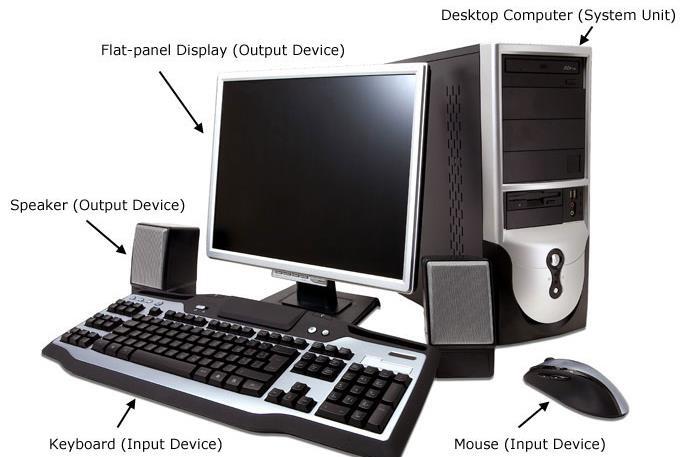
- Hardware: This encompasses the physical components of a computer system, such as the central processing unit (CPU), memory (RAM), storage devices (hard drives, solid-state drives), input devices (keyboard, mouse), output devices (monitor, printer), and networking equipment (routers, switches).
- Software: Software refers to the programs and instructions that enable computers to perform specific tasks. It includes operating systems (e.g., Windows, macO S, Linux), application software (e.g., word processors, web browsers), and system software (e.g., device drivers, utility programs).
- Operating Systems: An operating system (OS) is the software that manages computer hardware and software resources and provides common services for computer programs. It facilitates communication between hardware and software, manages memory and processes, and provides a user interface.
- Data Representation: Computers store and process data using binary digits (bits), which represent either a 0 or a 1. Bits are grouped into bytes, and different data types (numbers, characters, images) are represented using specific patterns of bits.
- Algorithms and Programming: Algorithms are step-by-step procedures for solving problems or accomplishing specific tasks. Programming involves writing code using programming languages to create software applications and implement algorithms.
- Computer Networks: Computer networks enable computers to communicate and share resources with each other. They can be local area networks (LAN s) within a limited area or wide area networks (WAN s) that span larger geographical distances. Networking protocols like TC P/IP govern data transmission over networks.
- Internet and World Wide Web: The Internet is a global network of interconnected computers, while the World Wide Web (WWW) is a system of interconnected documents and resources accessible via the Internet. Web browsers and web servers enable users to access and publish web content.
- Security and Privacy: Computer security involves protecting computer systems and data from unauthorized access, damage, or disruption. It includes measures like authentication, encryption, firewalls, and antivirus software. Privacy focuses on safeguarding personal information and controlling its collection and use.
- Computer Architecture: Computer architecture refers to the design and organization of computer systems, including the structure and interconnections of components. It encompasses topics such as the CPU, memory hierarchy, input/output systems, and bus structures.
- Human-Computer Interaction: Human-computer interaction (HC I) studies how people interact with computers and how to design user-friendly interfaces. It considers factors like usability, accessibility, and user experience to improve the interaction between humans and computers.
These are just some of the fundamental aspects of computers. The field of computer science and technology is vast and continually evolving, but a solid understanding of these fundamentals forms a strong foundation for further exploration and learning.
What is required Computer Fundamental
To understand and work with computer fundamentals, there are a few requirements you should consider:
- Computer System: You will need access to a computer system or a computing device to apply and practice the concepts. This can be a desktop computer, laptop, or even a tablet or smartphone.
- Operating System: Familiarize yourself with an operating system such as Windows, macO S, or Linux. These provide the foundation for running software applications and interacting with computer hardware.
- Internet Access: Having an internet connection is beneficial as it allows you to explore online resources, access information, and stay updated with the latest trends and developments in computer technology.
- Basic Computer Skills: It’s helpful to have basic computer skills, including keyboard and mouse proficiency, navigating through the file system, using applications, and managing files and folders. If you’re new to computers, consider taking a beginner-level course or tutorial to acquire these skills.
- Curiosity and Learning Attitude: Computer fundamentals involve a continuous learning process due to the evolving nature of technology. Develop a curiosity to explore new concepts and a positive attitude towards learning to keep up with advancements in the field.
- Study Materials and Resources: Gather relevant study materials such as books, online tutorials, video courses, and websites that cover computer fundamentals. These resources can provide structured information and guidance as you delve into different aspects of computer science.
- Practical Application: To solidify your understanding of computer fundamentals, engage in practical application. Practice writing code, setting up networks, troubleshooting hardware issues, or performing basic system maintenance tasks. Hands-on experience is crucial for reinforcing theoretical knowledge.
- Problem-Solving Skills: Computer fundamentals often involve problem-solving. Cultivate your analytical and problem-solving skills as they will be useful when encountering challenges or errors during computer operations.
Remember that computer fundamentals serve as a foundation, and as you progress, you can explore specialized areas such as programming, networking, databases, cyber security, or artificial intelligence, based on your interests and goals.
Who is required Computer Fundamental
Computer fundamentals are not limited to a specific individual but are beneficial and necessary for various individuals who interact with computers in their personal or professional lives. Here are some examples of individuals who may benefit from understanding computer fundamentals:
- Students: Computer fundamentals are essential for students pursuing degrees or courses in computer science, information technology, or related fields. It provides them with a solid foundation to understand advanced concepts and pursue specialized areas of study.
- Professionals in IT and Computer Science: Professionals working in the IT industry, such as software developers, system administrators, network engineers, database administrators, and cyber security experts, require a strong understanding of computer fundamentals to perform their roles effectively.
- Office Workers: Most office workers rely on computers and software applications to carry out their daily tasks, such as word processing, data entry, email communication, or creating presentations. Understanding computer fundamentals helps them navigate software interfaces, troubleshoot basic issues, and work efficiently.
- Entrepreneurs and Business Owners: Entrepreneurs and business owners benefit from computer fundamentals as they need to make informed decisions about technology investments, understand basic software and hardware requirements, and effectively communicate with IT professionals or vendors.
- Educators and Trainers: Teachers and trainers need a good grasp of computer fundamentals to incorporate technology into their teaching methods, use educational software, and help students understand the principles behind computer operations.
- Home Users: Everyday computer users, including individuals at home, can benefit from understanding computer fundamentals. It allows them to use their computers effectively, troubleshoot basic issues, protect their data and privacy, and make informed decisions when purchasing or upgrading computer systems.
- Job Seekers: Computer fundamentals are often considered a basic requirement in many job roles and industries. Job seekers with a strong understanding of computer fundamentals are more likely to be successful in their applications and have a competitive edge in the job market.
- Non-Technical Professionals: Even professionals in non-technical fields can benefit from computer fundamentals. Understanding basic computer concepts, file management, and software applications enables them to work efficiently, communicate effectively with technical colleagues, and adapt to digital workflows.
In summary, computer fundamentals are essential for anyone who uses computers in their personal or professional lives. Whether you are a student, a professional in the IT industry, an office worker, an entrepreneur, an educator, or a home user, a solid understanding of computer fundamentals can enhance your skills, productivity, and overall digital literacy.
When is required Computer Fundamental
Computer fundamentals are required in various situations and scenarios. Here are some instances when computer fundamentals are particularly important:
- Learning Computer Science or IT: If you are pursuing a degree or taking courses in computer science, information technology, or related fields, a solid understanding of computer fundamentals is essential. It forms the basis for understanding advanced concepts and specialized areas of study.
- Using Computers at Work: In most modern workplaces, computers are an integral part of daily operations. Whether you work in an office, a retail environment, a healthcare setting, or any other industry, computer fundamentals are necessary to effectively navigate software applications, perform basic tasks, and communicate digitally.
- Problem Solving and Troubleshooting: When faced with computer-related issues, having a foundation in computer fundamentals can help you troubleshoot problems. It enables you to identify the root cause of issues, perform basic troubleshooting steps, and seek appropriate solutions.
- Software and Application Usage: Computer fundamentals are crucial for using various software applications. Whether it’s a word processor, a spreadsheet program, an email client, or a design tool, understanding the fundamentals allows you to navigate the interface, use features effectively, and troubleshoot common problems.
- Basic Computer Maintenance: Knowing computer fundamentals helps you perform basic maintenance tasks, such as managing files and folders, optimizing storage, updating software and operating systems, and protecting your computer from malware and security threats.
- Digital Communication and Collaboration: Computer fundamentals are essential for effective digital communication and collaboration. Understanding concepts like email, instant messaging, file sharing, and online collaboration tools enables you to communicate and work with others in a digital environment.
- Personal Computer Use: Whether you’re using a computer for personal tasks, such as browsing the web, managing finances, or editing photos, or for entertainment purposes, computer fundamentals are necessary for efficient and safe usage. It allows you to make informed decisions, protect your privacy and security, and troubleshoot basic issues.
- Adapting to Technological Changes: As technology continues to evolve, having a foundation in computer fundamentals helps you adapt to new devices, operating systems, software applications, and digital trends. It enables you to quickly learn and utilize new technologies as they emerge.
In summary, computer fundamentals are required in various contexts, including education, professional environments, problem-solving, software usage, computer maintenance, digital communication, personal computer use, and adapting to technological changes. Developing a solid understanding of computer fundamentals empowers you to effectively utilize and navigate the digital world in a wide range of situations.
Where is required Computer Fundamental
Computer fundamentals are required in various settings and environments where computers are used. Here are some common places where computer fundamentals are necessary:
- Educational Institutions: Schools, colleges, and universities require computer fundamentals to support computer science and information technology courses. Students learn the basics of computer systems, programming, software applications, and data management.
- Offices and Workplaces: Virtually all workplaces rely on computers for tasks such as data entry, document creation, communication, project management, and data analysis. Understanding computer fundamentals is crucial for employees to effectively use computer systems and software applications in their work.
- Research and Development: Scientists, researchers, and engineers often work with computers to conduct simulations, analyze data, develop models, and perform complex calculations. Computer fundamentals are necessary to understand the underlying technology and programming languages used in their research.
- IT Industry: Computer fundamentals are at the core of the information technology (IT) industry. IT professionals, such as software developers, network administrators, database administrators, and cyber security experts, require a deep understanding of computer fundamentals to design, develop, and maintain computer systems and software.
- Internet and Online Platforms: As the internet plays an increasingly important role in our lives, computer fundamentals are essential for individuals using online platforms. Understanding concepts such as web browsing, online communication, cloud storage, and online security helps users navigate the digital landscape safely and efficiently.
- Healthcare Facilities: Hospitals, clinics, and healthcare organizations utilize computers for medical record keeping, patient management, medical imaging, and laboratory analysis. Healthcare professionals need computer fundamentals to access and interpret electronic health records (EH R s) and operate medical devices.
- Manufacturing and Industrial Environments: Computers and automation systems are extensively used in manufacturing and industrial settings for controlling processes, monitoring equipment, and managing inventory. Understanding computer fundamentals is crucial for maintaining and troubleshooting these systems.
- Retail and E-commerce: The retail industry relies on computers for inventory management, point-of-sale systems, online storefronts, and order processing. Computer fundamentals are necessary for employees to operate these systems and provide efficient customer service.
- Home and Personal Use: Computer fundamentals are required for personal computer use at home. They enable individuals to perform tasks such as online banking, online shopping, social media usage, entertainment streaming, and general computer maintenance.
- Research and Education Centers: Research institutions, laboratories, and educational centers often require computer fundamentals for data analysis, scientific simulations, and educational software development.
These are just a few examples of where computer fundamentals are required. In reality, computer fundamentals are relevant in almost every domain and industry where computers are used as essential tools for productivity, communication, data management, and problem-solving.
How is required Computer Fundamental
Computer fundamentals are required in several ways to effectively utilize and interact with computers and related technologies. Here are some ways in which computer fundamentals are necessary:
- Computer Operation: Understanding computer fundamentals helps in operating a computer system. It includes knowledge of hardware components, powering on/off the system, navigating the operating system’s interface, using input/output devices (keyboard, mouse), and managing files and folders.
- Software Usage: Computer fundamentals are crucial for using various software applications. It involves knowing how to install software, open and close applications, navigate through software interfaces, use menus and toolbars, and perform basic tasks like creating documents, editing images, or browsing the internet.
- Troubleshooting: When encountering issues with computers or software, knowledge of computer fundamentals helps in troubleshooting. It involves identifying and diagnosing problems, applying basic fixes, and seeking appropriate support or solutions.
- Data Management: Computer fundamentals play a role in managing data effectively. It includes understanding file systems, organizing files and folders, creating backups, transferring data between devices, and ensuring data security and privacy.
- Internet and Online Activities: Computer fundamentals are necessary for internet usage and online activities. It involves using web browsers, conducting online searches, accessing websites, understanding internet safety and security practices, and communicating through email or messaging platforms.
- Digital Literacy: Computer fundamentals contribute to digital literacy, which encompasses a range of skills related to using digital devices and online platforms. It involves understanding concepts like online privacy, online etiquette, evaluating information credibility, and protecting against cyber threats.
- Basic Programming and Scripting: An understanding of computer fundamentals forms the foundation for basic programming and scripting knowledge. It enables individuals to write and execute simple scripts or programs, automate tasks, and understand programming concepts like variables, loops, and conditionals.
- Device and Software Upgrades: Computer fundamentals help in making informed decisions regarding device or software upgrades. It involves understanding hardware requirements, compatibility issues, software installation procedures, and the impact of upgrades on system performance.
- Security and Privacy: Computer fundamentals are essential for maintaining security and privacy. It includes knowledge of safe online practices, setting up strong passwords, recognizing and avoiding phishing attempts, using antivirus software, and securing wireless networks.
- Continued Learning and Adaptation: Computer fundamentals provide a basis for continued learning and adaptation to new technologies. With a strong foundation, individuals can stay updated with emerging trends, learn new software applications, and adapt to technological advancements.
In summary, computer fundamentals are required for operating computers, using software applications, troubleshooting issues, managing data, engaging in online activities, programming, ensuring security and privacy, making informed decisions, and adapting to new technologies. Having a solid understanding of computer fundamentals enables individuals to utilize computers and related technologies effectively in various contexts.
Case study on Computer fundamental
Case Study: Computer Fundamentals in a Small Business Environment
Background: ABC Enterprises is a small business that provides digital marketing services to its clients. The company employs a team of professionals who work remotely and collaborate using digital tools. The following case study illustrates how computer fundamentals are applied in their day-to-day operations.
- Hardware and Software Selection: ABC Enterprises relies on computer fundamentals to select appropriate hardware and software for their business needs. They consider factors such as processing power, memory, storage, and graphics capabilities when choosing laptops or desktop computers for their team. They also evaluate software applications based on their compatibility with the operating system, features, security, and scalability.
- Operating System and Software Usage: Understanding computer fundamentals helps the team at ABC Enterprises navigate and utilize their chosen operating system efficiently. They are familiar with the user interface, file management, and settings. They use software applications such as web browsers, email clients, project management tools, and graphic design software to perform their tasks effectively.
- Data Management and Storage: Computer fundamentals guide the team in organizing and managing their data. They create structured folders and use naming conventions to store and retrieve files easily. They also implement backup strategies, both locally and in the cloud, to ensure data redundancy and protect against data loss.
- Internet and Online Communication: The team at ABC Enterprises relies on computer fundamentals to leverage the internet and online communication tools. They use web browsers for research, accessing client websites, and utilizing online marketing platforms. They communicate through email, video conferencing, and instant messaging tools to collaborate with clients and team members effectively.
- Security and Privacy Measures: Computer fundamentals help ABC Enterprises implement security measures to protect their systems and client data. They use strong passwords, enable two-factor authentication, and keep their operating systems and software up to date with security patches. They educate their team on phishing and malware threats and implement antivirus software and firewalls to enhance their security.
- Troubleshooting and Technical Support: Computer fundamentals enable the team to troubleshoot common technical issues. They can diagnose and resolve software conflicts, connectivity problems, and perform basic system maintenance tasks. When faced with more complex issues, they seek technical support and communicate effectively with IT professionals, providing relevant information to assist in troubleshooting.
- Digital Literacy and Adaptation: Computer fundamentals provide ABC Enterprises with the necessary digital literacy to adapt to new technologies and software updates. They stay updated with industry trends, explore emerging digital marketing platforms, and learn new software applications to provide innovative services to their clients.
Conclusion: Computer fundamentals play a vital role in the day-to-day operations of ABC Enterprises. Their understanding of hardware, software, operating systems, data management, online communication, security, troubleshooting, and adaptation to new technologies enables them to provide digital marketing services effectively. By applying computer fundamentals, ABC Enterprises maximizes productivity, enhances data security, and stays competitive in the dynamic digital marketing industry.
White paper on Computer Fundamentals
Title: Understanding Computer Fundamentals: A Comprehensive White Paper
Abstract: This white paper aims to provide a comprehensive overview of computer fundamentals, covering the essential concepts and components that form the foundation of modern computing. It explores the core aspects of hardware, software, operating systems, data management, networking, and security. By understanding these fundamentals, individuals can develop a solid knowledge base to effectively navigate and utilize computer systems and technologies.
- Introduction
- Definition and importance of computer fundamentals
- Role of computer fundamentals in various domains and industries
- Hardware Fundamentals
- Overview of computer hardware components: CPU, memory, storage devices, input/output devices
- Types of computers: desktops, laptops, servers, mobile devices
- Hardware architecture: motherboard, expansion slots, buses
- Software Fundamentals
- Distinction between system software and application software
- Operating systems: functions, types (Windows, macO S, Linux), user interfaces
- Software development life cycle: planning, coding, testing, deployment
- Operating System Fundamentals
- Basic functions and services provided by operating systems
- Process management, memory management, file systems
- Multitasking, multiprocessing, and virtualization
- Data Management Fundamentals
- Introduction to data representation: bits, bytes, binary, hexadecimal
- File systems and file organization: directories, folders, file formats
- Databases and database management systems: relational databases, SQL
- Networking Fundamentals
- Introduction to computer networks: LAN, WAN, internet
- Network components: routers, switches, modems, protocols
- IP addressing, TC P/IP, DN S, and basic network troubleshooting
- Security Fundamentals
- Importance of computer security and privacy
- Threats and vulnerabilities: malware, social engineering, hacking
- Security measures: authentication, encryption, firewalls, antivirus software
- Future Trends and Emerging Technologies
- Overview of emerging technologies: artificial intelligence, blockchain, Internet of Things (Io T )
- Implications of technological advancements on computer fundamentals
- Importance of continuous learning and adaptation in the field
- Conclusion
- Recap of the importance of computer fundamentals
- Key takeaways and recommendations for further exploration
- The evolving role of computer fundamentals in an increasingly digital world
By providing a comprehensive understanding of computer fundamentals, this white paper aims to equip readers with the necessary knowledge to navigate and harness the power of computers effectively. With a solid foundation in computer fundamentals, individuals can adapt to evolving technologies, enhance their productivity, and contribute to the advancement of various industries and domains.