

Computer fundamental
The word computer is derived from the Latin word ‘computar e’ which translates to ‘to compute’.
With the technology advancing each day computers are now not just limited to perform calculations or play videos. They have evolved and doing all those activities that humans can do that too faster and with zero errors.
We must know-how must have computers evolved over the years. Take a quick look at the different generations of the computer.
Advantages of Computers
- It helps in performing any task in the easiest and most efficient way.
- Helps us connect to the internet.
- Increases productivity by using fewer resources and time.
- Helps to organize a vast amount of data most efficiently and makes it quite accessible.
- The computer keeps you connected with all the information as well as your loved ones.
For details, check – advantages and disadvantages of Computers.
Generations of Computer
Over the centuries, mankind had invented various methods to make calculations easier and faster. But, Charles Babbage invented the first mechanical computer in the 1830s.
He invented the first digital programmable computer. Also known as the ‘Father of the computer’, he took the first step of what we today know as the computers. Since then, computers have been evolved on various levels. Till now we know 5 generations of computer.
1st Generation (1940-56)
Also called the vacuum tubes. These computers had vacuum tubes for the circuitry and used magnetic drums for storage. They used to take up a lot of space, consumed a huge amount of electricity, and relied on machine language (the most basic language understood by the computer).
2nd Generation (1956-63)
Replacing vacuum tubes with transistors, this generation’s computers were faster, smaller, cheaper, and consumed way less electricity. Despite many other problems like heating issues and circuit breakdown, these were a huge improvement. Instead of binary language, these computers used assembly language as input.
3rd Generation (1964-71)
These computers took a huge leap in the world of technology. Using integrated circuits instead of transistors, these were way more efficient, cheaper, and most importantly smaller. This was the first time keyboard and mouse were a mode of input.
4th Generation
This was the era of VLS I (Very Large Scale Integration), integrating thousands of circuits in a small chip. Intel brought this revolutionary idea. They developed Intel 4004 chip. In 1981, IBM developed the first-ever computer for home use. Subsequently, Apple developed the Macintosh.
5th Generation (1980-present)
This is the era of artificial intelligence. The technology is still under development however, it has started showing its presence such as the voice recognition system. ULSI (Ultra Large Scale Integration) has replaced VLSI in this generation of computers.
Basic Block Diagram of Computer
No matter which company the computer has been manufactured, the basic components of the computer and working remain the same. The computer consists 4 main units-
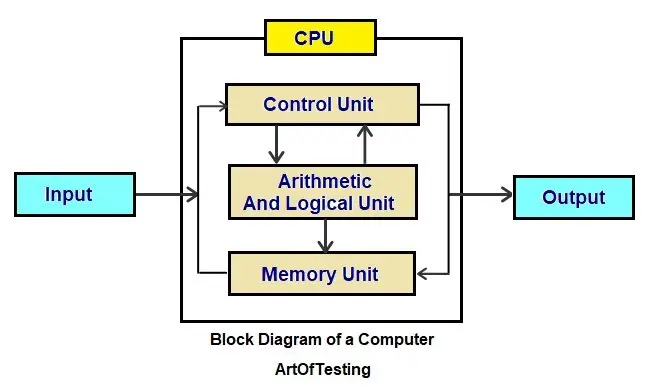
Input unit
All the data received by the computer goes through the input unit. The input unit comprises devices like a mouse, keyboard, scanner, etc. Each of these input devices of the computer acts as a mediator between the users and the computer.
CPU
Control Processing Unit or the CPU, is the brain of the computer. It works the same way a human brain works. The brain controls all the activities performed by humans.
Similarly, the CPU controls all the functions/tasks performed by the computer. The CPU further consists of two parts – ALU (Arithmetic Logic Unit) and CU (Control Unit).
Memory Unit
All the data that has to be either processed or has been processed is stored in the memory unit. The memory unit acts as a hub of all the data and transmits it to the required part of the computer whenever necessary.
Output Unit
All the information sent to the computer once processed is received by the user through the output unit. Output devices of computers like printers, monitors, projectors, etc. all come under the output unit.
The output unit displays the data either in the form of a soft copy like that in the monitor or the form of a hard copy, through a printer.