
Concepts Of Hardware And Software Representation Of Data/Information Innovation
COURTESY :- vrindawan.in
Wikipedia
Computer hardware includes the physical parts of a computer, such as the case, central processing unit (CPU), random access memory (RAM), monitor, mouse, keyboard, computer data storage, graphics card, sound card, speakers and motherboard.

By contrast, software is the set of instructions that can be stored and run by hardware. Hardware is so-termed because it is “hard” or rigid with respect to changes, whereas software is “soft” because it is easy to change.
Hardware is typically directed by the software to execute any command or instruction. A combination of hardware and software forms a usable computing system, although other systems exist with only hardware.
The template for all modern computers is the Von Neumann architecture, detailed in a 1945 paper by Hungarian mathematician John von Neumann. This describes a design architecture for an electronic digital computer with subdivisions of a processing unit consisting of an arithmetic logic unit and processor registers, a control unit containing an instruction register and program counter, a memory to store both data and instructions, external mass storage, and input and output mechanisms. The meaning of the term has evolved to mean a stored-program computer in which an instruction fetch and a data operation cannot occur at the same time because they share a common bus. This is referred to as the Von Neumann bottleneck and often limits the performance of the system.
The personal computer is one of the most common types of computer due to its versatility and relatively low price. Desktop personal computers have a monitor, a keyboard, a mouse, and a computer case. The computer case holds the motherboard, fixed or removable disk drives for data storage, the power supply, and may contain other peripheral devices such as modems or network interfaces. Some models of desktop computers integrated the monitor and keyboard into the same case as the processor and power supply. Separating the elements allows the user to arrange the components in a pleasing, comfortable array, at the cost of managing power and data cables between them.
Laptops are designed for portability but operate similarly to desktop PCs. They may use lower-power or reduced size components, with lower performance than a similarly priced desktop computer. Laptops contain the keyboard, display, and processor in one case. The monitor in the folding upper cover of the case can be closed for transportation, to protect the screen and keyboard. Instead of a mouse, laptops may have a touch pad or pointing stick.
Tablets are portable computers that use a touch screen as the primary input device. Tablets generally weigh less and are smaller than laptops.
Some tablets include fold-out keyboards, or offer connections to separate external keyboards. Some models of laptop computers have a detachable keyboard, which allows the system to be configured as a touch-screen tablet. They are sometimes called “2-in-1 detachable laptops” or “tablet-laptop hybrids”.
The computer case encloses most of the components of the system. It provides mechanical support and protection for internal elements such as the motherboard, disk drives, and power supplies, and controls and directs the flow of cooling air over internal components. The case is also part of the system to control electromagnetic interference radiated by the computer and protects internal parts from electrostatic discharge. Large tower cases provide space for multiple disk drives or other peripherals and usually stand on the floor, while desktop cases provide less expansion room. All-in-one style designs include a video display built into the same case. Portable and laptop computers require cases that provide impact protection for the unit. Hobbyists may decorate the cases with colored lights, paint, or other features, in an activity called case modding.
Software is a set of computer programs and associated documentation and data. This is in contrast to hardware, from which the system is built and which actually performs the work.
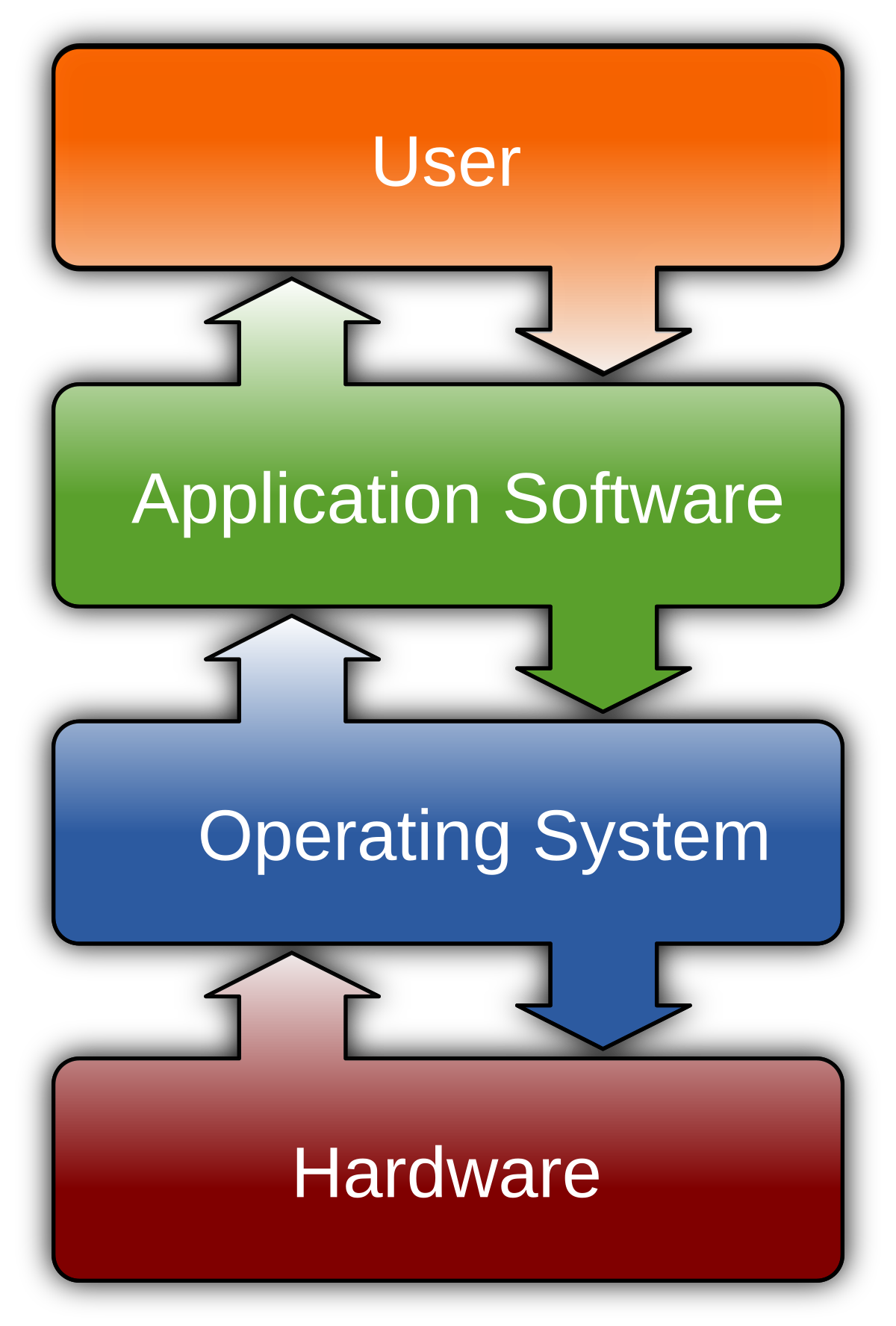
At the lowest programming level, executable code consists of machine language instructions supported by an individual processor—typically a central processing unit (CPU) or a graphics processing unit (GPU). Machine language consists of groups of binary values signifying processor instructions that change the state of the computer from its preceding state. For example, an instruction may change the value stored in a particular storage location in the computer—an effect that is not directly observable to the user. An instruction may also invoke one of many input or output operations, for example displaying some text on a computer screen; causing state changes which should be visible to the user. The processor executes the instructions in the order they are provided, unless it is instructed to “jump” to a different instruction, or is interrupted by the operating system. As of 2015, most personal computers, smartphone devices and servers have processors with multiple execution units or multiple processors performing computation together, and computing has become a much more concurrent activity than in the past.
The majority of software is written in high-level programming languages. They are easier and more efficient for programmers because they are closer to natural languages than machine languages. High-level languages are translated into machine language using a compiler or an interpreter or a combination of the two. Software may also be written in a low-level assembly language, which has a strong correspondence to the computer’s machine language instructions and is translated into machine language using an assembler.
An algorithm for what would have been the first piece of software was written by Ada Lovelace in the 19th century, for the planned Analytical Engine. She created proofs to show how the engine would calculate Bernoulli numbers. Because of the proofs and the algorithm, she is considered the first computer programmer.
The first theory about software, prior to the creation of computers as we know them today, was proposed by Alan Turing in his 1936 essay, On Computable Numbers, with an Application to the Entscheidungsproblem (decision problem). This eventually led to the creation of the academic fields of computer science and software engineering; both fields study software and its creation. Computer science is the theoretical study of computer and software (Turing’s essay is an example of computer science), whereas software engineering is the application of engineering principles to development of software.
In 2000, Fred Shapiro, a librarian at the Yale Law School, published a letter revealing that John Wilder Tukey’s 1958 paper “The Teaching of Concrete Mathematics” contained the earliest known usage of the term “software” found in a search of JSTOR’s electronic archives, predating the OED’s citation by two years. This led many to credit Tukey with coining the term, particularly in obituaries published that same year, although Tukey never claimed credit for any such coinage. In 1995, Paul Niquette claimed he had originally coined the term in October 1953, although he could not find any documents supporting his claim. The earliest known publication of the term “software” in an engineering context was in August 1953 by Richard R. Carhart, in a Rand Corporation Research Memorandum.
Computer data storage is a technology consisting of computer components and recording media that are used to retain digital data. It is a core function and fundamental component of computers.
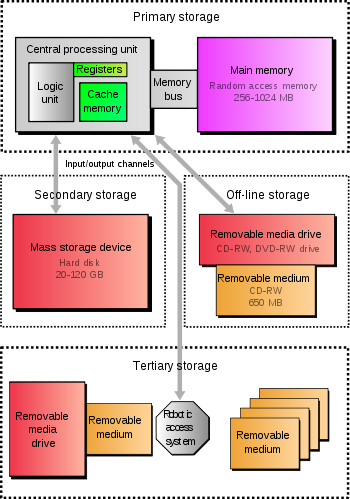
The central processing unit (CPU) of a computer is what manipulates data by performing computations. In practice, almost all computers use a storage hierarchy, which puts fast but expensive and small storage options close to the CPU and slower but less expensive and larger options further away. Generally, the fast volatile technologies (which lose data when off power) are referred to as “memory”, while slower persistent technologies are referred to as “storage”.
Even the first computer designs, Charles Babbage’s Analytical Engine and Percy Ludgate’s Analytical Machine, clearly distinguished between processing and memory (Babbage stored numbers as rotations of gears, while Lud gate stored numbers as displacements of rods in shuttles). This distinction was extended in the Von Neumann architecture, where the CPU consists of two main parts: The control unit and the arithmetic logic unit (ALU). The former controls the flow of data between the CPU and memory, while the latter performs arithmetic and logical operations on data.
Without a significant amount of memory, a computer would merely be able to perform fixed operations and immediately output the result. It would have to be reconfigured to change its behavior. This is acceptable for devices such as desk calculators, digital signal processors, and other specialized devices. Von Neumann machines differ in having a memory in which they store their operating instructions and data. Such computers are more versatile in that they do not need to have their hardware reconfigured for each new program, but can simply be reprogrammed with new in-memory instructions; they also tend to be simpler to design, in that a relatively simple processor may keep state between successive computations to build up complex procedural results. Most modern computers are von Neumann machines.
A modern digital computer represents data using the binary numeral system. Text, numbers, pictures, audio, and nearly any other form of information can be converted into a string of bits, or binary digits, each of which has a value of 0 or 1. The most common unit of storage is the byte, equal to 8 bits. A piece of information can be handled by any computer or device whose storage space is large enough to accommodate the binary representation of the piece of information, or simply data. For example, the complete works of Shakespeare, about 1250 pages in print, can be stored in about five megabytes (40 million bits) with one byte per character.
Data are encoded by assigning a bit pattern to each character, digit, or multimedia object. Many standards exist for encoding (e.g. character encodings like ASCII, image encodings like JPEG, and video encodings like MPEG-4).
By adding bits to each encoded unit, redundancy allows the computer to both detect errors in coded data and correct them based on mathematical algorithms. Errors generally occur in low probabilities due to random bit value flipping, or “physical bit fatigue”, loss of the physical bit in the storage of its ability to maintain a distinguishable value (0 or 1), or due to errors in inter or intra-computer communication. A random bit flip (e.g. due to random radiation) is typically corrected upon detection. A bit or a group of malfunctioning physical bits (the specific defective bit is not always known; group definition depends on the specific storage device) is typically automatically fenced out, taken out of use by the device, and replaced with another functioning equivalent group in the device, where the corrected bit values are restored (if possible). The cyclic redundancy check (CRC) method is typically used in communications and storage for error detection. A detected error is then retried.
Data compression methods allow in many cases (such as a database) to represent a string of bits by a shorter bit string (“compress”) and reconstruct the original string (“decompress”) when needed. This utilizes substantially less storage (tens of percents) for many types of data at the cost of more computation (compress and decompress when needed). Analysis of the trade-off between storage cost saving and costs of related computations and possible delays in data availability is done before deciding whether to keep certain data compressed or not.
For security reasons, certain types of data (e.g. credit card information) may be kept encrypted in storage to prevent the possibility of unauthorized information reconstruction from chunks of storage snapshots.
Generally, the lower a storage is in the hierarchy, the lesser its bandwidth and the greater its access latency is from the CPU. This traditional division of storage to primary, secondary, tertiary, and off-line storage is also guided by cost per bit.
In contemporary usage, memory is usually semiconductor storage read-write random-access memory, typically DRAM (dynamic RAM) or other forms of fast but temporary storage. Storage consists of storage devices and their media not directly accessible by the CPU (secondary or tertiary storage), typically hard disk drives, optical disc drives, and other devices slower than RAM but non-volatile (retaining contents when powered down).
Historically, memory has been called core memory, main memory, real storage, or internal memory. Meanwhile, non-volatile storage devices have been referred to as secondary storage, external memory, or auxiliary/peripheral storage.
Primary storage (also known as main memory, internal memory, or prime memory), often referred to simply as memory, is the only one directly accessible to the CPU. The CPU continuously reads instructions stored there and executes them as required. Any data actively operated on is also stored there in uniform manner.
Historically, early computers used delay lines, Williams tubes, or rotating magnetic drums as primary storage. By 1954, those unreliable methods were mostly replaced by magnetic-core memory. Core memory remained dominant until the 1970s, when advances in integrated circuit technology allowed semiconductor memory to become economically competitive.
This led to modern random-access memory (RAM). It is small-sized, light, but quite expensive at the same time. The particular types of RAM used for primary storage are volatile, meaning that they lose the information when not powered. Besides storing opened programs, it serves as disk cache and write buffer to improve both reading and writing performance. Operating systems borrow RAM capacity for caching so long as not needed by running software. Spare memory can be utilized as RAM drive for temporary high-speed data storage.
As shown in the diagram, traditionally there are two more sub-layers of the primary storage, besides main large-capacity RAM:
- Processor registers are located inside the processor. Each register typically holds a word of data (often 32 or 64 bits). CPU instructions instruct the arithmetic logic unit to perform various calculations or other operations on this data (or with the help of it). Registers are the fastest of all forms of computer data storage.
- Processor cache is an intermediate stage between ultra-fast registers and much slower main memory. It was introduced solely to improve the performance of computers. Most actively used information in the main memory is just duplicated in the cache memory, which is faster, but of much lesser capacity. On the other hand, main memory is much slower, but has a much greater storage capacity than processor registers. Multi-level hierarchical cache setup is also commonly used—primary cache being smallest, fastest and located inside the processor; secondary cache being somewhat larger and slower.
Main memory is directly or indirectly connected to the central processing unit via a memory bus. It is actually two buses (not on the diagram): an address bus and a data bus. The CPU firstly sends a number through an address bus, a number called memory address, that indicates the desired location of data. Then it reads or writes the data in the memory cells using the data bus. Additionally, a memory management unit (MMU) is a small device between CPU and RAM recalculating the actual memory address, for example to provide an abstraction of virtual memory or other tasks.
As the RAM types used for primary storage are volatile (uninitialized at start up), a computer containing only such storage would not have a source to read instructions from, in order to start the computer. Hence, non-volatile primary storage containing a small startup program (BIOS) is used to bootstrap the computer, that is, to read a larger program from non-volatile secondary storage to RAM and start to execute it. A non-volatile technology used for this purpose is called ROM, for read-only memory (the terminology may be somewhat confusing as most ROM types are also capable of random access).
Many types of “ROM” are not literally read only, as updates to them are possible; however it is slow and memory must be erased in large portions before it can be re-written. Some embedded systems run programs directly from ROM (or similar), because such programs are rarely changed. Standard computers do not store non-rudimentary programs in ROM, and rather, use large capacities of secondary storage, which is non-volatile as well, and not as costly.
Recently, primary storage and secondary storage in some uses refer to what was historically called, respectively, secondary storage and tertiary storage.