
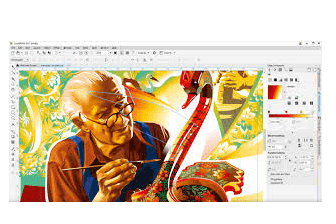
Corel draw
Corel DRAW is a vector graphics editor developed and marketed by Corel Corporation. It is used for creating and editing graphics and illustrations for print and digital media. The latest version of Corel DRAW is Corel DRAW 2021.
Core l DRAW features a user-friendly interface and a wide range of tools for creating and editing vector graphics. It supports a variety of file formats, including AI, EPS, SV G, PDF, JPG, PNG, and more. Some of the key features of Corel DRAW include:
- Layout and design tools – Corel DRAW offers a range of layout and design tools, such as grids and guidelines, that make it easy to create precise and professional-looking designs.
- Object management – Corel DRAW allows users to easily manage objects, including grouping, un grouping, aligning, and distributing them.
- Typography tools – Corel DRAW offers a wide range of typography tools, including support for Open Type fonts, kerning, tracking, and more.
- Photo editing – Corel DRAW includes photo editing tools, such as brightness and contrast adjustments, color correction, and more.
- Export options – Corel DRAW supports a variety of file formats for exporting designs, including PDF, JPG, PN G, and more.
Corel DRAW is widely used by graphic designers, marketing professionals, and other creative professionals. It is a popular choice for creating logos, brochures, flyers, and other marketing materials. It is also used for creating digital illustrations, such as icons and graphics for websites and mobile apps.
In addition to Corel DRAW, Corel Corporation offers a range of other software products for graphic design, photo editing, and other creative tasks. Some of these products include Corel PHOTO-PAINT, Corel Painter, and Corel DRAW Technical Suite.
To use Corel DRAW, you will need a computer that meets the minimum system requirements, which may vary depending on the version of Corel DRAW that you are using. Here are some of the basic requirements:
- Operating system: Windows 10, 8.1 or 7, in 64-bit or 32-bit editions, with the latest updates and service packs.
- Processor: Intel Core i3/5/7 or AMD Athlon 64.
- RAM: 4 GB of RAM (8 GB recommended).
- Storage: 4.3 GB of available hard disk space.
- Display resolution: 1280 x 720 screen resolution (1920 x 1080 recommended).
- Multi-touch screen, mouse or tablet.
- Microsoft .NET Framework 4.7.
- DVD drive (required for box installation).
Additionally, you will need to purchase a license or subscription to use Corel DRAW. Corel DRAW is available as a standalone purchase, or as part of a subscription to the Corel DRAW Graphics Suite, which includes other software products for graphic design and photo editing.
Once you have the necessary hardware and software, you can start using Corel DRAW to create and edit vector graphics and illustrations. Corel DRAW includes a range of tools and features for layout and design, object management, typography, and photo editing, which can be used to create a wide range of designs for print and digital media.
Corel DRAW is primarily used by graphic designers, marketing professionals, and other creative professionals who need to create and edit vector graphics and illustrations for print and digital media. It is also used by artists, illustrators, and other individuals who create digital artwork.
In addition to professionals, Corel DRAW can also be used by students and hobbyists who are interested in graphic design and digital art. The software is user-friendly and offers a range of features and tools that make it easy to create professional-looking designs.
Overall, anyone who needs to create vector graphics and illustrations for print or digital media can benefit from using Corel DRAW.
is required whenever there is a need to create and edit vector graphics and illustrations for print or digital media. Here are some specific situations where Corel DRAW may be required:
- Logo design – Corel DRAW is commonly used for creating logos for businesses and organizations. The software offers a range of tools for creating unique and professional-looking logos.
- Marketing materials – is used for creating a wide range of marketing materials, such as brochures, flyers, business cards, and posters. The software’s layout and design tools make it easy to create professional-looking designs that can help businesses attract customers.
- Digital illustrations – Corel DRAW is used by artists and illustrators for creating digital illustrations, such as icons, graphics for websites and mobile apps, and other types of digital artwork.
- Packaging design – Core l DRAW is commonly used for creating packaging designs for products, such as food, cosmetics, and consumer goods. The software’s object management tools make it easy to create designs that are optimized for packaging production.
Overall, Corel DRAW is required whenever there is a need to create professional-looking vector graphics and illustrations for various purposes.
Corel DRAW is required in various industries and settings where there is a need to create and edit vector graphics and illustrations. Here are some specific industries and settings where Corel DRAW may be required:
- Advertising and marketing agencies – Corel DRAW is commonly used by advertising and marketing agencies for creating promotional materials, such as flyers, brochures, and billboards.
- Graphic design studios – Corel DRAW is used by graphic design studios for creating logos, branding materials, and other types of designs for clients.
- Printing and publishing companies – Corel DRAW is used by printing and publishing companies for creating designs for books, magazines, newspapers, and other types of printed materials.
- Manufacturing companies – Corel DRAW is used by manufacturing companies for creating designs for product packaging, labels, and other types of promotional materials.
- Education – Corel DRAW is used in educational settings for teaching graphic design and digital art. Many schools and universities offer courses that teach Corel DRAW as part of their curriculum.
Overall, Corel DRAW is required in various industries and settings where there is a need to create professional-looking vector graphics and illustrations for various purposes.
Corel DRAW is required in several ways to create and edit vector graphics and illustrations. Here are some of the ways in which Corel DRAW is used:
- Layout and design – Corel DRAW offers a range of layout and design tools that make it easy to create professional-looking designs. Users can create shapes, lines, and curves, and apply colors and gradients to them. The software also includes features for working with typography, such as creating text frames and applying text formatting.
- Object management – Corel DRAW includes powerful object management tools that allow users to easily manipulate and arrange objects on a page. Users can group objects together, align them, and adjust their size and position.
- Image editing – Corel DRAW includes a range of image editing tools that allow users to modify and enhance photos and other raster graphics. Users can adjust color and brightness, apply filters and effects, and remove unwanted elements from an image.
- Exporting and sharing – Corel DRAW allows users to export their designs in a range of file formats, such as PDF, SVG, and AI. Users can also share their designs with others by sending them as email attachments or uploading them to cloud storage services.
Overall, Corel DRAW is required in several ways to create and edit vector graphics and illustrations. The software’s powerful tools and features make it a versatile tool for graphic designers, artists, and other creative professionals.
Here is a case study on the use of Corel DRAW in a real-world scenario:
Client: A small printing company that specializes in creating promotional materials for businesses and organizations.
Challenge: The client needed to create a new brochure for a local real estate agency that would showcase their available properties. The brochure needed to be visually appealing, easy to read, and include photos and descriptions of the properties.
Solution: The client used Corel DRAW to create the brochure. They started by selecting a brochure template from the software’s library of templates. They then customized the template by adding the real estate agency’s logo and colors, and modifying the layout to fit the content.
Next, the client added photos of the properties to the brochure. They used Corel DRAW’s image editing tools to adjust the brightness and contrast of the photos and remove any unwanted elements. They also added text descriptions of the properties, using Corel DRAW’s typography tools to format the text and make it easy to read.
Finally, the client exported the brochure as a PDF file and sent it to the real estate agency for review. The real estate agency was impressed with the quality of the brochure and decided to use the printing company for all of their future promotional materials.
Outcome: By using Corel DRAW, the printing company was able to create a professional-looking brochure for their client. The software’s layout and design tools made it easy to customize the brochure to fit the client’s needs, while the image editing and typography tools allowed the client to create visually appealing and informative content. The end result was a brochure that effectively promoted the real estate agency’s properties and helped the printing company gain a new long-term client.
Here is a white paper on Corel DRAW that provides an overview of the software’s features and benefits:
Introduction: Corel DRAW is a professional vector graphics software that allows users to create and edit high-quality illustrations, logos, and other types of graphics. The software is popular among graphic designers, artists, and other creative professionals who need a powerful tool for creating and editing vector graphics. In this white paper, we will provide an overview of Corel DRAW’s features and benefits, and explain why it is a valuable tool for anyone who works with graphics.
Features: Corel DRAW includes a range of features that make it a versatile tool for creating and editing vector graphics. Here are some of the software’s key features:
- Layout and design tools – Corel DRAW includes a range of tools for creating shapes, lines, and curves, and applying colors and gradients to them. The software also includes features for working with typography, such as creating text frames and applying text formatting.
- Object management tools – Corel DRAW includes powerful object management tools that allow users to easily manipulate and arrange objects on a page. Users can group objects together, align them, and adjust their size and position.
- Image editing tools – Corel DRAW includes a range of image editing tools that allow users to modify and enhance photos and other raster graphics. Users can adjust color and brightness, apply filters and effects, and remove unwanted elements from an image.
- Exporting and sharing – Corel DRAW allows users to export their designs in a range of file formats, such as PDF, SVG, and AI. Users can also share their designs with others by sending them as email attachments or uploading them to cloud storage services.
Benefits: Corel DRAW provides a range of benefits to users who work with graphics. Here are some of the software’s key benefits:
- Versatility – Corel DRAW is a versatile tool that can be used to create a wide range of graphics, from simple logos to complex illustrations. The software’s range of features and tools make it a valuable tool for graphic designers, artists, and other creative professionals.
- User-friendly interface – Corel DRAW’s user-friendly interface makes it easy to learn and use. Users can quickly become familiar with the software’s tools and features, and start creating and editing graphics in no time.
- Affordable – Corel DRAW is an affordable alternative to other vector graphics software, making it a valuable tool for small businesses and individuals who need to create and edit graphics on a budget.
- Support and resources – Corel DRAW offers a range of support and resources to users, including tutorials, forums, and a knowledge base. This makes it easy for users to get help and find answers to their questions.
Conclusion: Corel DRAW is a powerful tool for anyone who works with graphics. Its range of features and tools make it a valuable tool for graphic designers, artists, and other creative professionals who need to create and edit high-quality vector graphics. Its user-friendly interface and affordability make it a valuable tool for small businesses and individuals who need to create and edit graphics on a budget. Overall, Corel DRAW is a valuable tool that provides users with the flexibility and control they need to create and edit graphics to their exact specifications.