
Data Entry / Typing Computer Innovation
COURTESY :- vrindawan.in
Wikipedia
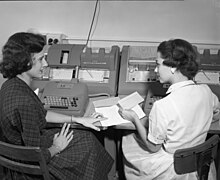
Data entry is the process of digitizing data by entering it into a computer system for organization and management purposes. It is a person-based process and is “one of the important basic” tasks needed when no machine-readable version of the information is readily available for planned computer-based analysis or processing.
Sometimes what is needed is “information about information (that) can be greater than the value of the information itself.” It can also involve filling in required information which is then “data-entered” from what was written on the research document, such as the growth in available items in a category. This is a higher level of abstraction than metadata, “information about data.” Common errors in data entry include transposition errors, misclassified data, duplicate data, and omitted data, which are similar to bookkeeping errors.
Data entry is often done with a keyboard and at times also using a mouse, although a manually-fed scanner may be involved.
Historically, devices lacking any pre-processing capabilities were used.
Data entry using keypunches was related to the concept of batch processing – there was no immediate feedback.
Typing is the process of writing or inputting text by pressing keys on a typewriter, computer keyboard, cell phone, or calculator. It can be distinguished from other means of text input, such as handwriting and speech recognition. Text can be in the form of letters, numbers and other symbols. The world’s first typist was Lillian Sholes from Wisconsin, the daughter of Christopher Sholes, who invented the first practical typewriter.
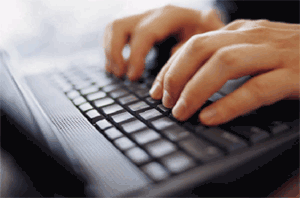
User interface features such as spell checker and autocomplete serve to facilitate and speed up typing and to prevent or correct errors the typist may make.
Hunt and peck (two-fingered typing) is a common form of typing in which the typist presses each key individually. Instead of relying on the memorized position of keys, the typist must find each key by sight. Although good accuracy may be achieved, the use of this method may also prevent the typist from being able to see what has been typed without glancing away from the keys, and any typing errors that are made may not be noticed immediately. Because only a few fingers are used in this technique, this also means that the fingers are forced to move a much greater distance.
In this technique, the typist keeps their eyes on the source copy at all times. Touch typing also involves the use of the home row method, where typists rest their wrist down, rather than lifting up and typing (which can cause carpal tunnel syndrome). To avoid this, typists should sit up tall, leaning slightly forward from the waist, place their feet flat on the floor in front of them with one foot slightly in front of the other, and keep their elbows close to their sides with forearms slanted slightly upward to the keyboard; fingers should be curved slightly and rest on the home row.
Many touch typists also use keyboard shortcuts when typing on a computer. This allows them to edit their document without having to take their hands off the keyboard to use a mouse. An example of a keyboard shortcut is pressing the Ctrl key plus the S key to save a document as they type, or the Ctrl key plus the Z key to undo a mistake. Other shortcuts are the Ctrl key plus the C to copy and the Ctrl key and the V key to paste, and the Ctrl key and the X key to cut. Many experienced typists can feel or sense when they have made an error and can hit the ← Backspace key and make the correction with no increase in time between keystrokes.
There are many idiosyncratic typing styles in between novice-style “hunt and peck” and touch typing. For example, many “hunt and peck” typists have the keyboard layout memorized and are able to type while focusing their gaze on the screen. Some use just two fingers, while others use 3–6 fingers. Some use their fingers very consistently, with the same finger being used to type the same character every time, while others vary the way they use their fingers.
One study examining 30 subjects, of varying different styles and expertise, has found minimal difference in typing speed between touch typists and self-taught hybrid typists. According to the study, “The number of fingers does not determine typing speed… People using self-taught typing strategies were found to be as fast as trained typists… instead of the number of fingers, there are other factors that predict typing speed… fast typists… keep their hands fixed on one position, instead of moving them over the keyboard, and more consistently use the same finger to type a certain letter.” To quote doctoral candidate Anna Feit: “We were surprised to observe that people who took a typing course, performed at similar average speed and accuracy, as those that taught typing to themselves and only used 6 fingers on average.
A late 20th century trend in typing, primarily used with devices with small keyboards (such as PDAs and Smartphones), is thumbing or thumb typing. This can be accomplished using either only one thumb or both the thumbs, with more proficient typists reaching speeds of 100 words per minute. Similar to desktop keyboards and input devices, if a user overuses keys which need hard presses and/or have small and unergonomic layouts, it could cause thumb tendonitis or other repetitive strain injury.
Words per minute (WPM) is a measure of typing speed, commonly used in recruitment. For the purposes of WPM measurement a word is standardized to five characters or keystrokes. Therefore, “brown” counts as one word, but “mozzarella” counts as two.
The benefits of a standardized measurement of input speed are that it enables comparison across language and hardware boundaries. The speed of an Afrikaans-speaking operator in Cape Town can be compared with a French-speaking operator in Paris.
Today, even Written Chinese can be typed very quickly using the combination of a software prediction system and by typing their sounds in Pinyin. Such prediction software even allows typing short-hand forms while producing complete characters. For example, the phrase “nǐ chī le ma” (你吃了吗) meaning “Have you eaten yet?” can be typed with just 4 strokes: “nclm”.
In one study of average computer users, the average rate for transcription was 33 words per minute, and 19 words per minute for composition. In the same study, when the group was divided into “fast”, “moderate” and “slow” groups, the average speeds were 40 wpm, 35 wpm, and 23 wpm respectively. An average professional typist reaches 50 to 80 wpm, while some positions can require 80 to 95 wpm (usually the minimum required for dispatch positions and other typing jobs), and some advanced typists work at speeds above 120 wpm. Two-finger typists, sometimes also referred to as “hunt and peck” typists, commonly reach sustained speeds of about 37 wpm for memorized text and 27 wpm when copying text, but in bursts may be able to reach speeds of 60 to 70 wpm. From the 1920s through the 1970s, typing speed (along with shorthand speed) was an important secretarial qualification and typing contests were popular and often publicized by typewriter companies as promotional tools.
A less common measure of the speed of a typist, CPM is used to identify the number of characters typed per minute. This is a common measurement for typing programs, or typing tutors, as it can give a more accurate measure of a person’s typing speed without having to type for a prolonged period of time. The common conversion factor between WPM and CPM is 5. It is also used occasionally for associating the speed of a reader with the amount they have read. CPM has also been applied to 20th century printers, but modern faster printers more commonly use PPM (pages per minute).
The fastest typing speed ever, 216 words per minute, was achieved by Stella Pajunas-Garnand from Chicago in 1946 in one minute on an IBM electric using the QWERTY keyboard layout. As of 2005, writer Barbara Blackburn was the fastest English language typist in the world, according to The Guinness Book of World Records. Using the Dvorak keyboard layout, she had maintained 150 wpm for 50 minutes, and 170 wpm for shorter periods, with a peak speed of 212 wpm. Blackburn, who failed her QWERTY typing class in high school, first encountered the Dvorak layout in 1938, quickly learned to achieve very high speeds, and occasionally toured giving speed-typing demonstrations during her secretarial career. She appeared on Late Night with David Letterman on January 24, 1985, but felt that Letterman made a spectacle of her.
The recent emergence of several competitive typing websites has allowed fast typists on computer keyboards to emerge along with new records, though many of these are unverifiable. Some notable, verified records include 255 wpm on a one-minute, random-word test by a user under the username slekap and occasionally bailey, 213 wpm on a 1-hour, random-word test by Joshua Hu, 221 wpm average on 10 random quotes by Joshua Hu, and first place in the 2020 Ultimate Typing Championship by Anthony Ermollin based on an average of 180.88 wpm on texts of various lengths. These three people are the most commonly cited fastest typists in online typing communities. All of their records were set on the QWERTY keyboard layout.
Using a personalized interface, physicist Stephen Hawking, who suffered from amyotrophic lateral sclerosis, managed to type 15 wpm with a switch and adapted software created by Walt Woltosz. Due to a slowdown of his motor skills, his interface was upgraded with an infrared camera that detected “twitches in the cheek muscle under the eye. His typing speed decreased to approximately one word per minute in the later part of his life.
The numeric entry, or 10-key, speed is a measure of one’s ability to manipulate a numeric keypad. Generally, it is measured in Keystrokes per Hour or KPH.
Very good article on computer innovation . I like this blog