
Data management (SQL server) Innovation
COURTESY :- vrindawan.in
Wikipedia
A database server is a server which uses a database application that provides database services to other computer programs or to computers, as defined by the client–server model. Database management systems (DBMSs) frequently provide database-server functionality, and some database management systems (such as MySQL) rely exclusively on the client–server model for database access (while others, like SQLite, are meant for use as an embedded database).
Users access a database server either through a “front end” running on the user’s computer – which displays requested data – or through the “back end”, which runs on the server and handles tasks such as data analysis and storage.
In a master-slave model, database master servers are central and primary locations of data while database slave servers are synchronized backups of the master acting as proxies.
Most database applications respond to a query language. Each database understands its query language and converts each submitted query to server-readable form and executes it to retrieve results.
Examples of proprietary database applications include Oracle, IBM Db2, Informix, and Microsoft SQL Server. Examples of free software database applications include PostgreSQL; and under the GNU General Public Licence include Ingres and MySQL. Every server uses its own query logic and structure. The SQL (Structured Query Language) query language is more or less the same on all relational database applications.
For clarification, a database server is simply a server that maintains services related to clients via database applications.
DB-Engines lists over 300 DBMSs in its ranking.
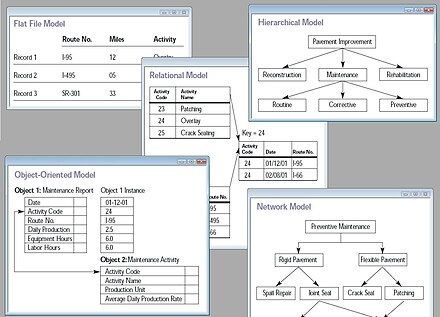
The foundations for modeling large sets of data were first introduced by Charles Bachman in 1969. Bachman introduced Data Structure Diagrams (DSDs) as a means to graphically represent data. DSDs provided a means to represent the relationships between different data entities. In 1970, Codd introduced the concept that users of a database should be ignorant of the “inner workings” of the database. Codd proposed the “relational view” of data which later evolved into the Relational Model which most databases use today. In 1971, the Database Task Report Group of CODASYL (the driving force behind the development of the programming language COBOL) first proposed a “data description language for describing a database, a data description language for describing that part of the data base known to a program, and a data manipulation language.” Most of the research and development of databases focused on the relational model during the 1970s.
In 1975 Bachman demonstrated how the relational model and the data structure set were similar and “congruent” ways of structuring data while working for Honeywell. The Entity-relationship model was first proposed in its current form by Peter Chen in 1976 while he was conducting research at MIT. This model became the most frequently used model to describe relational databases. Chen was able to propose a model that was superior to the navigational model and was more applicable to the “real world” than the relational model proposed by Codd.
Microsoft SQL Server Integration Services (SSIS) is a component of the Microsoft SQL Server database software that can be used to perform a broad range of data migration tasks.

SSIS is a platform for data integration and workflow applications. It features a data warehousing tool used for data extraction, transformation, and loading (ETL). The tool may also be used to automate maintenance of SQL Server databases and updates to multidimensional cube data.
First released with Microsoft SQL Server 2005, SSIS replaced Data Transformation Services, which had been a feature of SQL Server since Version 7.0. Unlike DTS, which was included in all versions, SSIS is only available in the “Standard”, “Business Intelligence” and “Enterprise” editions.With Microsoft “Visual Studio Dev Essentials” it is now possible to use SSIS with Visual Studio 2017 free of cost so long as it is for development and learning purposes only.
The SSIS Import/Export Wizard lets the user create packages that move data from a single data source to a destination with no transformations. The Wizard can quickly move data from a variety of source types to a variety of destination types, including text files and other SQL Server instances.
Developers tasked with creating or maintaining SSIS packages use a visual development tool based on Microsoft Visual Studio called the SQL Server Business Intelligence Development Studio (BIDS). It allows users to edit SSIS packages using a drag-and-drop user interface. A scripting environment for writing programming code is also available in the tool. A package holds a variety of elements that define a workflow. Upon package execution, the tool provides color-coded real-time monitoring. (Note: In more recent versions MS SQL Server, BIDS has been replaced with “SQL Server Data Tools – Business Intelligence” (SSDT-BI).
A connection includes the information necessary to connect to a particular data source. Tasks can reference the connection by its name, allowing the details of the connection to be changed or configured at run time.
A workflow can be designed for a number of events in the different scopes where they might occur. In this way, tasks may be executed in response to happenings within the package — such as cleaning up after errors.
Parameters allow you to assign values to properties within packages at the time of package execution. You can have project parameters and package parameters. In general, if you are deploying a package using the package deployment model, you should use configurations instead of parameters.
Tasks are linked by precedence constraints. The precedence constraint preceding a particular task must be met before that task executes. The run time supports executing tasks in parallel, if their precedence constraints so allow. Constraints may otherwise allow different paths of execution depending on the success or failure of other tasks. Together with the tasks, precedence constraints comprise the workflow of the package.
A task is an atomic work unit that performs some action. There are a couple of dozen tasks that ship in the box, ranging from the file system task (that can copy or move files) to the data transformation task. The data transformation task actually copies data; it implements the ETL features of the product.
- Tasks may reference variables to store results, make decisions, or affect their configuration.
A package may be saved to a file or to a store with a hierarchical namespace within a SQL Server instance. In either case, the package content is persisted in XML.
Once completed, the designer also allows the user to start the package’s execution. Once started, the package may be readily debugged or monitored.