
Electronics Components and P.C. Hardware
Electronics components and PC (personal computer) hardware are essential elements in the field of electronics and computing. Here, I’ll provide an overview of both electronics components and PC hardware:
Electronics Components:
- Resistor: A passive two-terminal component that limits the flow of electric current. It is commonly used to control voltage and current in circuits.
- Capacitor: Another passive component used to store and release electrical energy. Capacitors are often used for smoothing voltage fluctuations and filtering signals.
- Inductor: A passive component that resists changes in current flow. It is commonly used in filters and inductance coils.
- Diode: A semiconductor device that allows current to flow in one direction only. Diodes are used in rectification, signal clipping, and voltage regulation.
- Transistor: An active semiconductor device that can amplify or switch electronic signals. Common types include bipolar junction transistors (BJT) and field-effect transistors (FET).
- Integrated Circuit (IC): A complex assembly of transistors, diodes, and other components on a single chip. ICs are the building blocks of modern electronic devices, including microprocessors and memory chips.
- Resistor Network: A set of resistors arranged in a specific configuration, often used for voltage division and impedance matching.
- LED (Light Emitting Diode): A special diode that emits light when current flows through it. LEDs are used for indicator lights, displays, and lighting.
- Sensor: A device that detects and measures physical properties such as temperature, pressure, light, or motion. Sensors are widely used in electronic systems for data acquisition.
- Connector: Various types of connectors, such as USB, HDMI, and RJ45, are used to establish electrical connections between devices.
PC Hardware:
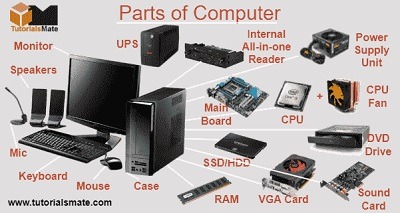
- Central Processing Unit (CPU): The “brain” of a computer, responsible for executing instructions and performing calculations.
- Motherboard: The main circuit board that connects and houses various components, including the CPU, RAM, and storage devices.
- Random Access Memory (RAM): Temporary storage used by the CPU to store data and instructions while the computer is running.
- Hard Disk Drive (HDD) and Solid-State Drive (SSD): Storage devices for long-term data storage. HDDs use spinning disks, while SSDs use flash memory for faster access times.
- Graphics Processing Unit (GPU): A specialized processor for rendering graphics and accelerating certain calculations, commonly used for gaming and graphics-intensive tasks.
- Power Supply Unit (PSU): Provides electrical power to all components in the PC.
What is required Electronics Components and P.C. Hardware
The specific electronics components and PC hardware required for a particular project or application can vary widely depending on your goals and needs. However, I can provide a general list of components and hardware commonly required for building and configuring a basic personal computer, which can serve as a starting point:
Required PC Hardware:
- Central Processing Unit (CPU): The choice of CPU depends on your computing needs and budget.
- Motherboard: Compatible with your CPU and other hardware components, with the necessary slots and connectors.
- Memory (RAM): Sufficient RAM to meet your computing demands, typically 8GB or more for general use.
- Storage: A storage device, which can be a Hard Disk Drive (HDD) or a Solid-State Drive (SSD) for the operating system and data storage.
- Power Supply Unit (PSU): Adequate wattage and connectors to power all your components.
- Graphics Processing Unit (GPU): Integrated graphics or a dedicated GPU for graphical tasks, including gaming and content creation.
- Case (Chassis): An appropriate computer case that accommodates your chosen components.
- Cooling System: Fans and heatsinks to keep your CPU and GPU at safe operating temperatures.
- Optical Drive (optional): CD/DVD/Blu-ray drive if needed.
- Input Devices: Keyboard, mouse, and optionally other peripherals like a game controller or stylus.
- Monitor: A display screen with the desired size and resolution.
- Operating System (OS): Software required to run and manage your computer (e.g., Windows, macOS, Linux).
- Cables and Connectors: Various cables (SATA, power, data, etc.) and connectors to connect components together.
- Network Connection: Ethernet cable or a Wi-Fi adapter for internet connectivity
Who is required Electronics Components and P.C. Hardware
The need for electronics components and PC hardware varies depending on the specific context and requirements of individuals, organizations, and industries. Here are some examples of who may require electronics components and PC hardware:
- Individual Consumers: Everyday consumers often require PC hardware when purchasing or building personal computers for various purposes, such as work, gaming, or entertainment.
- IT Professionals: Information technology professionals in businesses and organizations require PC hardware for setting up and maintaining computer networks, servers, and workstations.
- Electronics Engineers: Engineers involved in electronics design and development require electronics components to create circuits and devices for various applications.
- PC Builders and Technicians: PC builders and technicians need PC hardware components for assembling, repairing, and upgrading computers.
- Manufacturers: Manufacturers of electronic devices, such as smartphones, tablets, and appliances, require electronics components for mass production.
- Researchers and Developers: Professionals working in research and development roles use electronics components and PC hardware for prototyping, testing, and product development.
- Data Center Operators: Operators of data centers and cloud infrastructure rely on PC hardware for server deployment, maintenance, and scaling.
- Educators: Teachers and professors in educational institutions use electronics components and PC hardware for teaching purposes, such as electronics labs and computer science courses.
- Government Agencies: Government agencies and departments utilize electronics components and PC hardware for various applications, including data management and infrastructure maintenance.
- Medical Professionals: Healthcare professionals use specialized PC hardware and electronics components for medical equipment, diagnostic devices, and patient data management.
- Gaming Enthusiasts: Gamers require high-performance PC hardware, including gaming PCs, graphics cards, and accessories, for playing video games.
- Startups and Entrepreneurs: Startup founders and entrepreneurs may need electronics components and PC hardware for product development and prototyping.
- Home Automation Enthusiasts: Individuals interested in home automation projects use electronics components to create customized automation systems.
- Aerospace and Defense Professionals: Professionals in the aerospace and defense industries use electronics components and ruggedized PC hardware for avionics, satellite systems, and military applications.
- Automotive Engineers: Engineers working in the automotive industry use electronics components and PC hardware for designing and testing vehicle systems, including engine control units and infotainment systems.
- Industrial Automation Experts: Experts in industrial automation rely on electronics components and PC hardware to design and maintain automated manufacturing systems and control systems.
- Environmental Monitoring Specialists: Professionals involved in environmental monitoring may use electronics components for creating data collection and sensor systems.
- Robotics Engineers: Engineers working on robotics projects require electronics components for creating robotic systems and control circuits.
The specific roles and individuals who require electronics components and PC hardware depend on the application, industry, and project. These components and hardware are fundamental in enabling various technologies and applications across a wide range of fields and disciplines.
When is required Electronics Components and P.C. Hardware
Electronics components and PC hardware are required in various situations and scenarios. Here are some common instances when you might need these components:
- Building a Personal Computer: When you want to assemble or upgrade a personal computer, you’ll require PC hardware components such as a CPU, motherboard, RAM, storage, and more.
- Repair and Maintenance: If your existing PC or electronic device is malfunctioning, you might need to replace or repair specific hardware components. This can include replacing a faulty hard drive, upgrading memory, or fixing a broken power supply.
- Custom Electronic Projects: When designing and building electronic circuits or projects, you’ll need a range of electronics components like resistors, capacitors, transistors, sensors, and microcontrollers. These are used in various DIY projects, hobbyist endeavors, and professional applications.
- Gaming: Enthusiastic gamers often require high-performance PC hardware, including powerful CPUs, GPUs, and ample RAM to run modern games smoothly.
- Content Creation: If you work with graphics, video editing, or other resource-intensive tasks, you’ll need PC hardware with sufficient processing power and graphics capabilities.
- Server and Data Center Setup: Organizations that run servers and data centers require specialized PC hardware to handle network and data storage needs.
- Embedded Systems: Engineers and developers creating embedded systems, IoT devices, or industrial automation solutions will need both electronics components and specific PC hardware for development and testing.
- Educational and Research Projects: In educational institutions and research labs, electronics components and PC hardware are often used for teaching and conducting experiments.
- Entertainment and Multimedia: Home entertainment systems, smart TVs, and audio equipment all rely on electronics components for functionality.
- Networking and IT Infrastructure: Setting up and maintaining computer networks and IT infrastructure requires various PC hardware components, including routers, switches, and network cards.
- Home Automation: DIY home automation projects may involve using electronics components and microcontrollers to control lights, appliances, and security systems.
- Robotics: Building and programming robots often necessitates both electronics components and hardware for motion control and sensory input.
The need for electronics components and PC hardware can arise in many aspects of our daily lives, whether for personal use, work, hobbies, or educational purposes. The specific requirements will depend on the task at hand and the goals you want to achieve.
Where is required Electronics Components and P.C. Hardware
Electronics components and PC hardware are required in various locations and settings depending on the specific applications and needs. Here are some common places where these components and hardware are required:
- Homes: Many households have personal computers for various purposes, including work, entertainment, and communication. Electronics components may also be used in home automation projects.
- Offices: Offices often have multiple PCs and networking equipment for business operations, as well as printers, scanners, and other hardware.
- Schools and Educational Institutions: Educational institutions use PCs for teaching, research, and administrative tasks. Electronics components are used in educational electronics and robotics projects.
- Research Labs: Research facilities often require specialized PC hardware and electronics components for experiments and data analysis.
- Manufacturing and Industrial Facilities: PC hardware is used for automation and control systems in manufacturing plants, while electronics components are integrated into industrial machinery and control systems.
- Data Centers: Large data centers rely on extensive PC hardware setups, including servers, storage arrays, and networking equipment.
- Retail Stores: Point-of-sale (POS) systems in retail stores often involve
How is required Electronics Components and P.C Hardware
The requirement for electronics components and PC hardware is determined by the specific needs and purposes of the user or organization. The process of determining what components and hardware are required typically involves the following steps:
- Identify the Purpose: Determine the primary purpose for which you need electronics components or PC hardware. Is it for personal use, a specific project, a business operation, or an industrial application? Understanding the purpose is crucial in defining your requirements.
- Assess Performance Needs: Depending on the intended use, assess the performance requirements. For a personal computer, consider factors like CPU speed, RAM capacity, and storage size. For electronics components, think about the desired functionality and specifications of sensors, microcontrollers, or other components.
- Consider Compatibility: Ensure that the components and hardware you select are compatible with each other. For PCs, this includes ensuring that the CPU is compatible with the motherboard and that RAM and storage meet the motherboard’s specifications. In electronics projects, make sure that the components work together within the circuit.
- Budget Constraints: Determine your budget for acquiring the components or hardware. Your budget will influence your choices, as high-performance or specialized components can be more expensive.
- Research and Selection: Research various options and manufacturers for the components or hardware you need. Read reviews, compare prices, and consider the reputation of the brands. For electronics components, consult datasheets and technical documentation.
- Project Planning (for Electronics): If you’re working on an electronics project, create a detailed project plan. This plan should outline the specific components needed, their quantities, and their interconnections within the project.
- Consult Experts: If you’re uncertain about your requirements or need advice, consult with experts or experienced professionals in the field. They can provide valuable insights and recommendations.
- Purchase and Procurement: Once you’ve identified the required components or hardware, make the necessary purchases from reputable suppliers or vendors. Ensure that you acquire genuine and compatible products.
- Assembly and Integration: Assemble the PC or integrate the electronics components according to
Case study on Electronics Components and P.C. Hardware
Sure, here’s a hypothetical case study involving electronics components and PC hardware in an organizational setting:
Case Study: XYZ Manufacturing Company’s IT Infrastructure Upgrade
Background: XYZ Manufacturing Company is a medium-sized manufacturing firm that specializes in producing automotive components. Over the years, the company has experienced significant growth, leading to increased demands on its IT infrastructure. The existing computer systems are outdated, causing productivity bottlenecks, and the company’s servers are struggling to handle the growing volume of data generated by automated manufacturing processes.
Challenges:
- Outdated PC Hardware: The employees are using PCs that are several years old, resulting in slow performance and frequent hardware failures.
- Inadequate Server Capacity: The existing servers are unable to handle the increased data processing requirements, leading to data bottlenecks and occasional downtime.
- Security Concerns: With the rise of cyber threats, the company’s IT security is a concern, especially as they handle sensitive manufacturing data.
Objectives: XYZ Manufacturing Company has set the following objectives for its IT infrastructure upgrade project:
- Improve PC Performance: Replace outdated PCs with modern hardware to enhance employee productivity and reduce downtime.
- Upgrade Servers: Invest in new server hardware and data storage solutions to improve data processing capabilities, scalability, and reliability.
- Enhance IT Security: Implement robust security measures, including firewalls, intrusion detection systems, and employee training, to safeguard sensitive manufacturing data.
Solution: To address these challenges and achieve their objectives, XYZ Manufacturing Company undertakes the following steps:
- Assessment: The IT team conducts a comprehensive assessment of the existing PC hardware and server infrastructure, identifying performance bottlenecks and security vulnerabilities.
- PC Hardware Selection: Based on the assessment, they select a range of modern PCs with faster processors, ample RAM, and SSD storage to replace outdated machines.
- Server Upgrade: New server hardware is chosen, including high-performance processors, increased RAM capacity, and scalable storage solutions such as a Network Attached Storage (NAS) system.
- Security Measures: To enhance security, the company invests in enterprise-grade firewalls, intrusion detection systems, antivirus software, and conducts employee training on cybersecurity best practices.
- Migration Plan: The IT team develops a migration plan to ensure a smooth transition from the old hardware to the new systems. Data migration tools and backup strategies are put in place.
- Testing and Validation: Before deployment, all new hardware and security measures are thoroughly tested to identify and resolve any issues.
- Deployment: The new PCs are deployed to employees across the organization, and the upgraded servers are integrated into the network.
- Training: Employees receive training on the use of new PCs and are educated on security best practices.
- Monitoring and Maintenance: A system for continuous monitoring and maintenance is established to ensure optimal performance and security.
Results: Following the implementation of the IT infrastructure upgrade project, XYZ Manufacturing Company experiences the following results:
- Improved Productivity: Employees report a significant increase in productivity due to the faster and more reliable PCs.
- Enhanced Data Processing: The upgraded servers effectively handle the increased data processing demands, reducing data bottlenecks and downtime.
- Enhanced Security: The new security measures protect the company’s manufacturing data from cyber threats, ensuring data integrity and confidentiality.
- Scalability: The new server infrastructure is designed to accommodate future growth, allowing the company to expand its operations without major IT infrastructure overhauls.
- Cost Savings: While there was an initial investment in hardware and security measures, the company realizes cost savings over time due to reduced downtime and maintenance.
In conclusion, the case study of XYZ Manufacturing Company illustrates the importance of regularly assessing and upgrading both PC hardware and server infrastructure to meet the evolving needs of a growing organization while addressing security concerns and enhancing overall performance and productivity.
White paper on Electronics Components and P.C. Hardware
Creating a comprehensive white paper on “Electronics Components and PC Hardware” would require a substantial amount of content. Below is an outline for such a white paper, covering key topics and sections that could be included. Each section can be expanded upon with detailed information and analysis as needed.
White Paper: Electronics Components and PC Hardware
Table of Contents
- Executive Summary
- Brief overview of the importance of electronics components and PC hardware in modern computing and technology.
- Introduction
- Background and context for the white paper.
- Importance of understanding electronics components and PC hardware.
- Electronics Components
3.1 Resistors
- Explanation of resistors and their role in electronic circuits.
- Types of resistors and their applications.
- Practical examples and use cases.
3.2 Capacitors
- Explanation of capacitors and their functions.
- Types of capacitors and their applications.
- Capacitor selection criteria.
3.3 Diodes
- Overview of diodes and their properties.
- Rectification and signal clipping using diodes.
- Diode applications in electronic circuits.
3.4 Transistors
- Introduction to transistors and their importance.
- Types of transistors (BJT, FET) and their characteristics.
- Amplification and switching applications.
3.5 Integrated Circuits (ICs)
- Role of ICs in modern electronics.
- Different types of ICs (analog, digital, microcontrollers).
- Practical examples of IC usage.
3.6 Sensors
- Explanation of sensors and their role in data acquisition.
- Various sensor types (temperature, pressure, motion, etc.).
- Real-world sensor applications.
3.7 Connectors and Interconnects
- Importance of connectors in electronics.
- Common types of connectors (USB, HDMI, etc.).
- Connecting components in electronic systems.
- PC Hardware
4.1 Central Processing Unit (CPU)
- Significance of the CPU in a computer.
- CPU architecture and performance factors.
- CPU selection considerations.
4.2 Motherboard
- Role of the motherboard in a PC.
- Key components on the motherboard.
- Motherboard form factors and compatibility.
4.3 Memory (RAM)
- Importance of RAM for system performance.
- Types of RAM (DDR, SDRAM) and capacity considerations.
- RAM upgrade and optimization tips.
4.4 Storage Devices
- Overview of storage options (HDD, SSD, NVMe).
- Advantages and disadvantages of different storage media.
- Storage configuration and data management.
4.5 Graphics Processing Unit (GPU)
- Role of GPUs in PC hardware.
- Integrated vs. dedicated GPUs.
- GPU selection for gaming and professional applications.
4.6 Power Supply Unit (PSU)
- Importance of PSU selection and quality.
- Calculating power requirements for a PC.
- Efficiency ratings and safety considerations.
4.7 Peripherals and Input/Output
- Types of peripherals (keyboard, mouse, display, etc.).
- I/O ports and their functions.
- Peripheral connectivity and expansion.
- Integration and Best Practices
- Guidelines for integrating electronics components and PC hardware effectively.
- Best practices for system assembly, cable management, and cooling.
- Troubleshooting common issues.
- Future Trends
- Emerging technologies and trends in electronics components and PC hardware.
- Predictions for the evolution of computing technology.
- Conclusion
- Recap of the importance of electronics components and PC hardware.
- Encouragement for continued learning and adaptation to technological advancements.
- References
- Citations and sources used in the white paper.
This outline provides a structured framework for a comprehensive white paper on electronics components and PC hardware. Each section can be expanded with detailed explanations, diagrams, examples, and case studies to provide a valuable resource for readers interested in these topics.