
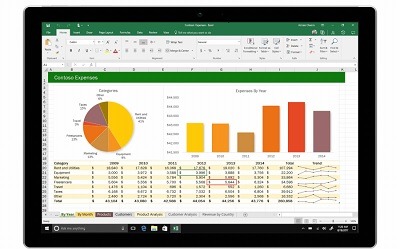
Excel innovation
Excel, a widely used spreadsheet software, has been a staple tool for businesses and individuals for decades. While it has traditionally been associated with data analysis, calculations, and organizing information, there have been several notable innovations in Excel that have transformed how it is used and expanded its capabilities. Here are a few examples of Excel innovation:
- Data Visualization: Excel has evolved from being a mere number crunching tool to a powerful data visualization platform. With the introduction of features like Conditional Formatting, Pivot Tables, and Charts, users can now easily create visually appealing and interactive representations of their data. These innovations enable users to gain insights from complex datasets, identify patterns, and present information in a more compelling way.
- Collaboration and Cloud Integration: Excel has embraced collaboration by integrating with cloud services such as Microsoft One Drive and SharePoint. This enables real-time collaboration on Excel files, allowing multiple users to work on the same spreadsheet simultaneously. Additionally, the cloud integration allows for seamless access to Excel files across devices and the ability to share and collaborate on spreadsheets with colleagues or clients remotely.
- Power Query and Power Pivot: Microsoft introduced Power Query and Power Pivot as powerful add-ins for Excel, revolutionizing data processing and analysis. Power Query enables users to import, clean, and transform data from various sources with ease. Power Pivot, on the other hand, brings advanced data modeling and analysis capabilities, including the ability to create relationships between different datasets and perform complex calculations using Data Analysis Expressions (DA X). These features have made Excel a robust tool for handling large datasets and performing sophisticated data analysis.
- Automation with Macros and VBA: Excel offers a built-in macro recorder and Visual Basic for Applications (VBA) programming language, allowing users to automate repetitive tasks and create custom solutions. Users can record a series of actions in Excel, such as data formatting or calculations, and save them as macros. They can also write VBA code to create complex automated processes, interact with other applications, and extend Excel’s functionality. This innovation enables users to save time, increase productivity, and tailor Excel to their specific needs.
- Integration with External Data Sources: Excel has become more versatile by integrating with external data sources. Users can connect Excel to databases, online services, and other data repositories using features like Power Query, O Data connections, and web queries. This enables users to directly import data into Excel from various sources, refresh data automatically, and create dynamic reports or dashboards that pull data from live sources.
- Excel Online and Mobile Apps: Microsoft has expanded the reach of Excel by introducing Excel Online, a web-based version that allows users to create, edit, and collaborate on Excel files directly in a web browser. Additionally, Excel Mobile Apps enable users to access and work on Excel files on their smartphones and tablets, providing flexibility and on-the-go productivity.
These innovations have transformed Excel from a basic spreadsheet tool to a versatile and powerful platform for data analysis, visualization, automation, and collaboration. They have opened up new possibilities for businesses, analysts, and individuals to leverage Excel’s capabilities in innovative ways, driving efficiency, insights, and better decision-making.
What is required Excel innovation
Excel innovation requires a combination of technological advancements, user needs, and industry trends. Here are some key elements that are typically required for Excel innovation:
- User Experience Improvement: Excel innovation should focus on enhancing the user experience by providing intuitive interfaces, streamlined workflows, and user-friendly features. This may involve simplifying complex tasks, reducing the learning curve, and providing visual cues or interactive elements to make Excel more accessible and engaging for users.
- Advanced Data Analysis and Visualization: Innovations in Excel should empower users to perform sophisticated data analysis and visualization. This may include introducing new functions, formulas, or built-in tools for statistical analysis, forecasting, machine learning, or advanced visualization techniques. The goal is to enable users to derive meaningful insights from their data and present it in a compelling and informative manner.
- Integration with External Data Sources: In today’s data-driven world, Excel innovation often involves seamless integration with external data sources. This may include the ability to connect Excel to databases, cloud services, APIs, or online platforms to import and update data in real-time. Enabling users to work with live data from multiple sources enhances the accuracy and relevance of their analysis and reporting.
- Automation and Customization: Excel innovation should empower users to automate repetitive tasks and customize Excel to suit their specific needs. This may involve enhancing Excel’s macro capabilities, scripting languages like VBA (Visual Basic for Applications), or introducing new automation features such as flow-based programming or visual scripting interfaces. Providing users with the flexibility to automate processes and create custom solutions increases productivity and efficiency.
- Collaboration and Cloud Integration: Innovations in Excel should embrace collaboration and enable seamless sharing and collaboration on spreadsheets. This may involve cloud integration, allowing users to store Excel files online, work on them simultaneously with others, track changes, and easily share and distribute spreadsheets with stakeholders. Collaboration features enhance productivity, foster teamwork, and enable real-time decision-making.
- Mobile and Cross-Platform Accessibility: Excel innovation should cater to the increasing demand for mobile and cross-platform accessibility. This may involve developing mobile apps for smartphones and tablets that offer a rich Excel experience on smaller screens. It may also include ensuring compatibility with different operating systems and browsers, enabling users to access and work on their Excel files from various devices and platforms.
- Integration with AI and Automation Technologies: Incorporating artificial intelligence (AI) and automation technologies can significantly enhance Excel innovation. This may involve integrating AI-powered features like natural language processing, automated data cleaning, intelligent recommendations, or predictive analytics. Automation technologies can help streamline workflows, automate data processing, and provide intelligent insights to users.
To drive Excel innovation, it is crucial to stay updated with user feedback, market demands, and emerging technologies. Understanding the evolving needs of users, leveraging cutting-edge technologies, and focusing on enhancing usability and functionality will pave the way for meaningful Excel innovations.
Who is required Excel innovation
Excel innovation typically involves the collaboration and contributions of multiple stakeholders. Here are some key individuals and groups that play a role in driving Excel innovation:
- Microsoft Development Team: The primary responsibility for Excel innovation lies with the development team at Microsoft. This team comprises software engineers, designers, and product managers who work together to enhance and expand Excel’s capabilities. They research emerging technologies, gather user feedback, and implement new features and functionalities based on market trends and customer needs.
- User Community: The Excel user community plays a crucial role in driving innovation. Users provide feedback, suggestions, and insights on how Excel can be improved to better meet their needs. Their input helps shape the direction of Excel’s development and identifies areas where innovation is most needed. Microsoft often engages with users through surveys, user forums, beta testing programs, and customer feedback channels to gather valuable insights.
- Excel Power Users: Excel power users, who have extensive knowledge and expertise in using Excel, often contribute to innovation by exploring creative solutions, sharing best practices, and pushing the boundaries of what Excel can do. They provide valuable feedback to Microsoft, showcase innovative use cases, and inspire others to leverage Excel in new and inventive ways.
- Third-Party Developers: The Excel ecosystem benefits from the contributions of third-party developers who create add-ins, plugins, and complementary tools that extend Excel’s functionality. These developers innovate by building upon Excel’s capabilities, addressing specific industry needs, and introducing new features and tools that enhance Excel’s power and versatility.
- Industry Experts and Consultants: Excel innovation is also influenced by industry experts and consultants who provide guidance, insights, and recommendations based on their domain expertise. They understand the unique challenges and requirements of various industries and offer suggestions on how Excel can be tailored to address specific industry needs. Their insights help shape Excel’s innovation roadmap and drive industry-specific advancements.
- Academic and Research Institutions: Academic institutions and research organizations contribute to Excel innovation through research and development initiatives. They explore advanced data analysis techniques, algorithms, and visualization methods that can be applied to Excel. Their research findings and collaborations with Microsoft and other stakeholders often result in cutting-edge innovations and novel approaches to using Excel for data analysis and modeling.
- Partnerships and Acquisitions: Microsoft may also drive Excel innovation through strategic partnerships with other technology companies or through acquisitions of innovative startups. By integrating new technologies, tools, or services into Excel, these partnerships and acquisitions can bring fresh ideas, capabilities, and expertise to further enhance Excel’s functionality and value.
It is the collective effort and collaboration among these stakeholders that drive Excel innovation, ensuring that the software evolves to meet the changing needs and demands of its users and the industry as a whole.
When is required Excel innovation
Excel innovation is required when there is a need to enhance and improve the functionality, usability, and capabilities of Excel to meet evolving user requirements, industry trends, and technological advancements. Here are some situations where Excel innovation is often necessary:
- Changing User Needs: As user needs and expectations evolve, Excel must adapt to provide new features, tools, and functionalities that align with the changing requirements. This could involve addressing demands for more advanced data analysis capabilities, improved visualization options, streamlined workflows, collaboration features, or integration with other applications and services.
- Technological Advancements: Excel innovation is often driven by advancements in technology. For example, as new data processing techniques, algorithms, or artificial intelligence technologies emerge, Excel may need to incorporate these innovations to enable more powerful and efficient data analysis, automation, and decision-making.
- Industry-specific Requirements: Different industries have unique needs when it comes to data analysis, reporting, and modeling. Excel innovation may be necessary to develop industry-specific templates, functions, or tools that cater to the specialized requirements of sectors such as finance, healthcare, manufacturing, or retail. This could involve incorporating industry-specific calculations, compliance standards, or visualization techniques.
- Market Competition: Excel operates in a competitive software market. To maintain its position as a leading spreadsheet software, Excel needs to continually innovate and offer features and capabilities that differentiate it from competitors. This may involve introducing new functionalities, enhancing performance, improving user experience, or integrating with other popular tools and platforms.
- Emerging Trends and Best Practices: Excel innovation is influenced by emerging trends and best practices in data analysis, visualization, and automation. For example, as new approaches to data modeling or interactive visualization gain traction, Excel may need to incorporate these trends to stay relevant and ensure that users can adopt modern techniques in their workflows.
- User Feedback and Requests: User feedback plays a vital role in driving Excel innovation. Microsoft collects user feedback through various channels and uses it to identify pain points, gather feature requests, and prioritize areas for improvement. Excel innovation is often guided by the feedback and suggestions provided by users to ensure that their needs are addressed and their experience is enhanced.
- Platform Updates and New Releases: With each new version or update of Excel, there is an opportunity for innovation. Microsoft may introduce new features, enhancements, or performance optimizations to address user feedback, incorporate new technologies, or align with broader Microsoft ecosystem updates.
In summary, Excel innovation is required when there is a need to meet changing user needs, leverage technological advancements, cater to industry-specific requirements, stay competitive, follow emerging trends and best practices, incorporate user feedback, and align with platform updates. By continuously innovating, Excel can remain a powerful and versatile tool for data analysis, modeling, and reporting.
Where is required Excel innovation
Excel innovation is required in various contexts and settings where Excel is used. Here are some key areas where Excel innovation is often necessary:
- Business Organizations: Excel is extensively used in business organizations for a wide range of purposes, including data analysis, financial modeling, budgeting, project management, and reporting. Innovation in Excel is required to meet the evolving needs of businesses, improve productivity, enable better decision-making, and provide advanced analytical capabilities. This could involve developing new features, templates, or tools tailored to specific business functions or industries.
- Educational Institutions: Excel is a valuable tool in educational institutions for teaching and learning purposes. Innovation in Excel for education is important to enhance the learning experience, enable students to develop data analysis and modeling skills, and provide educators with effective teaching resources. This may involve creating educational templates, interactive tutorials, or incorporating gamification elements to make learning with Excel more engaging and interactive.
- Research and Data Analysis: Excel is widely used in research and data analysis across various fields, including scientific research, market research, social sciences, and more. Innovation in Excel for research and data analysis involves providing advanced statistical analysis capabilities, data visualization tools, and integration with other data analysis platforms. This enables researchers and analysts to efficiently analyze and interpret large datasets and derive meaningful insights.
- Financial Services: The finance industry heavily relies on Excel for financial modeling, risk analysis, investment analysis, and reporting. Excel innovation is crucial in this sector to improve accuracy, enable complex financial calculations, incorporate regulatory requirements, and facilitate seamless integration with financial data sources and platforms. Innovation in Excel for finance may involve specialized financial functions, macros, or integration with financial data services.
- Government and Public Sector: Excel is commonly used in government agencies and the public sector for data management, budgeting, policy analysis, and reporting. Excel innovation in this context may focus on enhancing data security and privacy features, streamlining data sharing and collaboration among different departments, and enabling integration with government databases and systems to ensure efficient data management and analysis.
- Nonprofit and Research Organizations: Nonprofit organizations and research institutions often rely on Excel for data collection, analysis, and reporting. Excel innovation in this sector may involve developing specific templates or tools tailored to the needs of nonprofit organizations, enabling better tracking and reporting of program outcomes, and facilitating data sharing and collaboration with stakeholders.
- Personal Use: Excel is also widely used by individuals for personal finance management, budgeting, data organization, and personal projects. Innovation in Excel for personal use may involve user-friendly templates, interactive dashboards, or mobile applications that provide convenient access to personal data and enable better financial planning and analysis.
Excel innovation is required in diverse sectors and settings where Excel is used as a valuable tool for data analysis, modeling, reporting, and decision-making. By continuously innovating, Excel can adapt to the specific needs of different industries and contexts, providing enhanced functionality and empowering users to achieve their goals more efficiently and effectively.
How is required Excel innovation
Excel innovation is required to enhance the functionality, usability, and capabilities of Excel. Here are some ways in which Excel innovation is necessary:
- Enhanced Features and Functions: Excel innovation involves introducing new and improved features and functions that expand Excel’s capabilities. This may include adding advanced mathematical functions, statistical analysis tools, data manipulation functions, and visualization options. Innovation also focuses on improving existing features to make them more powerful, intuitive, and user-friendly.
- Streamlined Workflows: Excel innovation aims to streamline workflows and improve productivity. This may involve introducing automation features, such as macros, scripting, or integration with other applications and services. Automation helps users automate repetitive tasks, reduce manual data entry, and simplify complex processes, allowing them to work more efficiently.
- Improved Data Analysis and Visualization: Excel innovation focuses on improving data analysis and visualization capabilities. This may include introducing new chart types, enhancing data sorting and filtering options, providing interactive visualization tools, and integrating with external data sources for real-time analysis. Innovations in data analysis and visualization empower users to derive meaningful insights from their data and present it in a visually compelling manner.
- Collaboration and Sharing: Excel innovation includes features that enable collaboration and sharing of Excel files. This may involve cloud integration, allowing users to store and share Excel files online, work on them simultaneously with others, and track changes. Collaboration features facilitate teamwork, simplify communication, and enhance the efficiency of collaborative projects.
- Customization and Personal ization: Excel innovation involves providing users with customization options to tailor Excel to their specific needs. This may include custom izable templates, themes, and styles, allowing users to create personalized spreadsheets. Innovation also focuses on enabling users to create their own functions, develop add-ins, and customize the user interface to suit their preferences and workflows.
- Integration with External Data Sources: Excel innovation includes integration with external data sources, such as databases, cloud services, APIs, and web scraping tools. This enables users to import and update data in real-time, enhancing the accuracy and relevance of their analysis. Integration with external data sources allows users to work with live data from various sources without the need for manual data entry or file imports.
- Mobile and Cross-Platform Compatibility: Excel innovation addresses the need for mobile and cross-platform accessibility. This involves developing mobile applications for smartphones and tablets that provide a seamless Excel experience on smaller screens. Innovations also focus on ensuring compatibility with different operating systems and browsers, enabling users to access and work on their Excel files from various devices and platforms.
Excel innovation is driven by user feedback, market demands, technological advancements, and the desire to enhance the overall user experience. It aims to make Excel a more powerful, versatile, and user-friendly tool for data analysis, modeling, and reporting.
Case study on Excel innovation
Case Study: Excel Innovation in Data Analysis and Visualization
Company: XYZ Corporation
Background: XY Z Corporation is a multinational company specializing in retail and consumer goods. They have a vast amount of sales data from various regions, products, and customer segments. To gain insights from this data and make informed business decisions, XYZ Corporation relies on Excel for data analysis and visualization.
Challenge: XYZ Corporation faced challenges in analyzing and visualizing their sales data efficiently and effectively. They needed a solution that could handle large datasets, provide advanced analytical capabilities, and generate visually appealing reports and dashboards. The existing Excel functionalities were limited in meeting their evolving needs.
Solution: To address these challenges, XY Z Corporation decided to leverage Excel innovation by incorporating advanced data analysis and visualization tools. They partnered with a software development company specializing in Excel add-ins to enhance Excel’s capabilities and tailor them to their specific requirements.
- Advanced Data Analysis: The software development team created custom Excel add-ins that integrated advanced statistical functions, predictive analytics algorithms, and machine learning models. These add-ins enabled XY Z Corporation’s analysts to perform complex data analysis tasks within Excel, such as regression analysis, forecasting, clustering, and trend identification. The add-ins also streamlined data cleaning and preparation processes, saving significant time and effort.
- Interactive Visualization: To improve data visualization, the team developed interactive charting and visualization add-ins. These add-ins allowed XY Z Corporation’s analysts to create dynamic and visually appealing charts, graphs, and dashboards directly within Excel. The add-ins provided various chart types, advanced formatting options, and interactive controls, enabling analysts to explore data from different perspectives and present their findings effectively.
- Integration with External Data Sources: The software development team integrated Excel with external data sources, including the company’s enterprise data warehouse, cloud-based analytics platforms, and web scraping tools. This integration enabled analysts to access and import data directly into Excel, ensuring real-time analysis and eliminating the need for manual data entry or file imports. The integration also facilitated automatic data updates, ensuring that analysis and reports were always based on the latest information.
- Collaboration and Sharing: To improve collaboration among analysts and stakeholders, the team implemented cloud integration and collaboration features. XY Z Corporation’s analysts could now store their Excel files in the cloud, share them with colleagues, and collaborate on the same file simultaneously. The cloud-based collaboration features allowed multiple users to work on the same spreadsheet, track changes, and leave comments, enhancing teamwork and streamlining the review process.
Results: The Excel innovation implemented by XY Z Corporation yielded significant benefits:
- Enhanced Data Analysis: The advanced data analysis capabilities empowered analysts to perform complex analyses more efficiently, leading to improved decision-making and actionable insights. Analysts could now identify trends, patterns, and correlations in the sales data, enabling the company to optimize pricing strategies, target specific customer segments, and identify new market opportunities.
- Visual Storytelling: The interactive visualization tools enabled analysts to create compelling visual reports and dashboards. This helped communicate insights and trends effectively to stakeholders, facilitating data-driven discussions and decision-making. The visually appealing charts and graphs made it easier for non-technical users to understand complex data and engage with the findings.
- Efficiency and Productivity: The streamlined data analysis processes, automated data updates, and cloud-based collaboration features significantly improved the efficiency and productivity of the analysts. They could focus more on analyzing data and generating insights rather than spending time on manual data manipulation and report generation.
- Scalability and Flexibility: The Excel innovation allowed XY Z Corporation to scale their data analysis capabilities to handle larger datasets and accommodate evolving business needs. The integration with external data sources provided flexibility in accessing diverse data sources and incorporating real-time data for analysis.
In conclusion, by embracing Excel innovation through the development of custom add-ins and integration with external data sources, XY Z Corporation successfully enhanced their
White paper on Excel innovation
Title: Excel Innovation: Empowering Data Analysis and Decision-Making
Abstract: This white paper explores the concept of Excel innovation and its impact on data analysis and decision-making. Excel, a widely used spreadsheet software, continues to evolve through continuous innovation to meet the ever-changing needs of businesses and individuals. This paper delves into the key areas of Excel innovation, including advanced data analysis, visualization, collaboration, and integration with external data sources. It highlights the benefits and challenges of Excel innovation, provides real-world examples, and offers insights into the future of Excel as a powerful tool for data-driven insights.
Table of Contents:
- Introduction
- Definition of Excel innovation
- Importance of Excel in data analysis and decision-making
- Key Areas of Excel Innovation
- Advanced Data Analysis
- Statistical functions and analysis tools
- Predictive analytics and machine learning integration
- Data cleaning and preparation enhancements
- Visualization and Reporting
- Interactive charting and graphing capabilities
- Dynamic dashboards and visualization add-ins
- Customization options for visual representation
- Collaboration and Sharing
- Cloud integration and real-time collaboration features
- Concurrent editing and version control
- Streamlined review and feedback process
- Integration with External Data Sources
- Connection to databases and enterprise systems
- Web scraping and data import automation
- Real-time data updates and synchronization
- Advanced Data Analysis
- Benefits of Excel Innovation
- Improved data analysis efficiency and accuracy
- Enhanced decision-making through actionable insights
- Streamlined workflows and increased productivity
- Empowered visualization and storytelling capabilities
- Flexibility and scalability in handling diverse datasets
- Challenges and Considerations
- Learning curve and training requirements
- Compatibility and interoperability considerations
- Data security and privacy concerns
- Integration complexities with external systems
- Case Studies
- Case study 1: Excel innovation in financial analysis and modeling
- Case study 2: Excel innovation in sales forecasting and demand planning
- Case study 3: Excel innovation in healthcare data analysis
- The Future of Excel Innovation
- Emerging trends and technologies
- Integration with AI and machine learning
- Cloud-based collaboration and real-time analytics
- Enhanced mobile and cross-platform accessibility
- Conclusion
- Recap of Excel innovation’s impact on data analysis and decision-making
- Recommendations for organizations and individuals leveraging Excel
- Outlook on the future of Excel as an innovative data analysis tool
- References
This white paper aims to provide a comprehensive overview of Excel innovation, its benefits, challenges, and future prospects. It serves as a guide for organizations and individuals seeking to leverage Excel’s innovative capabilities to unlock the full potential of their data analysis and decision-making processes.