
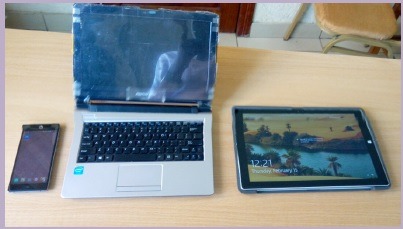
Fundamental Laptop and Portable Devices
Fundamental components of laptops and portable devices are key elements that enable these devices to function effectively. Here are some of the primary components:
- Central Processing Unit (CPU): The CPU is the “brain” of the laptop or portable device. It executes instructions, performs calculations, and manages the overall operation of the device. CPUs are typically manufactured by companies like Intel and AMD.
- Random Access Memory (RAM): RAM is the temporary memory that allows the device to store and access data quickly. It’s essential for multitasking and running applications efficiently.
- Storage Drive: Laptops and portable devices use storage drives to save data and applications. Common types include Hard Disk Drives (HDDs) and Solid-State Drives (SSDs).
- Battery: Batteries power portable devices when they are not connected to an electrical outlet. Battery life is a critical factor for the portability and usability of these devices.
- Display Screen: The display screen provides the visual output and allows users to interact with the device. Modern laptops and portable devices often use LED or OLED screens for high resolution and energy efficiency.
- Input Devices: These include keyboards, touchpads, and sometimes touchscreens. These components allow users to input data and navigate the device.
- Ports and Connectivity: Laptops and portable devices come equipped with various ports, such as USB, HDMI, audio jacks, and wireless connectivity options like Wi-Fi and Bluetooth.
- Graphics Processing Unit (GPU): GPUs are responsible for rendering graphics and are particularly important for tasks like gaming, video editing, and 3D modeling.
- Operating System (OS): The OS is the software that manages the hardware and allows users to run applications. Common OS options include Windows, macOS, and Linux for laptops, while portable devices often run on Android or iOS.
- Chassis: The chassis is the physical body or case of the laptop or portable device. It houses and protects all the internal components. Materials, size, and design can vary widely.
- Audio System: Laptops and portable devices have built-in speakers and audio components for sound output. Some devices also support external audio peripherals.
- Webcam and Microphone: Many laptops and portable devices come with built-in webcams and microphones for video conferencing, online meetings, and content creation.
- Biometric Security: Some devices offer biometric security features like fingerprint scanners or facial recognition for user authentication.
- Cooling System: To prevent overheating, laptops typically have a cooling system that includes fans and heat sinks to dissipate heat generated by the CPU and GPU.
- Memory Card Slots: Portable devices often include memory card slots for expanding storage capacity or transferring data.
These fundamental components work together to provide the functionality and portability that make laptops and portable devices so versatile and essential in our modern world. The specific configuration and performance of these components can vary greatly depending on the device’s intended use and price range.
What is required Fundamental Laptop and Portable Devices
The fundamental components required for laptops and portable devices, such as tablets and smartphones, are essential for these devices to function effectively. These components provide the basic capabilities that allow users to perform various tasks, connect to networks, and run applications. Here are the required fundamental components:
- Central Processing Unit (CPU): The CPU is the core processing unit that executes instructions, performs calculations, and manages the device’s operations. It’s the “brain” of the device.
- Memory (RAM): Random Access Memory (RAM) is used for temporary data storage and quick access by the CPU. Adequate RAM is crucial for multitasking and application performance.
- Storage Drive: A storage drive, often a Solid-State Drive (SSD) for speed and durability, is necessary to store the device’s operating system, software, and user data.
- Battery: For portable devices, a rechargeable battery is essential to provide power when not connected to an electrical outlet. Battery life impacts device usability.
- Display Screen: The screen provides the visual output and user interface. Modern devices use LED or OLED screens with varying sizes and resolutions.
- Input Devices: Laptops typically include keyboards and touchpads or pointing devices, while portable devices often incorporate touchscreens and virtual keyboards.
- Ports and Connectivity: Essential ports include USB, audio jacks, HDMI, and network ports. Wireless connectivity options like Wi-Fi, Bluetooth, and cellular data are important for connectivity.
- Operating System (OS): The OS manages hardware resources and enables users to run applications. Examples include Windows, macOS, Linux, Android, and iOS.
- Chassis: The chassis, or physical housing, protects and contains all the internal components. It also contributes to the device’s size, weight, and design.
- Audio System: Laptops and portable devices come with built-in speakers and audio components for sound output, including headphones and microphone jacks.
- Webcam and Microphone: Webcams and microphones are crucial for video conferencing, online meetings, and content creation.
- Biometric Security: Some devices offer biometric security features like fingerprint scanners or facial recognition for user authentication and data protection.
- Cooling System: To prevent overheating, laptops often include cooling systems with fans and heat sinks to dissipate heat generated by the CPU and GPU.
- Memory Card Slots: Many portable devices include memory card slots to expand storage capacity or transfer data.
These components form the foundational hardware of laptops and portable devices. The specific configuration and quality of these components can vary based on the device’s intended use, price range, and manufacturer. Users should consider their needs and priorities to choose the right combination of components when selecting a laptop or portable device.
Who is required Fundamental Laptop and Portable Devices
The concept of “who” does not apply to the fundamental components of laptops and portable devices. These components are not individuals or entities; they are the physical and electronic parts that make up the devices.
The “required fundamental components” of laptops and portable devices are essential for the proper functioning of these devices, and they are necessary for anyone who uses such devices. These components are built into the devices by manufacturers to provide the necessary hardware and infrastructure for various functions, such as processing data, storing information, connecting to networks, and displaying content.
The choice of specific components and their quality may vary based on the manufacturer, model, and the intended use of the device. However, these components collectively define the device’s capabilities and determine its suitability for various tasks and applications.
When is required Fundamental Laptop and Portable Devices
The need for fundamental components in laptops and portable devices exists whenever you want to use or operate such devices. These components are required at the very moment you intend to use the laptop or portable device to perform tasks, access information, or use applications.
The timing of when these components are required is essentially whenever you power on the device and use it for various purposes. Here are a few scenarios:
- Powering on the Device: When you turn on a laptop or portable device, the central processing unit (CPU), memory (RAM), and storage drive are immediately required to boot the operating system and run software.
- Running Applications: Whether you’re opening a web browser, a word processing program, a game, or any other application, the CPU, RAM, and storage drive are all required components to make it happen.
- Connecting to the Internet: If you want to connect to the internet, the device’s networking components, such as Wi-Fi or cellular connectivity, become necessary.
- Displaying Content: The display screen is required to visualize information, whether it’s a website, a document, a video, or any other content.
- Input and Interaction: Keyboards, touchpads, touchscreens, or other input devices are required for you to interact with the device and enter data or commands.
- Listening to Audio: If you want to listen to music, watch videos, or participate in a video call, the audio system, including speakers and headphones, becomes necessary.
- Powering the Device: The battery or power source is required to operate portable devices when not connected to an electrical outlet.
In summary, the fundamental components of laptops and portable devices are required as soon as you use the device for any purpose, whether it’s for work, communication, entertainment, or any other task. The specific components in use may vary depending on the context and what you’re doing with the device at a given moment.
Where is required Fundamental Laptop and Portable Devices
The concept of “where” does not apply to the fundamental components of laptops and portable devices in a physical location sense. These components are integral to the devices themselves and are not located in a specific place. Instead, they are built into the laptop or portable device.
Here’s how these components are typically situated:
- Inside the Device: The fundamental components, such as the central processing unit (CPU), memory (RAM), storage drive, battery, display screen, input devices, and so on, are all physically integrated into the laptop or portable device’s chassis. They are compactly assembled within the device’s housing.
- Distribution of Components: Different components are distributed throughout the device. For example, the CPU, RAM, and storage drive are usually located on the device’s mainboard or motherboard. The display screen is attached to the lid of the laptop. Input devices like the keyboard and touchpad are built into the device’s base or body.
- Battery Placement: The rechargeable battery is typically located within the laptop’s chassis, and in portable devices like smartphones and tablets, it’s incorporated in a way that maximizes space efficiency.
- Peripheral Ports: Ports and connectivity options like USB, HDMI, and audio jacks are often situated on the sides or edges of the device to allow for external connections.
So, rather than thinking of these components as being located in a specific place, it’s more accurate to understand that they are integral to the structure of the laptop or portable device, and they collectively make the device functional wherever it is used.
How is required Fundamental Portable and Laptop Devices
The fundamental components of portable and laptop devices are essential for the proper functioning of these devices. Here’s how these components are required and how they work together to enable the functionality of the device:
- Central Processing Unit (CPU): The CPU is the device’s brain, responsible for executing instructions and calculations. It is required whenever the device is in use, as it handles all the processing tasks, from running applications to managing the operating system.
- Memory (RAM): RAM provides temporary storage for data that the CPU needs to access quickly. It’s required to run applications and for efficient multitasking. When you open an application or use your device, data is temporarily stored in RAM for fast access.
- Storage Drive: The storage drive (usually an SSD) stores the device’s operating system, software, and user data. It’s needed to access and retrieve files, applications, and the OS itself.
- Battery: The device’s battery is essential for portable devices when they are not connected to a power source. It provides the power needed to operate the device, from turning it on to running applications and connecting to the internet.
- Display Screen: The screen is required for any form of visual output. It’s where you see the user interface, applications, websites, videos, and any other content displayed by the device.
- Input Devices: Keyboards, touchpads, touchscreens, and other input devices are necessary for interacting with the device. They allow you to enter data, navigate the interface, and perform tasks.
- Ports and Connectivity: Ports and connectivity options like USB, HDMI, Wi-Fi, and Bluetooth enable you to connect the device to external devices, networks, and peripherals. They are required for data transfer and external connections.
- Operating System (OS): The operating system is the software that manages hardware resources and enables users to run applications. It’s required to operate the device and run software.
These components work together seamlessly to provide the functionality and versatility of portable and laptop devices. When you use your laptop or portable device for any purpose, whether it’s browsing the web, working on a document, watching a video, or connecting to the internet, all these fundamental components come into play, working in harmony to provide a seamless user experience.
Case Study on Fundamental Laptop and Portable Devices
Certainly, let’s explore a case study on the fundamental components of laptops and portable devices in the context of a real-world scenario:
Title: “Enhancing Remote Work Productivity with Laptops and Portable Devices”
Introduction: The global COVID-19 pandemic in 2020 prompted a significant shift toward remote work. A multinational company, XYZ Solutions, recognized the need to provide its employees with laptops and portable devices to maintain productivity. This case study illustrates how fundamental components played a crucial role in facilitating remote work for this organization.
Background:
- XYZ Solutions, an IT services company, had an extensive workforce of IT professionals and support staff.
- Prior to the pandemic, the majority of employees worked from the company’s office.
- In response to health and safety concerns, the company transitioned to remote work for an extended period.
- To ensure uninterrupted work, the company distributed laptops and portable devices to its employees.
Challenges:
- The abrupt transition to remote work posed several challenges:
- Ensuring access to work applications, data, and collaboration tools.
- Maintaining data security and privacy.
- Providing technical support for remote employees.
- Addressing the need for flexibility and mobility in a remote work environment.
Solutions:
- Laptops with Adequate CPUs and RAM: The company provided laptops with robust CPUs and sufficient RAM to ensure that employees could run resource-intensive development and analytics tools without performance issues. This allowed seamless work on software development projects and data analysis.
- Storage Drives and Data Access: Employees were equipped with laptops featuring high-capacity SSDs, ensuring fast data access. Secure remote access to the company’s data center was established to maintain data security and centralize information.
- Battery Life: Laptops with extended battery life were distributed to avoid interruptions during remote meetings and presentations. This allowed employees to work for extended periods without being tethered to a power source.
- Display Screens: Laptops with high-resolution screens facilitated effective communication and ensured that employees could comfortably read code, analyze data, and participate in video conferences.
- Connectivity: Laptops included a range of connectivity options, such as USB-C, HDMI, and Wi-Fi, to enable employees to connect to external displays, peripherals, and networks seamlessly.
- Operating Systems and Software: The laptops were pre-loaded with the necessary operating systems and software, including development tools, collaboration platforms, and security software.
Outcomes:
- Employees successfully transitioned to remote work without significant disruptions.
- Laptops and portable devices played a crucial role in maintaining productivity and enabling employees to work from home.
- Data security was upheld through VPNs and data center access controls.
- Technical support was provided through remote IT assistance, addressing issues in a timely manner.
Conclusion: This case study highlights how fundamental components of laptops and portable devices were essential in facilitating a seamless transition to remote work for XYZ Solutions. Adequate CPU and RAM, storage drives, battery life, display screens, connectivity options, and pre-configured software ensured that employees could continue their work effectively. The ability to work remotely underscored the importance of well-equipped devices in maintaining business operations during challenging times.
White Paper on Fundamental Laptop and Portable Devices
White Paper: Understanding the Fundamental Components of Laptops and Portable Devices
Abstract:
This white paper provides a comprehensive overview of the fundamental components that power laptops and portable devices, explaining their significance in various contexts and industries. We delve into the critical role each component plays in enabling the mobility, versatility, and functionality of these devices. Understanding these fundamentals is essential for making informed decisions when selecting or using laptops and portable devices.
Table of Contents:
- Introduction
- Definition of Laptops and Portable Devices
- Significance of Understanding Fundamental Components
- Central Processing Unit (CPU)
- Role in Device Operation
- Different CPU Architectures
- Impact on Performance
- Memory (RAM)
- How RAM Facilitates Multitasking
- RAM Capacity and Performance
- Role in User Experience
- Storage Drives
- Types of Storage Drives (HDD, SSD)
- Impact on Boot Times and Data Access
- Storage Drive Size and Data Capacity
- Battery
- Battery Types (Lithium-Ion, Li-Polymer)
- Battery Life and Mobility
- Charging Technologies
- Display Screens
- Screen Technologies (LED, OLED)
- Resolution and Quality
- Touchscreens and Their Applications
- Input Devices
- Keyboards and Key Layouts
- Touchpads and Pointing Devices
- Touchscreen Interaction
- Ports and Connectivity
- USB, HDMI, Thunderbolt, and More
- Wireless Connectivity (Wi-Fi, Bluetooth, Cellular)
- External Devices and Expansion
- Operating System (OS)
- Role of the OS in Device Operation
- Popular OS Options (Windows, macOS, Android, iOS)
- Impact on Software Compatibility
- Chassis and Build
- Material and Durability
- Device Size and Weight
- Design and Aesthetics
- Audio System
- Built-In Speakers and Sound Quality
- Audio Ports and Connectivity
- External Audio Devices
- Webcam and Microphone
- Role in Video Conferencing and Content Creation
- Privacy and Security Considerations
- Security and Biometrics
- Fingerprint Scanners and Facial Recognition
- Device Security and User Authentication
- Data Protection Features
- Cooling System
- Importance of Cooling for Device Longevity
- Fan less Designs and Heat Dissipation
- Cooling Technologies
- Memory Card Slots
- Expandable Storage Options
- Data Transfer and Backup
- Use Cases and Compatibility
- Optimization and Performance
- Tips for Optimizing Device Performance
- Balancing Components for Specific Uses
- Regular Maintenance and Upgrades
- Conclusion
- Recap of Key Components and Their Significance
- The Evolving Landscape of Laptops and Portable Devices
References
- Cite authoritative sources and references for each section.
This white paper provides a comprehensive guide to the fundamental components of laptops and portable devices, exploring their role and significance in the modern world. It is intended to serve as a valuable resource for both technical and non-technical audiences seeking to understand the key elements that power these essential devices and impact their performance and usability.