
Fundamental Operating System
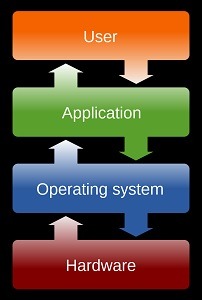
A fundamental operating system (OS), often referred to simply as an “operating system,” is a core software component that manages a computer’s hardware resources and provides a platform for running software applications. The fundamental operating system serves as an intermediary between users and the computer’s hardware, facilitating the execution of tasks and the use of computer resources. Here are key aspects of a fundamental operating system:
- Hardware Abstraction: The OS abstracts the hardware components of a computer, such as the CPU, memory, storage devices, and input/output (I/O) devices. This abstraction allows software applications to interact with hardware without needing to know the specific details of each device.
- Process Management: The OS is responsible for managing processes, which are individual programs or tasks running on the computer. It allocates CPU time, manages the execution of multiple processes simultaneously (multitasking), and provides mechanisms for inter-process communication.
- Memory Management: Memory management involves allocating and deallocating memory for running processes. The OS ensures that each process has access to the required memory resources, prevents memory conflicts, and manages virtual memory when physical memory is limited.
- File System: The OS provides a file system that organizes and manages data storage. It enables users and applications to create, read, write, and delete files and directories. File systems also handle file access permissions and security.
- Device Drivers: Device drivers are software components that allow the OS to communicate with hardware devices, such as graphics cards, printers, and network adapters. The OS includes a collection of device drivers to support a wide range of hardware.
- User Interface: The user interface (UI) of the OS allows users to interact with the computer. It can be text-based (command-line interface) or graphical (graphical user interface or GUI). The UI provides a way to launch applications, manage files, and configure system settings.
- Security and Access Control: The OS enforces security measures to protect the computer from unauthorized access and malicious software. It includes user account management, access control lists (ACLs), and security features like firewalls and antivirus software integration.
- Networking: The OS provides networking capabilities to connect the computer to networks and the internet. It includes network protocols, services, and configuration settings for network communication.
- Error Handling: When errors or exceptions occur, the OS is responsible for handling them gracefully. This includes error reporting to users, logging errors for diagnostic purposes, and attempting to recover from errors when possible.
- Resource Allocation: The OS manages system resources, such as CPU time, memory, and I/O devices, to ensure fair and efficient resource allocation among running processes and users.
- System Utilities: The OS typically includes system utilities and tools for tasks like system maintenance, software updates, and performance monitoring.
- Kernel: The core of the operating system is called the kernel. It is responsible for essential tasks like process scheduling, memory management, and hardware interaction. The kernel operates in a privileged mode, providing services to both user-level processes and system-level processes.
Fundamental operating systems are the foundation of modern computing, serving as a platform for running various software applications and enabling users to interact with computer hardware in a convenient and efficient manner. Examples of fundamental operating systems include Microsoft Windows, macOS, Linux distributions, and various Unix-based operating systems. Each of these OSs provides a robust set of features and services to support diverse computing needs.
A “required fundamental operating system” typically refers to the basic operating system software that is essential for a computer or computing device to function. This fundamental operating system is necessary to manage hardware resources, run software applications, and facilitate user interaction. The specific requirements for a fundamental operating system include:
- Hardware Compatibility: The operating system must be compatible with the computer’s hardware components, including the CPU architecture, memory, storage devices, and peripheral devices. It should support the hardware configuration of the computer.
- Installation and Booting: The operating system should be capable of being installed on the computer’s storage media (e.g., hard drive, solid-state drive) and should provide a bootloader or boot manager to initiate the system startup process.
- Basic Functionality: The fundamental operating system should offer core functionality, such as process management, memory management, file system support, and device driver compatibility. These features enable the computer to execute tasks and manage resources efficiently.
- User Interface: The operating system may have a user interface, which could be a command-line interface (CLI) or a graphical user interface (GUI). A GUI is often preferred for user-friendly interactions, but some applications may require a CLI for automation or scripting.
- Security Features: Basic security features, such as user account management, access control, and password protection, should be present to safeguard the system from unauthorized access and potential threats.
- Networking Support: If the computer is expected to connect to networks or the internet, the operating system should include networking capabilities, including support for network protocols and configurations.
- Error Handling: The OS should have error-handling mechanisms to report and manage errors and exceptions gracefully. This includes logging error information and providing diagnostic tools.
- Resource Management: The OS must efficiently manage system resources, including CPU utilization, memory allocation, and I/O operations, to ensure smooth and fair resource allocation among processes.
- System Utilities: Basic system utilities and tools may be included to assist with tasks like software updates, system maintenance, and system performance monitoring.
- Documentation: The operating system should provide documentation or user guides to help users understand its features and functionalities.
- Compatibility with Software: The OS should be compatible with a wide range of software applications, allowing users to install and run various programs without compatibility issues.
- License and Legal Compliance: Ensure that the operating system complies with relevant licensing agreements and legal requirements.
- Support and Updates: Availability of support channels and regular updates or patches to address security vulnerabilities and improve system stability.
The specific requirements for a fundamental operating system may vary depending on the intended use and the computing environment. Common examples of fundamental operating systems include Microsoft Windows, macOS, various Linux distributions, and Unix-based operating systems. These operating systems provide the foundational software infrastructure for desktops, laptops, servers, and embedded systems.
The term “required fundamental operating system” doesn’t refer to a specific person or entity. Instead, it describes an essential component of computing systems that is necessary for the operation of the hardware and software. A fundamental operating system is required by various entities and individuals, including:
- Individual Computer Users: Everyday computer users, such as students, professionals, and home users, require a fundamental operating system to operate their personal computers, laptops, and mobile devices. This operating system enables them to run applications, access files, and perform various tasks.
- Businesses and Organizations: Businesses of all sizes and organizations require fundamental operating systems to power their computer infrastructure. These operating systems serve as the foundation for servers, workstations, and networking equipment, allowing them to run business-critical applications and services.
- Software Developers: Software developers and programmers rely on fundamental operating systems to develop, test, and debug software applications. The operating system provides the necessary environment for software development tools and programming languages.
- IT Administrators: IT professionals responsible for managing computer networks and systems within organizations depend on operating systems to configure and maintain hardware resources, ensure network connectivity, and enforce security policies.
- Server Farms and Data Centers: Large-scale server farms and data centers utilize fundamental operating systems to manage numerous servers and virtual machines. These operating systems optimize resource allocation and facilitate efficient data processing.
- Embedded Systems Developers: Developers of embedded systems, such as those used in consumer electronics, automotive, and industrial applications, require specialized fundamental operating systems tailored to the specific needs of their devices.
- Educational Institutions: Educational institutions, including schools, colleges, and universities, use fundamental operating systems to support teaching and learning activities. These operating systems provide students and educators with access to educational software and resources.
- Government Agencies: Government agencies and departments rely on operating systems to manage their computer infrastructure, process data, and deliver public services.
- Healthcare Providers: Healthcare organizations use fundamental operating systems to run electronic health record (EHR) systems, medical imaging equipment, and other healthcare-related software.
- Scientific and Research Institutions: Scientific research institutions utilize operating systems to support computational research, simulations, data analysis, and scientific applications.
- Manufacturers: Manufacturers of computing hardware, such as servers, workstations, and embedded systems, often include or recommend specific fundamental operating systems for their products.
- Cloud Service Providers: Cloud service providers offer virtual machines and cloud computing services based on fundamental operating systems, providing scalable computing resources to clients.
In summary, a fundamental operating system is a foundational software component that is required by a wide range of individuals, organizations, and entities across various sectors to enable the operation and management of computer systems and devices. The specific choice of operating system may vary depending on the needs and preferences of each entity.
A required fundamental operating system is needed in various situations and scenarios where computing devices, whether personal computers, servers, embedded systems, or other hardware, need to function and run software applications. Here are common situations when a fundamental operating system is required:
- Personal Computing: A fundamental operating system is required for personal computers, laptops, and mobile devices to provide users with a platform to run applications, access files, and perform everyday tasks. Users rely on operating systems like Windows, macOS, or various Linux distributions.
- Server Environments: In data centers and server farms, a fundamental operating system is necessary to manage and control server hardware. These operating systems enable the deployment and operation of web servers, database servers, email servers, and other server-based applications.
- Embedded Systems: Embedded systems used in consumer electronics, automotive systems, industrial automation, and IoT devices require fundamental operating systems designed for specific hardware platforms. These operating systems ensure the proper functioning of embedded devices.
- Software Development: Software developers require operating systems on their development machines to create, test, and debug software applications. The operating system provides the development environment, tools, and libraries needed for coding.
- Educational Institutions: Educational institutions, from primary schools to universities, rely on operating systems to support computer labs and provide students and educators with access to educational software and resources.
- Business and Enterprise: Businesses and organizations require fundamental operating systems to power their IT infrastructure, including desktop computers, laptops, servers, and networking equipment. These operating systems enable business-critical applications and services.
- Cloud Computing: Cloud service providers use fundamental operating systems to manage the underlying infrastructure of their cloud platforms. These operating systems ensure the allocation and isolation of resources for virtual machines and containers.
- Research and Scientific Computing: Scientific research institutions and laboratories use operating systems to support computational research, simulations, data analysis, and scientific applications.
- Healthcare Systems: Healthcare providers rely on operating systems to run electronic health record (EHR) systems, medical imaging equipment, and healthcare-related software to manage patient data and clinical operations.
- Government and Public Services: Government agencies and departments utilize operating systems to support administrative tasks, deliver public services, and manage data and information.
- Manufacturing and Industrial Control: Manufacturers use embedded operating systems in industrial control systems to automate processes, monitor equipment, and control manufacturing operations.
- Entertainment and Media: The entertainment industry employs operating systems in devices such as gaming consoles, set-top boxes, and smart TVs to deliver multimedia content and interactive experiences.
- Communication and Networking: Routers, switches, and networking equipment rely on operating systems to manage network traffic, routing, and communication protocols.
In essence, a required fundamental operating system is a fundamental component of modern computing that is needed whenever a computing device or system needs to manage hardware resources, execute software applications, and provide a platform for user interaction or data processing. The specific choice of operating system depends on the intended use, hardware platform, and user requirements of the given si
A required fundamental operating system (OS) is essential for the proper functioning of computing devices and systems. It plays a critical role in managing hardware resources, providing a platform for software applications, and facilitating user interactions. Here’s a more detailed explanation of how a fundamental operating system works and why it is necessary:
- Hardware Abstraction:
- Device Management: The OS communicates with and manages various hardware components, including the central processing unit (CPU), memory, storage devices (e.g., hard drives, solid-state drives), input devices (e.g., keyboard, mouse), and output devices (e.g., monitor, printer).
- Abstraction Layer: It abstracts the complex hardware details, allowing software applications to interact with hardware through a simplified and consistent interface. This abstraction ensures that applications can run on different hardware configurations without modification.
- Boot Process:
- Initialization: When a computer is powered on or restarted, the OS is loaded during the boot process. The OS’s bootloader is responsible for initializing essential system components and loading the OS kernel into memory.
- Kernel Execution: The OS kernel is the core component responsible for managing hardware resources and system functions. It takes control of the computer and coordinates the execution of tasks.
- Process Management:
- Process Creation: The OS manages processes, which are individual programs or tasks. It can create, terminate, and suspend processes as needed.
- Multitasking: The OS supports multitasking, allowing multiple processes to run simultaneously. It allocates CPU time to each process based on priority and scheduling policies.
- Memory Management:
- Memory Allocation: The OS allocates and manages memory resources for processes, ensuring that they have sufficient memory to execute.
- Virtual Memory: In systems with limited physical memory, the OS uses virtual memory techniques to allow processes to use more memory than is physically available by using disk space as an extension of RAM.
- File System and Data Management:
- File Handling: The OS provides a file system that organizes and manages data storage. It allows users and applications to create, read, write, and delete files and directories.
- Data Access: It enforces file access permissions and security, ensuring that only authorized users can access specific files and data.
- User Interface:
- Graphical User Interface (GUI): Many OSs offer a GUI that provides a user-friendly interface with icons, windows, menus, and other graphical elements.
- Command-Line Interface (CLI): Some OSs provide a CLI, where users interact with the system by entering text-based commands.
- Device Drivers:
- Hardware Communication: The OS includes device drivers that serve as intermediaries between the OS and hardware devices. These drivers enable the OS to communicate with and control devices such as graphics cards, network adapters, and printers.
- Security and Access Control:
- User Authentication: The OS manages user accounts, passwords, and authentication mechanisms to control access to the system.
- Security Features: It includes security features like firewalls, antivirus software integration, and encryption to protect the system from security threats.
- Networking and Communication:
- Network Support: The OS provides networking capabilities, allowing the computer to connect to local networks and the internet. It manages network protocols, configurations, and services.
- Error Handling and Recovery:
- Error Reporting: The OS handles errors and exceptions, providing error messages and diagnostic information to users and administrators.
- Error Recovery: It attempts to recover from errors to maintain system stability and minimize disruptions.
- System Utilities and Maintenance:
- System Tools: The OS includes system utilities and tools for tasks such as software updates, system maintenance, performance monitoring, and troubleshooting.
- User Assistance:
- Help and Documentation: The OS often provides built-in help systems and documentation to assist users in understanding its features and functionalities.
In summary, a required fundamental operating system is a crucial software layer that manages hardware resources, provides a platform for running software applications, and offers user-friendly interfaces for interacting with computing devices. It serves as the foundation for various computing environments, from personal computers to servers and embedded systems, and ensures the efficient and secure operation of these syste
Certainly, here’s a case study illustrating the importance of a fundamental operating system in a business context:
Case Study: Optimizing Business Operations with a Fundamental Operating System
Background: XYZ Corporation is a mid-sized manufacturing company that specializes in producing automotive components. The company’s operations involve a complex network of machinery, supply chains, and inventory management. For years, they had been relying on outdated and fragmented computer systems to run their operations, resulting in inefficiencies, data errors, and frequent downtime.
Challenges:
- Inefficient Operations: The existing computer systems were slow, often leading to production delays and increased manufacturing costs.
- Data Inaccuracy: Multiple systems with inconsistent data entry processes resulted in data errors, inventory discrepancies, and shipping delays.
- Maintenance Costs: The company was spending a significant amount on maintaining legacy systems that were becoming increasingly unreliable.
- Limited Scalability: The old systems could not scale to meet the growing demands of the business, hampering expansion plans.
Strategy and Implementation:
1. Selection of a Modern Operating System:
- XYZ Corporation decided to overhaul its IT infrastructure and selected a modern fundamental operating system that was compatible with their hardware and software needs.
2. Hardware and Software Integration:
- The new OS seamlessly integrated with the company’s existing hardware, including manufacturing machines, inventory management systems, and office computers.
- Software applications critical to manufacturing and inventory management were developed or migrated to run on the new operating system.
3. Streamlined Processes:
- The implementation process included streamlining and standardizing manufacturing processes. This involved creating digital workflows and real-time data tracking.
4. Training and Change Management:
- Employees were provided with extensive training on the new operating system and the updated processes. Change management strategies were implemented to ensure a smooth transition.
5. Data Integrity and Security:
- The OS included robust security features to protect sensitive manufacturing and customer data. Data validation rules were implemented to minimize errors.
6. Scalability and Future-Proofing:
- The selected OS offered scalability, enabling the company to expand its operations and adapt to changing market demands in the future.
Results:
- Efficiency Improvements: With the new operating system, manufacturing processes became significantly more efficient, reducing production delays and associated costs.
- Data Accuracy: The standardization of data entry and validation rules led to a substantial reduction in data errors, improving inventory accuracy and order fulfillment.
- Cost Savings: The reduction in maintenance costs for legacy systems, coupled with improved operational efficiency, resulted in substantial cost savings for the company.
- Scalability: The company successfully expanded its operations into new markets and product lines without significant IT infrastructure hurdles.
- Customer Satisfaction: The reduction in production delays and improved order accuracy led to increased customer satisfaction and repeat business.
Conclusion:
By adopting a modern and robust fundamental operating system, XYZ Corporation transformed its manufacturing and business operations. The new OS not only addressed the challenges posed by legacy systems but also positioned the company for future growth and competitiveness in the automotive manufacturing industry. This case study illustrates the critical role that a well-selected and implemented operating system can play in optimizing business operations and ensuring long-term success.
Creating a white paper on fundamental operating systems requires a comprehensive exploration of the topic, including the significance of operating systems, their key components, and their role in modern computing. Below is an outline and content for a white paper titled “Fundamental Operating Systems: The Backbone of Modern Computing.”
White Paper: Fundamental Operating Systems
The Backbone of Modern Computing
Abstract: This white paper delves into the world of fundamental operating systems, examining their vital role in the realm of computing. It explores the core components and functionalities of operating systems, their impact on user experience and business operations, and the significance of choosing the right operating system for specific computing needs.
Table of Contents
- Introduction
- The Importance of Operating Systems
- Purpose and Scope of the White Paper
- Understanding Fundamental Operating Systems
- Definition and Role of Operating Systems
- Historical Evolution of Operating Systems
- Core Components of an Operating System
- Kernel: The Heart of the OS
- File Systems and Data Management
- User Interfaces: CLI vs. GUI
- Device Drivers and Hardware Abstraction
- Process and Memory Management
- Networking and Communication
- Operating Systems in Action
- Everyday Computing: Desktop and Mobile
- Business and Enterprise Environments
- Servers and Data Centers
- Embedded Systems and IoT
- Choosing the Right Operating System
- Factors Influencing OS Selection
- Comparison of Popular OS Types (Windows, macOS, Linux)
- Security and Reliability
- Security Features and Mechanisms
- The Role of OS Updates and Patches
- Scalability and Adaptability
- How OSs Support Growth and Change
- Case Studies
- Real-World Examples of OS Impact (e.g., Server Virtualization, IoT)
- The Future of Operating Systems
- Trends and Innovations (e.g., Containerization, Edge Computing)
- Conclusion
- The Enduring Significance of Fundamental Operating Systems
- The Intersection of Technology and Human Progress
- References
- Citations and Resources for Further Exploration
Introduction
The introduction sets the stage for the white paper, emphasizing the critical role that operating systems play in modern computing. It also outlines the scope and purpose of the document.
Understanding Fundamental Operating Systems
This section provides a foundational understanding of what operating systems are and their historical evolution. It establishes the importance of operating systems as the bridge between hardware and software.
Core Components of an Operating System
Here, we dive into the essential components of an operating system, explaining the kernel’s central role, file systems, user interfaces, device drivers, process and memory management, and networking capabilities.
Operating Systems in Action
This section explores the diverse applications of operating systems in various computing environments, including desktop and mobile computing, business and enterprise settings, servers and data centers, as well as embedded systems and IoT devices.
Choosing the Right Operating System
Readers will learn how to evaluate and select the most suitable operating system for their specific needs, considering factors such as compatibility, functionality, and user preferences. A comparison of popular OS types will be included.
Security and Reliability
Operating system security and reliability are crucial topics. This section discusses the security features and mechanisms OSs employ to protect against threats and ensure system stability.
Scalability and Adaptability
Operating systems’ capacity to scale and adapt to changing requirements is explored, highlighting their role in supporting growth and technological evolution.
Case Studies
Real-world case studies will showcase the tangible impact of operating systems, demonstrating their significance in various contexts.
The Future of Operating Systems
A forward-looking section discusses emerging trends and innovations in the world of operating systems, providing insights into the direction of future OS development.
Conclusion
The conclusion emphasizes the enduring importance of fundamental operating systems and their integral role in the ongoing evolution of technology and human progress.
References
The references section includes citations and resources for readers interested in exploring specific aspects of operating systems in more detail.
This white paper provides a comprehensive overview of fundamental operating systems, serving as an informative resource for both technical professionals and individuals interested in understanding the pivotal role that operating systems play in modern computing.