
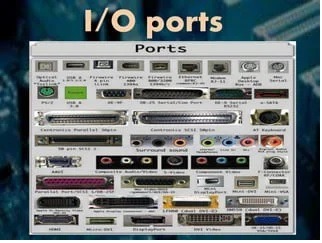
I/O Ports
I/O ports, also known as input/output ports, are physical interfaces on a computer or electronic device that allow communication with external devices or peripherals. These ports facilitate the exchange of data, signals, and commands between the device and the external world. Each port is designed to handle specific types of input or output, and they serve various purposes depending on the device and its functionalities. Here are some commonly used I/O ports:
- USB (Universal Serial Bus) Ports: USB ports are widely used for connecting a variety of peripherals and devices, such as keyboards, mice, printers, external hard drives, smartphones, and more. USB ports provide a standardized interface for data transfer and power supply.
- Ethernet Port: An Ethernet port is used to connect a computer or device to a local area network (LAN) using an Ethernet cable. It enables high-speed data communication and internet connectivity.
- HDMI (High-Definition Multimedia Interface) Port: HDMI ports are commonly found on TVs, monitors, and laptops. They transmit high-definition audio and video signals from the device to an external display or TV.
- Display Port: Display Port is another video interface commonly used to connect computers and displays. It supports high-resolution video and audio transmission.
- Audio Ports: Audio ports include headphone jacks, microphone jacks, and line-in/line-out jacks. These ports allow the connection of audio devices like headphones, microphones, speakers, and external audio sources.
- VGA (Video Graphics Array) Port: Although becoming less common, VGA ports were widely used in the past to connect computers and displays. VGA ports transmit analog video signals.
- DVI (Digital Visual Interface) Port: DV I ports are used to connect computers and displays to transmit digital video signals. There are different types of DV I connectors, including DV I-D (digital only), DV I-I (digital and analog), and DVI-A (analog only).
- Thunderbolt Port: Thunderbolt is a high-speed interface that combines data, video, and power transmission. Thunderbolt ports are commonly found on Mac computers and high-end PCs.
- Serial Port: Serial ports were widely used in the past for connecting devices such as modems, serial mice, and older printers. They transmit data one bit at a time.
- Parallel Port: Parallel ports were also commonly used in older computers for connecting devices such as printers. They transmit multiple bits simultaneously.
- PS/2 Port: PS/2 ports were used to connect keyboards and mice in older computers. They have been largely replaced by USB ports.
It’s important to note that the availability and types of I/O ports can vary depending on the device, its age, and its intended use. Newer devices often feature a combination of USB, HDMI, and other modern ports, while older devices may include legacy ports that are less commonly used today.
What is required I/O Ports
The required I/O (input/output) ports can vary depending on the specific needs and use case of a device or system. The required I/O ports are determined by the peripherals and external devices that need to be connected to the device. Here are some common requirements for I/O ports in different scenarios:
- General Computing:
- USB ports: Required for connecting keyboards, mice, external storage devices, printers, scanners, and other USB peripherals.
- Ethernet port: Necessary for wired network connectivity.
- HDMI or Display Port: Essential for connecting to external monitors or displays.
- Audio ports: Required for audio input and output, including headphone jacks, microphone jacks, and line-in/line-out ports.
- Gaming:
- USB ports: Needed for connecting gaming controllers, keyboards, mice, and other gaming peripherals.
- HDMI or Display Port: Required for connecting gaming consoles or PCs to gaming monitors or TVs.
- Audio ports: Necessary for connecting gaming headsets or speakers.
- Home Entertainment:
- HDMI or Display Port: Required for connecting media players, set-top boxes, or gaming consoles to TVs or home theater systems.
- Audio ports: Necessary for connecting speakers, soundbars, or audio systems.
- USB ports: Needed for connecting external storage devices or USB media players.
- Professional Design or Multimedia:
- HDMI or Display Port: Essential for connecting high-resolution monitors or displays for graphic design or multimedia work.
- Thunderbolt or USB ports: Required for connecting high-speed storage devices or external peripherals.
- Audio ports: Necessary for connecting professional audio equipment or speakers.
- Industrial or Embedded Systems:
- Serial ports: Required for communication with legacy industrial devices, modems, or specialized equipment.
- GPI O (General Purpose Input/Output) ports: Necessary for connecting sensors, actuators, or custom external devices.
- Ethernet ports: Required for network connectivity in industrial or embedded systems.
It’s important to note that the specific I/O port requirements can vary based on the device or system’s purpose, industry, and intended functionality. Different devices may have additional or specialized ports to cater to their specific needs.
Who is required I/O Ports
I/O (input/output) ports are required in various devices and systems to enable communication with external devices or peripherals. Here are some examples of who might require I/O ports:
- Personal Computers and Laptops: Individuals and businesses require I/O ports on their computers and laptops to connect peripherals such as keyboards, mice, printers, scanners, external storage devices, monitors, and speakers. The availability and types of I/O ports vary depending on the device’s make and model.
- Gaming Consoles: Gaming consoles like PlayStation, Xbox, or Nintendo Switch require I/O ports to connect gaming controllers, headsets, external storage devices, and other gaming peripherals. HDMI or Display Port ports are also necessary to connect the console to a TV or monitor for video output.
- Smartphones and Tablets: Mobile devices typically have various I/O ports, such as USB ports or Lightning ports, for charging, data transfer, and connecting accessories like headphones, speakers, or external storage devices. Some smartphones also support HDMI or Display Port connectivity through specialized adapters.
- Home Entertainment Systems: Devices like TVs, media players, set-top boxes, or home theater systems require I/O ports for connecting external devices. HDMI ports are commonly used for video and audio output, while USB ports can be used for media playback or connecting external storage.
- Industrial and Embedded Systems: In industrial settings or embedded systems, I/O ports are necessary for connecting sensors, actuators, communication modules, or other external devices. These ports may include serial ports, G PI O (General Purpose Input/Output) ports, Ethernet ports, or specialized industrial interfaces.
- Networking Equipment: Routers, switches, and other network devices require I/O ports for network connectivity. Ethernet ports are essential for connecting network cables to establish wired network connections.
- Audio and Video Equipment: Audio systems, speakers, amplifiers, and video equipment may have various I/O ports for connecting input sources, output devices, or interconnecting components. This includes ports like HDMI, RCA connectors, XL R connectors, optical ports, or analog audio jacks.
- Point-of-Sale (PO S) Systems: PO S systems used in retail or hospitality environments require I/O ports for connecting bar code scanners, receipt printers, cash drawers, credit card terminals, and other peripherals.
- Medical Devices and Equipment: Medical devices often utilize specialized I/O ports for connecting sensors, monitors, input devices, or data storage devices. These ports may comply with medical industry standards and protocols.
It’s important to note that the specific I/O port requirements can vary widely based on the device’s purpose, industry, and intended functionalities. The selection and availability of I/O ports depend on the device manufacturer’s design choices and the needs of the users or the specific use case.
When is required I/O Ports
/O (input/output) ports are required in various situations and scenarios where communication between a device and external devices or peripherals is necessary. Here are some instances when I/O ports are required:
- Device Connectivity: I/O ports are required when connecting external devices or peripherals to a computer, laptop, or mobile device. This includes connecting keyboards, mice, printers, scanners, external storage devices, monitors, speakers, headphones, cameras, microphones, and other accessories. I/O ports provide the necessary interfaces for data transfer, power supply, and interaction with these external devices.
- Data Transfer: I/O ports are essential for transferring data between devices. For example, USB ports are commonly used for transferring files between a computer and a USB flash drive or external hard drive. Ethernet ports enable data transfer over a network, allowing devices to share information or access the internet. Other ports like Bluetooth or Wi-Fi support wireless data transfer between compatible devices.
- Display Output: I/O ports are required for connecting devices to external displays or projectors. HDMI, Display Port, VGA, or DV I ports are used to transmit video and audio signals from a computer, gaming console, media player, or other devices to a monitor, TV, or projector.
- Audio Input/Output: I/O ports are necessary for audio input and output. Audio ports, such as headphone jacks, microphone jacks, or line-in/line-out ports, allow connection to headphones, speakers, microphones, audio recording devices, or external sound systems.
- Network Connectivity: I/O ports are required for network connectivity in devices such as computers, routers, switches, and network-enabled devices. Ethernet ports provide a physical connection to a wired network, allowing devices to communicate, share data, and access the internet.
- Peripheral Expansion: I/O ports are needed when expanding the capabilities of a device through peripheral devices. For example, PCI or PC I e slots in desktop computers allow the installation of expansion cards such as graphics cards, sound cards, or network cards. These expansion cards provide additional functionality and connectivity options.
- Specialized Interfaces: In specific industries or applications, devices may require specialized I/O ports to interact with dedicated peripherals. This includes industries like healthcare, where medical devices may have unique interfaces to connect sensors, monitors, or other medical equipment.
It’s important to consider the specific requirements of a device and its intended use when determining the need for I/O ports. Different devices may have varying port configurations based on their functionalities, and the availability of ports can impact the device’s compatibility and connectivity options.
Where is required I/O Ports
I/O (input/output) ports are required on various devices and systems in order to facilitate communication with external devices or peripherals. The physical location or placement of I/O ports can vary depending on the device or system. Here are some common places where I/O ports are typically found:
- Computers and Laptops: On desktop computers, I/O ports are usually located on the back of the computer tower or on the sides of the monitor. Laptops typically have I/O ports on the sides or back of the device. The exact placement and configuration of I/O ports can vary, but commonly used ports like USB, Ethernet, audio jacks, HDMI, Display Port, and card readers are typically easily accessible.
- Mobile Devices: Smartphones, tablets, and other mobile devices usually have their I/O ports located on the sides or bottom of the device. The most common I/O ports found on mobile devices include USB ports (such as USB-C or Lightning), audio jacks, and sometimes additional ports like micro SD card slots or HDMI through specialized adapters.
- Peripheral Devices: Peripherals such as keyboards, mice, printers, scanners, and external storage devices usually have their own I/O ports. These ports are typically located on the back or sides of the peripheral device, allowing for connection to a computer or other compatible devices.
- TVs and Monitors: I/O ports on TVs and monitors are typically located on the back or side panels. Common ports include HDMI, Display Port, audio jacks, USB ports for media playback, and antenna/cable connections.
- Networking Equipment: Routers, switches, and other networking devices usually have their I/O ports located on the back or front of the device. Ethernet ports, power ports, USB ports for peripheral devices, and other specialized ports for networking cables or modules are commonly found in networking equipment.
- Audio/Video Equipment: Audio systems, receivers, amplifiers, and video equipment typically have their I/O ports located on the back or front panel. These ports may include HDMI, RCA connectors, XL R connectors, optical ports, analog audio jacks, or specialized interfaces for professional audio/video equipment.
- Industrial and Embedded Systems: The placement of I/O ports in industrial and embedded systems can vary depending on the specific device and its purpose. In some cases, these ports may be located on the front or back panels of a control unit, while in others, they may be housed in specialized enclosures or connectors for rugged environments.
It’s important to note that the specific placement and configuration of I/O ports can vary between different devices, manufacturers, and models. The design and positioning of I/O ports aim to provide convenient access for connecting external devices or peripherals while considering the device’s form factor and intended use.
How is required I/O Ports
I/O (input/output) ports are required in various devices and systems to enable communication with external devices or peripherals. The way I/O ports are implemented and utilized can vary depending on the specific device or system. Here’s a general overview of how I/O ports are required and used:
- Device Connectivity: I/O ports are used to establish connections between a device and external devices or peripherals. For example, USB ports allow for the connection of keyboards, mice, printers, scanners, and other USB devices. The ports provide a standardized interface for data transfer, power supply, and control signals.
- Data Transfer: I/O ports facilitate the transfer of data between a device and external devices. USB ports are commonly used for data transfer between computers and storage devices like flash drives or external hard drives. Ethernet ports enable data transfer over networks, allowing devices to share data or access the internet. Bluetooth or Wi-Fi ports support wireless data transfer between compatible devices.
- Display Output: I/O ports are used to connect devices to external displays or monitors. HDMI, Display Port, VGA, or DV I ports transmit video and audio signals from a device to a display. These ports enable the device to extend its desktop, mirror the screen, or output high-definition content.
- Audio Input/Output: I/O ports are essential for audio input and output. Devices include audio jacks for connecting headphones, speakers, microphones, or audio recording devices. The ports allow for audio playback, recording, or communication functions.
- Network Connectivity: I/O ports are required for network connectivity in devices such as computers, routers, switches, or network-enabled devices. Ethernet ports provide a physical connection to wired networks, enabling data exchange and internet access. These ports allow devices to connect to local area networks (LAN s) or wide area networks (WAN s).
- Peripheral Expansion: I/O ports are used for expanding the capabilities of a device through peripheral devices. For example, desktop computers have expansion slots like PCI or PCIe, allowing the installation of additional cards such as graphics cards, sound cards, or network cards. These ports provide connectivity options for specialized peripherals or devices.
- Specialized Interfaces: Some devices require specialized I/O ports to interact with dedicated peripherals or equipment. Examples include medical devices that utilize specific ports for connecting sensors, monitors, or other medical equipment. These specialized interfaces ensure compatibility and proper functionality in specific industries or applications.
The specific implementation and utilization of I/O ports can vary depending on the device’s design, industry standards, and intended use. Manufacturers consider factors such as compatibility, ease of use, data transfer speeds, and power requirements when determining the types and quantities of I/O ports to include in their devices.
Case study on I/O Ports
Unfortunately, as an AI language model, I don’t have access to real-time data or the ability to generate specific case studies. However, I can provide you with a hypothetical case study on I/O ports to illustrate their importance and application in a practical scenario:
Case Study: I/O Ports in a Smart Home System
Company XY Z is a leading provider of smart home systems that integrate various devices and appliances for enhanced convenience and automation. They develop a centralized smart home hub that acts as a control center for managing different aspects of the home, such as lighting, temperature, security, and entertainment.
Challenge: One of the primary challenges faced by Company XYZ is designing an efficient I/O port system for their smart home hub. The I/O ports are crucial for connecting and controlling a wide range of devices, sensors, and peripherals used in smart homes.
Solution: To address the challenge, Company XY Z carefully considers the following factors when designing the I/O port system for their smart home hub:
- Connectivity: The smart home hub requires various I/O ports to enable connectivity with external devices and sensors. USB ports are included to connect peripherals like keyboards, mice, or storage devices for easy user interaction. Ethernet ports are essential to establish a reliable wired network connection for seamless communication with security cameras, smart thermostats, and other network-enabled devices.
- Sensor Integration: The smart home hub is equipped with specialized I/O ports dedicated to sensor integration. These ports enable the connection of motion sensors, door/window sensors, temperature and humidity sensors, and other environmental sensors. The data collected from these sensors helps automate functions such as turning on lights when motion is detected or adjusting the temperature based on environmental conditions.
- Audio/Video Output: The smart home hub includes HDMI or Display Port output ports to connect to TVs or monitors. This allows users to view the hub’s graphical user interface and control various smart home functions conveniently. Additionally, audio output ports are included for connecting speakers or audio systems to provide voice feedback or play music throughout the home.
- Wireless Connectivity: To support wireless communication, the smart home hub incorporates Wi-Fi and Bluetooth connectivity. These wireless technologies enable the hub to connect to compatible devices such as smartphones, tablets, or wireless speakers, allowing users to control their smart home system remotely.
- Expansion Capabilities: Recognizing the evolving nature of smart home technology, the hub is designed with expansion in mind. It includes expansion slots or USB-C ports that can accommodate additional modules or devices, such as Z-Wave or Zig bee adapters, to support integration with a broader range of smart devices and protocols.
Results: By carefully considering the design and implementation of the I/O port system, Company XY Z successfully develops a smart home hub that offers seamless connectivity, sensor integration, and expand ability. The hub becomes a central control point for managing the entire smart home ecosystem, providing users with an intuitive interface and enabling automation and remote control of various home functions.
This hypothetical case study illustrates how I/O ports play a vital role in facilitating connectivity, data transfer, and control in a smart home system. The appropriate selection and design of I/O ports are crucial for creating a robust and versatile smart home hub that meets the needs of modern homeowners.
White paper on I/O Ports
Title: Understanding I/O Ports: A Comprehensive White Paper
Abstract: This white paper aims to provide a comprehensive understanding of I/O (input/output) ports, their significance, types, functionalities, and applications in modern computing and electronic systems. It explores the role of I/O ports in facilitating communication between devices and external peripherals, enabling data transfer, and enhancing user interaction. By delving into various aspects of I/O ports, this white paper offers valuable insights for professionals, engineers, and enthusiasts seeking a deeper understanding of this critical component of contemporary technology.
Table of Contents:
- Introduction 1.1 Overview 1.2 Importance of I/O Ports 1.3 Objectives
- Fundamentals of I/O Ports 2.1 Definition and Purpose 2.2 Historical Evolution 2.3 Role in Input and Output Operations
- Types of I/O Ports 3.1 Serial Ports 3.2 Parallel Ports 3.3 USB Ports 3.4 Ethernet Ports 3.5 HDMI and Display Port 3.6 Audio Ports 3.7 Expansion Slots 3.8 Wireless Connectivity Ports
- Functionality and Operation of I/O Ports 4.1 Data Transfer Modes 4.2 Protocols and Standards 4.3 Power Supply and Charging 4.4 Control and Communication Signals 4.5 Plug and Play Capabilities
- Applications of I/O Ports 5.1 Personal Computers and Laptops 5.2 Mobile Devices 5.3 Gaming Consoles 5.4 Home Entertainment Systems 5.5 Industrial and Embedded Systems 5.6 Networking Equipment 5.7 Audio and Video Equipment 5.8 Automotive Systems 5.9 Point-of-Sale (PO S) Systems 5.10 Medical Devices and Equipment
- Considerations for I/O Port Design 6.1 Compatibility and Interoperability 6.2 Data Transfer Speeds 6.3 Power Requirements 6.4 Physical Form Factors 6.5 Future-proofing and Expansion
- Challenges and Future Trends 7.1 Increasing Data Transfer Speeds 7.2 Wireless Connectivity Advancements 7.3 Standardization and Inter connectivity 7.4 Security and Protection
- Conclusion 8.1 Recap of Key Points 8.2 Importance of I/O Ports in Modern Systems 8.3 Future Outlook
References
This white paper aims to serve as a comprehensive resource that explores the intricacies of I/O ports, their types, functionalities, and applications across various domains. It provides readers with valuable insights into the design considerations, challenges, and future trends surrounding I/O ports. With its well-researched content and in-depth analysis, this white paper is an essential reference for anyone seeking a deeper understanding of I/O ports in today’s technology landscape.