
Introduction to Computer
Introduction to Computers
In today’s digital age, computers are an integral part of our daily lives, driving technological advancements and reshaping the way we work, communicate, and access information. Understanding the fundamentals of computers is essential, whether you’re a seasoned tech professional or a beginner looking to navigate the digital world. In this introduction to computers, we’ll explore the basics, components, and key concepts that form the foundation of computer technology.
I. What Is a Computer?
A computer is a versatile and programmable electronic device that processes data, performs calculations, and executes tasks based on instructions provided by users or pre-defined programs. Computers come in various forms and sizes, from personal laptops and desktops to powerful servers and supercomputers. They are indispensable tools in numerous industries, including business, education, healthcare, entertainment, and scientific research.
II. Key Components of a Computer:
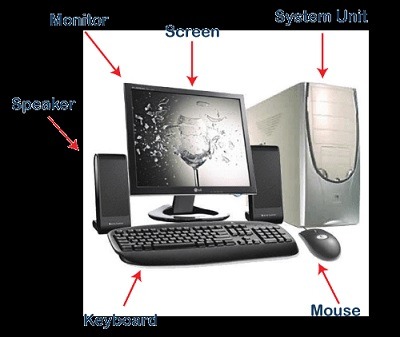
Computers consist of several essential components, each playing a unique role in the overall functionality of the system:
- Central Processing Unit (CPU): Often referred to as the “brain” of the computer, the CPU executes instructions and performs calculations.
- Memory (RAM): Random Access Memory stores data and instructions that the CPU needs while actively running programs.
- Storage Devices: Hard drives and solid-state drives (SSDs) store data, programs, and the operating system for long-term use.
- Motherboard: The main circuit board connects and facilitates communication between all the computer’s components.
- Input Devices: Keyboards, mice, touchscreens, and other input devices enable users to interact with the computer.
- Output Devices: Monitors, speakers, and printers display or produce results generated by the computer.
III. How Computers Work:
Computers operate based on a fundamental process:
- Input: Users or external devices provide data and instructions to the computer through input devices.
- Processing: The CPU processes the input data, executes instructions, and performs calculations, usually at incredible speeds.
- Memory: Data and program instructions are temporarily stored in RAM during processing.
- Storage: The computer stores data and programs on storage devices for long-term access.
- Output: Processed data and results are presented to users through output devices.
- Control: The operating system manages hardware resources, runs software applications, and ensures the orderly execution of tasks.
IV. Types of Computers:
There are several categories of computers designed for various purposes:
- Personal Computers (PCs): Including desktops and laptops, these are commonly used for general tasks, such as word processing, web browsing, and gaming.
- Servers: Specialized computers designed to store and manage data, provide services, and facilitate network communication.
- Mainframes: Large, high-performance computers used for processing massive amounts of data and supporting enterprise-level applications.
- Supercomputers: The most powerful computers, used for complex scientific simulations, weather forecasting, and advanced research.
V. The Role of Software:
Software is the set of programs, applications, and instructions that tell a computer what to do. Operating systems (e.g., Windows, macOS, Linux) manage computer hardware, while software applications (e.g., Microsoft Word, web browsers) enable users to perform specific tasks.
In this digital era, computer literacy is essential for personal and professional growth. Understanding the basics of computers equips individuals with the skills needed to navigate modern technology, access information, and harness the power of computation for various purposes. As technology continues to evolve, a solid foundation in computer knowledge remains invaluable.
What is required Introduction to Computer
An introductory course or presentation on computers typically covers the fundamental concepts and components of computer systems. Here’s an overview of what is typically required in an introduction to computer course:
1. Computer Basics:
- Define what a computer is and its primary functions.
- Introduce the idea of data processing and how computers manipulate data.
2. Computer Hardware:
- Explain the key hardware components, including the CPU, memory (RAM), storage devices (HDD, SSD), motherboard, input devices (keyboard, mouse), and output devices (monitor, printer, speakers).
- Discuss the role of each component in the computer system.
3. Operating Systems:
- Define what an operating system is and its role in managing computer resources.
- Introduce popular operating systems like Windows, macOS, and Linux.
4. Software:
- Distinguish between system software (e.g., operating systems) and application software (e.g., word processors, web browsers).
- Explain how software is installed and used.
5. Computer Input and Output:
- Describe how users interact with computers through input devices (keyboard, mouse, touchscreens) and receive information through output devices (monitors, speakers, printers).
6. Data Storage:
- Discuss various storage devices (hard drives, SSDs, USB drives) and their capacities.
- Explain the difference between volatile memory (RAM) and non-volatile memory (storage).
7. Basic Computer Operations:
- Introduce common tasks and operations, such as file management, web browsing, and word processing.
8. Computer Networks:
- Explain the concept of computer networks and the internet.
- Discuss the importance of network connectivity and security.
9. Computer Security:
- Highlight the importance of computer security and data protection.
- Discuss common security threats and best practices for safe computing.
10. Troubleshooting:
- Teach basic troubleshooting techniques for common computer problems.
- Encourage students to seek help or resources when facing technical issues.
11. Computer History and Future Trends:
- Provide a brief overview of the history of computers and their evolution.
- Discuss current and emerging trends in computer technology, such as artificial intelligence, cloud computing, and IoT.
12. Practical Exercises:
- Include hands-on exercises or demonstrations to reinforce concepts.
- Encourage students to practice basic tasks like creating documents, browsing the web, and managing files.
13. Assessment:
- Assess students’ understanding through quizzes, assignments, or exams.
- Provide opportunities for students to apply what they’ve learned in practical scenarios.
14. Additional Resources:
- Recommend additional resources, such as books, websites, or online tutorials, for students who want to explore computer technology further.
An introductory course on computers should aim to provide a solid foundation for individuals with varying levels of prior knowledge. It should be accessible and engaging, fostering computer literacy and promoting confident use of technology in everyday life.
Who is required Introduction to Computer
An introduction to computers is valuable and required for various individuals and groups, as computer literacy has become a fundamental skill in today’s digital age. Here are some categories of people who may benefit from an introduction to computer course:
- Students: Many educational institutions include computer literacy courses in their curricula to ensure that students have the necessary digital skills for both academic and future career endeavors.
- Employees and Professionals: Workers in nearly every industry benefit from computer literacy, as computers are used for communication, data analysis, research, and various tasks. Employers often provide computer training to ensure their employees are proficient with the technology they use.
- Job Seekers: Computer skills are often a requirement or advantage in the job market. Job seekers may take introductory computer courses to enhance their employability.
- Seniors: As technology becomes more integrated into daily life, seniors may take computer courses to stay connected with family and friends, access online services, and engage in digital hobbies.
- Entrepreneurs: Individuals starting their own businesses or pursuing entrepreneurial ventures may need computer skills for tasks like bookkeeping, marketing, and online sales.
- Parents and Guardians: Familiarity with computers is essential for parents to support their children’s education and ensure their online safety. Parents may take introductory courses to understand and manage technology better.
- Adult Learners: Anyone interested in expanding their knowledge and skills, regardless of age, can benefit from an introduction to computer course.
- Non-Profit Organizations: Organizations that serve communities may offer computer literacy programs to empower their clients, enabling them to access information, job opportunities, and social services online.
- Community Programs: Many community centers and libraries provide computer literacy classes to help community members access resources and develop essential skills.
- Individuals with Disabilities: Adaptive technology and assistive devices for individuals with disabilities often involve computer interfaces. An introduction to computer course can be tailored to accommodate diverse needs.
- International Audiences: Computer literacy is a global necessity. International organizations may provide computer training to individuals in underserved or developing regions.
In essence, computer literacy is essential for nearly everyone in today’s interconnected world. The specific content and focus of an introductory computer course may vary depending on the audience’s needs and goals, but the aim is to equip individuals with the foundational knowledge and skills required to use computers effectively and confidently in their personal and professional lives.
When is required Introduction to Computer
An introduction to computers can be required or beneficial in various situations and stages of life. Here are some common scenarios and times when an introduction to computer course may be necessary or highly advantageous:
- Primary and Secondary Education: Many educational systems around the world include computer literacy courses as part of the curriculum to ensure that students acquire essential digital skills early in their academic journey.
- Higher Education: In college or university, students may be required to take introductory computer science or computer literacy courses as part of their degree programs, especially if they are pursuing majors related to technology, science, or business.
- Job Training and Career Development: In many professions, basic computer skills are a prerequisite. Employers often expect employees to have a certain level of computer literacy. Job seekers may take introductory computer courses to improve their qualifications.
- Career Changes: Individuals changing careers or transitioning to a new industry may require computer training to gain the skills needed for their new roles.
- Online Learning: As online education becomes more prevalent, learners of all ages may take introductory computer courses to become proficient in online learning platforms and tools.
- Starting a Business: Entrepreneurs and small business owners may enroll in computer courses to manage various aspects of their businesses, including online marketing, accounting, and e-commerce.
- Senior Citizens: Seniors who want to stay connected with family and friends through digital communication, access online services, or pursue digital hobbies may take computer courses tailored to their needs.
- Parents and Caregivers: Parents and caregivers often enroll in computer courses to support their children’s education, monitor their online activities, and stay informed about digital safety.
- Retirement Planning: Some individuals nearing retirement may take computer courses to prepare for managing finances, accessing healthcare information, and staying engaged through online activities during retirement.
- Community Programs: Community centers, libraries, and non-profit organizations may offer computer literacy courses to empower community members with digital skills.
- Digital Inclusion Programs: Various initiatives aim to bridge the digital divide by providing computer training to underserved populations, refugees, and people with disabilities.
- Personal Growth: Lifelong learners seeking personal development may enroll in introductory computer courses out of curiosity or the desire to acquire new skills.
The specific timing and requirement for an introduction to computer course can vary depending on individual circumstances, educational systems, career paths, and personal goals. However, in today’s technology-driven world, computer literacy is increasingly considered a fundamental skill, and introductory computer courses are readily available to accommodate diverse needs and backgrounds.
Where is required Introduction to Computer
The requirement for an introduction to computer course can vary depending on educational institutions, job positions, and individual preferences. Here are some common places and scenarios where an introduction to computer course may be required or highly beneficial:
- Educational Institutions:
- Schools and K-12 Education: Many primary and secondary schools include computer literacy courses as part of their curriculum to ensure that students acquire essential digital skills at an early age.
- Colleges and Universities: Higher education institutions often offer computer science or computer literacy courses as prerequisites or general education requirements, particularly for majors related to technology, business, or science.
- Online Learning Platforms: Individuals pursuing online degrees or courses may encounter introductory computer courses as a fundamental component of their online learning experience.
- Vocational and Technical Schools: Vocational and technical institutions frequently offer computer training programs as part of their job-specific training to prepare students for careers in various industries, such as healthcare, automotive, or information technology.
- Workplace and Job Training:
- Employers: Many employers require employees to have basic computer skills, and they may provide on-the-job computer training or require new hires to complete introductory computer courses.
- Career Development: Individuals looking to advance in their careers or switch to technology-related roles often seek computer training to improve their qualifications.
- Community Programs:
- Community Centers: Community centers often offer computer literacy classes to residents, focusing on digital inclusion and empowering community members with essential skills.
- Public Libraries: Public libraries frequently provide computer workshops and courses to help patrons develop digital literacy skills and access online resources.
- Online Learning Platforms:
- Various online learning platforms, such as Coursera, edX, Udemy, and Khan Academy, offer introductory computer courses that individuals can enroll in from anywhere in the world.
- Government and Non-Profit Organizations:
- Government Initiatives: Some governments and non-profit organizations run digital inclusion programs that offer free or subsidized computer training to underserved populations, refugees, or people with disabilities.
- Job Placement Programs: Job placement and workforce development programs may include computer training to enhance job seekers’ employability.
- Personal Interest and Self-Led Learning:
- Individuals interested in computers, technology, or personal development may choose to take introductory computer courses on their own through online resources, books, or local community offerings.
- Retirement and Senior Centers:
- Senior centers and retirement communities may offer computer classes tailored to older adults’ needs, helping them stay engaged and connected in the digital age.
The availability and requirement for introductory computer courses can vary by location, institution, and industry. However, given the increasing importance of digital literacy in various aspects of life, including education, employment, and daily activities, these courses are widely accessible to individuals of all backgrounds and ages.
How is required Introduction to Computer
The requirement for an introduction to computer course can vary depending on educational institutions, employers, and specific circumstances. Here’s how the requirement for an introduction to computer course is typically determined:
1. Educational Institutions:
- K-12 Schools: In many primary and secondary schools, computer literacy courses are part of the curriculum and are required for all students. These courses aim to ensure that students acquire essential digital skills.
- Colleges and Universities: Higher education institutions may have different approaches to computer literacy requirements. Some may require computer science or computer literacy courses as prerequisites for certain majors or as part of general education requirements. Others may offer these courses as electives, allowing students to choose whether to take them.
- Online Learning Platforms: For individuals pursuing online degrees or courses, the requirement for introductory computer courses may depend on the specific program’s curriculum. Some programs may include computer literacy as a mandatory component.
2. Employers and Career Fields:
- Employers: Many employers require employees to have basic computer skills, as digital literacy is essential in the modern workplace. Depending on the job role, employers may provide on-the-job computer training or require new hires to complete introductory computer courses as part of their onboarding process.
- Specific Career Fields: Certain career fields, such as information technology, data analysis, and web development, often require advanced computer skills. In these cases, more specialized computer courses may be required.
3. Government and Certification Programs:
- Government Initiatives: Some governments and government-funded programs run digital inclusion initiatives that require participants to complete introductory computer courses. These programs aim to improve digital literacy among underserved populations.
- Certification Programs: Certain professional certifications, such as CompTIA A+ for IT professionals, may require candidates to demonstrate proficiency in computer fundamentals. Completing specific computer courses may be necessary to prepare for these certifications.
4. Personal Goals and Interests:
- Self-Motivation: Individuals who recognize the importance of computer literacy for personal growth and career advancement may choose to take introductory computer courses voluntarily. These courses are often available through online learning platforms and local educational institutions.
The requirement for an introduction to computer course ultimately depends on the educational path, career goals, and individual circumstances of the learner. Educational institutions, employers, and certification bodies may have specific requirements, while others may offer computer courses as optional opportunities for skill development. In today’s digitally connected world, having at least basic computer literacy is highly beneficial and can open doors to various educational and career opportunities.