
Introduction to computer
Computer is a programmable electronic device that processes and stores data. It is capable of performing a wide range of tasks, from simple calculations to complex operations, and it plays a crucial role in various aspects of our modern lives. Computers are used in diverse fields such as education, business, entertainment, scientific research, and many more.
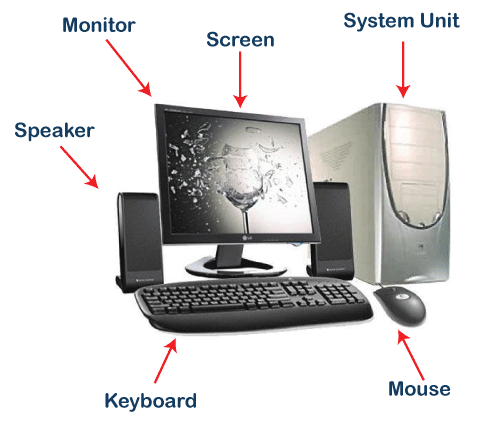
At its core, a computer consists of two fundamental components: hardware and software. The hardware encompasses the physical components of the computer, including the central processing unit (CPU), memory, storage devices, input devices (e.g., keyboard, mouse), output devices (e.g., monitor, printer), and other peripheral devices.
Software, on the other hand, refers to the set of instructions and programs that enable the computer to perform specific tasks. It includes the operating system, which manages the computer’s resources and provides a user interface, as well as various applications and software programs used for specific purposes such as word processing, web browsing, graphic design, and more.
Computers operate on a binary system, using binary digits (bits) to represent and process data. Each bit can have a value of either 0 or 1, which corresponds to the “off” and “on” states of electronic switches within the computer’s hardware. These bits are organized into bytes, which are the basic units of storage and processing in a computer.
The functioning of a computer relies on the execution of instructions. Programs or software are written in programming languages, which consist of a set of commands and rules that specify the operations to be carried out by the computer. These instructions are executed by the CPU, which performs calculations, logical operations, and manages the flow of data within the computer.
Computers store data in various forms, including text, numbers, images, audio, and video. Data is stored in memory for temporary use or on storage devices such as hard drives, solid-state drives, or optical media for long-term storage.
Over the years, computers have evolved in terms of size, speed, storage capacity, and capabilities. They have become increasingly compact and powerful, with advancements in technology leading to the development of personal computers, laptops, tablets, smartphones, and other portable devices.
The field of computer science encompasses the study of computers, their design, development, and application. It includes areas such as computer programming, algorithms, data structures, computer architecture, artificial intelligence, computer networks, and more. The advancements in computer technology continue to revolutionize industries, improve efficiency, and enable new possibilities in various fields of human endeavor.
What is required Introduction to computer
To have a basic introduction to computers, there are a few key concepts and components that you should understand:
- Hardware: Learn about the essential hardware components of a computer, including the CPU, memory (RAM), storage devices (hard drives, SSD s ), input devices (keyboard, mouse), output devices (monitor, printer), and peripheral devices (USB drives, external hard drives, etc.).
- Software: Understand the distinction between system software (operating systems like Windows, macO S, Linux) and application software (programs like word processors, web browsers, media players). Get familiar with common software applications and their functions.
- Operating System: Learn about the operating system that runs on a computer and manages its resources. Understand the role of the operating system in providing a user interface, managing files and folders, and facilitating communication between hardware and software.
- File Management: Gain knowledge about organizing files and folders on a computer, creating, renaming, copying, moving, and deleting files. Understand the file hierarchy and directory structure.
- Input and Output: Understand how input devices (keyboard, mouse, touchscreens) allow users to interact with the computer, and how output devices (monitors, printers, speakers) display or present information to the user.
- Networking: Learn the basics of computer networks, including concepts like local area networks (LAN s) and the internet. Understand IP addresses, protocols, and the role of routers and modems.
- Internet and Web Browsing: Gain an understanding of the internet and web browsing. Learn about web browsers, search engines, URLs, hyperlinks, and common internet services.
- Computer Security: Develop awareness of computer security threats, such as malware, phishing, and data breaches. Understand the importance of antivirus software, strong passwords, and safe browsing habits.
- Basic Troubleshooting: Learn how to identify and solve common computer issues, such as software errors, connectivity problems, and hardware malfunctions. Familiarize yourself with resources like online forums, help documentation, and support services.
- Ethical and Legal Considerations: Gain awareness of ethical and legal issues related to computer use, including copyright infringement, privacy concerns, and responsible online behavior.
These topics provide a foundation for understanding computers and their applications. As you delve deeper into specific areas of interest, you can explore advanced concepts, programming languages, computer architecture, data analysis, and more.
Who is required Introduction to computer
Introduction to computers is typically required for individuals who are new to the field of computing or have limited knowledge about computers. It is a fundamental course offered in various educational settings, including schools, colleges, and training programs. The target audience for an introduction to computer course may include:
- Students: Introduction to computers is commonly taught at the school level as part of the curriculum or as an elective course. It provides students with a foundational understanding of computers and prepares them for more advanced computer science or information technology courses.
- Professionals transitioning to a new field: Individuals who are switching careers or entering a new field that involves working with computers may take an introduction to computer course to acquire the necessary knowledge and skills.
- Older adults: Many older adults who did not grow up with computers may choose to take an introduction to computer course to familiarize themselves with basic computer operations and applications. It helps them stay connected, access information, and perform everyday tasks in a digital world.
- Individuals seeking digital literacy: In today’s digital age, basic computer literacy is essential for various tasks, such as online communication, accessing information, and conducting transactions. Introduction to computer courses serve as a starting point for individuals who want to develop their digital skills and gain confidence in using computers.
- Non-technical professionals: People working in non-technical fields, such as business, healthcare, or arts, may benefit from an introduction to computer course to understand how computers are used in their respective industries. It equips them with the necessary knowledge to work with computer-based tools and systems.
- Hobbyists and enthusiasts: Some individuals with a general interest in technology may take an introduction to computer course to satisfy their curiosity and gain a deeper understanding of how computers work and how they can be utilized for various purposes.
Overall, the introduction to computer course is designed for anyone who wants to develop a basic understanding of computers, their components, functions, and applications. It serves as a stepping stone for further exploration and specialization in the field of computing.
When is required Introduction to computer
Introduction to computer courses may be required or beneficial in several situations:
- Academic Requirements: Many educational institutions, such as schools, colleges, and universities, include an introduction to computer course as part of their curriculum. It may be a required course for students pursuing degrees in computer science, information technology, or related fields. It provides a foundation for more advanced coursework in the field.
- Career Preparation: Introduction to computer courses can be beneficial for individuals preparing for careers that involve working with computers. It helps them acquire the necessary knowledge and skills to navigate computer systems, use software applications, and understand basic programming concepts. This is particularly relevant for fields such as IT support, data analysis, digital marketing, software development, and administrative roles that require computer proficiency.
- Skill Enhancement: Individuals who want to enhance their computer skills or expand their knowledge base may choose to take an introduction to computer course. It can help improve their digital literacy, increase productivity in their current job, or open up new career opportunities.
- Technological Transition: When organizations or institutions adopt new technologies or systems, they may require employees to undergo an introduction to computer course to ensure a smooth transition. This helps familiarize employees with the new technology, its features, and its applications.
- Personal Development: Some people may take an introduction to computer course out of personal interest or to stay updated with the latest technology trends. It allows them to explore computer-related topics, understand how computers work, and use technology more effectively in their personal lives.
It’s important to note that the specific requirements and situations where an introduction to computer course is required may vary depending on educational institutions, employers, or individual goals. It’s recommended to consult with academic advisors, career counselors, or employers to determine if an introduction to computer course is necessary or beneficial in a particular context.
Where is required Introduction to computer
Introduction to computer courses can be required or offered in various educational and professional settings. Some common places where an introduction to computer course may be required or available include:
- Schools and Colleges: Many schools and colleges include introduction to computer courses as part of their curriculum. These courses may be mandatory for students studying computer science, information technology, or related disciplines. They provide a foundation for further study in the field.
- Universities and Higher Education Institutions: Universities often offer introductory computer courses to students from various disciplines, as computer literacy is increasingly important in today’s digital age. These courses may be taken as electives or as part of general education requirements.
- Vocational Training Programs: Vocational training programs, technical schools, and community colleges may offer introduction to computer courses as part of their career-oriented programs. These courses aim to provide practical computer skills relevant to specific industries or professions.
- Workplace Training: Some employers require employees to undergo an introduction to computer course as part of their on boarding or professional development programs. This is especially common in workplaces where computer skills are essential, such as office environments, IT companies, or organizations adopting new technology systems.
- Online Platforms and MOOC s: Introduction to computer courses are also available on various online learning platforms, such as Coursera, edX, Udemy, and Khan Academy. These courses offer flexibility and accessibility, allowing individuals to learn at their own pace and from anywhere with an internet connection.
- Community Centers and Adult Education Programs: Local community centers, adult education programs, and libraries often offer introduction to computer courses for individuals seeking to improve their computer literacy or acquire new skills.
- Personal Tutoring or Private Institutions: Individuals can also opt for personal tutoring or enroll in private institutions that offer computer training. These options provide customized learning experiences tailored to specific needs and goals.
It’s important to note that the availability and requirements for introduction to computer courses can vary depending on the institution, region, and specific program or course offerings. It’s recommended to research and inquire about local educational institutions, training centers, or online platforms to find suitable options for an introduction to computer course.
How is required Introduction to computer
The specific requirements for an introduction to computer course can vary depending on the educational institution, organization, or individual circumstances. Here are some common ways in which an introduction to computer course may be required:
- Academic Requirements: In educational institutions, an introduction to computer course may be a mandatory part of the curriculum for certain programs or degrees. Students pursuing degrees in computer science, information technology, or related fields may be required to complete the course as a prerequisite for advanced coursework.
- Program or Degree Requirements: Some specific programs or degrees may have a specific requirement for an introduction to computer course. For example, a business program may require students to take an introduction to computer course to develop computer skills relevant to their field.
- Workplace Requirements: In certain professions or industries, employers may require employees to have a basic understanding of computers. This can include completion of an introduction to computer course as part of the on boarding process or ongoing professional development.
- Certification or Licen sure Requirements: Some professional certifications or licen sure programs may require individuals to demonstrate proficiency in computer basics. Completing an introduction to computer course can help fulfill this requirement.
- Personal Development or Skill Enhancement: While not necessarily required, individuals may choose to take an introduction to computer course voluntarily to enhance their computer skills or broaden their knowledge base. This can be beneficial for personal growth, career advancement, or to keep up with the demands of a rapidly evolving technological landscape.
It’s important to note that the specific requirements for an introduction to computer course can vary widely. It is advisable to check the requirements of the educational institution, employer, or certification program in question to determine if an introduction to computer course is required and how it fits into the overall requirements or objectives.
Case study on Introduction to computer
Case Study: Introduction to Computer Course at XYZ University
Overview: XYZ University offers an Introduction to Computer course as part of its undergraduate curriculum for students from various disciplines. The course aims to provide students with a fundamental understanding of computers, their components, software applications, and basic programming concepts. The course is a prerequisite for advanced computer science and information technology courses offered by the university.
Objectives:
- Introduce students to the basic components and functioning of a computer system.
- Familiarize students with common software applications and their practical use.
- Develop basic programming skills and logical thinking.
- Enhance students’ computer literacy and digital skills.
- Prepare students for advanced computer-related coursework.
Course Structure: The Introduction to Computer course at XY Z University is a semester-long course consisting of lectures, hands-on lab sessions, and assignments. The course covers the following topics:
- Computer Hardware: Introduction to the components of a computer system, including the CPU, memory, storage devices, input/output devices, and peripheral devices. Students learn about their functions and how they work together.
- Software: Overview of system software, including operating systems, file management, and utilities. Introduction to application software, such as word processing, spreadsheets, presentations, and web browsers. Students learn practical skills in using these applications.
- Programming Basics: Introduction to programming concepts using a high-level programming language. Students learn about variables, data types, control structures (conditionals and loops), and basic algorithms. They apply these concepts to solve simple programming problems.
- Computer Networks and the Internet: Overview of computer networks, network protocols, and the internet. Students learn about IP addresses, domain names, web browsing, and email communication. They also explore internet safety and privacy considerations.
- Computer Ethics and Digital Citizenship: Discussion on ethical considerations related to computer use, intellectual property, privacy, and responsible online behavior. Students explore the impact of technology on society and develop a sense of digital citizenship.
Assessment: The Introduction to Computer course at XY Z University employs a variety of assessment methods to evaluate students’ understanding and progress. These include:
- Quizzes and Exams: Regular quizzes and exams to assess students’ comprehension of the course material.
- Assignments and Projects: Practical assignments and small projects to apply knowledge and skills gained during the course. This includes tasks like creating documents, developing simple programs, or exploring online resources.
- Lab Sessions: Hands-on lab sessions where students perform tasks related to computer hardware, software applications, and programming exercises. These sessions allow students to gain practical experience and reinforce theoretical concepts.
- Class Participation: Active participation in class discussions, group activities, and presentations. This encourages students to engage with the subject matter and develop communication and teamwork skills.
Outcome: By the end of the Introduction to Computer course at XY Z University, students are expected to have achieved the following outcomes:
- Understand the basic components and functioning of a computer system.
- Use common software applications effectively and efficiently.
- Write simple programs and apply basic programming concepts.
- Demonstrate awareness of computer ethics, digital citizenship, and online safety.
- Have a solid foundation for further study in computer science or related disciplines.
The course prepares students to pursue advanced computer-related coursework and equips them with essential computer literacy and digital skills applicable in various fields.
Note: This case study is a hypothetical scenario and does not represent any specific institution or course. The details provided are for illustrative purposes only.
White paper on Introduction to computer
Title: Introduction to Computer: A Comprehensive Overview
Abstract: This white paper provides a comprehensive overview of computer fundamentals, aiming to familiarize readers with the key components, functions, and applications of computers. It serves as a foundation for individuals seeking to develop a basic understanding of computers and their role in today’s digital world. The paper covers topics such as computer hardware, software, operating systems, networking, and computer security. By the end, readers will have a solid grasp of computer basics, empowering them to navigate the digital landscape with confidence.
- Introduction 1.1 Purpose and Scope 1.2 Importance of Computer Literacy 1.3 Structure of the White Paper
- Computer Hardware 2.1 Central Processing Unit (CPU) 2.2 Memory (RAM) 2.3 Storage Devices 2.4 Input Devices 2.5 Output Devices 2.6 Peripheral Devices
- Software 3.1 System Software 3.2 Application Software 3.3 Operating Systems 3.4 Utilities
- Operating Systems 4.1 Functions of an Operating System 4.2 User Interfaces 4.3 File Management 4.4 Multitasking and Process Management
- Networking 5.1 Local Area Networks (LANs) 5.2 Wide Area Networks (WANs) 5.3 Internet and the World Wide Web 5.4 IP Addresses and Protocols 5.5 Network Security
- Computer Security 6.1 Importance of Computer Security 6.2 Common Security Threats 6.3 Antivirus Software and Firewalls 6.4 Data Encryption and Secure Communication
- Introduction to Programming 7.1 Basic Programming Concepts 7.2 Programming Languages and Paradigms 7.3 Algorithms and Problem Solving
- Ethical and Legal Considerations 8.1 Intellectual Property Rights 8.2 Privacy and Data Protection 8.3 Responsible Use of Technology
- Conclusion 9.1 Recap of Key Concepts 9.2 Importance of Continued Learning 9.3 Resources for Further Exploration
This white paper aims to provide readers with a comprehensive understanding of computer fundamentals. It presents the essential components, functions, and applications of computers, including hardware, software, operating systems, networking, and security. By grasping these foundational concepts, readers will be equipped to navigate the digital landscape, make informed decisions, and adapt to the ever-evolving world of technology.