
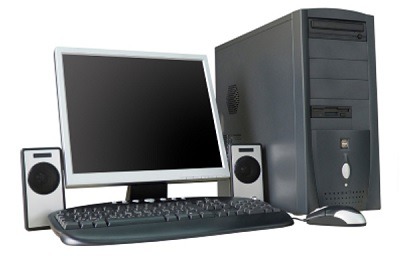
Introduction To The Personal Computer
An introduction to the personal computer (PC) provides an overview of this ubiquitous technology that has revolutionized the way we work, communicate, and live. A personal computer is a versatile and programmable device that individuals use for various tasks, from work to entertainment and beyond. Here’s an introduction to the personal computer:
Definition of a Personal Computer (PC):
A personal computer, commonly known as a PC, is a general-purpose computing device designed for individual use. It is a digital machine capable of executing a wide range of tasks, from basic word processing and web browsing to complex calculations and multimedia production.
Key Components of a Personal Computer:
A typical personal computer consists of the following key components:
- Central Processing Unit (CPU): The CPU is the “brain” of the computer, responsible for executing instructions and performing calculations. It interprets and processes data stored in memory.
- Memory (RAM): Random Access Memory (RAM) provides temporary storage for data and program instructions that the CPU actively uses during tasks. More RAM generally allows for smoother multitasking.
- Storage (Hard Drive or SSD): PCs use storage devices, such as hard disk drives (HDDs) or solid-state drives (SSDs), to store operating systems, applications, files, and data. SSDs are faster and becoming more common.
- Motherboard: The motherboard is the main circuit board that connects and controls various hardware components, including the CPU, RAM, and storage devices. It also contains connectors for peripheral devices.
- Input Devices: PCs have input devices like keyboards and mice to interact with the computer. Some may have touchscreens, styluses, or other specialized input methods.
- Output Devices: Output devices, such as monitors, speakers, and printers, display information or produce audio as a result of computer processing.
- Operating System (OS): The operating system, like Windows, macOS, or Linux, manages hardware resources, runs software applications, and provides a user interface for interacting with the computer.
Types of Personal Computers:
There are various types of personal computers tailored to different needs:
- Desktop Computers: These are traditional, stationary PCs with separate monitors and a separate processing unit, which may be a tower or all-in-one design.
- Laptop Computers: Laptops are portable PCs with integrated screens, keyboards, and trackpads. They are designed for on-the-go use.
- Tablet Computers: Tablets are compact, touchscreen-based devices often used for web browsing, media consumption, and light productivity tasks.
- Ultrabooks: These are high-performance, lightweight laptops known for their slim designs and long battery life.
- Gaming PCs: Built for gaming enthusiasts, these PCs feature powerful processors and graphics cards to handle resource-intensive games.
- Workstations: Workstations are optimized for demanding tasks like video editing, 3D modeling, and scientific simulations.
Evolution of the Personal Computer:
The personal computer has a rich history, starting from early models like the Altair 8800 and progressing through the IBM PC, the Macintosh, and the proliferation of Windows-based machines. Over the years, PCs have become smaller, faster, more affordable, and more accessible to a global audience.
Applications of Personal Computers:
Personal computers have countless applications in today’s world. They are used for:
- Office productivity (word processing, spreadsheets, presentations)
- Web browsing and online communication
- Graphic design and multimedia editing
- Software development
- Gaming
- Data analysis and research
- Educational purposes
- Content creation (blogs, videos, music)
- Home automation and control
- Entertainment (streaming movies, music, and games)
In conclusion, the personal computer is an integral part of modern life, offering tremendous versatility and utility across various domains. Its evolution continues, ensuring that PCs remain relevant and indispensable in an ever-changing technological landscape.
What is required Introduction To The Personal Computer
A comprehensive introduction to the personal computer (PC) should cover the following key aspects:
- Definition and Purpose of a Personal Computer:
- Explain that a personal computer is a versatile digital device designed for individual use.
- Highlight its role in performing a wide range of tasks, from basic productivity to advanced computing.
- Key Components of a Personal Computer:
- Describe the essential hardware components of a PC, including the CPU, RAM, storage devices, motherboard, input and output devices, and the operating system.
- Explain the function of each component in the context of how the PC operates.
- Types of Personal Computers:
- Introduce various types of personal computers, such as desktops, laptops, tablets, ultrabooks, gaming PCs, and workstations.
- Discuss the unique features and use cases of each type.
- Historical Overview:
- Provide a brief history of personal computers, mentioning important milestones and key contributors in the development of PCs.
- Highlight the evolution of PC technology and its impact on society.
- Applications and Use Cases:
- Enumerate the diverse applications of personal computers, ranging from office productivity to entertainment, gaming, content creation, and more.
- Emphasize the role of PCs in various industries and fields.
- Operating Systems:
- Discuss the role of an operating system (e.g., Windows, macOS, Linux) in managing hardware resources, running software, and providing a user interface.
- Explain how users interact with the operating system.
- Evolution and Trends:
- Describe how personal computers have evolved over time, becoming smaller, more powerful, and more integrated into our lives.
- Mention current trends in PC technology, such as advances in processors, graphics, and storage, as well as the rise of mobile computing.
- Common Tasks and Productivity:
- Explore typical tasks performed on personal computers, including word processing, web browsing, email communication, and data management.
- Explain how PCs enhance productivity in various settings.
- Entertainment and Multimedia:
- Discuss the role of PCs in multimedia consumption, gaming, streaming, and content creation (e.g., video editing, music production, graphic design).
- Education and Learning:
- Highlight the significance of personal computers in education, both for students and educators.
- Mention e-learning platforms and educational software.
- Challenges and Considerations:
- Address common challenges associated with personal computers, such as security concerns, software updates, and hardware maintenance.
- Suggest best practices for ensuring the optimal performance and longevity of a PC.
- Future Outlook:
- Offer insights into the future of personal computing, including emerging technologies, such as artificial intelligence, virtual reality, and augmented reality, that may shape the next generation of PCs.
By covering these aspects, an introduction to the personal computer provides a comprehensive understanding of this essential technology and its multifaceted role in contemporary life.
Who is required Introduction To The Personal Computer
An introduction to the personal computer (PC) is relevant and required for various audiences, including:
- Novice Users: Individuals who are new to computing and technology benefit from a basic introduction to understand what a PC is, its components, and its common uses. This audience may include older adults, young children, or individuals who have had limited exposure to technology.
- Students: Students at various educational levels, from primary school to university, require an introduction to PCs as part of digital literacy and computer science courses. This introduction helps them become proficient in using computers for academic purposes.
- Business Professionals: Employees in the corporate world need an understanding of PCs as they are essential tools for office work, including document creation, data analysis, and communication. An introduction helps professionals leverage technology effectively in their careers.
- Entrepreneurs and Small Business Owners: Small business owners and entrepreneurs need to know how PCs can benefit their businesses, from managing finances and marketing to online sales and customer communication.
- Educators: Teachers and educational professionals require knowledge of PCs to integrate technology into the classroom, create digital learning materials, and teach students computer skills.
- IT and Technical Support Personnel: IT professionals and technical support staff must have a strong foundation in PCs to troubleshoot issues, set up computer networks, and assist users with hardware and software problems.
- Parents and Guardians: Parents and guardians should be familiar with PCs to guide and supervise their children’s use of computers for educational and recreational purposes and to ensure online safety.
- Seniors: Many older adults are now using PCs for various purposes, including staying connected with family, accessing healthcare information, and pursuing hobbies. An introduction can help seniors become more comfortable with technology.
- Job Seekers: Individuals seeking employment need to be proficient in using PCs for job searching, online applications, and resume creation.
- Tech Enthusiasts: Individuals passionate about technology and computing may seek in-depth knowledge about PCs for personal interest or to build and customize their own systems.
- Researchers and Academics: Professionals and scholars in computer science, information technology, and related fields may require an introduction to PCs as part of foundational knowledge.
In summary, an introduction to the personal computer is essential for a wide range of audiences, from beginners to experts, who interact with computers in various personal, educational, professional, or academic contexts. Understanding the basics of PCs is a fundamental aspect of digital literacy in today’s technology-driven world.
When is required Introduction To The Personal Computer
An introduction to the personal computer (PC) is required at various points in a person’s life and can depend on individual circumstances and needs. Here are some common situations when an introduction to the personal computer may be required:
- Early Education: Many educational systems introduce students to computers and basic digital literacy skills at an early age, often in elementary or primary school.
- Entering the Workforce: As individuals prepare to enter the workforce, understanding how to use a PC becomes essential for many job roles. This introduction can occur during formal education or as part of on-the-job training.
- Career Transitions: People changing careers may require an introduction to PCs if their new field of work relies heavily on technology. This can involve retraining or upskilling.
- Starting a Business: Entrepreneurs and small business owners often need to become familiar with PCs to manage various aspects of their businesses, from accounting to marketing.
- Computer Purchases: When individuals buy a new computer, whether it’s a desktop or laptop, they typically need an introduction to set up and use the device effectively.
- Technology Adoption in Older Age: Seniors who are new to using PCs or other digital devices may require an introduction to stay connected with family, access healthcare information, or engage in hobbies.
- Returning to Education: Adults returning to formal education, whether for degree programs, online courses, or vocational training, may need an introduction to PCs to navigate digital learning platforms.
- Personal Interest or Hobbies: Some individuals seek an introduction to PCs out of personal interest or as a way to pursue hobbies, such as digital photography, music production, or gaming.
- Digital Literacy Programs: Many community organizations and government initiatives offer digital literacy programs to help individuals, especially those from underserved communities, gain basic computer skills.
- Supporting Children’s Education: Parents and guardians often need to learn about PCs to support their children’s educational needs, including assisting with online homework and remote learning.
- Remote Work or Telecommuting: With the increasing prevalence of remote work arrangements, employees may require an introduction to effectively use PCs for remote collaboration, video conferencing, and task management.
- Adoption of New Technologies: As technology evolves, individuals may need periodic introductions to new software, operating systems, or hardware devices.
In essence, the need for an introduction to the personal computer can arise at various life stages and situations. The timing and depth of the introduction will vary based on individual goals, career paths, and personal interests. Additionally, as technology continues to advance, ongoing learning and adaptation to new computing tools and platforms become essential.
Where is Required Introduction To The Personal Computer
An introduction to the personal computer (PC) is required in various settings and locations where individuals interact with computers. Here are some common places where an introduction to PCs is necessary:
- Educational Institutions: Schools, colleges, and universities provide computer literacy courses and training programs to introduce students to PCs. These institutions have computer labs equipped with PCs for practical learning.
- Workplaces: Many workplaces, especially office environments, require employees to have basic PC skills. Employee training and onboarding often include PC orientation sessions.
- Training Centers: Dedicated computer training centers or vocational schools offer courses in PC usage, software applications, and technical skills for various industries.
- Community Centers: Community centers and libraries may offer free or low-cost computer literacy classes to residents, particularly to bridge the digital divide in underserved communities.
- Online Learning Platforms: Numerous online platforms and educational websites provide tutorials, courses, and guides to introduce individuals to PCs. These resources are accessible from anywhere with an internet connection.
- Technology Stores: Some technology retailers offer workshops and demonstrations to educate customers about PCs, software, and accessories when purchasing new devices.
- Senior Centers: Organizations catering to older adults often offer PC training sessions to help seniors become familiar with using computers and the internet.
- Business Incubators: Start-up incubators and entrepreneurial support organizations may provide PC training to aspiring entrepreneurs and business owners.
- Home: Learning about PCs can begin at home, where family members or friends introduce individuals to basic computer operations, software applications, and internet usage.
- Online Communities: Online forums, social media groups, and technology-focused communities are platforms where individuals can seek advice, ask questions, and learn from experienced users.
- Remote Learning Environments: As more education and training move online, the introduction to PCs can take place in remote learning environments, such as webinars and virtual classrooms.
- Public Workstations: Public places like libraries, internet cafes, and business centers often provide public access PCs. An introduction to using these shared PCs may be necessary for individuals unfamiliar with them.
- Home Offices: In the context of remote work, individuals setting up home offices may require an introduction to configuring and using PCs for work-related tasks.
The specific location or context where an introduction to the personal computer is required will depend on an individual’s needs and circumstances. Fortunately, various resources, both physical and online, are available to accommodate different learning preferences and environments.
How is required Introduction To The Personal Computer
An effective introduction to the personal computer (PC) should be designed to provide individuals with the necessary knowledge and skills to use a computer confidently and proficiently. Here’s how an introduction to the personal computer can be structured and conducted:
- Assess the Audience:
- Determine the level of familiarity and prior experience with computers among the participants.
- Identify any specific goals or tasks they want to accomplish using the PC.
- Set Learning Objectives:
- Define clear learning objectives based on the participants’ needs and goals. For example, learning to use basic software applications, browse the internet, or perform specific tasks like word processing or data entry.
- Create a Structured Curriculum:
- Develop a curriculum that covers essential topics, including PC hardware and software, operating systems, common applications, and basic troubleshooting.
- Organize the curriculum into modules or lessons, making it easy for participants to follow and track their progress.
- Provide Hands-On Experience:
- Incorporate practical, hands-on exercises that allow participants to interact with a computer directly.
- Use a PC lab or provide access to individual computers to ensure participants can apply what they learn.
- Cover Fundamental Topics:
- Introduction to PC hardware components: Explain the CPU, RAM, storage devices, input/output peripherals, and their roles.
- Operating systems: Provide an overview of common operating systems (e.g., Windows, macOS) and how to navigate them.
- Basic software applications: Teach participants how to use word processors, web browsers, email clients, and other common software.
- File management: Explain how to create, save, organize, and retrieve files and folders.
- Internet usage: Guide participants on web browsing, search engines, email communication, and online safety.
- Troubleshooting: Address common issues and teach participants how to resolve basic problems.
- Encourage Questions and Interaction:
- Create a welcoming environment where participants feel comfortable asking questions and seeking clarification.
- Foster interaction among participants to facilitate peer learning.
- Adapt to Learning Styles:
- Recognize that participants may have different learning styles (visual, auditory, kinesthetic) and adapt teaching methods accordingly.
- Use visuals, demonstrations, verbal explanations, and hands-on activities to accommodate diverse preferences.
- Provide Reference Materials:
- Offer printed or digital reference materials, such as user manuals, cheat sheets, or online tutorials, for participants to use after the introduction.
- Offer Ongoing Support:
- Inform participants about resources for further learning, including online courses, forums, and community centers.
- Encourage participants to seek assistance when encountering challenges in the future.
- Assessment and Feedback:
- Assess participants’ progress and understanding through quizzes, assignments, or practical exercises.
- Collect feedback to improve the quality of future introductions and adapt the curriculum as needed.
- Gradual Complexity:
- Start with simple concepts and gradually introduce more advanced topics as participants become comfortable with the basics.
- Practice and Repetition:
- Reinforce learning through practice, repetition, and real-world tasks to build confidence and competence.
- Flexibility and Patience:
- Be patient and accommodating, as learners may progress at different rates.
- Be open to addressing specific questions or concerns that participants may have.
- Regular Review and Updates:
- Regularly review and update the curriculum to reflect changes in technology and software applications.
- Celebrate Achievements:
- Acknowledge and celebrate participants’ achievements and progress to boost their confidence and motivation.
By following these principles and strategies, an introduction to the personal computer can effectively equip individuals with the skills and knowledge they need to make productive use of PCs in various personal, educational, or professional contexts.
Case Study on Introduction To The Personal Computer
Title: Bridging the Digital Divide: A Case Study on Introducing Seniors to Personal Computers
Introduction:
This case study focuses on a community initiative aimed at introducing senior citizens to personal computers (PCs) and digital technology. The project, “Silver Tech,” was launched to empower older adults with the knowledge and skills to use PCs for communication, entertainment, and accessing essential services. The initiative addressed the unique challenges faced by seniors in adopting technology and showcased the positive impact of PC introduction programs.
Project Overview:
- Project Name: Silver Tech
- Objective: To introduce seniors to PCs, teach essential digital literacy skills, and promote social inclusion and connectivity.
- Location: A community center serving a diverse senior population.
Challenges Faced by Seniors:
- Limited Exposure to Technology: Many seniors had little to no prior experience with PCs or the internet.
- Fear of Technology: Fear and apprehension regarding technology use were common barriers.
- Social Isolation: Some seniors felt isolated due to limited access to online communication tools.
- Access Barriers: Financial constraints and lack of personal access to computers were challenges for some participants.
Project Implementation:
- Needs Assessment: The project team conducted surveys and interviews with senior community members to understand their specific needs and concerns.
- Customized Curriculum: A customized curriculum was developed, focusing on basic PC operations, internet usage, email communication, and online safety.
- Hands-On Workshops: A series of hands-on workshops were organized at the community center, led by skilled instructors with experience in teaching seniors.
- Adaptive Learning: Teaching methods were adapted to accommodate various learning styles and pace, with an emphasis on patience and encouragement.
- Access to Computers: The community center provided access to a dedicated PC lab equipped with computers, internet access, and support staff.
- Peer Learning: Participants were encouraged to help and learn from each other, fostering a sense of community.
- Gradual Progression: The curriculum started with fundamental concepts and gradually introduced more advanced topics, such as online banking and social media.
- Ongoing Support: Participants were given access to online resources, including video tutorials and practice exercises. Technical support was also available.
Results and Impact:
- Increased Digital Literacy: Participants gained confidence in using PCs and the internet, successfully navigating websites, sending emails, and performing basic online tasks.
- Social Inclusion: Seniors reported feeling more connected with family and friends through email and social media, reducing feelings of isolation.
- Access to Information: Participants began using PCs to access healthcare information, news, and online services, empowering them with knowledge.
- Improved Quality of Life: Learning to use PCs opened up new avenues for entertainment, such as streaming movies and music.
- Community Building: SilverTech fostered a sense of community among seniors, who continued to meet and support each other beyond the workshops.
Lessons Learned:
- Customization Matters: Tailoring the curriculum to the unique needs and abilities of seniors is crucial for success.
- Patience and Encouragement: Seniors require patience and encouragement to overcome the fear of technology.
- Peer Learning: Encouraging seniors to learn from each other creates a supportive learning environment.
- Ongoing Support: Providing ongoing access to resources and support is essential for continued digital literacy development.
Conclusion:
The SilverTech project exemplifies the positive impact of introducing seniors to personal computers. By addressing their unique challenges and providing tailored support, the initiative empowered older adults to embrace technology, enhancing their quality of life, connectivity, and access to essential services. Bridging the digital divide among seniors requires patience, empathy, and a community-centered approach.
White Paper on Introduction To The Personal Computer
White Paper: Introduction to the Personal Computer (PC)
Abstract
This white paper provides a comprehensive overview of the importance of introducing individuals to personal computers (PCs) in today’s digital age. It explores the significance of PC literacy, outlines the key components of an effective introduction program, and highlights the benefits of empowering people with basic computer skills. Additionally, it discusses the challenges faced by those unfamiliar with PCs and offers insights into best practices for successful PC introduction initiatives.
Introduction
In the 21st century, personal computers (PCs) have become integral tools for communication, productivity, education, and entertainment. Yet, a significant portion of the global population lacks the essential computer skills required to harness the full potential of these devices. Bridging the digital divide and empowering individuals with PC literacy is crucial for personal growth, employability, and participation in a rapidly evolving digital landscape.
The Significance of PC Literacy
Digital Inclusion: PC literacy is a cornerstone of digital inclusion, ensuring that individuals can access online resources, services, and opportunities. It promotes equality and access to education, healthcare, and government services.
Employability: In today’s job market, digital skills are often a prerequisite for employment. Proficiency in using PCs, office software, and online platforms enhances employability and career prospects.
Education: PC literacy is essential for students of all ages, enabling them to access digital learning materials, conduct research, and collaborate on projects. It prepares them for a technology-driven future.
Communication: PCs facilitate communication through email, social media, video conferencing, and instant messaging. Being PC-literate is crucial for staying connected with family, friends, and colleagues.
Information Access: PCs provide access to a vast reservoir of information, from news and research to online libraries and educational resources.
Productivity: PC skills enable efficient document creation, data management, and task automation, making individuals more productive in both personal and professional contexts.
Challenges Faced by PC Novices
Fear and Intimidation: Many individuals are intimidated by PCs due to their complexity and fear making mistakes.
Limited Exposure: Those who have not had prior exposure to PCs may lack the confidence to explore and use them effectively.
Age-Related Barriers: Older adults, in particular, may face age-related barriers to PC adoption, such as diminished visual acuity or reduced manual dexterity.
Access Constraints: Some individuals, especially in underserved communities, may lack access to PCs or the internet.
Key Components of a PC Introduction Program
- Customized Curriculum: Tailor the curriculum to the needs and abilities of the target audience. Start with basic concepts and gradually introduce more advanced topics.
- Hands-On Learning: Practical exercises and hands-on experience with PCs are essential for building confidence and competence.
- Patient and Supportive Instructors: Instructors should provide a patient and encouraging learning environment, addressing participants’ concerns and questions.
- Access to PCs: Ensure access to PCs, either in a dedicated computer lab or through loaner devices, to allow participants to practice what they learn.
- Peer Learning: Encourage participants to collaborate and learn from each other, fostering a sense of community.
- Ongoing Support: Provide access to online resources, technical support, and further learning opportunities beyond the introductory program.
- Adaptability: Recognize that learners may have different paces and learning styles; adapt teaching methods accordingly.
Benefits of PC Introduction Initiatives
- Digital Empowerment: PC introduction programs empower individuals with the skills and confidence to use PCs for personal, educational, and professional purposes.
- Digital Inclusion: These initiatives bridge the digital divide, promoting equality and ensuring that no one is left behind in the digital era.
- Employability: PC literacy enhances job prospects and equips individuals with the skills needed for the modern workplace.
- Lifelong Learning: PC skills facilitate lifelong learning, enabling individuals to access educational resources and pursue their interests.
- Community Building: PC introduction programs foster a sense of community among participants, who often continue to support each other beyond the training.
Conclusion
An introduction to the personal computer is not merely a matter of acquiring technical skills; it is a gateway to digital empowerment, inclusion, and personal growth. By offering accessible and effective PC introduction programs, societies and organizations can equip individuals with the tools they need to navigate the digital world, unlock opportunities, and build a brighter future. Bridging the digital divide begins with the power of education and empowerment through PCs.