

PC Architecture

PC architecture, short for Personal Computer architecture, refers to the design and organization of the various components that make up a personal computer. It encompasses both hardware and software aspects, detailing how the different components of a computer system interact and work together to perform various tasks. Here are some key components and concepts related to PC architecture:
- Central Processing Unit (CPU): The CPU is the “brain” of the computer, responsible for executing instructions and performing calculations. It consists of the arithmetic logic unit (ALU) and the control unit, which work together to carry out operations.
- Memory: Computers have several types of memory, including Random Access Memory (RAM) for temporary data storage and cache memory for faster access to frequently used data. Memory plays a crucial role in the overall performance of a computer.
- Motherboard: The motherboard is the main circuit board that connects and houses various components such as the CPU, RAM, storage devices, and expansion cards. It provides the pathways for data and power to flow between components.
- Storage: PCs use various types of storage devices, including Hard Disk Drives (HDDs) and Solid State Drives (SSDs), to store data and programs. These devices retain data even when the computer is turned off.
- Input/Output (I/O) Devices: These devices allow users to interact with the computer. Examples include keyboards, mice, monitors, printers, and network adapters.
- Expansion Slots: These are connectors on the motherboard that allow for additional components like graphics cards, sound cards, and network cards to be added to the system.
- Bus Architecture: The bus is a communication pathway that allows data and instructions to travel between components. It consists of data buses, address buses, and control buses.
- Instruction Set Architecture (ISA): This is the set of instructions that a CPU understands and can execute. Different CPUs can have different ISAs, which affect software compatibility.
- Operating System (OS): The software that manages the computer’s hardware and provides a user interface for interacting with the system. It also manages tasks such as memory allocation, file management, and process scheduling.
- BIOS/UEFI: Basic Input/Output System (BIOS) or Unified Extensible Firmware Interface (UEFI) is firmware that initializes hardware components during the boot process and provides a basic interface for configuring system settings.
- Graphics Processing Unit (GPU): While originally designed for rendering graphics, modern GPUs are used for a wide range of parallel processing tasks, including scientific calculations, machine learning, and cryptocurrency mining.
- Power Supply Unit (PSU): Provides electrical power to the components in the computer system.
PC architecture continues to evolve with advancements in technology, leading to faster processors, larger memory capacities, faster storage devices, and more efficient power management. Different architectures and designs cater to various use cases, from gaming and content creation to business and scientific computing.
1.what is PC Architecture?

PC architecture, also known as personal computer architecture, refers to the design and organization of the various components and subsystems that make up a personal computer (PC). It encompasses both the hardware and software aspects of a computer system and defines how these components interact and function together to perform tasks.
Key components and concepts within PC architecture include:
- Central Processing Unit (CPU): The CPU is the “brain” of the computer and is responsible for executing instructions, performing calculations, and managing data.
- Memory: PCs have different types of memory, including RAM (Random Access Memory) for temporary data storage and cache memory for quick access to frequently used data.
- Motherboard: The main circuit board that houses the CPU, memory, storage devices, and other components. It provides the electrical connections and pathways for data transfer and communication.
- Storage: PCs use various storage devices, such as Hard Disk Drives (HDDs) and Solid State Drives (SSDs), to store data, applications, and the operating system.
- Input/Output (I/O) Devices: These include peripherals like keyboards, mice, monitors, printers, and network interfaces that allow users to interact with the computer and exchange data.
- Bus Architecture: The internal communication system that allows data to move between various components, such as the CPU, memory, and I/O devices.
- Expansion Slots: Connectors on the motherboard that enable additional components, such as graphics cards, sound cards, and network cards, to be added to the system.
- Instruction Set Architecture (ISA): The set of instructions that the CPU understands and can execute, defining the software interface between hardware and software.
- Operating System (OS): System software that manages hardware resources, provides user interfaces, and enables software applications to run on the computer.
- BIOS/UEFI: Firmware that initializes hardware components during startup and provides basic configuration settings. UEFI (Unified Extensible Firmware Interface) is a modern replacement for traditional BIOS.
- Graphics Processing Unit (GPU): Responsible for rendering graphics and increasingly used for parallel processing tasks, like gaming and GPU-accelerated applications.
- Power Supply Unit (PSU): Provides electrical power to all components in the PC.
PC architecture has evolved over the years, driven by advancements in technology and changes in computing requirements. Different architectural designs cater to various usage scenarios, such as general computing, gaming, content creation, scientific research, and more. Understanding PC architecture helps in selecting components, optimizing performance, and troubleshooting issues in personal computers.
2where is required PC Architecture
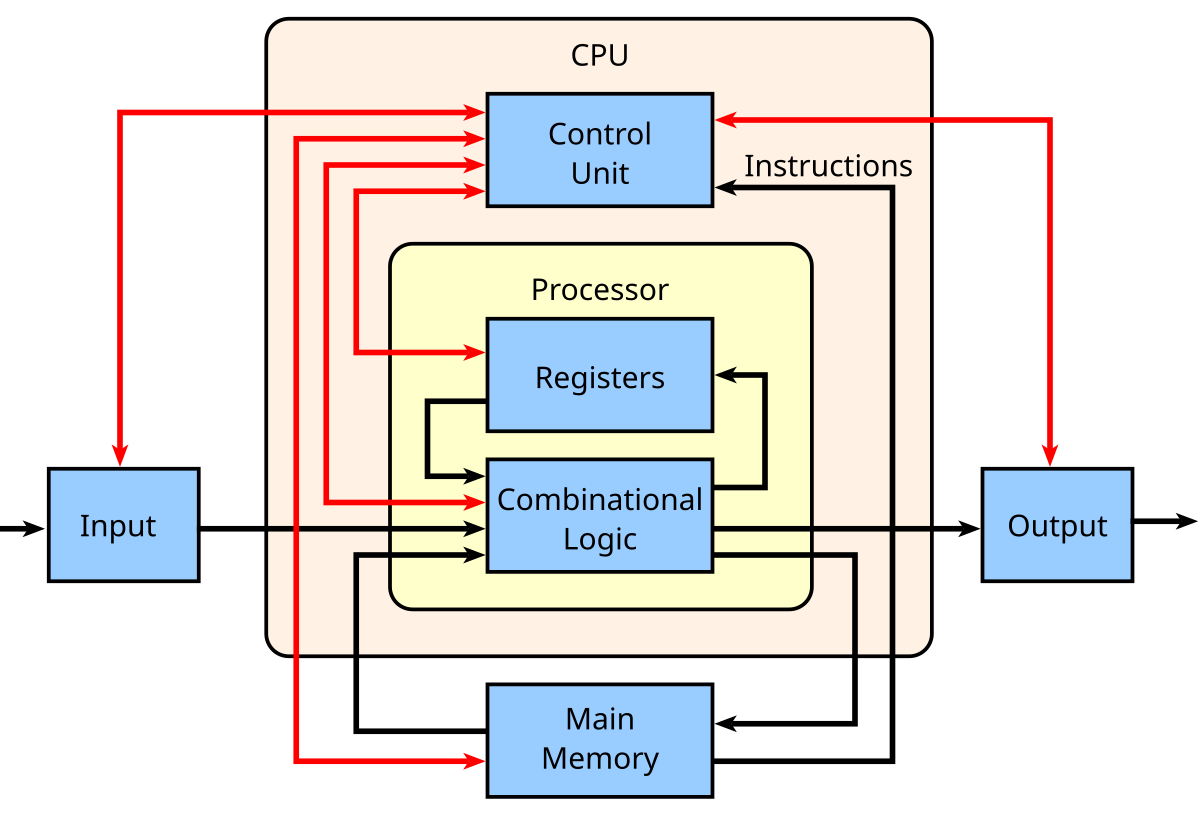
PC architecture is required in various contexts, primarily related to the design, development, maintenance, and understanding of personal computers. Here are some key areas where knowledge of PC architecture is important:
- Hardware Design and Engineering: Engineers and designers need a deep understanding of PC architecture to create and develop new computer systems. They must consider factors like component compatibility, power consumption, thermal management, and overall system performance.
- Software Development: Software developers need to understand PC architecture to optimize their programs for efficient execution on different hardware configurations. This knowledge helps in writing code that takes advantage of the CPU, memory, and other resources effectively.
- System Integration: When building or upgrading PCs, knowledge of architecture is crucial to ensure that components work well together. Choosing the right CPU, GPU, memory, and storage components requires an understanding of how they interact.
- Performance Optimization: PC architecture knowledge is essential for optimizing a system’s performance. This includes tasks such as tuning software settings, overclocking, and managing resource allocation.
- Troubleshooting and Repairs: Professionals and enthusiasts involved in troubleshooting and repairing PCs need to understand architecture to diagnose hardware and software issues accurately. This knowledge helps identify faulty components and resolve compatibility problems.
- Gaming and Graphics: Gamers and professionals in graphics-intensive fields (such as video editing and 3D rendering) require an understanding of PC architecture to choose the right hardware for optimal gaming performance or rendering capabilities.
- IT Management: IT administrators responsible for managing a network of PCs need to understand architecture to ensure efficient resource allocation, manage updates, and troubleshoot problems remotely.
- Education and Training: PC architecture is taught in computer science and engineering programs to provide students with a foundational understanding of how computers work. This knowledge is essential for future professionals in the technology industry.
- Research and Innovation: Researchers and innovators in computer science and related fields require a deep understanding of PC architecture to develop new technologies, algorithms, and approaches for computing.
- Consumer Knowledge: For everyday users, a basic understanding of PC architecture can help them make informed decisions when purchasing or upgrading a computer. It can also aid in troubleshooting minor issues and improving overall system performance.
In essence, PC architecture plays a crucial role in virtually every aspect of working with and using personal computers, from design and development to maintenance and optimization. It forms the foundation upon which hardware and software interact to provide the computing experiences we rely on in today’s digital world.
3.who required PC Architecture

Various professionals and individuals require an understanding of PC architecture, each in their respective roles and contexts. Here’s a breakdown of who might need PC architecture knowledge:
- Hardware Engineers and Designers: These professionals create and develop new computer systems, requiring a deep understanding of PC architecture to design efficient and compatible hardware components.
- Software Developers: Programmers need to optimize software for different hardware configurations, making knowledge of PC architecture essential for efficient code development.
- System Integrators: Those building or upgrading PCs need to know architecture to ensure components work well together and to choose suitable hardware.
- Performance Optimizers: Professionals involved in maximizing system performance through tasks like software tuning and overclocking require PC architecture knowledge.
- PC Repair Technicians: Troubleshooters and repair specialists rely on architecture understanding to diagnose and fix hardware and software issues accurately.
- Gamers and Graphics Professionals: These individuals need architecture knowledge to select the right hardware for optimal gaming and graphic rendering performance.
- IT Administrators: Those managing networks of PCs must understand architecture for efficient resource allocation, updates, and remote troubleshooting.
- Computer Science and Engineering Students: Education and training in PC architecture are crucial for future technology professionals.
- Researchers and Innovators: Individuals working on advancements in computing technologies require a deep understanding of PC architecture.
- Everyday Users: Basic knowledge of PC architecture helps users make informed decisions when buying, upgrading, or troubleshooting their personal computers.
- Educators: Teachers and trainers in computer science and related fields need architecture knowledge to impart relevant skills to their students.
- System Analysts: Professionals analyzing system requirements and designing IT solutions benefit from an understanding of PC architecture.
- Embedded Systems Developers: Those working on devices with integrated computing components require architecture knowledge to optimize performance.
- Technical Writers: Individuals creating user manuals, guides, and technical documentation for PC components and systems need architecture understanding.
- Entrepreneurs and Innovators: Individuals starting tech-related businesses can benefit from architecture knowledge when developing new products or services.
- Quality Assurance Testers: Those testing software and hardware need to understand architecture to identify issues and ensure compatibility.
In essence, PC architecture knowledge is valuable to anyone who interacts with or relies on personal computers, from technical experts to casual users. It provides a foundation for making informed decisions, optimizing performance, troubleshooting, and contributing to advancements in the field of computing.
4.case study on PC Architecture
Certainly, let’s consider a case study that highlights the importance of PC architecture in a real-world scenario:
Case Study: Optimizing Video Editing Workstations
Background: A video production company specializes in creating high-quality videos for clients. Their work involves extensive video editing, motion graphics, and visual effects. As their projects grew in complexity, they realized the need to optimize their video editing workstations to improve efficiency and reduce rendering times.
Challenges: The video editing process was becoming increasingly time-consuming, and the company needed a solution to streamline their workflow and deliver projects faster. They were experiencing slowdowns during video editing tasks, rendering, and playback of high-resolution videos.
Solution:
- Hardware Selection: The company decided to upgrade their video editing workstations. They consulted with PC architecture experts to carefully select hardware components based on their architecture knowledge.
- CPU: Chose a high-performance multi-core CPU optimized for video editing software.
- GPU: Selected a powerful GPU with ample VRAM for smooth playback and rendering of complex visual effects.
- Memory: Installed a sufficient amount of high-speed RAM to handle large video files and multiple applications simultaneously.
- Storage: Incorporated a combination of fast SSDs for project files and a high-capacity HDD for long-term storage.
- Cooling and Thermal Management: To prevent overheating during resource-intensive tasks, they integrated an efficient cooling system with fans and heat sinks.
- Software Optimization: With a strong understanding of PC architecture, the company’s IT team optimized the video editing software settings to leverage the hardware’s capabilities effectively.
- Network Infrastructure: Upgraded their network infrastructure to enable seamless collaboration on large video projects between multiple workstations.
Results:
- Performance Boost: The optimized workstations exhibited significantly improved performance during video editing and rendering tasks. Rendering times were reduced, leading to quicker project turnaround.
- Smooth Playback: High-resolution videos played back smoothly, allowing for real-time editing and quicker previewing of effects.
- Efficient Workflow: The streamlined workflow enabled the team to handle more projects simultaneously, leading to increased productivity and client satisfaction.
- Future-Proofing: By understanding PC architecture trends, they built workstations with components that could handle future advancements in video editing software and technology.
Conclusion: This case study demonstrates how a video production company leveraged their understanding of PC architecture to optimize their video editing workstations. By carefully selecting and configuring hardware components, they significantly improved their workflow efficiency, reduced rendering times, and enhanced overall productivity. This example underscores the importance of PC architecture knowledge in achieving optimal performance and meeting the demands of specialized computing tasks.
efficiently and effectively.
Title: Understanding Personal Computer (PC) Architecture: A Comprehensive Guide
Abstract: This white paper aims to provide a thorough understanding of personal computer architecture, covering its key components, interactions, and significance in various computing contexts. The paper explores hardware and software aspects, emphasizing the role of PC architecture in modern computing.
Table of Contents:
- Introduction
- Definition and Importance of PC Architecture
- Evolution of PC Architecture
- Fundamentals of PC Architecture
- Central Processing Unit (CPU)
- Memory Hierarchy: RAM, Cache, Virtual Memory
- Storage Technologies: HDD, SSD, NVMe
- Motherboard and System Interconnects
- CPU Architecture
- Instruction Execution Cycle
- CPU Registers and Arithmetic Logic Unit (ALU)
- Pipelining and Superscalar Architecture
- Multi-Core Processors and Parallel Processing
- Memory Architecture
- Types of Memory: RAM, ROM, Flash Memory
- Memory Controllers and Addressing
- Caching Strategies: L1, L2, L3 Cache
- Memory Interleaving and Access Patterns
- Storage Architecture
- Hard Disk Drives (HDD): Platters, Actuators, Interfaces
- Solid State Drives (SSD): NAND Flash, Controllers
- NVMe and PCIe SSDs
- Storage Virtualization and RAID
- Input/Output (I/O) Architecture
- I/O Ports and Buses
- Expansion Slots and Peripheral Connectivity
- USB, Thunderbolt, and Other I/O Technologies
- Graphics Processing Unit (GPU) Architecture
- Graphics Rendering Pipeline
- GPU Cores, Memory, and Parallel Computing
- Integrated vs. Dedicated GPUs
- System Software and PC Architecture
- Operating System Kernel and Hardware Abstraction
- Device Drivers and Interrupt Handling
- BIOS/UEFI and System Initialization
- PC Architecture and Performance
- Bottlenecks and Performance Metrics
- Overclocking and Thermal Management
- Performance Optimization Strategies
- PC Architecture in Practical Scenarios
- Gaming and Graphics Design
- Video Editing and Rendering
- Scientific Computing and Machine Learning
- Future Trends in PC Architecture
- Moore’s Law and Its Implications
- Quantum Computing and Beyond
- Conclusion
- Recap of Key Concepts
- Importance of PC Architecture in Modern Computing
References
- List of Sources and Citations
Remember that a comprehensive white paper should include in-depth explanations, technical diagrams, charts, and possibly real-world case studies to support the concepts discussed in each section. You can use this outline as a guide to structure your white paper on PC architecture, tailoring it to your specific audience and objectives.